File I/O with Read/Write
A pantry holds your food in jars on labeled shelves. To use any of it you grab a jar, twist the lid, take what you need, put the lid back, and walk away. The disk holds your data the same way. Each file is a jar on a shelf, the operating system is the pantry door, and a file handle is your hand inside the jar. Rust's file I/O is the set of moves that lets you reach in, scoop out bytes, drop new bytes in, and close the lid without leaving a mess.
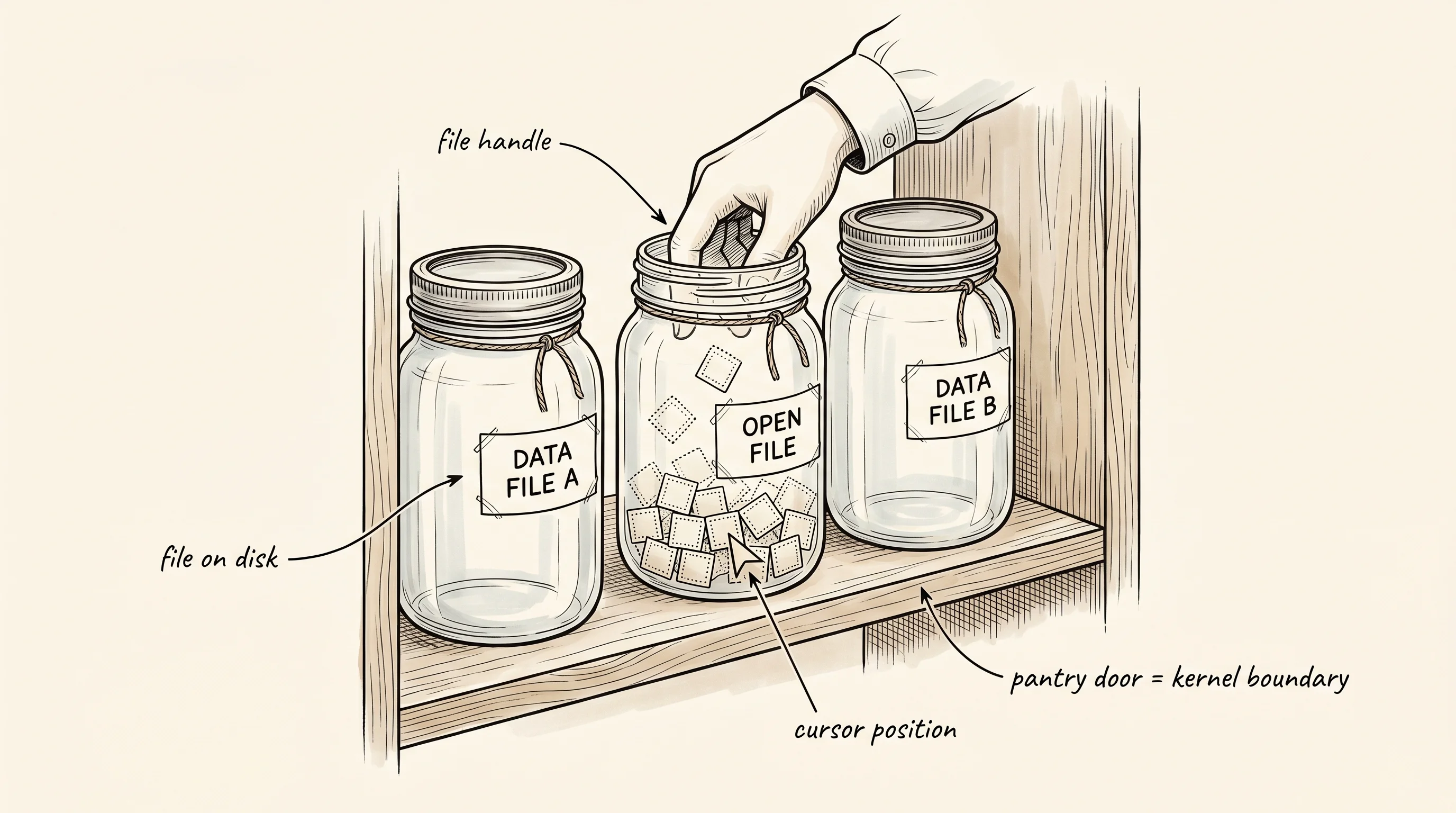
Ken Thompson and Dennis Ritchie sat in a Bell Labs office in 1969 trying to write the operating system that would become Unix. They made a decision that still shapes every program you run — they declared that the same four moves (open, read, write, close) would work for files on disk, for the terminal, for the network, and for any device they had not invented yet. Before that, every kind of I/O came with its own commands and its own headaches. After it, you could pipe the output of one program into another and neither program had to know which end was a real file. Rust inherits the same shape through its Read and Write traits. A trait in Rust is the list of moves something promises to support, and any type that implements Read can be fed to any function expecting a reader — whether it is a file, a network socket, or a slice of bytes already in memory.
The shortest way to use a file is the one-shot pair fs::write and fs::read_to_string. You hand them a path and a chunk of bytes (or get a string back) and they handle every step in between. The pantry door opens, the jar gets twisted, the contents land in your bowl, and the door closes — all in one line.
fn one_shot_round_trip() {
    let path = "/tmp/rust-lesson-file-io-oneshot.txt";
    fs::write(path, b"hello from rust\n").expect("write file");
    let text = fs::read_to_string(path).expect("read file");
    print!("one-shot: {text}");
    fs::remove_file(path).ok();
}
That works when the file fits comfortably in memory and you do not care about anything in between. When the file is bigger, or when you want to do something other than read the whole thing at once, you drop down a layer. File::open returns a File, which is the Rust handle around the operating system's file descriptor — the slot the kernel gave you when it opened the jar. The handle implements Read, so you can call read_to_end on it and watch the bytes pile up in a Vec<u8> you own.
fn streaming_read() {
    let path = "/tmp/rust-lesson-file-io-stream.bin";
    fs::write(path, b"three little pigs").expect("write file");
    let mut file = File::open(path).expect("open file");
    let mut bytes = Vec::new();
    file.read_to_end(&mut bytes).expect("read to end");
    println!("streamed {} bytes", bytes.len());
    print!("streamed text: ");
    println!("{}", String::from_utf8(bytes).expect("utf8"));
    fs::remove_file(path).ok();
}
Pay attention to the mut on the file. Reading advances a cursor inside the handle, the same way scooping flour out of a jar lowers what is left, so the handle has to change while you read. The Vec<u8> is a buffer you control — you decide when to allocate it, how much it grows, and what happens to it after. The OS does not own your memory anymore. That is the Rust deal — the standard library gives you the smallest piece that connects to the kernel, and you compose larger conveniences on top.
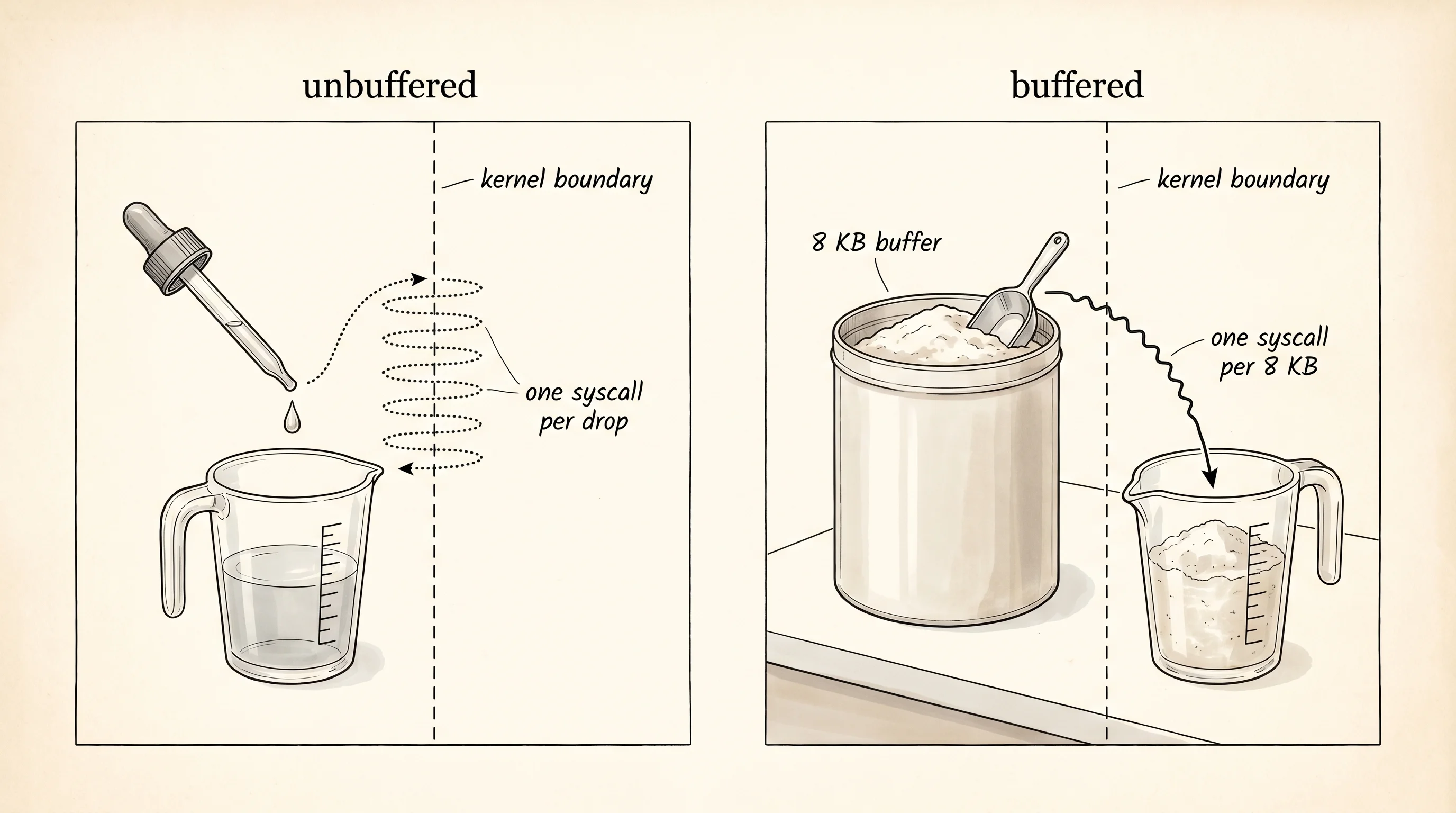
Now imagine you want to read a million tiny lines, one at a time. If you call into the operating system for every single line, each call has to cross the boundary between your program and the kernel — a slow trip, because the CPU has to switch modes, save your registers, and hand control to code that does not trust you. A buffered reader fixes this by grabbing a big chunk (usually 8 KB) on each trip, parking it in memory, and serving you lines from that chunk. The kernel makes one trip for every 8 KB instead of one trip for every line. The same trick works in reverse for writing — a BufWriter collects your small writes in a chunk and pushes the chunk through the door once it fills up, or when you explicitly flush it. Cooks have done this forever. You do not run to the pantry for one teaspoon, then run back for the next teaspoon. You bring out the whole canister, measure what you need on the counter, and put the canister back once.
fn buffered_lines() {
    let path = "/tmp/rust-lesson-file-io-lines.txt";
    {
        let file = File::create(path).expect("create file");
        let mut writer = BufWriter::new(file);
        writeln!(writer, "alpha").expect("write line");
        writeln!(writer, "bravo").expect("write line");
        writeln!(writer, "charlie").expect("write line");
        writer.flush().expect("flush");
    }
    let file = File::open(path).expect("open file");
    let reader = BufReader::new(file);
    for (i, line) in reader.lines().enumerate() {
        let text = line.expect("line");
        println!("line {}: {}", i + 1, text);
    }
    fs::remove_file(path).ok();
}
The writeln! macro looks like println! but writes to whatever you hand it instead of standard output. Because BufWriter implements Write, the macro happily takes it. Because BufReader implements BufRead (a richer trait that adds line-by-line moves on top of plain Read), it gives you a lines() iterator. The whole point of Rust's I/O traits is that the same code reads from a file, a network socket, or a Vec<u8> you built in memory — the trait is the contract, the source on the other side is interchangeable.
The driver runs all three patterns in order.
fn main() {
    one_shot_round_trip();
    streaming_read();
    buffered_lines();
}
The output shows each pattern doing exactly what it claimed.
one-shot: hello from rust
streamed 17 bytes
streamed text: three little pigs
line 1: alpha
line 2: bravo
line 3: charlie
One question worth asking — why call writer.flush() at the end of the buffered write when BufWriter is supposed to push the chunk through when the buffer fills? Because the buffer might not be full when you stop writing. Rust's Drop impl on BufWriter does try to flush when the writer goes out of scope, but it silently swallows any error from that final flush. If you care about whether the bytes actually made it to disk, you call flush yourself and check what it returns. The convenience of Drop is real, but a buffered writer that hides an error from you on shutdown is the kind of bug that takes a Friday afternoon to find.
Reading and writing whole files is the easy part. The harder problem is two programs touching the same file at once — one writes while the other reads, and the operating system has to decide who sees what, when, and what counts as a complete write. That is the bottleneck the next lesson cracks open.