Memory and Storage
Stand in a kitchen and try to cook a meal. The knife you are holding is in your hand already. The salt is on the counter, one reach away. The flour is on a shelf, two steps to your left. The frozen meat is in the basement, down a flight of stairs. The thing you forgot to buy is at the grocery store across town. Every one of those distances costs you time, and the time it costs grows so fast that going to the store is a million times slower than touching the knife. A computer is a kitchen. The chef is the CPU. Everything else is just a different shelf at a different distance, and the whole job of writing a fast program is keeping the ingredients you need close to your hand.
The shelves were not always arranged this way. The first computers in the 1940s stored bits inside vacuum tubes — glass bulbs the size of a finger that glowed orange when a 1 was held inside them and went dark for a 0. A machine with a few thousand bits of memory needed a few thousand glowing bulbs and a room with air conditioning to keep them from melting. The bulbs burned out every few hours. By 1955 a team at MIT led by Jay Forrester replaced the tubes with magnetic cores — tiny rings of iron the size of a poppy seed, threaded onto a grid of copper wires by hand. Each ring held one bit by which way it was magnetized. The grid was the size of a placemat for a kilobyte of memory, and a woman in a clean room threaded every single ring with a needle. Core memory ran for twenty years because nothing better existed.
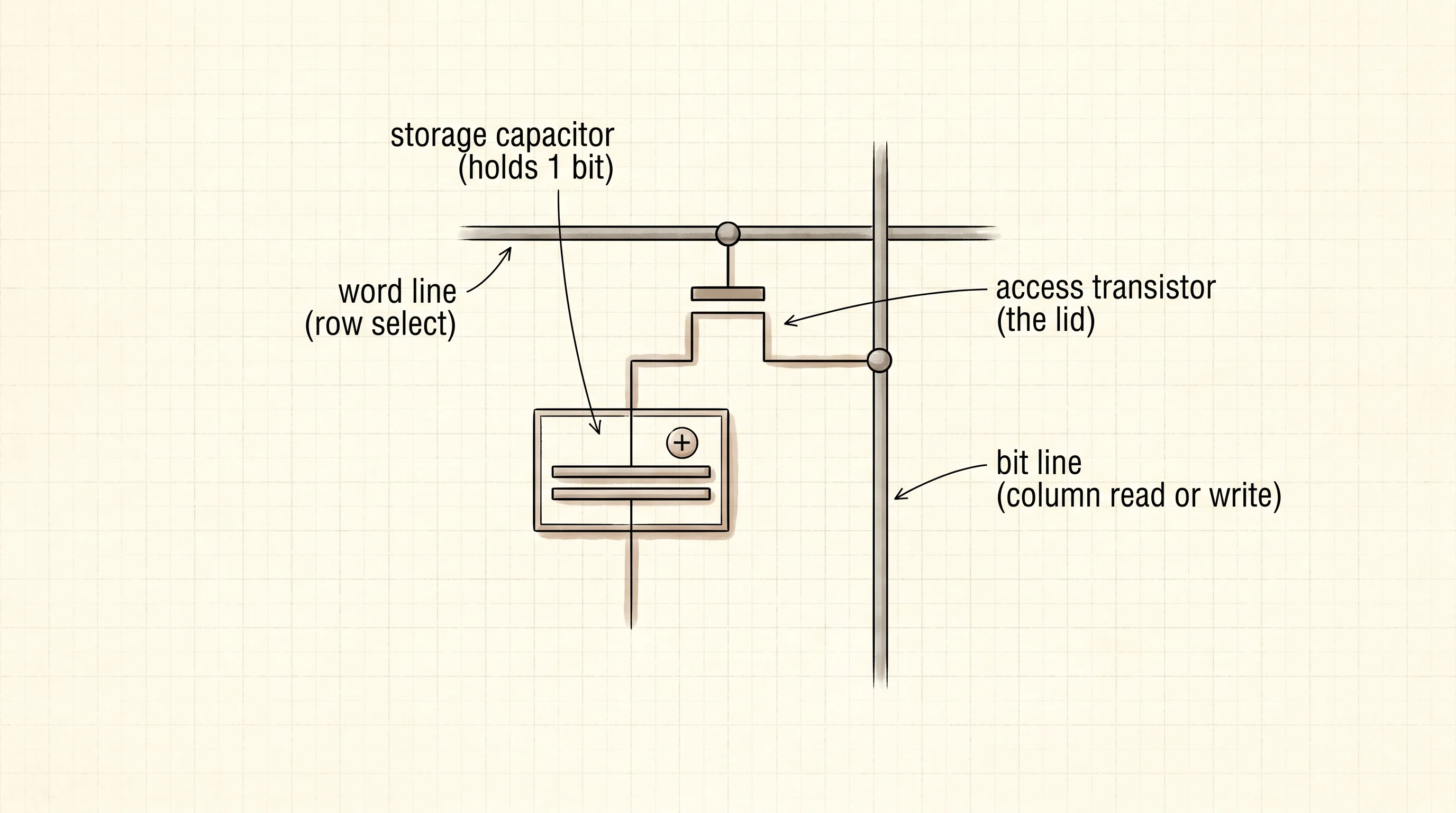
In 1970 Intel was a brand-new company with three employees and one product to sell. The product was the Intel 1103 — a chip the size of a fingernail that held one thousand bits of memory using a trick called dynamic RAM. Each bit was a single capacitor — a tiny electrical bucket — paired with a single transistor that opened and closed the bucket's lid. Charge in the bucket meant 1. Empty bucket meant 0. The buckets leaked, so the chip had to refresh every bit a few times a second to keep the charge from draining out. That refresh is why the M in DRAM stands for "dynamic" — the bits decay if the chip stops working for an instant. The 1103 sold for $10 a chip and replaced an entire placemat of hand-threaded core. By 1972 it was the best-selling memory chip on earth and the company that became Intel had its first real cash machine. Every DRAM stick in every computer ever built since is a denser version of that same one-capacitor-one-transistor cell. The DDR5 stick in a modern laptop holds 16 billion of them on a chip smaller than a postage stamp.
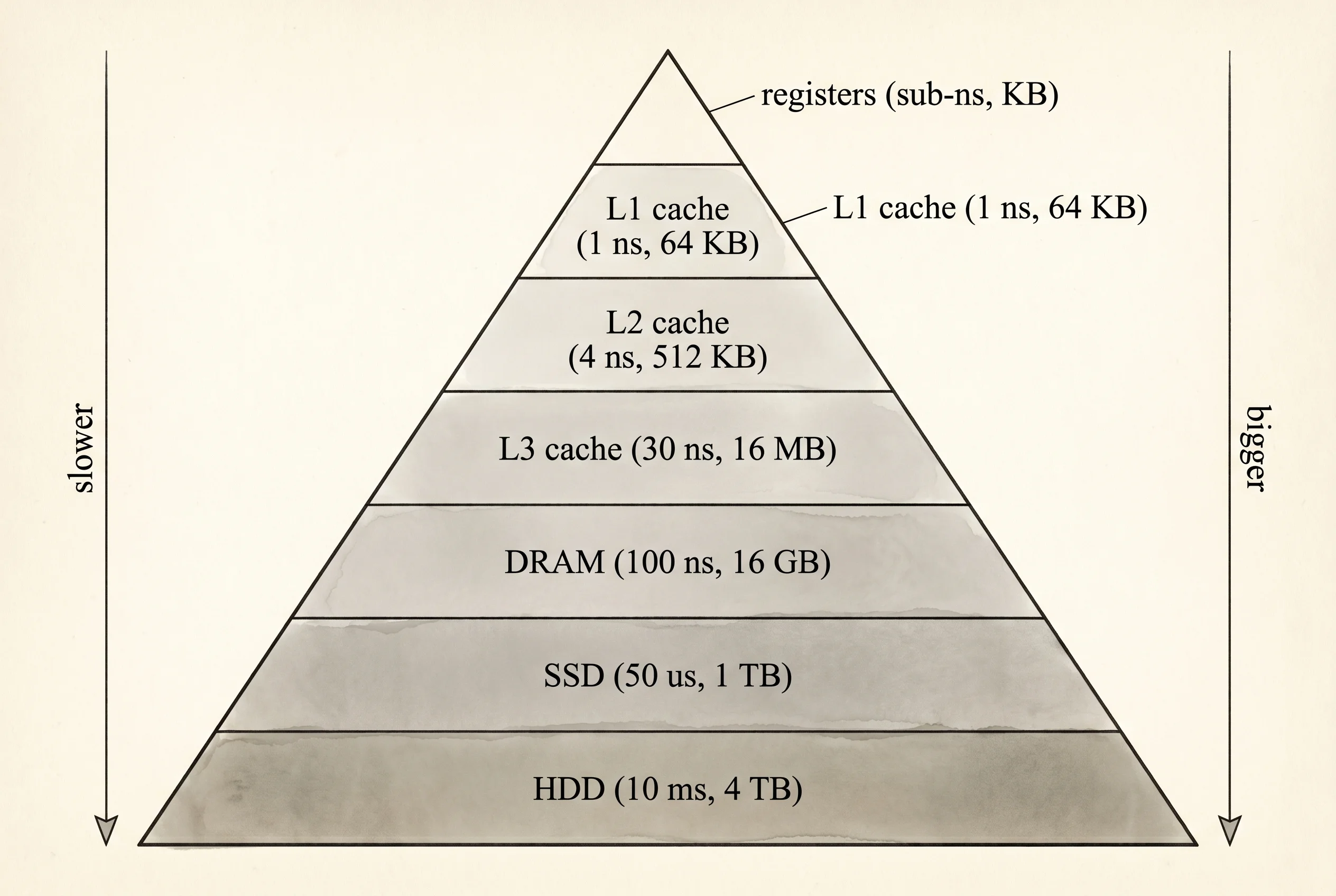
DRAM is the pantry across the kitchen. It is enormous compared to anything closer to the chef, but a trip to it costs about 100 nanoseconds — roughly 200 clock cycles for a modern CPU running at 3 GHz. While the CPU waits for a byte from DRAM it twiddles its thumbs and burns power doing nothing. That wait was so painful that chip designers added a smaller, faster pantry between the CPU and main memory called cache. There are three levels of it. L1 cache is a spice rack bolted to the CPU itself — 64 kilobytes per core, one nanosecond to read. L2 is a shelf one step away — 512 kilobytes, four nanoseconds. L3 is shared between all the cores — 16 megabytes, thirty nanoseconds. Below DRAM is storage, which is even slower but does not forget. A modern NVMe SSD takes about 50 microseconds to read — fifty thousand nanoseconds, half a million times slower than L1. A spinning hard drive takes ten milliseconds — the platter has to physically rotate under the read head. A request to a server in another datacenter takes a hundred milliseconds — most of it the speed of light losing a race against the curvature of the earth.
Here is a Rust program that lays out the hierarchy as a table. Each tier is a Tier struct holding a name, a typical size at that tier, and the latency in nanoseconds.
struct Tier {
    name: &'static str,
    typical_size: &'static str,
    latency_ns: u64,
}

const TIERS: &[Tier] = &[
    Tier {
        name: "CPU register",
        typical_size: "8 bytes per register",
        latency_ns: 0,
    },
    Tier {
        name: "L1 cache",
        typical_size: "64 KB per core",
        latency_ns: 1,
    },
    Tier {
        name: "L2 cache",
        typical_size: "512 KB per core",
        latency_ns: 4,
    },
    Tier {
        name: "L3 cache",
        typical_size: "16 MB shared",
        latency_ns: 30,
    },
    Tier {
        name: "DRAM (main memory)",
        typical_size: "16 GB stick",
        latency_ns: 100,
    },
    Tier {
        name: "NVMe SSD",
        typical_size: "1 TB drive",
        latency_ns: 50_000,
    },
    Tier {
        name: "spinning HDD",
        typical_size: "4 TB drive",
        latency_ns: 10_000_000,
    },
    Tier {
        name: "another datacenter",
        typical_size: "all of it",
        latency_ns: 100_000_000,
    },
];
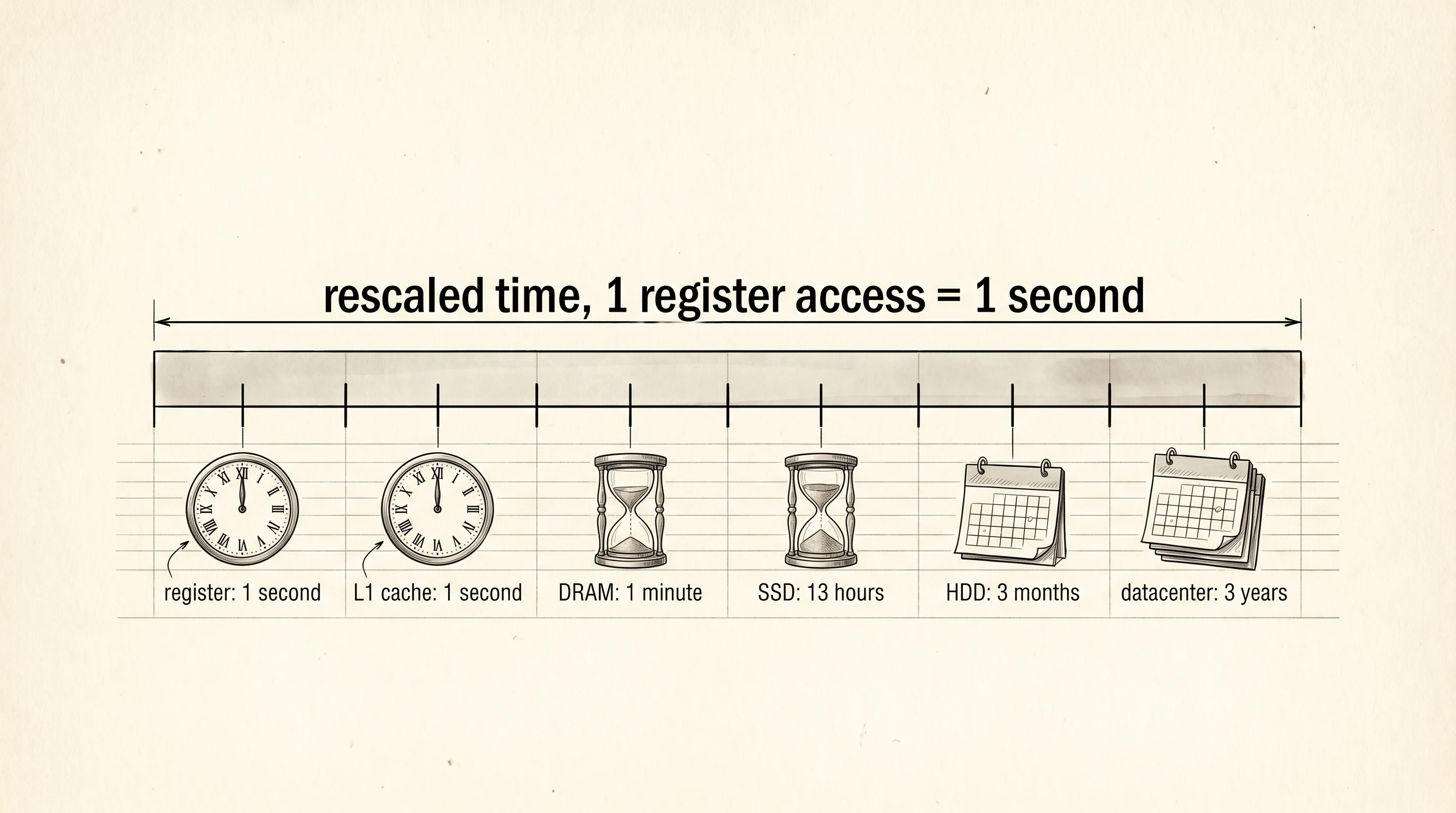
The numbers feel abstract until you rescale them. Pretend a single CPU register access takes one full second instead of a fraction of a nanosecond. Multiply every other tier by the same factor. A human_scale function turns nanoseconds into the right unit — seconds, minutes, hours, days, months, or years.
fn human_scale(ns: u64) -> String {
    // a register access is sub-nanosecond. pretend it takes 1 second.
    // every other tier is rescaled by the same factor (1 ns -> 1 sec).
    fn unit(n: u64, singular: &str) -> String {
        if n == 1 {
            format!("1 {}", singular)
        } else {
            format!("{} {}s", n, singular)
        }
    }
    let s = ns;
    if s < 60 {
        unit(s, "second")
    } else if s < 3_600 {
        unit(s / 60, "minute")
    } else if s < 86_400 {
        unit(s / 3_600, "hour")
    } else if s < 2_592_000 {
        unit(s / 86_400, "day")
    } else if s < 31_536_000 {
        unit(s / 2_592_000, "month")
    } else {
        unit(s / 31_536_000, "year")
    }
}
The main function walks the tier list and prints the rescaled time next to each one.
fn main() {
    println!("if one CPU register access took 1 second, every other tier would take:");
    println!();
    println!(
        "{:<22}  {:<22}  {:>14}",
        "tier", "typical size", "rescaled time"
    );
    println!("{}", "-".repeat(64));
    for t in TIERS {
        let scaled = if t.latency_ns == 0 {
            String::from("1 second")
        } else {
            human_scale(t.latency_ns)
        };
        println!(
            "{:<22}  {:<22}  {:>14}",
            t.name, t.typical_size, scaled
        );
    }
    println!();

    print_sizes();
    println!();
    println!("note: Option<Box<i32>> is 8 bytes, the same as Box<i32>.");
    println!("a Box pointer is never null, so the compiler reuses the");
    println!("zero pattern to mean None. this is called the niche optimization.");
}
Build it and run it.
if one CPU register access took 1 second, every other tier would take:

tier                    typical size             rescaled time
----------------------------------------------------------------
CPU register            8 bytes per register          1 second
L1 cache                64 KB per core                1 second
L2 cache                512 KB per core              4 seconds
L3 cache                16 MB shared                30 seconds
DRAM (main memory)      16 GB stick                   1 minute
NVMe SSD                1 TB drive                    13 hours
spinning HDD            4 TB drive                    3 months
another datacenter      all of it                      3 years

type                        bytes
----------------------------------
bool                        1
i32                         4
i64                         8
f64                         8
char                        4
&i32 (reference)            8
Box<i32>                    8
Vec<i32> (empty)            24
String (empty)              24
Option<i32>                 8
Option<Box<i32>> (niche)    8

note: Option<Box<i32>> is 8 bytes, the same as Box<i32>.
a Box pointer is never null, so the compiler reuses the
zero pattern to mean None. this is called the niche optimization.
Look at the rescaled time column. If grabbing a value from a CPU register felt like one second of your life, grabbing a value from L1 cache would feel like one second too — they are the same neighborhood. DRAM would feel like a minute. The SSD would feel like half a workday. The hard drive would feel like a season. A request across the country would feel like three years. That is what programmers mean when they say the memory hierarchy spans six orders of magnitude. The chef in the kitchen has to plan around the fact that the difference between reaching for the knife and walking to the store is the difference between one second and three years.
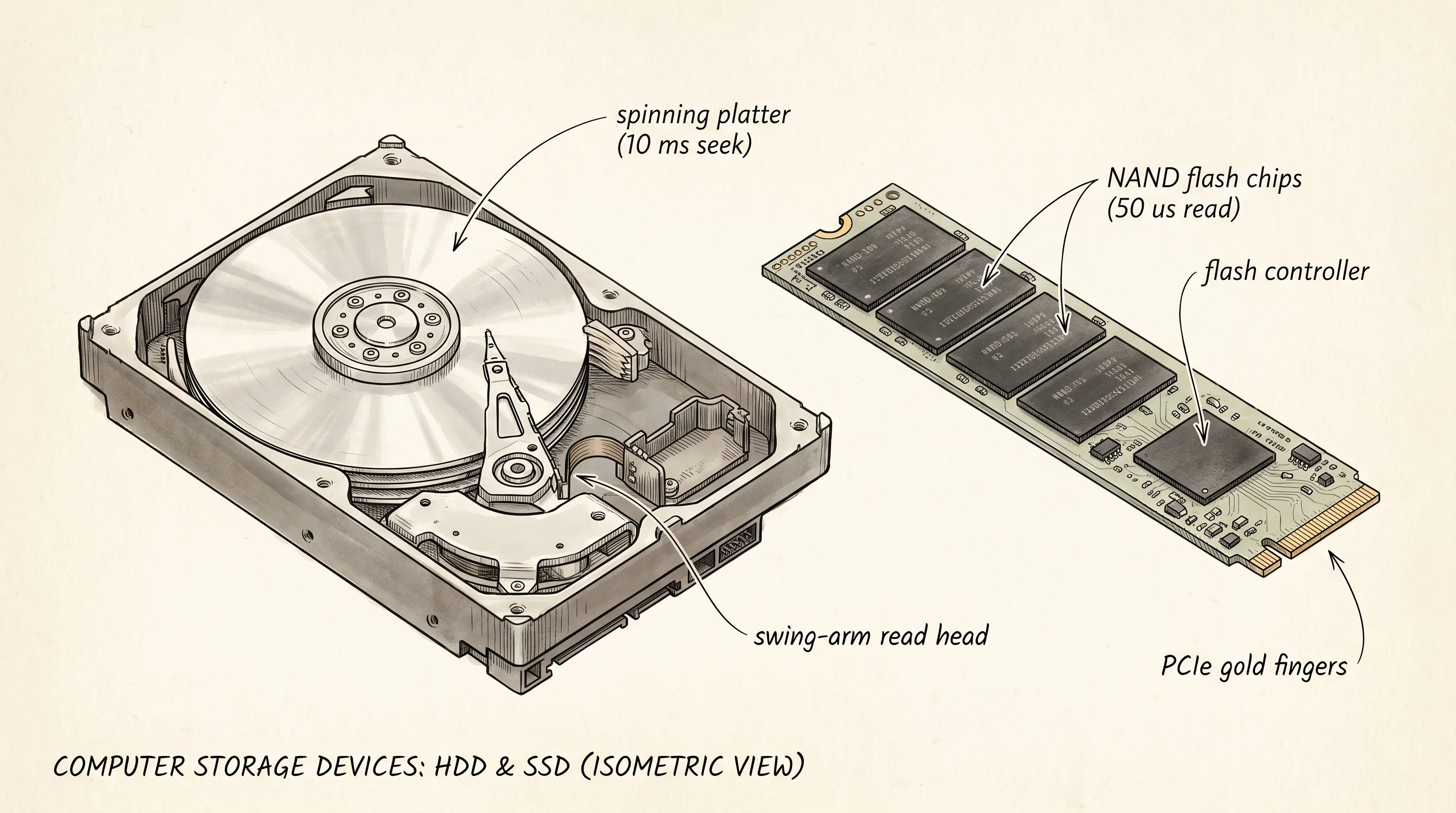
The same chip that holds your DRAM cannot hold your files. DRAM forgets every bit the moment the power goes off. Storage has to remember. The first hard drives came from IBM in 1956 — a refrigerator-sized cabinet holding fifty spinning aluminum platters coated with iron oxide, with a read head that flew a fraction of a millimeter above the surface on a cushion of air. The whole thing held 5 megabytes and weighed a ton. Drives shrunk every year for the next sixty years by spinning faster and packing the magnetic regions tighter, but they never escaped the central problem — a spinning platter has to physically move the bit you want under the read head, and physics caps that move at ten milliseconds. In 1980 a Toshiba engineer named Fujio Masuoka invented flash memory, a way of trapping electrons inside a tiny isolated chamber so they could not leak even with the power off. Flash had no moving parts. By 2010 a flash SSD was the same price per gigabyte as a hard drive and a thousand times faster. By 2015 every laptop sold by Apple had an SSD instead of a spinning drive. The connector got faster too — the original SATA wire could carry 600 megabytes a second, while the NVMe protocol that replaced it in the 2010s plugs the SSD directly into the CPU's high-speed bus and carries 7 gigabytes a second. A spinning hard drive is still cheaper per terabyte and still ships in data centers for cold backup, but the part of the kitchen where you keep the things you reach for every day has finished its switch to flash.
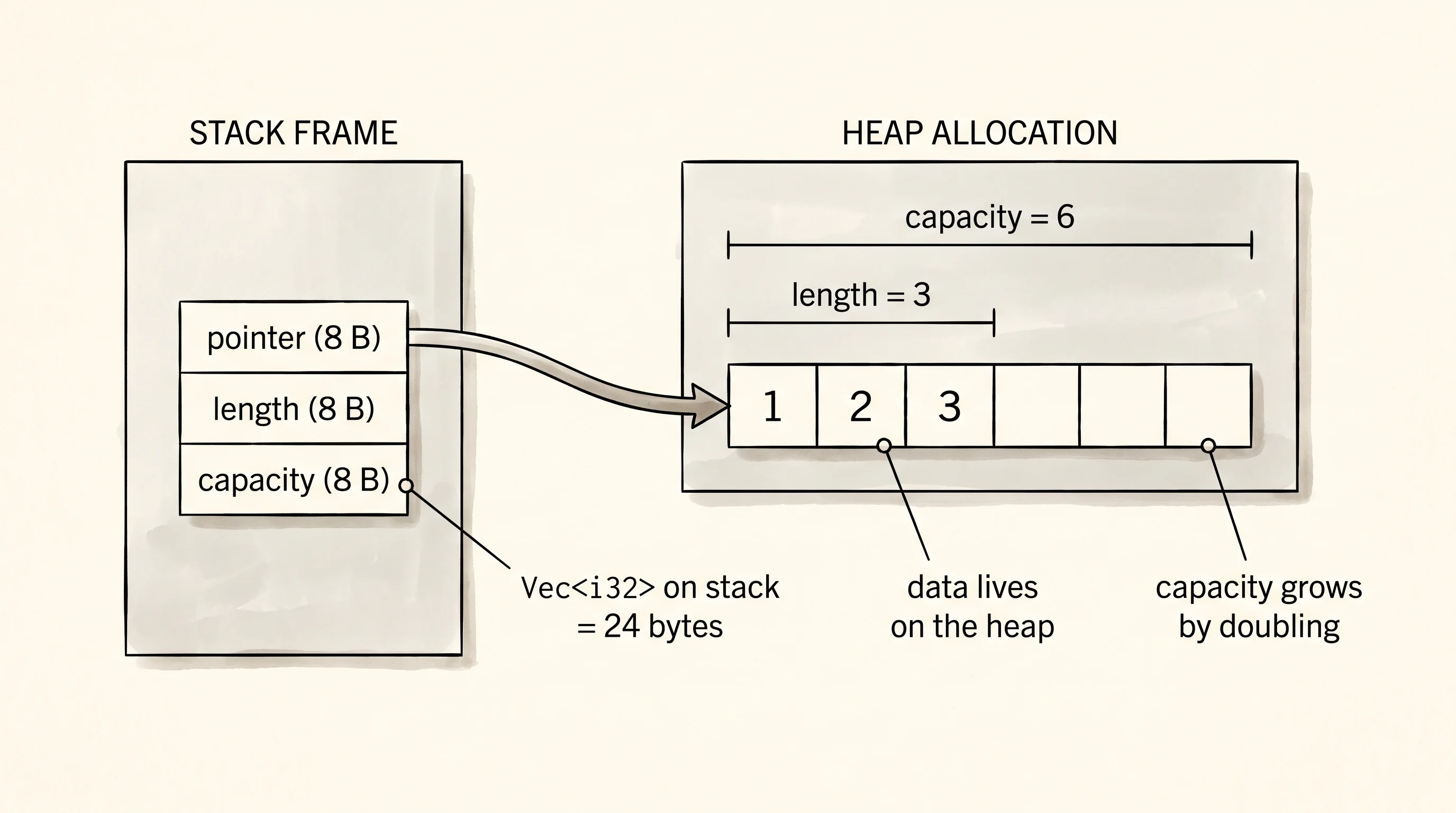
The hierarchy explains the latencies, but it does not explain how the chef labels the ingredients. Every value in a Rust program has a size in bytes, and that size is decided at compile time so the chef knows exactly how much shelf space to set aside before any cooking starts. A bool is one byte. An i32 is four. An i64 is eight. A char in Rust is four bytes because a Rust char is a full Unicode scalar value, not a byte. A reference to anything is eight bytes on a 64-bit machine because a reference is just a pointer — a postal address that fits in 64 bits regardless of how big the thing it points to is. A Box<i32> is also eight bytes because a box is a pointer to a heap allocation. A Vec<i32> is twenty-four bytes — three pointers' worth — because a Vec is a sticky note that says "the bin is over there, it currently holds this many items, and there is room for this many before we have to move." An empty String is twenty-four bytes for the same reason. The Option<i32> is eight bytes, not five, because the compiler pads it out to align with the underlying integer's alignment.
The interesting line is the last one. Option<Box<i32>> is eight bytes. Not nine. Not sixteen. Eight — the same as a bare Box<i32>. The compiler knows a Box can never legally hold the address zero because zero is the null pointer and a Box is always pointing at a real allocation. So the compiler reuses the zero pattern to mean None. The space for the tag is free. This trick is called the niche optimization, and it shows up in every Option wrapped around a type that has a forbidden value — references, boxes, non-zero integers, function pointers. Here is the program that prints every one of those sizes.
fn print_sizes() {
    println!("type                        bytes");
    println!("----------------------------------");
    println!("bool                        {}", size_of::<bool>());
    println!("i32                         {}", size_of::<i32>());
    println!("i64                         {}", size_of::<i64>());
    println!("f64                         {}", size_of::<f64>());
    println!("char                        {}", size_of::<char>());
    println!("&i32 (reference)            {}", size_of::<&i32>());
    println!("Box<i32>                    {}", size_of::<Box<i32>>());
    println!("Vec<i32> (empty)            {}", size_of::<Vec<i32>>());
    println!("String (empty)              {}", size_of::<String>());
    println!("Option<i32>                 {}", size_of::<Option<i32>>());
    println!(
        "Option<Box<i32>> (niche)    {}",
        size_of::<Option<Box<i32>>>()
    );
}
The output table tells the same story your eye already read. Run the program one more time and watch the bottom of the output.
Sizes and latencies are only half the picture. Every byte that lives on the heap had to be asked for from an allocator, and every byte that goes out of scope has to be given back — which is the next lesson.