Structs and Methods
A baseball card has a width and a height. Every card. The Topps 1952 Mantle is 6.5 cm by 9 cm, the binder page it sits on is 23 cm by 30 cm, the display cube the prize card lives in is 12 cm on every side. All three are rectangles, and a rectangle is two numbers stuck together. A struct in Rust is the slot in the binder — a labeled compartment with one spot for width and one spot for height, glued into a single thing the language treats as one value. The slot is empty until you stamp it with real numbers, and once you do, the two numbers travel together for the rest of their life.
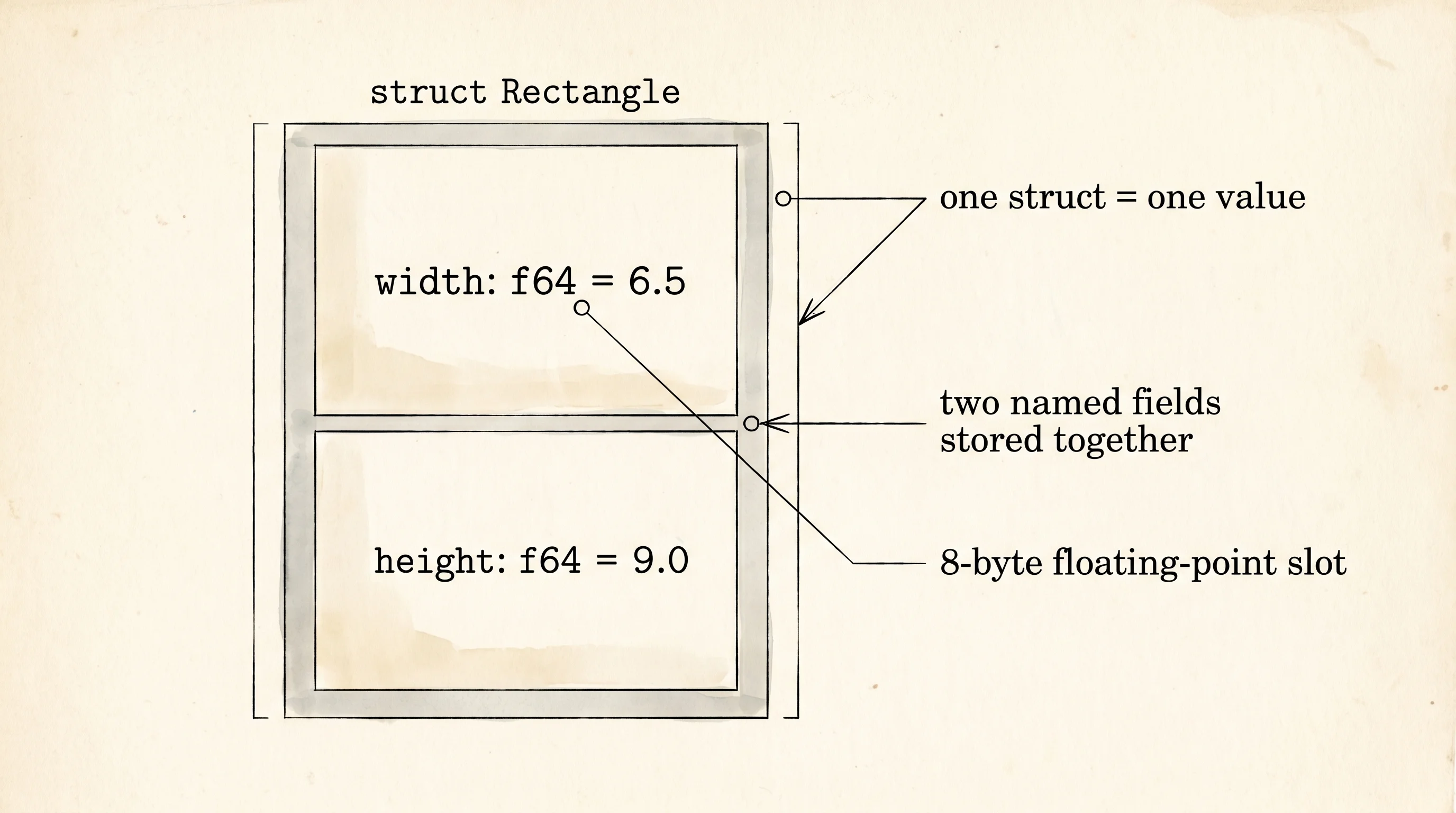
The reason structs exist as a first-class part of the language goes back to a guy named Dennis Ritchie sitting in front of a PDP-11 at Bell Labs in 1972. Ritchie was inventing C, and he kept running into a problem. He wanted to write a function that returned an x and a y coordinate, but C functions only returned one value. He could shove both into a global variable, or pack them into an array and hope the caller remembered which slot was which, or — and this is what he picked — invent a way to bolt two named values together into a single named thing. He called it struct, short for "structure," and he made the field names part of the type so the compiler would refuse to let you swap x and y by mistake. Rust inherited that idea wholesale fifty years later. The keyword is the same. The shape is the same. The compiler is stricter about what you can do with it.
struct Rectangle {
    width: f64,
    height: f64,
}

impl Rectangle {
    fn area(&self) -> f64 {
        self.width * self.height
    }

    fn perimeter(&self) -> f64 {
        2.0 * (self.width + self.height)
    }

    fn is_square(&self) -> bool {
        self.width == self.height
    }

    fn square(side: f64) -> Self {
        Self {
            width: side,
            height: side,
        }
    }
}
Look at the body of the struct block — two field declarations, each with a name and a type, separated by commas. That is the entire blueprint. Below it sits an impl block, which is where every behavior a Rectangle knows about lives. The keyword impl is short for "implementation" and it is Rust's way of keeping the data definition and the data behaviors in separate but linked blocks. The struct says what a rectangle IS. The impl block says what a rectangle CAN DO. Two ideas, two blocks, one type that ties them together.
Stamp out a card-sized rectangle and ask it questions.
fn show_struct() {
    let card = Rectangle {
        width: 6.5,
        height: 9.0,
    };
    println!("--- baseball card ---");
    println!("width:     {}", card.width);
    println!("height:    {}", card.height);
    println!("area:      {}", card.area());
    println!("perimeter: {}", card.perimeter());
    println!("is_square: {}", card.is_square());
}

fn show_methods() {
    let binder_page = Rectangle {
        width: 23.0,
        height: 30.0,
    };
    println!("--- binder page ---");
    println!("width:     {}", binder_page.width);
    println!("height:    {}", binder_page.height);
    println!("area:      {}", binder_page.area());
    println!("perimeter: {}", binder_page.perimeter());
    println!("is_square: {}", binder_page.is_square());
}
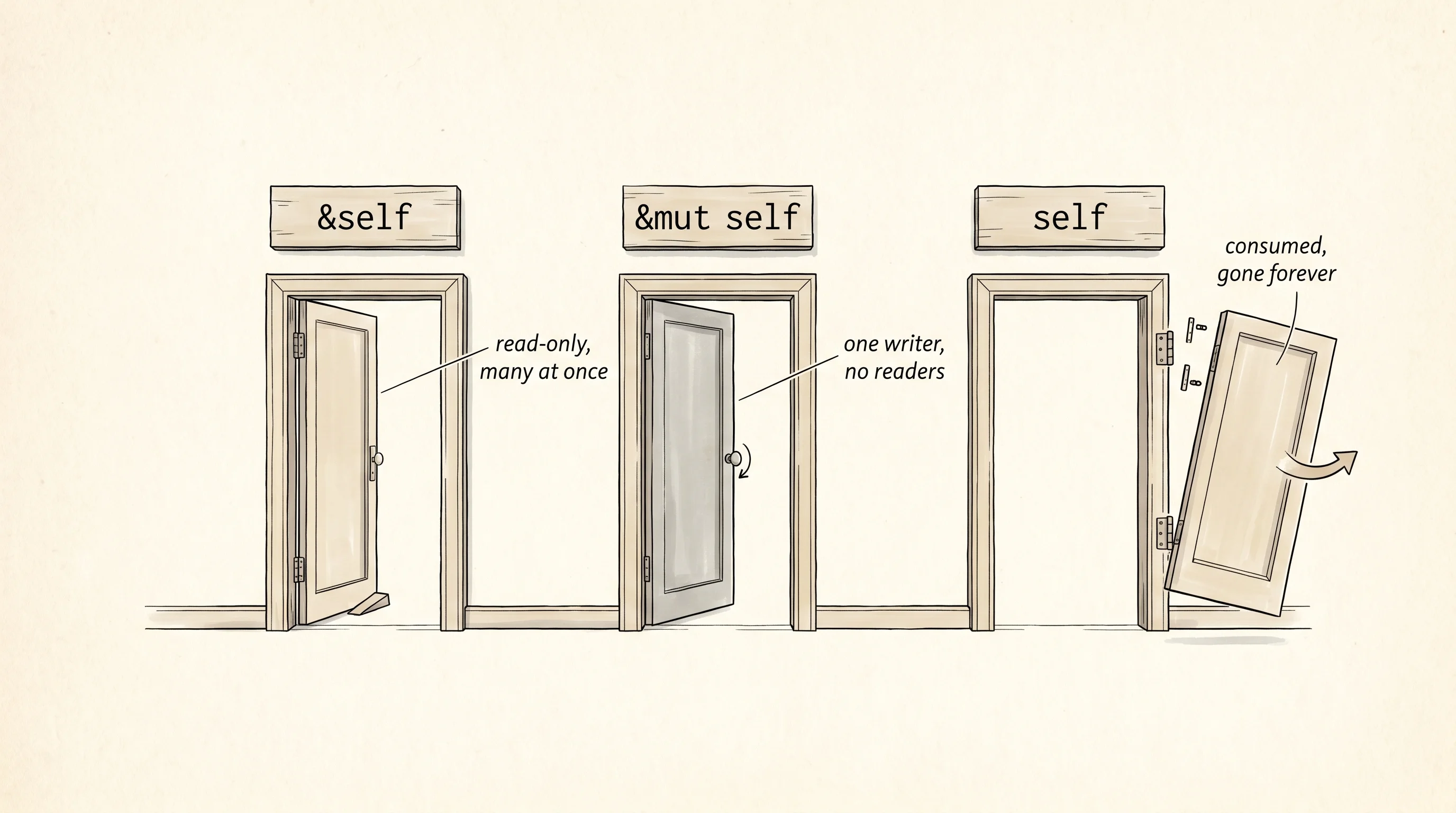
The first method is area. Look at its first parameter — &self. That is not a parameter you pass when you call the method. It is the rectangle itself, handed in automatically the moment you write card.area(). The dot before area is what tells Rust to wedge the receiver into the front of the parameter list for you. Inside the method, self.width and self.height reach into the rectangle's own fields. The ampersand in front of self is the same ampersand from the borrow lesson — it means the method takes the rectangle by reference, looks at it, and gives it back. The card stays in your binder slot. Anyone can call area a thousand times in a row and the card never moves.
The perimeter method has the same shape. So does is_square. All three take &self because none of them need to change the rectangle to do their job. They are read-only methods, and Rust lets as many of them run at the same time as you want, because no one is fighting over the card. This is the default and it is the one you reach for most often. A method only earns the right to take something heavier than &self if it has a real reason to.
The second flavor is &mut self. You take the card out of the sleeve, write on it, slide it back. The method receives a mutable reference, which means it can reach into the fields and assign new values — self.width = self.width * 2.0 is legal inside an &mut self method but a compiler error inside an &self one. The same borrow rule from earlier applies here too: while one &mut self method is running on a rectangle, nobody else can touch that rectangle, not even to read it. The card is out of the binder; nobody else can see it until you slide it back. This lesson does not call any &mut self methods because the demo rectangles never change, but the door is the same one you walked through with let mut x — once mut shows up, you are allowed to write.
The third flavor is the rarest one and the most permanent. self with no ampersand at all. The method takes the rectangle by value, which is the move semantics rule again — the rectangle is now owned by the method, and the caller cannot use it anymore. People reach for self when the method is supposed to consume the rectangle and turn it into something else. A method named into_square that grabs your rectangle, throws away the shorter side, and hands back a brand-new square would take self because the original rectangle is gone the moment the conversion happens. Hand the card away; do not expect it back.
The last piece of the impl block is the one that does not have self in its parameter list at all. Rectangle::square takes a side length and hands back a new rectangle with that side as both width and height. There is no self because there is no rectangle yet — the method is the thing that builds one. Rust calls this an associated function. It is not a method, because methods need a receiver. It is associated with the type the way a factory preset on a stamp is associated with the stamp's brand. The double colon between Rectangle and square is what calls it. Methods use the dot. Associated functions use ::. Same impl block, two different ways in.
fn show_associated() {
    let display_cube = Rectangle::square(12.0);
    println!("--- display cube face ---");
    println!("width:     {}", display_cube.width);
    println!("height:    {}", display_cube.height);
    println!("area:      {}", display_cube.area());
    println!("perimeter: {}", display_cube.perimeter());
    println!("is_square: {}", display_cube.is_square());
}
The return type is Self with a capital S. That Self is a shortcut for the type the impl block belongs to. Inside impl Rectangle, writing Self means the same thing as writing Rectangle, and the convention is to use the short form so a future rename of the type only has to happen in one place. The body builds a fresh rectangle by stamping side into both fields and returns it. The caller writes let cube = Rectangle::square(12.0) and out comes a 12-by-12 rectangle the rest of the methods can read just like any other.
--- baseball card ---
width:     6.5
height:    9
area:      58.5
perimeter: 31
is_square: false
--- binder page ---
width:     23
height:    30
area:      690
perimeter: 106
is_square: false
--- display cube face ---
width:     12
height:    12
area:      144
perimeter: 48
is_square: true
Read the three blocks of output side by side. The card and the binder page were built by hand with field labels — Rectangle { width: 6.5, height: 9.0 } — and the display cube was built by the associated function with a single number. All three flowed through the same area, perimeter, and is_square methods, and the only one that came back is_square: true was the one made by the function that promises a square. One blueprint, two ways to build, the same set of behaviors for every instance that comes out the other side.
One question worth asking — what stops a stray function elsewhere in the program from declaring its own area method on Rectangle? Nothing in the body of the lesson, but the rule is enforced by the impl block being the only place new methods can live. You can write a second impl Rectangle block in another file in the same crate and add more methods to it, but you cannot bolt methods onto a type from a crate you do not own without going through a separate mechanism called a trait. That restriction is what the next lesson on traits exists to lift.
Next lesson — what to do when one struct definition cannot capture every shape your data wants to take, and you need the type system to tell two cases apart instead of one.