AWS DynamoDB
The gym keeps a membership binder. Every time a member checks in, the front desk flips to their page and writes a new row: date, time, the workout they logged. When a member asks "show me every leg day I did last month," the attendant turns to that member's tab, skims down the rows sorted by date, and reads off the leg days. They never flip through the whole binder. They know exactly which tab to open because every tab is filed under the member's ID. DynamoDB is that binder — a key-value database Amazon runs for you, sharded across hundreds of machines, that finds one row out of billions in single-digit milliseconds by turning the member ID into a disk address. This lesson opens a PokerHands binder and writes a few rows.
The story begins in 2004. Amazon's shopping cart service kept falling over during the Christmas rush because the relational database underneath could not keep up with writes. The engineering team gave up on the relational model and wrote a paper in 2007 titled "Dynamo: Amazon's Highly Available Key-value Store." It described a different shape: no joins, no complex queries, just "give me the row at this key." The paper became one of the most influential systems papers of the decade — Cassandra, Riak, Voldemort, and MongoDB all borrowed from it. In January 2012, Amazon launched DynamoDB as a managed product you could rent. It was an instant hit with anyone who needed to scale writes far beyond what a single SQL server could handle. By 2018, Rick Houlihan, a principal engineer at AWS, was giving famous talks explaining that you should put every entity type in one table — a philosophy called single-table design — and model access patterns by choosing the right key schema. The community has been arguing about those talks ever since.
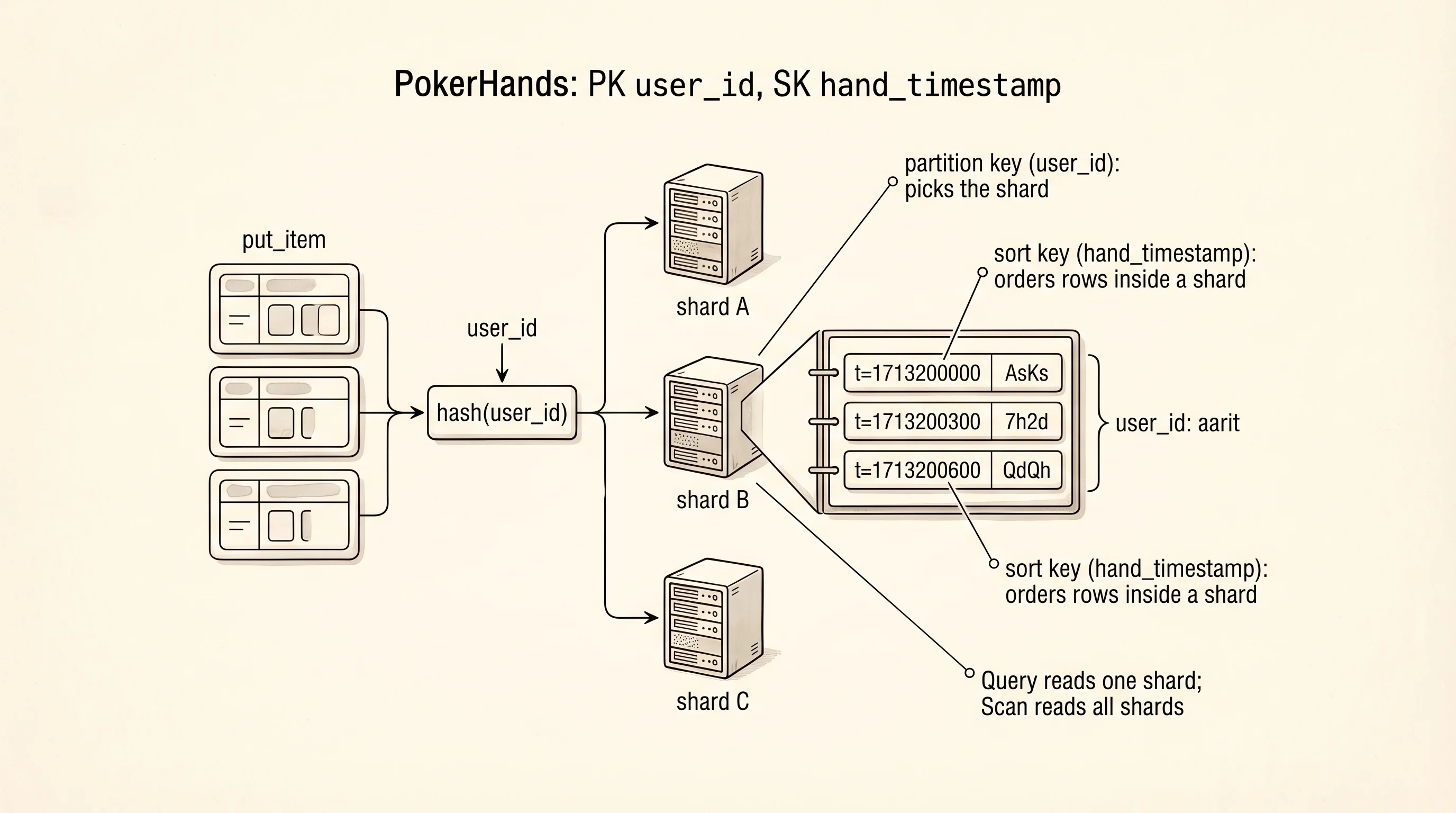
A DynamoDB table has two special columns. The partition key decides which physical shard the row lives on. DynamoDB hashes the partition key to a number, and that number tells the service which of its thousands of servers owns that row. All rows with the same partition key live on the same shard, next to each other on disk. The sort key decides the order of rows within a partition. If the partition key is the member's ID and the sort key is the check-in timestamp, DynamoDB keeps that member's check-ins sorted by date automatically. You can ask for "all rows with this partition key" (a Query) and get them back sorted, filtered, and paginated without a full table scan. You can ask for "any row in the whole table matching X" (a Scan) but it reads every row on every shard, which is slow and expensive. The table design is the difference.
Pricing is the second thing that matters. DynamoDB bills by capacity units, not by the size of the table. A write capacity unit (WCU) is one 1-KB write per second. A read capacity unit (RCU) is one strongly consistent 4-KB read per second, or two eventually consistent reads. You can provision capacity up front (pay by the hour for a fixed number) or switch to on-demand (pay per request, about 1.25 dollars per million writes and 0.25 per million reads). Small tables on-demand fit inside the Free Tier indefinitely. Every API call returns a field called ConsumedCapacity that tells you exactly how many units it cost. It is the only database I know where you can literally print the bill for the last call.
The poker project from later in this site will need to persist hands a player has played. Model it as a PokerHands table with partition key user_id and sort key hand_timestamp. Every hand written belongs to one user. Rows for that user are sorted by the moment the hand ended. Ask for "the last ten hands Aarit played" and DynamoDB finds Aarit's partition, reads the ten most recent rows, and returns them. No other user's data is touched.
Paste this into dynamo_demo.py. The PokerHands schema matches the curriculum — PK user_id, SK hand_timestamp — and the code is self-contained so you do not need the later poker project installed.
import boto3
import time
from botocore.exceptions import ClientError

region = "us-east-1"
table_name = "PokerHands"

dynamodb = boto3.client("dynamodb", region_name=region)

try:
    dynamodb.create_table(
        TableName=table_name,
        AttributeDefinitions=[
            {"AttributeName": "user_id", "AttributeType": "S"},
            {"AttributeName": "hand_timestamp", "AttributeType": "N"},
        ],
        KeySchema=[
            {"AttributeName": "user_id", "KeyType": "HASH"},
            {"AttributeName": "hand_timestamp", "KeyType": "RANGE"},
        ],
        BillingMode="PAY_PER_REQUEST",
    )
    print(f"creating table {table_name}...")
    dynamodb.get_waiter("table_exists").wait(TableName=table_name)
    print("table ready")
except ClientError as exc:
    if exc.response["Error"]["Code"] == "ResourceInUseException":
        print(f"table {table_name} already exists")
    else:
        raise
Run it once. DynamoDB creates the table in about 10 seconds and the script waits until the status flips to ACTIVE. The HASH key type marks the partition key; RANGE marks the sort key. S and N mean string and number. PAY_PER_REQUEST is on-demand billing — no capacity to provision, no idle cost.
Now put three hands for two users and read them back.
hands = [
    ("aarit", 1_713_200_000, "AsKs", 120, "won"),
    ("aarit", 1_713_200_300, "7h2d", -40, "folded"),
    ("aarit", 1_713_200_600, "QdQh", 75, "won"),
    ("aditya", 1_713_200_150, "JsTs", -20, "lost"),
]

for user_id, ts, hole, delta, result in hands:
    resp = dynamodb.put_item(
        TableName=table_name,
        Item={
            "user_id":        {"S": user_id},
            "hand_timestamp": {"N": str(ts)},
            "hole_cards":     {"S": hole},
            "chip_delta":     {"N": str(delta)},
            "result":         {"S": result},
        },
        ReturnConsumedCapacity="TOTAL",
    )
    cost = resp["ConsumedCapacity"]["CapacityUnits"]
    print(f"put hand {hole} for {user_id:<7} cost={cost} WCU")
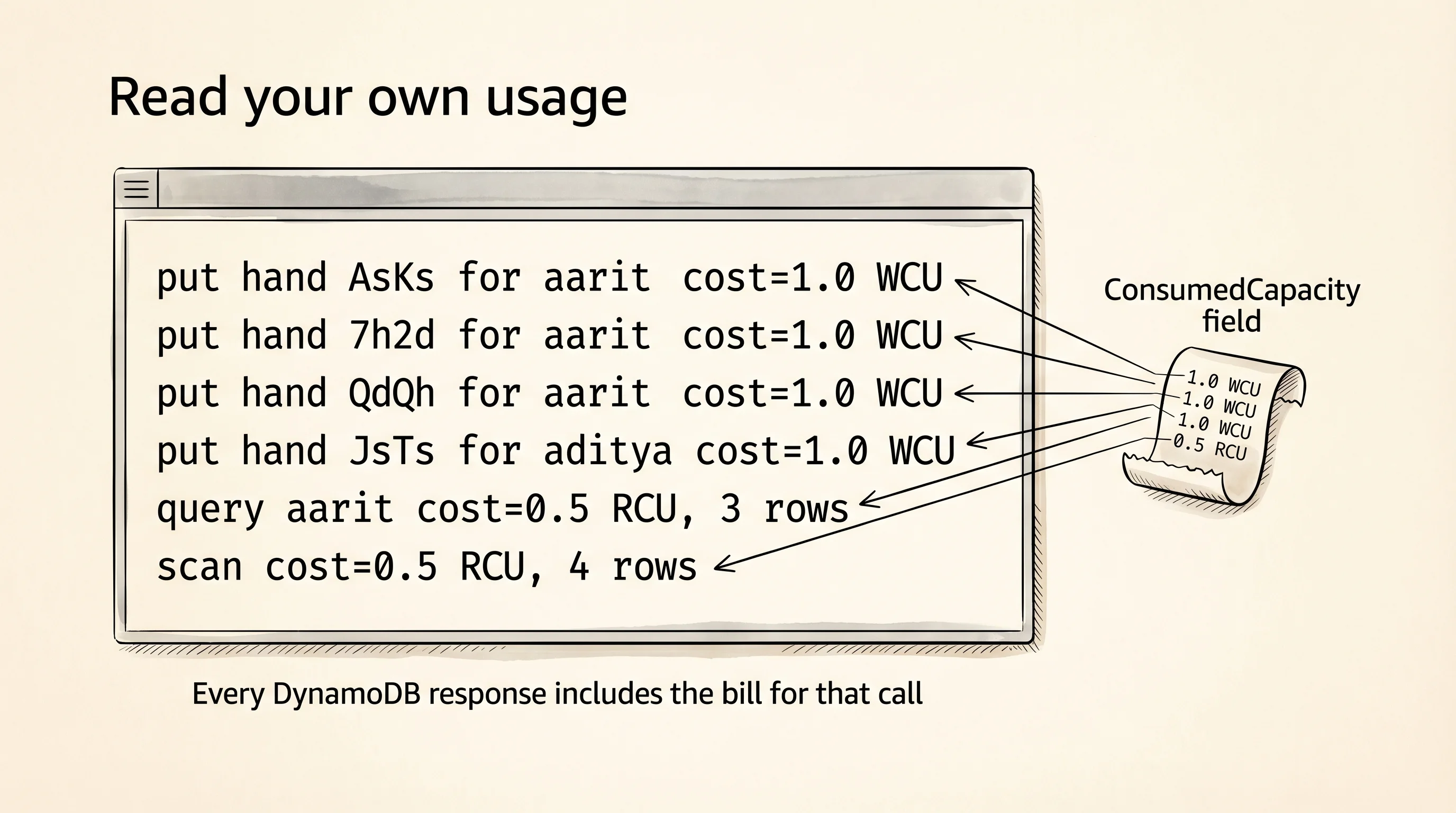
The ReturnConsumedCapacity="TOTAL" flag tells DynamoDB to include the bill on every response. Each put of a small item is 1 WCU. Every column is stored as a typed value ({"S": ...} for string, {"N": ...} for number). The odd double-dict shape is a DynamoDB convention — it is explicit about types at the wire level because the service has to hash them consistently across languages.
put hand AsKs for aarit   cost=1.0 WCU
put hand 7h2d for aarit   cost=1.0 WCU
put hand QdQh for aarit   cost=1.0 WCU
put hand JsTs for aditya  cost=1.0 WCU
Now query for all of Aarit's hands. A Query is the fast, cheap call — it only reads within one partition.
resp = dynamodb.query(
    TableName=table_name,
    KeyConditionExpression="user_id = :uid",
    ExpressionAttributeValues={":uid": {"S": "aarit"}},
    ReturnConsumedCapacity="TOTAL",
)
cost = resp["ConsumedCapacity"]["CapacityUnits"]
print(f"\nquery aarit cost={cost} RCU, {resp['Count']} rows")
for item in resp["Items"]:
    ts = int(item["hand_timestamp"]["N"])
    hole = item["hole_cards"]["S"]
    delta = int(item["chip_delta"]["N"])
    result = item["result"]["S"]
    print(f"  t={ts}  {hole}  delta={delta:+}  {result}")
The KeyConditionExpression is DynamoDB's filter language — here it says "give me rows where user_id equals the value I am about to bind to the placeholder :uid." The placeholder syntax is how the service protects against injection: you never splice values into the expression string.
query aarit cost=0.5 RCU, 3 rows
  t=1713200000  AsKs  delta=+120  won
  t=1713200300  7h2d  delta=-40   folded
  t=1713200600  QdQh  delta=+75   won
Half an RCU for three rows, all sorted by timestamp ascending because that is how the sort key orders the partition on disk. The service did not scan Aditya's partition at all. Flip the sort order to "newest first" with ScanIndexForward=False on the query and the same rows come back reversed at the same cost.
Try the scan for comparison. A scan reads every row across every partition.
resp = dynamodb.scan(TableName=table_name, ReturnConsumedCapacity="TOTAL")
cost = resp["ConsumedCapacity"]["CapacityUnits"]
print(f"\nscan cost={cost} RCU, {resp['Count']} rows")
On a 4-row table, a scan still costs about 0.5 RCU. On a 4-million-row table, a scan costs 500,000 RCU and takes minutes. This is why the partition key is load-bearing: it turns an O(N) search into an O(1) partition lookup plus an O(log M) sort-key seek inside the partition. The query is the binder turning to Aarit's tab. The scan is the attendant flipping through the whole binder.
Clean up when you finish.
dynamodb.delete_table(TableName=table_name)
print(f"\ndeleted table {table_name}")
DynamoDB is where shaped, queryable state lives when a laptop's SQLite is not enough. It assumes every service calls it directly and waits for the answer. The moment one service is slow or down, every caller stalls. The next lesson decouples the services with a message queue so the producer does not wait on the consumer.