AWS S3
The gym has a bag room. You walk in, hand the attendant a duffel, and get a tag with a unique number. The attendant stuffs the bag into whichever cubby has room. You do not know where it went. You do not need to. When you come back and hand over the tag, the bag appears. S3 is the bag room for the internet. You hand it a file and a key — a name of your choosing. S3 stuffs it into whichever disk on whichever server in whichever datacenter has room. When you ask for the key back, the file appears. This lesson hands a tag to the attendant and picks up the bag.
S3 stands for Simple Storage Service, and it was the first AWS product to launch on March 14, 2006. The name is accurate. The whole API has about a dozen calls: put an object, get an object, list objects, delete an object, a few things around permissions and multipart uploads. That simplicity is the product. Before S3, storing a file on the internet meant buying a server, formatting its disks, writing a backup plan, monitoring for failures, and hoping the building did not catch fire. S3 launched with three numbers attached: 11 nines of durability (a probability of losing a file so small that if you stored 10 million files you would expect to lose one every 10,000 years), 99.99% availability, and 15 cents per GB per month. A startup called Smugmug moved all of its user photos into S3 in its first week because the math was so obviously better than the racks its founder had been maintaining in a room off his garage. By 2012, S3 held 1 trillion objects. By 2021, over 100 trillion. The 2017 us-east-1 outage took half the internet down for four hours because so many services — Netflix's thumbnails, Slack's avatars, Docker Hub's images — lived on it.
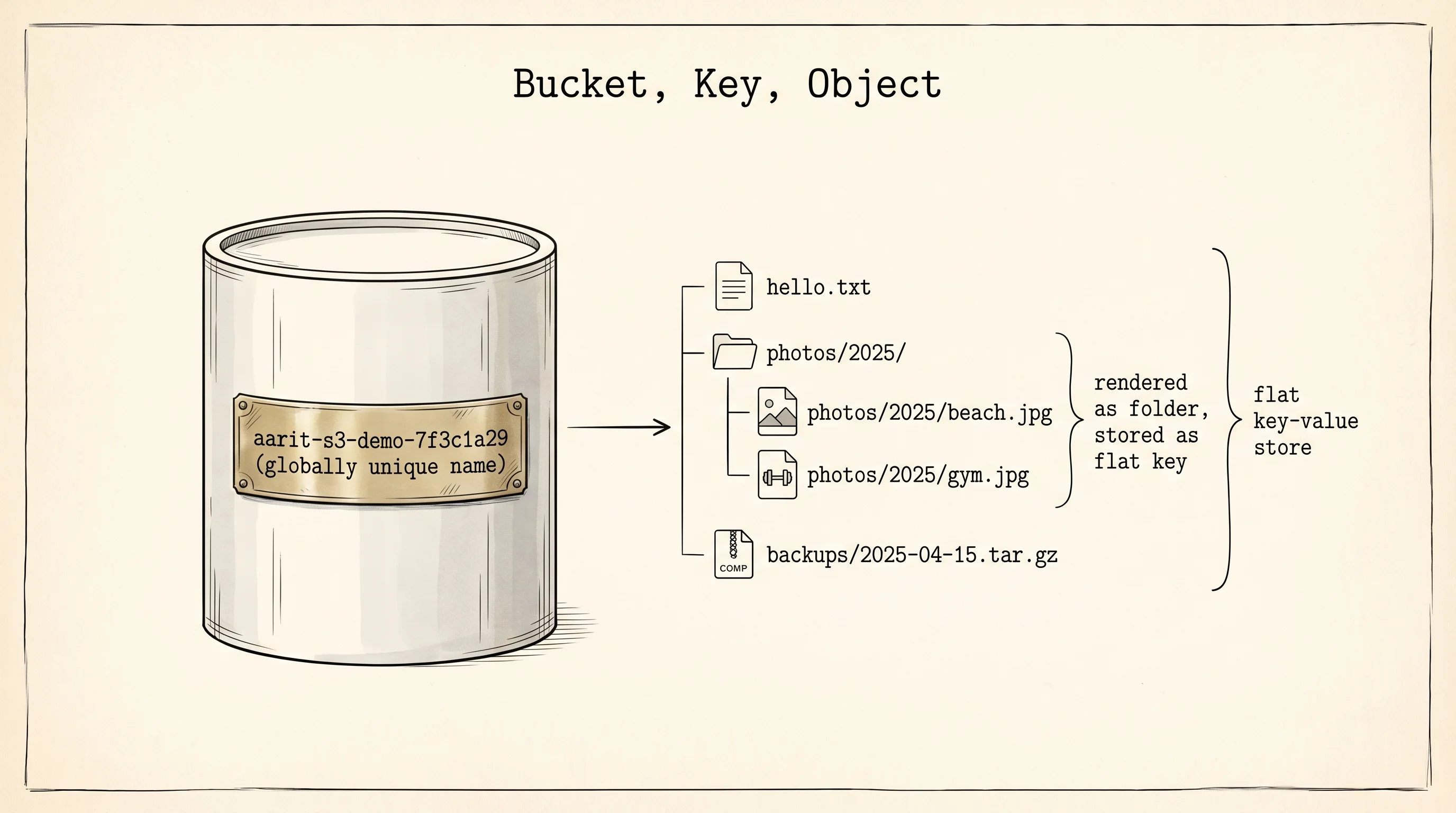
The S3 vocabulary is three words. A bucket is a top-level container with a globally unique name — globally, meaning across every AWS customer on the planet. If you try to create a bucket named photos, AWS tells you it is taken. Most engineers name their buckets like companyname-purpose-env to avoid the collision. An object is one file inside a bucket: the bytes, plus metadata like Content-Type and a last-modified timestamp. A key is the name you give the object, usually a slash-separated path that mimics a folder structure. S3 has no real folders — it is a flat key-value store — but it renders keys with slashes as folders in its console, and people have found it convenient enough for 19 years to not argue. An object lives at a URL shaped like https://<bucket>.s3.<region>.amazonaws.com/<key>, and whether that URL works depends on the bucket's permissions, not the URL itself.
The other thing that matters is the dollar math. S3 charges three ways: storage per GB per month (Standard class is about 2.3 cents per GB in us-east-1 in 2025; Infrequent Access drops to 1.25 cents; Glacier Deep Archive drops to 0.1 cents with a retrieval delay), requests per thousand (PUT and LIST cost about 0.5 cents per 1,000; GET costs about 0.04 cents per 1,000), and egress per GB when data leaves AWS (about 9 cents per GB to the public internet, free within the same region). The egress charge is the one people forget. A bucket that stores a terabyte costs 23 dollars a month; the same bucket read once a day to a laptop costs 2,700 dollars a month. The storage is cheap. The shipping is not.
Activate the venv from the setup lesson and install the AWS SDK for Python, boto3. The name comes from boto, which Mitch Garnaat started writing in 2006 as a weekend project right after S3 launched. It is one of the oldest continuously maintained open-source AWS clients. Amazon later adopted it as the official SDK.
pip install boto3Paste this into a file called s3_demo.py. Replace the bucket name with something globally unique — add a random suffix, your name, or a date.
import boto3
import uuid
from pathlib import Path
from botocore.exceptions import ClientError

region = "us-east-1"
bucket = f"aarit-s3-demo-{uuid.uuid4().hex[:8]}"
key = "hello.txt"

s3 = boto3.client("s3", region_name=region)

if region == "us-east-1":
    s3.create_bucket(Bucket=bucket)
else:
    s3.create_bucket(
        Bucket=bucket,
        CreateBucketConfiguration={"LocationConstraint": region},
    )
print(f"created bucket: {bucket}")

Path("hello.txt").write_text("Hello from the gym bag room.\n")
s3.upload_file("hello.txt", bucket, key)
print(f"uploaded object: s3://{bucket}/{key}")

head = s3.head_object(Bucket=bucket, Key=key)
print(f"  content length: {head['ContentLength']} bytes")
print(f"  content type:   {head['ContentType']}")
print(f"  etag:           {head['ETag']}")
print(f"  last modified:  {head['LastModified'].isoformat()}")

url = s3.generate_presigned_url(
    "get_object",
    Params={"Bucket": bucket, "Key": key},
    ExpiresIn=3600,
)
print(f"presigned URL (valid 1 hour):\n  {url}")
Run it with python s3_demo.py. If aws configure ran from the previous lesson, boto3 picks up the same credentials from ~/.aws/credentials without another line of setup.
created bucket: aarit-s3-demo-7f3c1a29
uploaded object: s3://aarit-s3-demo-7f3c1a29/hello.txt
  content length: 30 bytes
  content type:   text/plain
  etag:           "a6f3d2b8e1c47f8e0d1b5e2a9c3d4e5f"
  last modified:  2026-04-15T18:23:41+00:00
presigned URL (valid 1 hour):
  https://aarit-s3-demo-7f3c1a29.s3.amazonaws.com/hello.txt?X-Amz-Algorithm=AWS4-HMAC-SHA256&X-Amz-Credential=...&X-Amz-Date=20260415T182341Z&X-Amz-Expires=3600&X-Amz-SignedHeaders=host&X-Amz-Signature=...
Copy the presigned URL and paste it into a browser. The file downloads. Wait an hour and try again — the URL returns an error. The metadata block shows ContentLength (the number of bytes S3 is storing), ContentType (which S3 guessed from the extension), ETag (a hash S3 uses to detect a corrupted or modified object), and LastModified (the server-side timestamp).
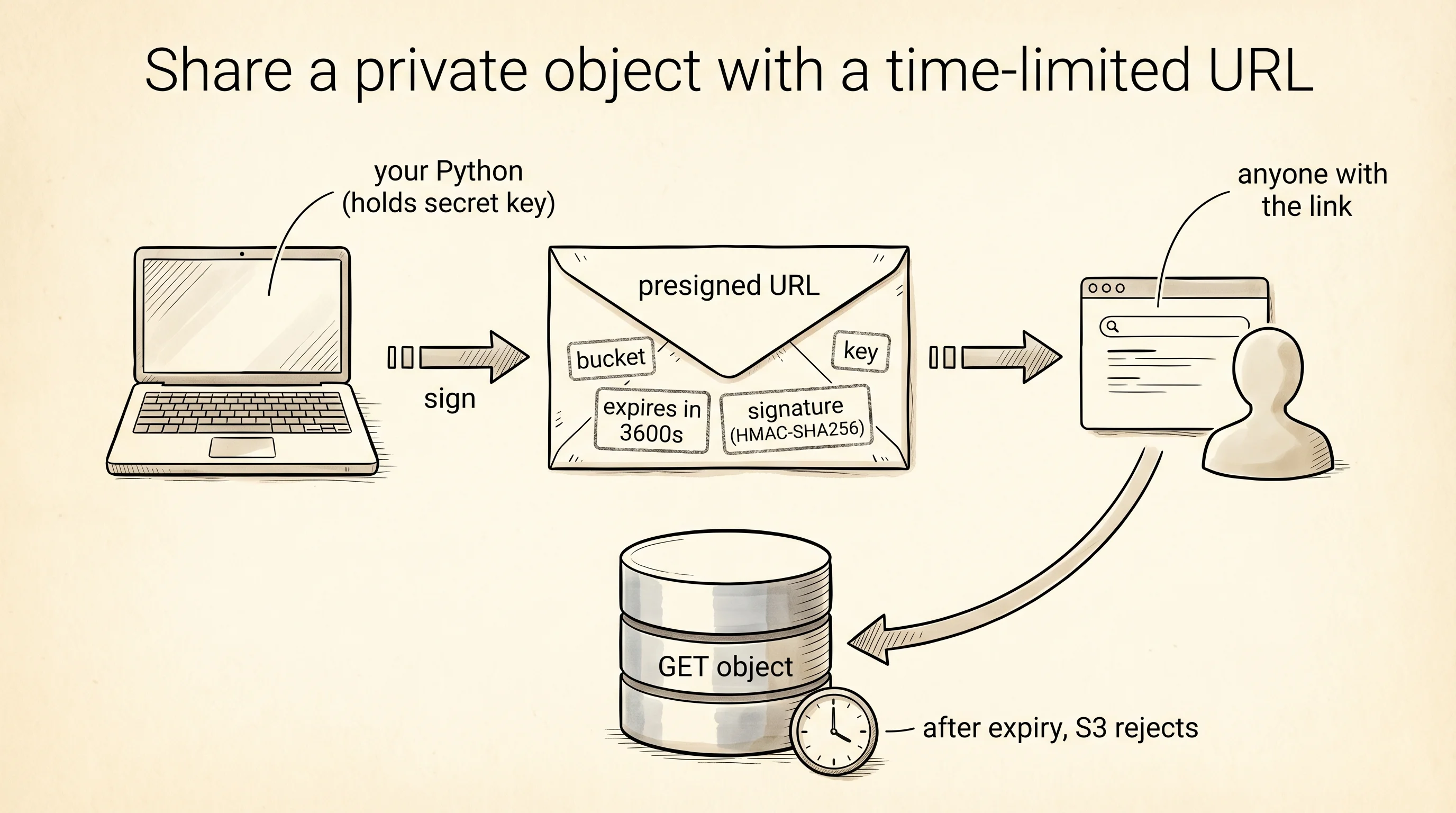
The presigned URL is the most interesting call on the page. Your bucket is private — by default, an anonymous visitor who hits the plain URL gets a 403 Forbidden. A presigned URL is a temporary grant: your SDK signs a URL with your secret key and bakes an expiration time into the signature. Anyone holding the signed URL can fetch the object for that many seconds. After that the signature fails. This is how Dropbox hands out share links. It is how Netflix hands video URLs to your browser. It is how every "download invoice" button on every SaaS site works. You keep the bucket private. You hand out temporary keys.
What is the ETag actually? It is the MD5 hash of the object's bytes for objects uploaded in a single PUT. S3 uses it to detect accidental corruption in transit and to let clients check whether the object has changed since they last fetched it. Think of it as a receipt number that changes if the file changes.
Delete the bucket when you finish so the next run does not complain. Add this to the end of s3_demo.py.
s3.delete_object(Bucket=bucket, Key=key)
s3.delete_bucket(Bucket=bucket)
print(f"cleaned up bucket: {bucket}")
S3 stores blobs — large, opaque chunks of bytes. It is wrong for data with shape. You cannot ask S3 for "every hand where the player was user_12 and the pot was over $100." For shaped, queryable data, you need a real database. The next lesson opens DynamoDB and creates a PokerHands table.