What Is the Cloud?
A gym membership is a strange deal the first time you think about it. You do not own the squat rack. You do not own the plates. You do not pay the water bill when the showers run. You swipe a card, walk in, and the equipment is already there, maintained by someone else. When you leave, the rack sits empty for the next person. The cloud is the same deal for computers. You do not own the server. You rent a slice of someone else's machine by the minute, and when you stop paying, the slice goes back on the floor for the next customer. This lesson walks from the world before the cloud, when everyone ran their own gym in their own garage, to the world after, when Amazon, Google, and Microsoft run most of the gyms on earth.
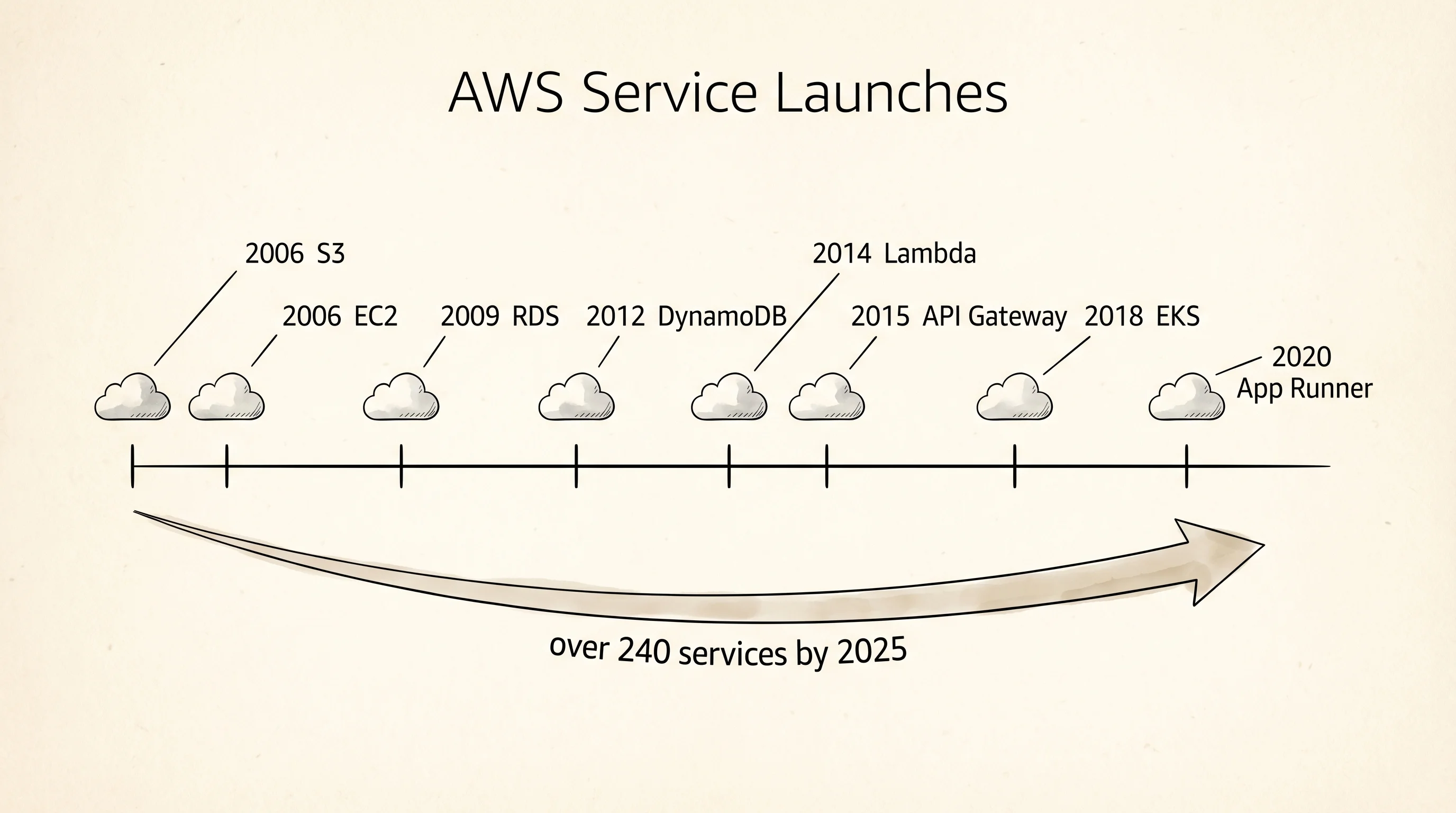
The before-world was heavy metal. In 1999 if you wanted to launch a website you bought a physical server — a pizza-box-sized computer with a power supply, disks, and network cables — and you shipped it to a colocation facility, a building full of racks that rented floor space and electricity. You paid for the box up front, you paid to rack it, you paid for bandwidth, and when your site got traffic you bought another box and shipped it. The small company Joyent estimated in 2005 that a serious startup spent 6 months and 100,000 dollars on infrastructure before it wrote its first line of product code. Amazon had the same problem internally. Jeff Bezos wrote a famous memo in 2003 demanding every team at Amazon expose its data through service interfaces so the rest of the company could consume it, and he ended the memo with "anyone who doesn't do this will be fired." Thank you, have a nice day. The teams that had to build these internal services discovered they were building the same plumbing over and over: storage, compute, message queues. Andy Jassy, a young executive in Bezos's office, pitched selling that plumbing to the outside world. In March 2006 Amazon Web Services launched S3, a storage service you called over HTTP. In August 2006 it launched EC2, virtual servers you rented by the hour. The cloud was born.
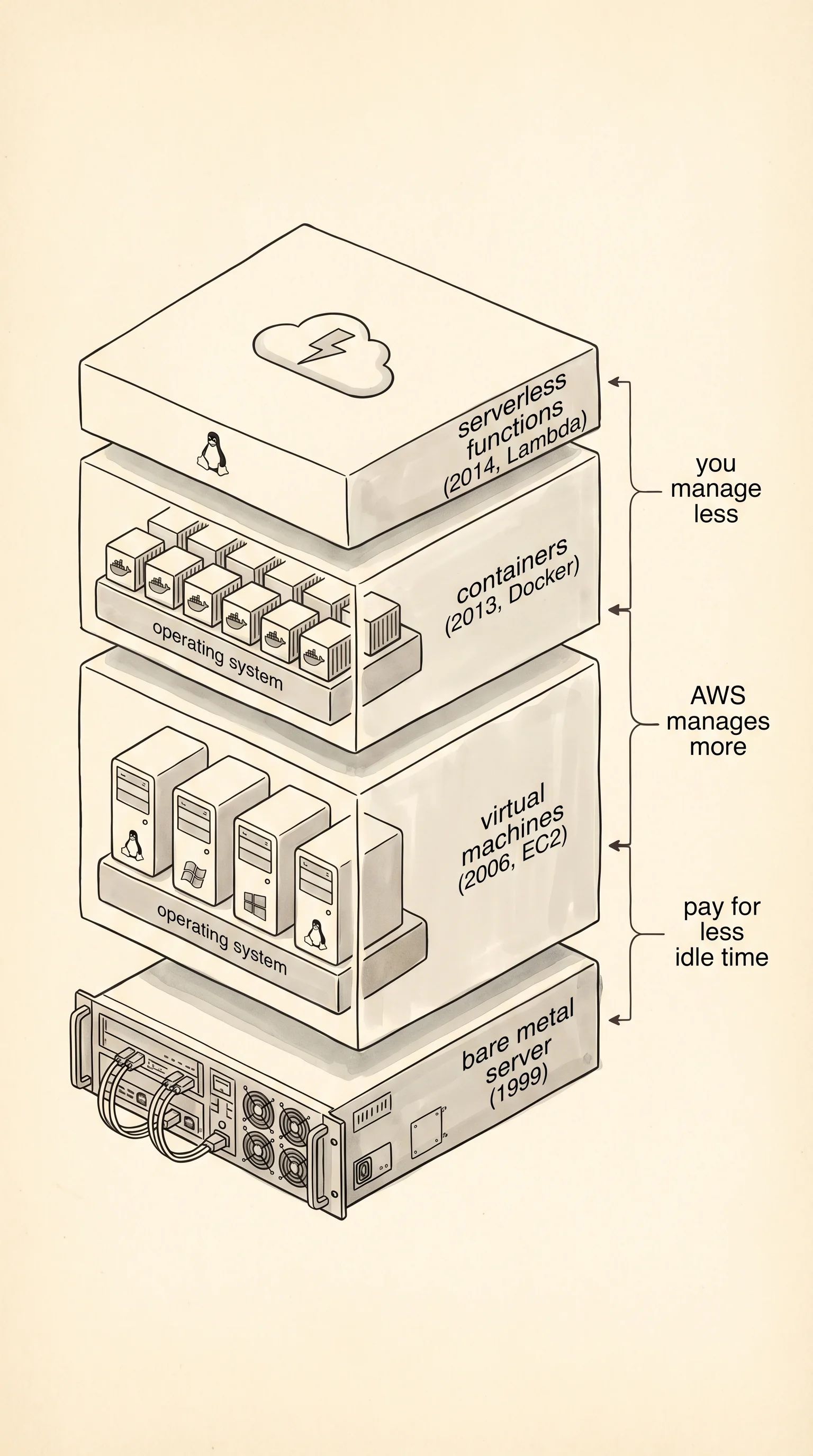
The first layer of the cloud was virtual machines. A virtual machine is a full fake computer — its own operating system, its own memory, its own disks — running inside a real computer under a supervisor program called a hypervisor. One beefy server can host 20 or 50 virtual machines, each isolated from the others. You rent one, you log in over SSH, and to your code it looks like a real Linux box. The hypervisor does all the sharing underneath. VMware had sold hypervisors to data centers since 1999, but EC2 made renting a VM a self-service web form. The second layer arrived in 2013 when Solomon Hykes, a French engineer at a small company called dotCloud, shipped Docker. A container is a VM with the operating system stripped out — it shares the host's Linux kernel and only packages your app and its direct dependencies. A container starts in milliseconds where a VM takes seconds, and where a host could run 20 VMs it can run 200 containers. The third layer arrived in November 2014 when AWS launched Lambda. A Lambda function has no server at all from your side — you upload Python code, AWS holds it in a warm slot somewhere, and when an event fires (an HTTP request, a file upload, a message in a queue) AWS runs your function for exactly as many milliseconds as it takes and bills you for that. No idle time. No rack. No operating system to patch. The industry called this serverless, which is a lie — there is still a server somewhere — but the name stuck because from your side there is nothing to name.
The sprawl after 2014 is what the inside of AWS looks like today. S3 for blobs. EC2 for VMs. RDS for SQL databases. DynamoDB for NoSQL. SQS for queues. Lambda for functions. Route 53 for DNS. CloudFront for CDN. IAM for permissions. As of 2025, AWS lists over 240 services in its console, and most engineers have touched fewer than 20. Google Cloud and Microsoft Azure each have a similar catalog. Your job when you use the cloud is not to learn every service — it is to know the small handful that actually matter for the thing you are building and rent them by the minute until you stop needing them.
The only way to use this lesson is to sign up. Go to https://aws.amazon.com/ and click Create an AWS Account. You need an email, a password, a physical address, and a credit card — AWS holds a 1 dollar authorization to verify the card and releases it. The Free Tier covers the next 12 months of light use, and the lessons in this section stay inside it, so you will not spend real money as long as you follow the steps. When the signup finishes, log in to the AWS Console and create an IAM user for yourself. Click your account name in the top right, click Security credentials, scroll to Access keys, and click Create access key. AWS shows you two strings once and only once: an Access Key ID and a Secret Access Key. Copy both into a password manager. If you lose the secret, you generate a new pair and rotate.
Now install the AWS command-line tool, awscli. Pick your OS.
brew install awscliIf you do not have Homebrew, install it from https://brew.sh/ first. Confirm the tool landed.
aws --versionYou should see something like aws-cli/2.15.0 Python/3.11.6 Darwin/24.6.0.
winget install --id Amazon.AWSCLIClose and reopen PowerShell so the PATH picks up the new binary. Confirm.
aws --versionYou should see something like aws-cli/2.15.0 Python/3.11.6 Windows/10.
The tool is a generic client. It can talk to every AWS service from the terminal. Before it can talk to anything, it needs your keys. Run the configure command.
aws configureIt asks four questions. Paste the Access Key ID when it asks for it. Paste the Secret Access Key when it asks for that. For default region, type us-east-1 (Northern Virginia, the oldest and cheapest region, where S3 originally launched). For default output format, type json. The tool writes the keys to ~/.aws/credentials and the region to ~/.aws/config. Every AWS call from now on — from the CLI, from boto3 in Python, from anywhere — will read those two files automatically. Never commit them to git.
Prove the wiring works. Run a call that costs nothing: ask AWS for your own identity.
aws sts get-caller-identityThe output is three fields that tell you which AWS account and which IAM user the keys belong to.
{
    "UserId": "AIDAEXAMPLEUSERID",
    "Account": "123456789012",
    "Arn": "arn:aws:iam::123456789012:user/aarit"
}
The UserId is a machine-friendly identifier. The Account is your 12-digit AWS account number — AWS uses it to route billing and permissions. The Arn (Amazon Resource Name) is the fully qualified address of the IAM user the keys belong to. Every single thing in AWS has an Arn of this shape, and every single permission policy refers to things by Arn. You will see them constantly.
You can talk to AWS. You have not stored anything in it yet. The next lesson opens S3 and drops your first file into a bucket.