How Computers Work
Picture your desk while you are doing homework. The thing you are working on right now — the open notebook, the pencil, the page you are reading — is on the desktop. The folders you finished last week are in the top drawer. The folders from last year are boxed up in the basement. Your brain reads from the desktop, not from the basement. If you need a basement folder, somebody has to walk down, get it, carry it up, and put it on the desk before you can use it. A computer works the same way. Every part of it is one of those four things: the desk (RAM), the drawer (SSD), the basement (HDD), or the brain doing the reading (CPU).
The brain part came first. In 1945 a team at the University of Pennsylvania finished a machine called ENIAC for the U.S. Army. It filled a room the size of a school gym, weighed 30 tons, and did its math with 17,468 vacuum tubes — glass bulbs the size of a soda can that glowed orange when current flowed through them. ENIAC could do about 5,000 additions a second, which sounds slow until you remember the alternative was a human with a pencil. Two years later, in December 1947, three engineers at Bell Labs in New Jersey — John Bardeen, Walter Brattain, and William Shockley — finished a tiny replacement for the vacuum tube. They called it the transistor. It did the same job — let current through, or block it — but in something the size of a fingernail clipping that did not glow, did not get hot, and never burned out. Every modern computer is built out of transistors. The reason your laptop fits on your lap is that one Bell Labs invention from 1947.
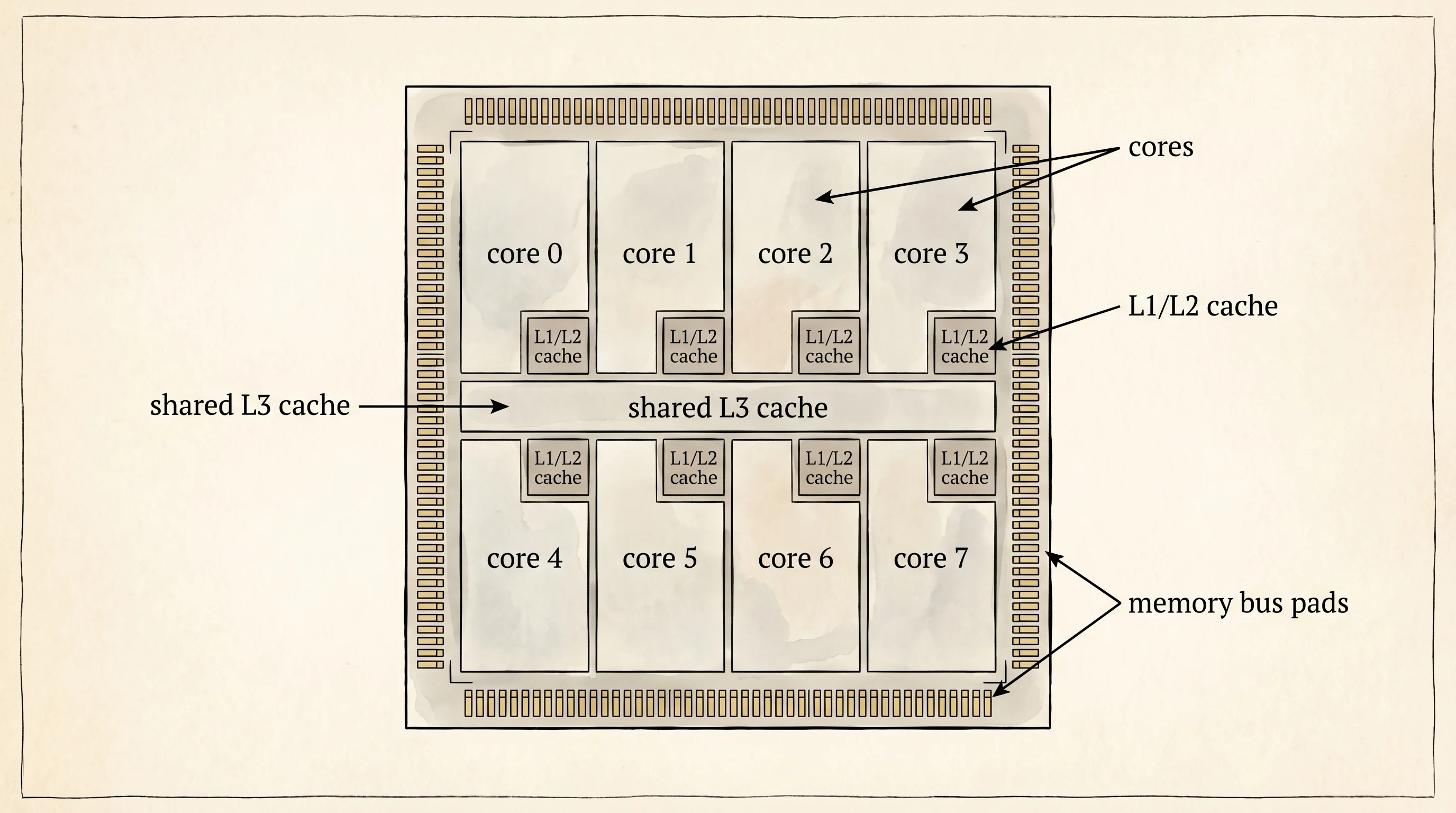
The CPU is the brain. Inside the CPU, billions of transistors are etched onto a square of silicon the size of your thumbnail, called a die. The die is divided into cores, and each core does one thing at a time, very fast. A modern Apple M-series chip has 8 cores. Each core can do somewhere around 4 billion math operations per second. The whole point of a transistor is that it has two states — current flowing or current not flowing — and those two states are the only things the chip ever sees. Programmers gave those two states the names 1 and 0. Every video, every song, every game, every Minecraft world is, at the very bottom, a long ribbon of 1s and 0s that the chip reads in batches. Bits, eight at a time, called a byte. The chip never sees a Minecraft block. It sees patterns of yes-current and no-current, and it has been trained by the engineers who built it to react to certain patterns by adding, certain patterns by jumping, certain patterns by writing to memory.
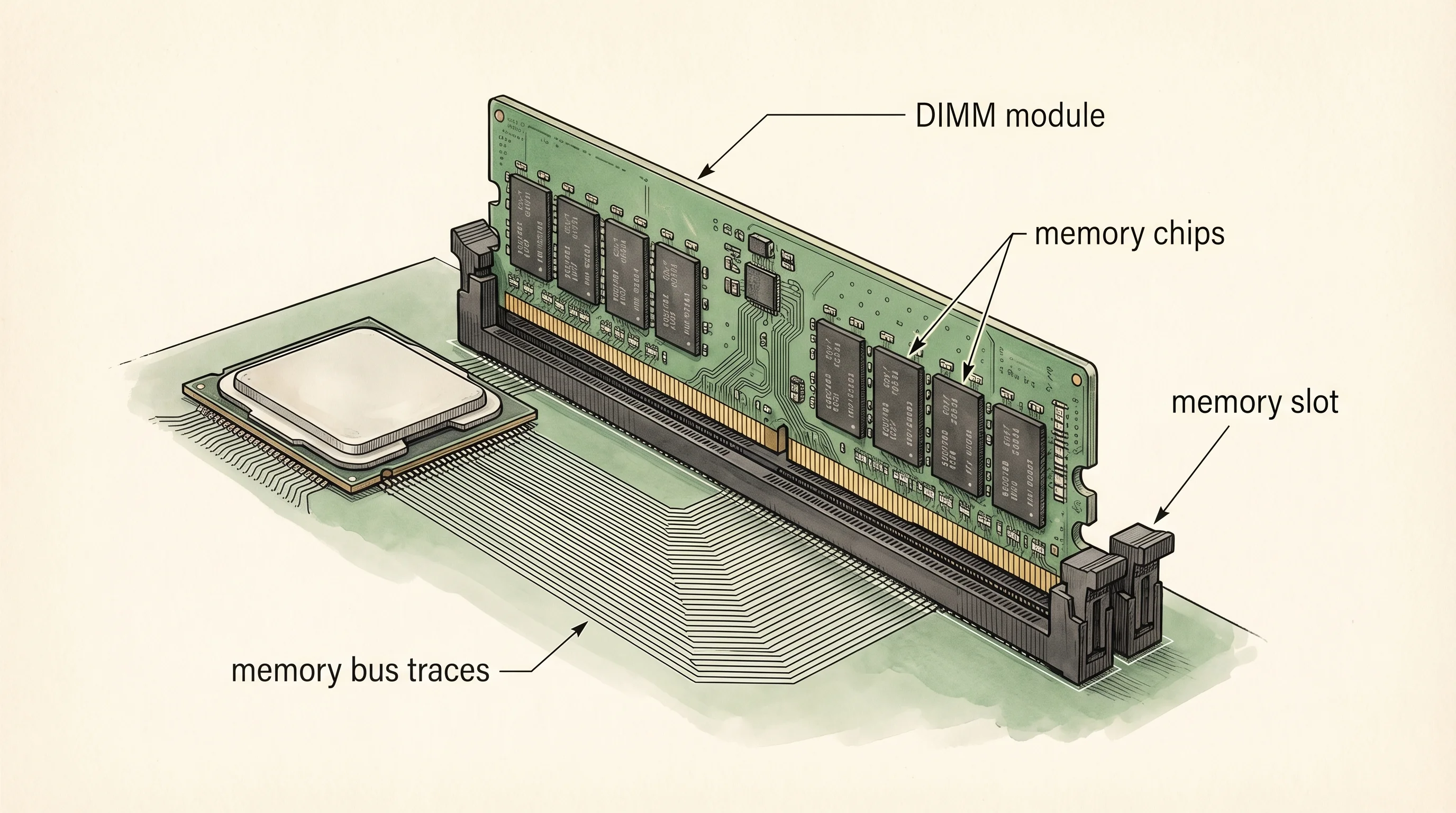
A core cannot read directly from your hard drive. The drive is too slow. So the chip works out of RAM, which stands for Random-Access Memory. RAM is the desktop. It is fast, it is small, and it forgets everything the second the power goes out. RAM lives on a long green stick called a DIMM that plugs into a slot on the motherboard. A typical laptop in 2026 has 16 to 32 gigabytes of it. The CPU pulls instructions and data out of RAM in batches, runs them through its cores, and writes the results back. The road between the CPU and RAM is called the memory bus. The bus is wide — typically 64 wires running side by side — and on every clock tick, those wires deliver another batch of bits.
When the power goes off, RAM goes blank. So you also need a place to keep things that has to survive a reboot. That is storage. Two flavors live in most machines today. The older one is the HDD, the hard disk drive. Inside an HDD is a literal spinning metal platter with magnetic coating, a bit like a record player, and a tiny arm that floats over the platter and reads the magnetism. HDDs were invented at IBM in 1956 and dominated for the next 50 years. They are cheap per gigabyte. They are also painfully slow, because the arm has to physically move and the platter has to spin to the right spot. The newer flavor is the SSD, the solid-state drive. An SSD is just chips. No moving parts. It stores each bit as a trapped electron in a tiny well of silicon. Reading is electronic, not mechanical, so an SSD is roughly 100 times faster than an HDD for random reads. That is why every modern laptop ships with an SSD, and HDDs now live mostly in big network-attached storage where the price-per-gigabyte still wins.
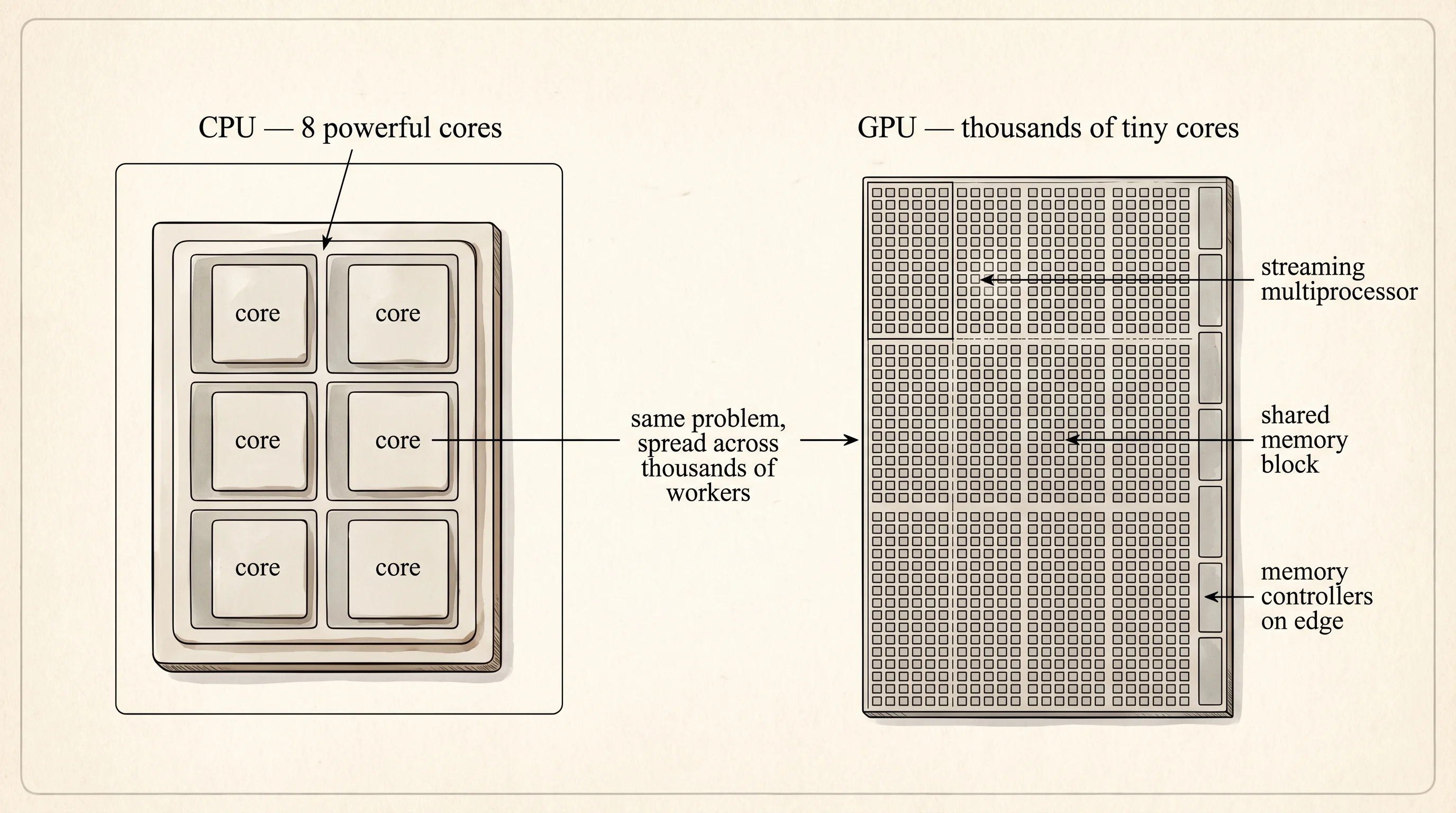
The fourth main piece is the GPU, the Graphics Processing Unit. A GPU is a weaker brain that does the same simple math thousands of times in parallel. Where a CPU has 8 powerful cores, a modern NVIDIA GPU has 10,000 tiny cores, each one slow but all of them working at once. NVIDIA was founded in 1993 by Jensen Huang, Chris Malachowsky, and Curtis Priem to build chips for video games — rendering a game frame meant doing the same multiplication on millions of pixels at the same time, which is exactly the work parallel cores are good at. In 2007 NVIDIA released a system called CUDA that let programmers use those parallel cores for any math, not just pixels. That bet sat unused by most of the world for almost a decade until researchers in 2012 used CUDA to train a neural network called AlexNet 60 times faster than CPUs could. Every large AI model today is trained on GPUs descended from that 2007 bet.
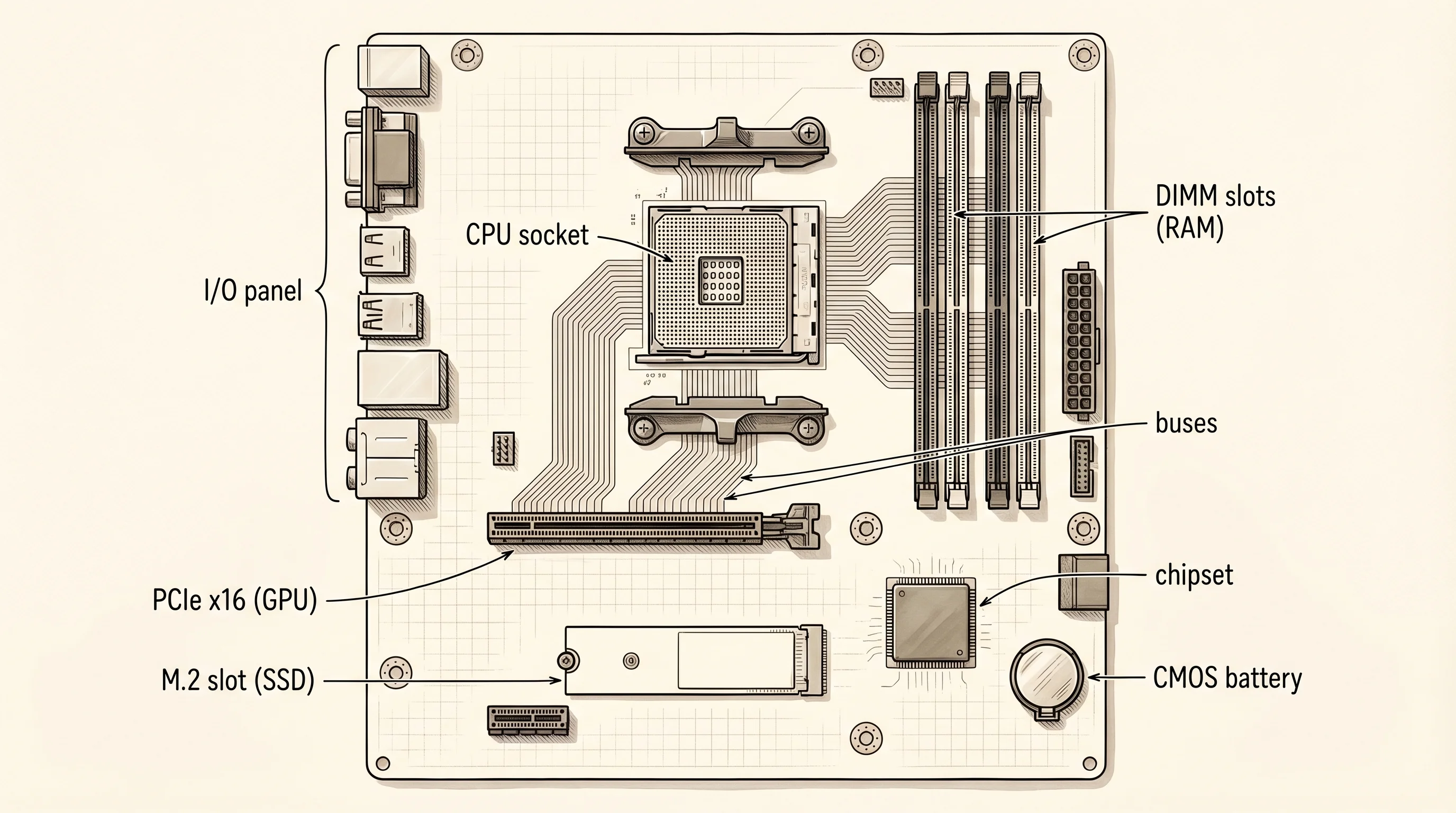
All four pieces — CPU, RAM, storage, and GPU — meet on one flat green board called the motherboard. The motherboard is the street grid of the computer. Every slot is a docking point for one of the pieces you just met, and the thin copper traces between the slots are the roads that carry bits from one piece to another.
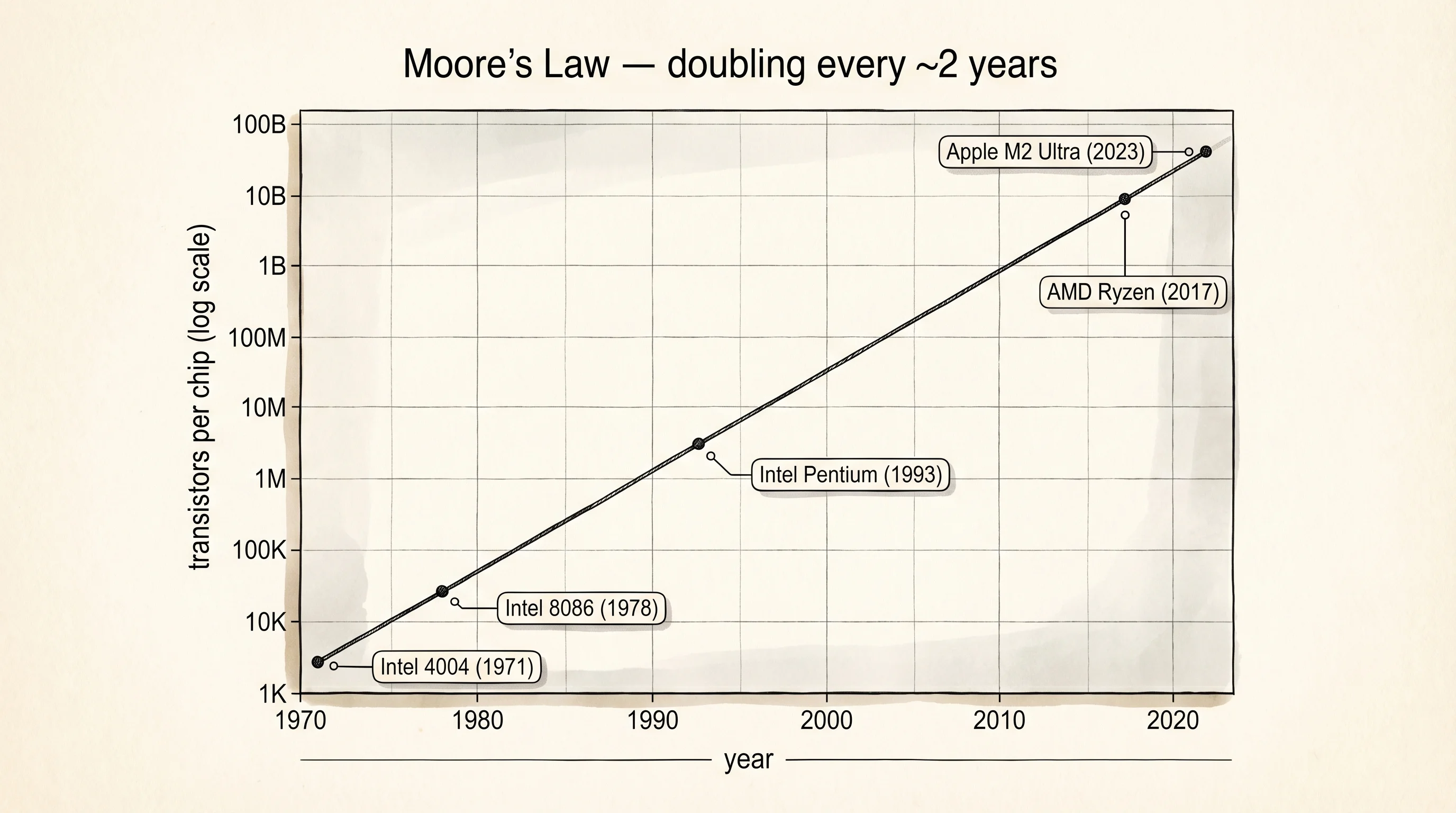
In 1965 Gordon Moore, who would later cofound Intel, wrote a short paper noticing that the number of transistors engineers were able to fit onto a single chip had been doubling roughly every two years. He guessed it would keep doubling for at least another decade. The doubling kept going, and going, until "Moore's Law" became the planning calendar for the entire computer industry. Engineers did not just predict the doubling — they organized whole companies around hitting it. The transistor that took 1947 Bell Labs months of hand-soldering now exists 100 billion times over inside the chip running this page in your browser, each one switched on and off about a billion times per second.
You have one more thing to do on this page, and it does not need any code. Find your own machine's brain and desk. Open the right tool for your OS and read what it says.
Click the Apple menu in the top-left corner. Hold Option and click "System Information." A window opens with a sidebar. Click "Hardware" → "Memory" to see your RAM. Click "Hardware" → "Storage" to see your SSD. Click the "Hardware Overview" header at the top to see your CPU model.
Press the Windows key and type "About your PC," then hit Enter. The "Device specifications" section lists your CPU under "Processor" and your RAM under "Installed RAM." For storage, press the Windows key again and type "This PC" — the disks show up there with their sizes.
Write down four lines: my CPU is X, my RAM is Y gigabytes, my storage is Z gigabytes, my GPU is W (or "integrated" if your laptop does not have a separate one). Those four numbers are the budget your code is going to live inside for the rest of this site.
You know the hardware. You know the brain reads from the desk and the desk forgets when the power goes out. There is one more layer between your code and that brain — the software layer that pretends the brain is friendly. The next lesson takes the lid off it.