Layers of Abstraction
Walk into a steakhouse and order a ribeye. You never see the kitchen. You never touch the gas valve on the stove. You never haggle with the rancher who raised the cow. The waiter takes your order in plain English, scribbles it onto a ticket in kitchen shorthand, and slides it through a window. The expediter on the other side reads the ticket, calls out commands to the line cooks, and keeps tickets moving in the right order. The line cook fires the burner, flips the steak, plates it, slides it back through the window. You eat. Your code is the order. The hardware is the stove. Between you and the stove is a tower of people, each one doing one job and translating for the next.
This restaurant did not always exist. The earliest computers had nothing between the programmer and the stove. In 1945 a programmer at the University of Pennsylvania who wanted to add two numbers on ENIAC walked over to the machine and physically rewired patch cables and flipped switches until the wiring spelled out the addition. There was no kitchen, no waiter, no menu — there was a stove and a person standing on top of it. A few years later programmers started feeding the machine punched cards: holes in cardboard that the reader translated into 1s and 0s. That was the first thin layer. By the 1950s Grace Hopper's compiler let people type words instead of holes. Each layer that arrived let the programmer above it forget more about the machine below.
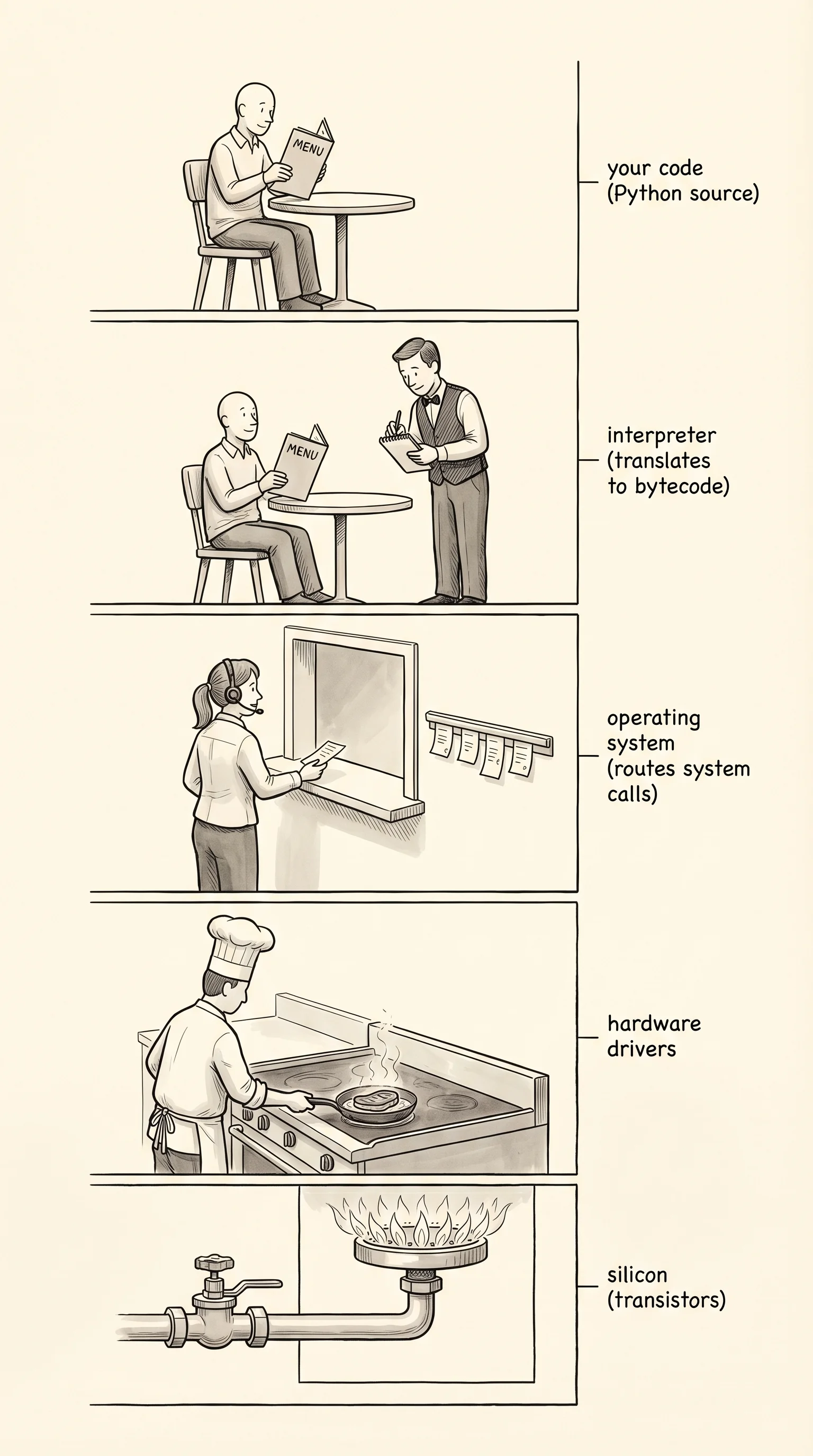
The restaurant has an exact layout. At the very bottom is the silicon — billions of transistors etched onto the CPU die from the last lesson. The transistors only know one thing: current flowing or not flowing, 1 or 0. One step above the silicon is microcode, a tiny set of instructions baked into the chip itself by the manufacturer that translates incoming commands into the dance of switches the silicon needs. One step above microcode is machine code, which is the actual stream of 1s and 0s the chip reads — the bytes that say "add the number in register 1 to the number in register 2." One step above that is assembly language, which gives those 1-and-0 patterns short human-readable names like MOV and ADD and JMP. A long time ago, some people wrote programs directly in assembly. Almost nobody does today.
Above assembly the restaurant gets interesting. The operating system, or OS, is the line cook and the expediter rolled into one. It is itself a program, written by someone else, that sits between every program on your computer and the hardware. When your Python script wants to write a file, it does not poke the SSD directly. It asks the OS — through a special doorway called a system call — and the OS handles the messy business of finding the right block on the drive, queueing the write, and reporting back. The OS also referees: when you have 30 tabs open and a YouTube video playing and a Python script running, the OS decides which one gets the CPU at every millisecond. It also keeps each program from reading another program's memory, which is the only reason your bank app and your random Steam game can coexist on the same machine.
The OS we use today owes most of its shape to two engineers at Bell Labs. In 1969 Ken Thompson and Dennis Ritchie were working on a research project called Multics that had grown so big and complicated that almost nobody could finish it. Ken found an old DEC PDP-7 minicomputer collecting dust in a corner and started writing a stripped-down OS on it for fun, partly so he could play a game he had written called Space Travel. Dennis joined him. Their stripped-down OS was a joke on Multics, so they called it Unics, then Unix. By the mid-1970s Unix was running on every research machine that mattered. By 1991 a Finnish college student named Linus Torvalds posted to a small newsgroup that he was building "just a hobby, won't be big and professional like gnu" — a Unix-style kernel he was writing for fun on his home PC. He called it Linux. Today every Android phone, every AWS server, every Tesla, every TV with a smart anything, runs some descendant of that 1991 hobby project. macOS itself is built on a Unix descendant called Darwin. Windows has its own line of OS work that started with DOS in 1981 and grew into Windows NT in 1993, and Windows now even runs Linux inside itself through a feature called WSL. Two people, one bored weekend in New Jersey, became the foundation of nearly every machine in your house.
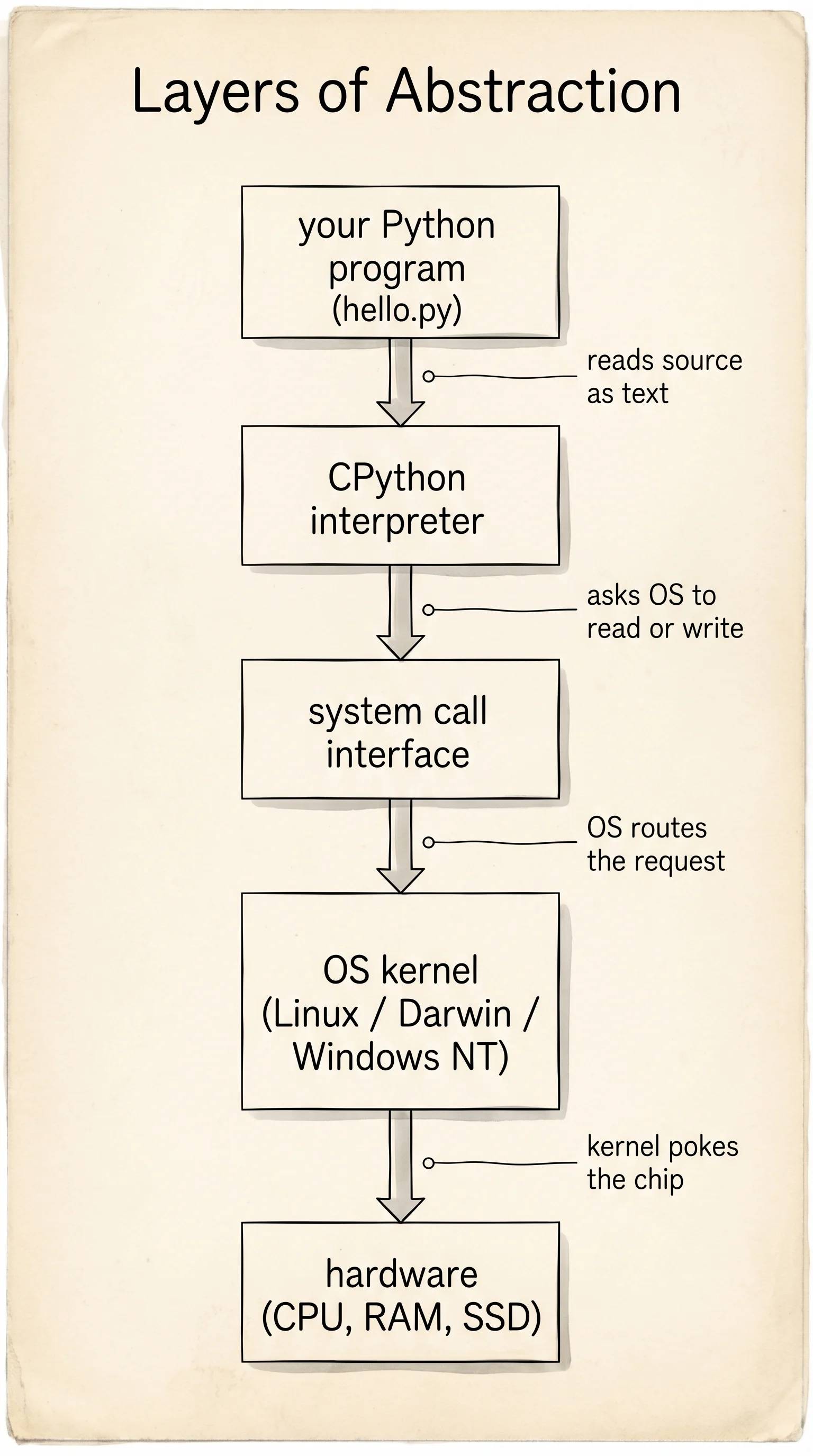
Above the OS sits the interpreter. Python is not magic — it is a program written in C that someone else compiled. When you type python hello.py, the OS launches that interpreter program, the interpreter reads your source file as plain text, breaks it apart into pieces called tokens, builds a tree of what your code means, translates the tree into a sequence of small instructions called bytecode, and then loops over those instructions one at a time, each loop iteration making system calls down to the OS, which pokes the hardware. Your print("hello") is the order. The interpreter is the waiter. The OS is the line cook. The CPU is the stove.
Each layer hides the one below. That is the whole reason towers of layers exist. If you had to think about the silicon every time you wanted to print a word, you would never finish writing a program. The hiding is also why bugs are so confusing — when something breaks, the symptom shows up at the top layer (your Python error) but the cause may live four layers down. Good programmers learn to peek beneath each layer, not to live there, but to know what is happening when the layer above behaves strangely.
You can shake hands with two of these layers right now. The OS is the most direct one, because it has built-in commands that print out who it is and what it is sitting on. Open a terminal and run the right command for your machine.
uname -aThe output looks something like Darwin My-MacBook.local 24.6.0 Darwin Kernel Version 24.6.0: Mon Jul 14 ... arm64. Read it left to right. Darwin is the name of the Unix-descended kernel that macOS runs on. My-MacBook.local is your machine's name. 24.6.0 is the kernel version. arm64 is the chip family — Apple Silicon. That is the layer right above the silicon talking to you.
systeminfo | Select-String "OS Name", "OS Version", "System Type"The output prints three lines. OS Name is something like Microsoft Windows 11 Pro. OS Version is the build number. System Type is the chip family, usually x64-based PC. Windows does not have a separate kernel you usually see by name, but the version number you just printed is the closest equivalent. That is the layer right above the silicon talking to you.
Now ask the layer above the OS to introduce itself. Run this:
python --versionYou see something like Python 3.13.1. That is the interpreter — the waiter — the program written in C that is going to translate your future scripts into bytecode and run them through the OS. Two layers, two short commands, both real and both running on your machine right now.
You know where Python sits in the tower. The waiter is on duty, the kitchen is hot, the stove works. Time to install the workbench you will write your first real Python on.