Iterators and Generators
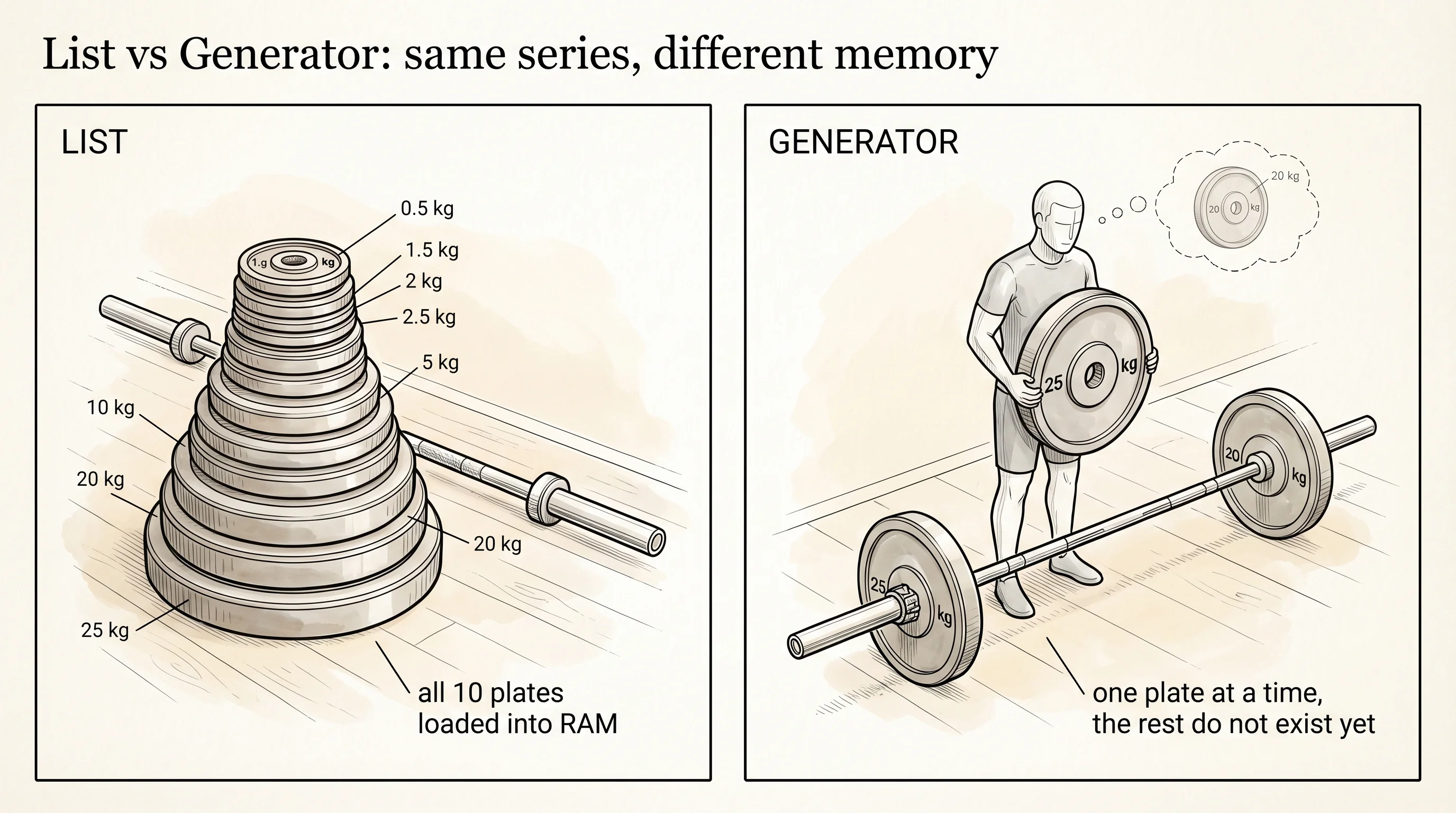
A spotter at the gym is the person who hands you the next plate when you need it. A list is the whole stack of plates dumped at your feet — you can see all of them, you can step over them, but they take up the floor space whether you use them or not. A generator is the spotter. They are holding one plate at a time, ready to hand the next when you ask, and the rest never enter the room. The same series of values, two completely different memory profiles.
Python had for loops from the start, but in the early years a for loop only knew how to walk a list, a tuple, or a string. Anything else needed a counter and an if. In May 2001 a developer named Magnus Lie Hetland wrote a Python Enhancement Proposal called PEP 234 that introduced the iterator protocol — a tiny interface that any object could implement to plug itself into the for loop. A few months later, in June 2001, PEP 255 added the yield keyword, a piece of syntax that turns an ordinary function into a generator. The two PEPs together unlocked everything that came after: Raymond Hettinger pushing iterator culture through the standard library in the 2000s, the rise of streaming data pipelines, and pandas 2.0's switch to lazy evaluation under the hood in 2023. Lazy evaluation is the spotter approach: do not compute a value until somebody actually asks for it.
The iterator protocol is two methods. An object is an iterable if it has an __iter__ method that returns an iterator. An object is an iterator if it has a __next__ method that returns the next value or raises StopIteration when there are no more. The for loop is just syntactic sugar over those two methods. Open Python with python and walk through it manually.
plates = [45, 25, 10]
spotter = iter(plates)
print(next(spotter))
print(next(spotter))
print(next(spotter))
print(next(spotter))
45
25
10
Traceback (most recent call last):
File "<stdin>", line 5, in <module>
StopIterationThe iter built-in calls plates.__iter__() and returns an iterator. Each next call asks the iterator for the next value. When there are no more, it raises StopIteration. A for loop is exactly that pattern with the exception caught for you. The two snippets below do the same thing.
for p in plates:
    print(p)

it = iter(plates)
while True:
    try:
        print(next(it))
    except StopIteration:
        break
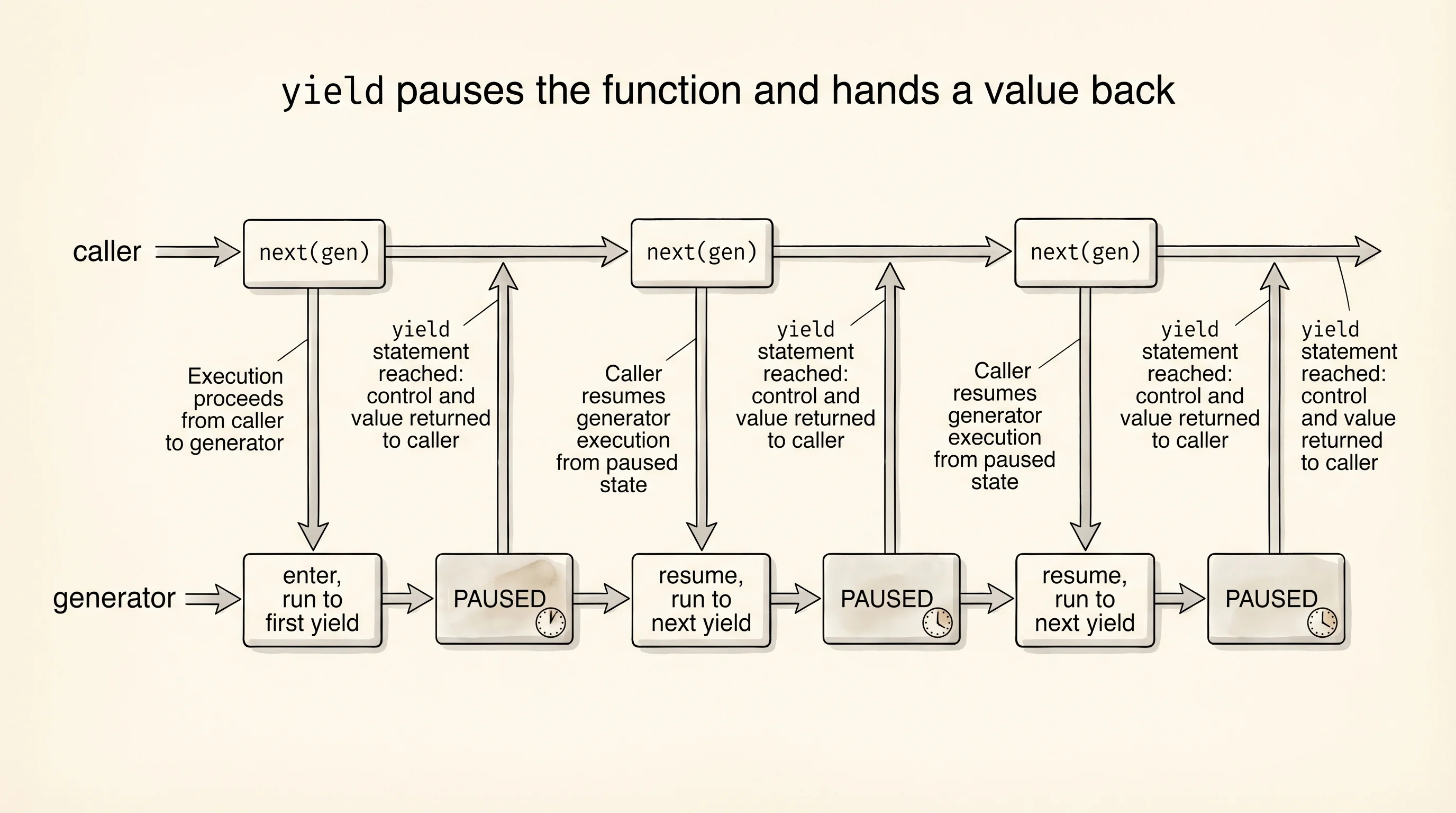
Writing iterator classes by hand is verbose. The yield keyword turns any function into a generator that produces values on demand. When Python sees yield inside a function, the function does not run when called — it returns a generator object that pauses and resumes around each yield. The pause is the whole point. The function freezes mid-execution, hands a value back to the caller, and waits to be resumed. Watch the pause happen by printing on both sides of the yield.
def counter(n):
    print(f"  generator: starting, n = {n}")
    i = 0
    while i < n:
        print(f"  generator: about to yield {i}")
        yield i
        print(f"  generator: resumed after yield {i}")
        i += 1
    print("  generator: loop done, will raise StopIteration")

print("caller: building generator (no body runs yet)")
gen = counter(3)
print("caller: built, generator object exists")
for value in gen:
    print(f"caller: got {value}")
print("caller: loop ended")
caller: building generator (no body runs yet)
caller: built, generator object exists
generator: starting, n = 3
generator: about to yield 0
caller: got 0
generator: resumed after yield 0
generator: about to yield 1
caller: got 1
generator: resumed after yield 1
generator: about to yield 2
caller: got 2
generator: resumed after yield 2
generator: loop done, will raise StopIteration
caller: loop endedRead the trace top to bottom. The first line of the function body did not run when you called counter(3) — it ran on the first next call from the for loop. After the first yield 0, control jumped back to the caller, and the spotter froze with one foot in the squat rack. When the caller asked for the next value, the spotter picked up exactly where they left off, on the line right after yield. That pause is what makes a generator memory-cheap: only one frame exists at a time, no matter how many values the generator could in theory produce.
Python has shorthand for the common case of "give me a generator that produces one value per item in a sequence." It is called a generator expression and looks like a list comprehension with parentheses instead of square brackets.
squares_list = [x * x for x in range(5)]
squares_gen = (x * x for x in range(5))

print("list:", squares_list)
print("gen:", squares_gen)
print("first from gen:", next(squares_gen))
print("second from gen:", next(squares_gen))
list: [0, 1, 4, 9, 16]
gen: <generator object <genexpr> at 0x10aabc740>
first from gen: 0
second from gen: 1The list shows you all 5 squares because all 5 were computed and stored. The generator shows you a generator object — nothing has been computed yet. Each next call drives one more square into existence.
The memory difference is the reason this matters. Build a list of 10 million squares and a generator over the same range, and ask Python how big each one is.
import sys

big_list = [x * x for x in range(10_000_000)]
big_gen = (x * x for x in range(10_000_000))

print("list size:", sys.getsizeof(big_list), "bytes")
print("gen size:", sys.getsizeof(big_gen), "bytes")
list size: 89095160 bytes
gen size: 224 bytesThe list takes about 89 megabytes of RAM. The generator takes 224 bytes. Same range of values, but the generator has not computed any of them yet — it is holding a tiny bit of bookkeeping that says "the next value will be i * i for the next i in the range." If you only need to walk the squares once and you do not need them all at the same time, the generator wins by a factor of about 400,000.
A question to answer from the size output: where did the 89 megabytes go? They are the actual integer objects the list is storing, plus the array of pointers the list keeps to find them. The generator holds no integers — it builds each one on demand and lets it be garbage-collected the moment the caller is done with it.
Your code can stream values one at a time without burning memory. The next bottleneck is what happens when the value the caller asked for cannot be produced — when the file does not exist, when the input is the wrong shape, when something further down the call stack actually goes wrong. You need a way to handle errors.