Errors and Exceptions
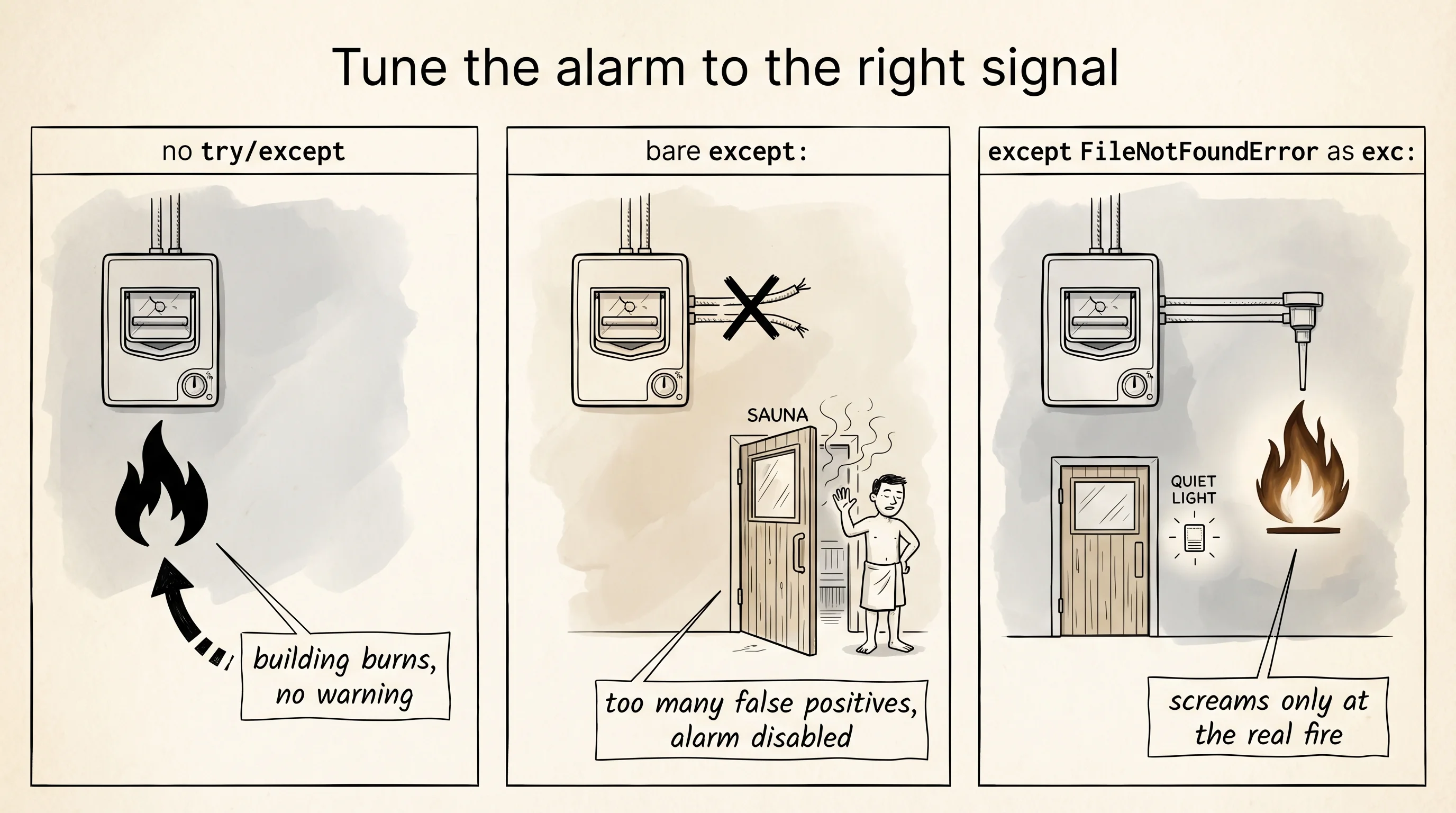
A fire alarm in a gym has one job: scream when there is a real fire, and stay quiet the rest of the time. An alarm that goes off every time someone opens the sauna door gets disabled by the manager within a week. An alarm wired to nothing at all watches the place burn down. Exceptions are Python's fire alarm. The art is wiring them so they catch real fires and ignore the sauna doors.
The idea that a program should have a special channel for "something went wrong" is older than Python. In 1960 John McCarthy added an error-handling form to LISP called errset so a program could try a calculation and recover if it blew up, instead of dying on the spot. The idea was good, the warning is older. Between June 1985 and January 1987 a Canadian medical machine called the Therac-25 delivered radiation overdoses to six patients, three of whom died. The investigation found a software bug, but the more chilling finding was that the operator console had been showing harmless-looking error codes for years and the operators had been trained to dismiss them. The errors had become wallpaper. Every time you write except: and ignore what came back, you are wiring a Therac-25 in miniature.
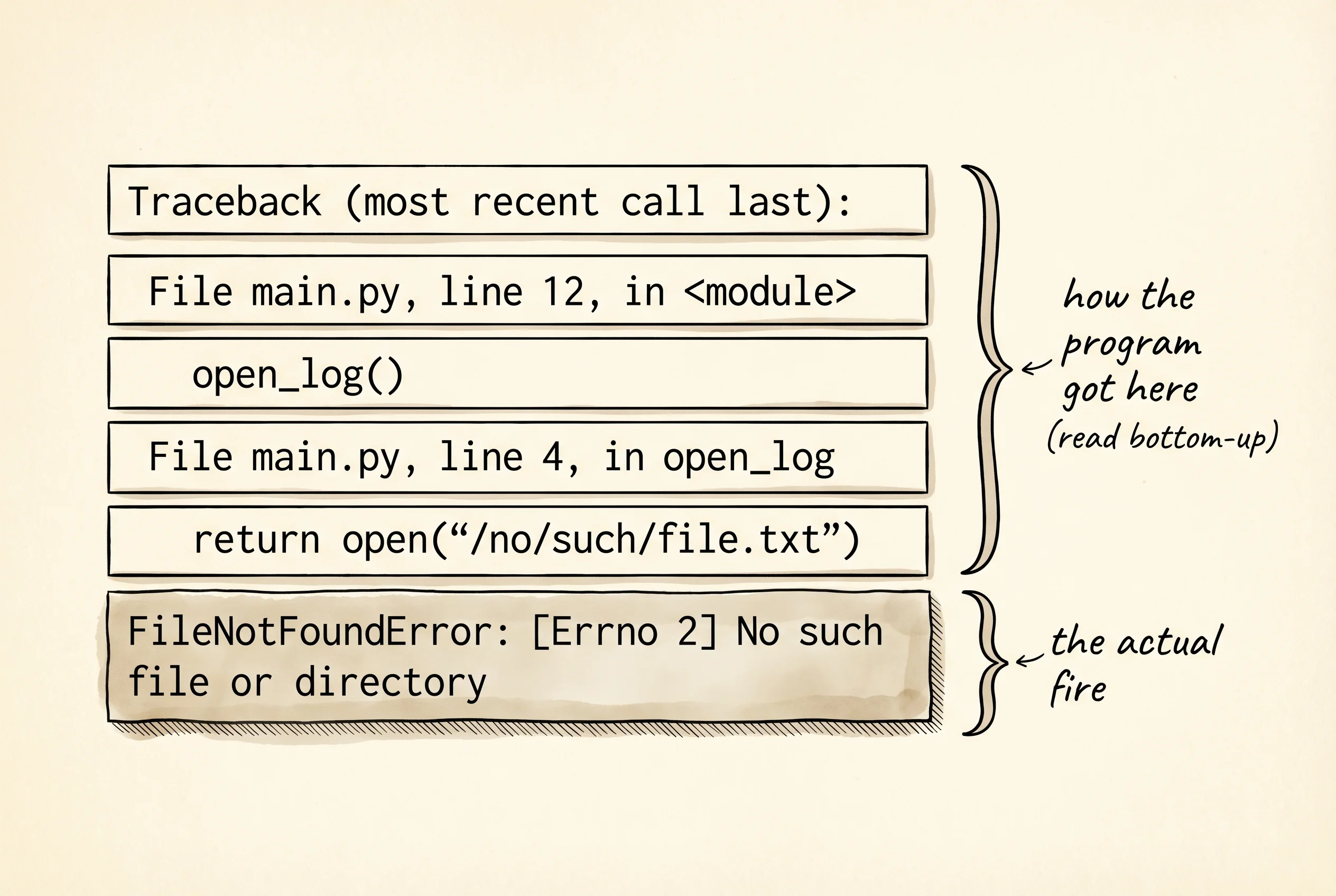
When something goes wrong in Python, the function that hit the problem raises an exception. The exception travels up the call stack, popping every frame, until somebody catches it or it reaches the top and crashes the program. Open Python with python and trigger one on purpose.
def open_log():
    return open("/no/such/file.txt")

open_log()
Traceback (most recent call last):
File "<stdin>", line 1, in <module>
File "<stdin>", line 2, in open_log
FileNotFoundError: [Errno 2] No such file or directory: '/no/such/file.txt'The traceback reads bottom up. The last line names the exception class — FileNotFoundError — and its message. The lines above it are the call stack at the moment the exception was raised: the bottom of the stack on top, the deepest call at the bottom. Read it like a road sign that says "you got here by going through these turns."
To stop an exception from killing the program, wrap the risky call in a try/except block. Save the next snippet to a file called errors_demo.py and run it with python errors_demo.py.
def open_log(path):
    try:
        return open(path)
    except FileNotFoundError as exc:
        print("caught:", exc)
        print("type:", type(exc).__name__)
        print("args:", exc.args)
        return None

handle = open_log("/no/such/file.txt")
print("handle is", handle)
caught: [Errno 2] No such file or directory: '/no/such/file.txt'
type: FileNotFoundError
args: (2, 'No such file or directory')The as exc binds the exception object to a name. Print the object and you see what an exception actually is: a regular Python object with attributes. type(exc).__name__ is the class name. exc.args is a tuple of the arguments the exception was constructed with. str(exc) is the human-readable message. The exception is not a magic value — it is a thing you can poke at, log, send to a monitoring system, or attach to a bug report.
The full shape of error handling has four blocks. try is the risky code. except catches a specific exception. else runs only when try did not raise. finally always runs, even if an exception was raised, even if you returned mid-block. finally is for cleanup that must happen no matter what — closing a file, releasing a network connection, restoring a database transaction.
def safe_read(path):
    handle = None
    try:
        handle = open(path)
        contents = handle.read()
    except FileNotFoundError as exc:
        print("file is missing:", exc)
        return ""
    else:
        print("read", len(contents), "characters")
        return contents
    finally:
        if handle is not None:
            handle.close()
            print("closed the file handle")

safe_read("/etc/hosts")
print("---")
safe_read("/no/such/file.txt")
The first call hits the else block because the file exists, then finally closes the handle. The second call hits the except block because the file does not exist, returns the empty string, and finally still runs — but since handle was never assigned, it stays None and the if skips the close. Output looks something like this.
read 213 characters
closed the file handle
---
file is missing: [Errno 2] No such file or directory: '/no/such/file.txt'
For the curious, the standard library has a module called traceback that lets you inspect the trail without crashing. Useful when you want to log what went wrong and keep running.
import traceback

def chain():
    return open("/no/such/file.txt")

try:
    chain()
except FileNotFoundError:
    traceback.print_exc()
print("program continues")
Traceback (most recent call last):
File "errors_demo.py", line 6, in <module>
chain()
File "errors_demo.py", line 4, in chain
return open("/no/such/file.txt")
FileNotFoundError: [Errno 2] No such file or directory: '/no/such/file.txt'
program continuesSometimes the right move is to raise an exception of your own. Python lets you make new exception classes by inheriting from the built-in Exception class. Use one when the error is specific to your program and the built-in classes do not name it well.
class BadInputError(Exception):
    """Raised when a caller hands us input we cannot use."""

def square_root(x):
    if x < 0:
        raise BadInputError(f"cannot square-root a negative: {x}")
    return x ** 0.5

try:
    print(square_root(9))
    print(square_root(-4))
except BadInputError as exc:
    print("caught a custom one:", exc)
    print("type:", type(exc).__name__)
3.0
caught a custom one: cannot square-root a negative: -4
type: BadInputErrorA custom class gives the caller a precise hook to catch on. Code that catches BadInputError will not accidentally swallow a FileNotFoundError from the same try block. The Therac-25 lesson lives here: catch the smallest, most specific exception you can name. A bare except: with no class catches everything including KeyboardInterrupt and is the alarm that gets disabled.
A question to answer from the trace output above: which line in the traceback tells you the actual problem, and which lines tell you how the program got there? The bottom line — FileNotFoundError: ... — is the real problem. Every File ... line ... block above it is a step on the path. Read tracebacks bottom up and they always make sense.
You can handle errors now. The next bottleneck is that everything you have read or written so far has lived in your terminal session — the moment you close Python, it is gone. Real programs read from and write to files, and that opens a fresh set of failure modes worth handling.