Memory and Storage
The desk is small and fast. The drawer under the desk is bigger and slower. The file cabinet across the room is enormous and slow enough that walking to it breaks your concentration. A computer is built the same way. RAM is the desktop — every variable you are using right now lives there. The SSD is the drawer — cheaper, ten times bigger, a thousand times slower. When the CPU has to leave the desk to rummage in the drawer it forgets what it was doing and stalls. This lesson weighs what sits on your desk and times the walk to the drawer.
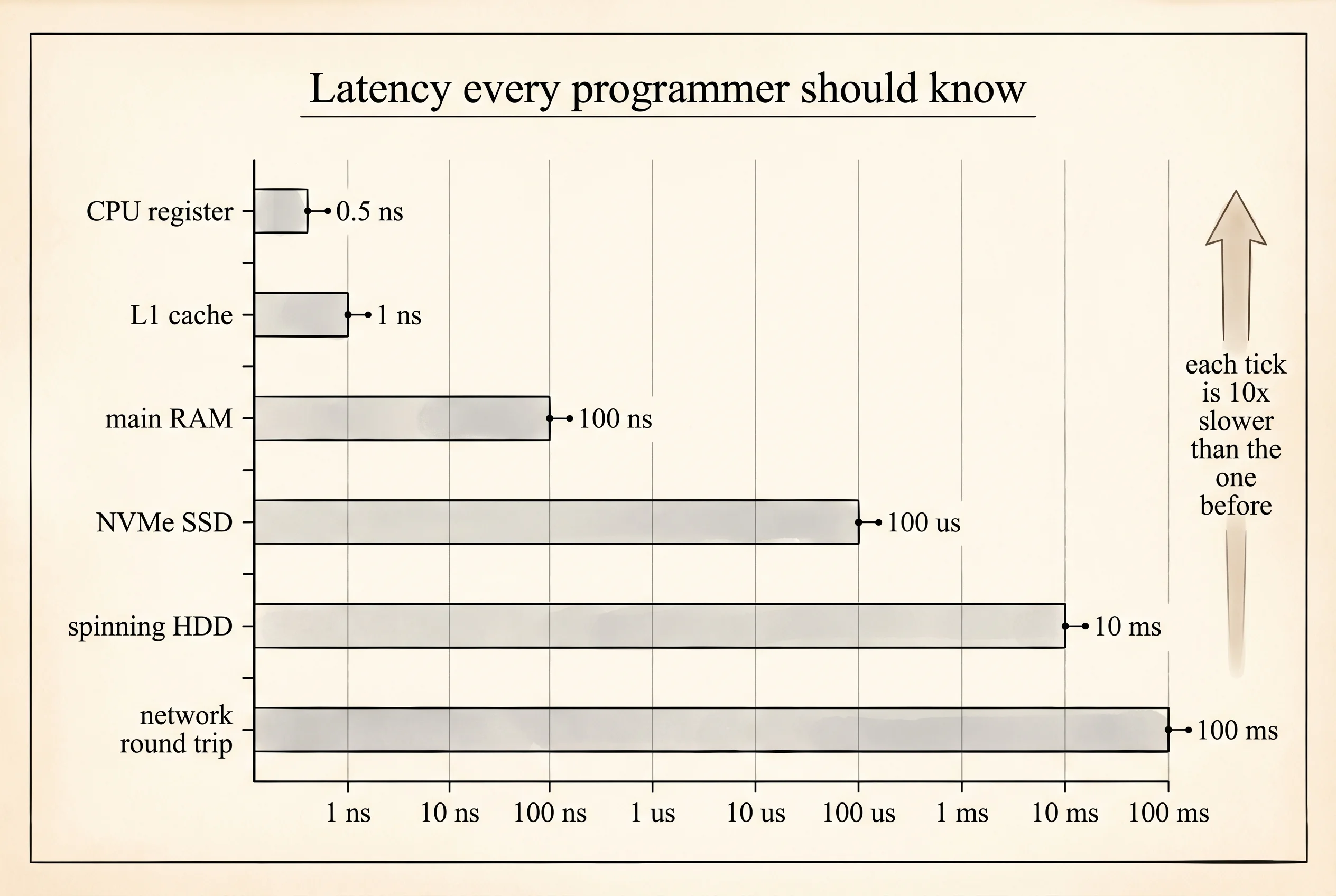
The hierarchy was not a design choice. In 1970 Digital Equipment Corporation built the PDP-11, a minicomputer that sold 600,000 units and anchored the Unix world for a decade. Its engineers named the layers in a memo that still gets cited: registers inside the CPU were fastest and tiniest, cache was slightly larger and slower, main memory was bigger and slower still, disk storage was biggest and slowest. Every computer since has kept that shape because physics enforces it — a bit you can read in one nanosecond has to live close to the transistor reading it. Jim Gray, a database researcher at Microsoft Research, gave the numbers their modern celebrity with a talk in the early 2000s titled "Latency Numbers Every Programmer Should Know." An L1 cache hit takes about 1 nanosecond. A main memory read takes about 100 nanoseconds. An SSD read takes about 100,000 nanoseconds — a hundred microseconds. A spinning hard disk seek is ten million nanoseconds. If the CPU registers are the pen in your hand and RAM is the pad of paper on the desk, the SSD is in the drawer and the HDD is in the basement.
Now weigh some common Python values. Python's sys.getsizeof reports how many bytes an object takes in memory, including its header. The header alone is 16 bytes for the smallest object, because every Python value carries a reference count and a pointer to its type. This is the tax that makes Python friendly and slow at the same time. Open a file called sizes.py and paste this.
import sys

values = list(range(10))

as_list      = values
as_tuple     = tuple(values)
as_dict      = {i: i for i in values}
as_generator = (i for i in values)
as_ints      = values[0]

print("value         bytes")
print("-" * 25)
print(f"one int       {sys.getsizeof(as_ints):>5}")
print(f"list(10)      {sys.getsizeof(as_list):>5}")
print(f"tuple(10)     {sys.getsizeof(as_tuple):>5}")
print(f"dict(10)      {sys.getsizeof(as_dict):>5}")
print(f"generator     {sys.getsizeof(as_generator):>5}")
Run it. You should see something close to this.
value         bytes
-------------------------
one int          28
list(10)        136
tuple(10)       120
dict(10)        352
generator       200
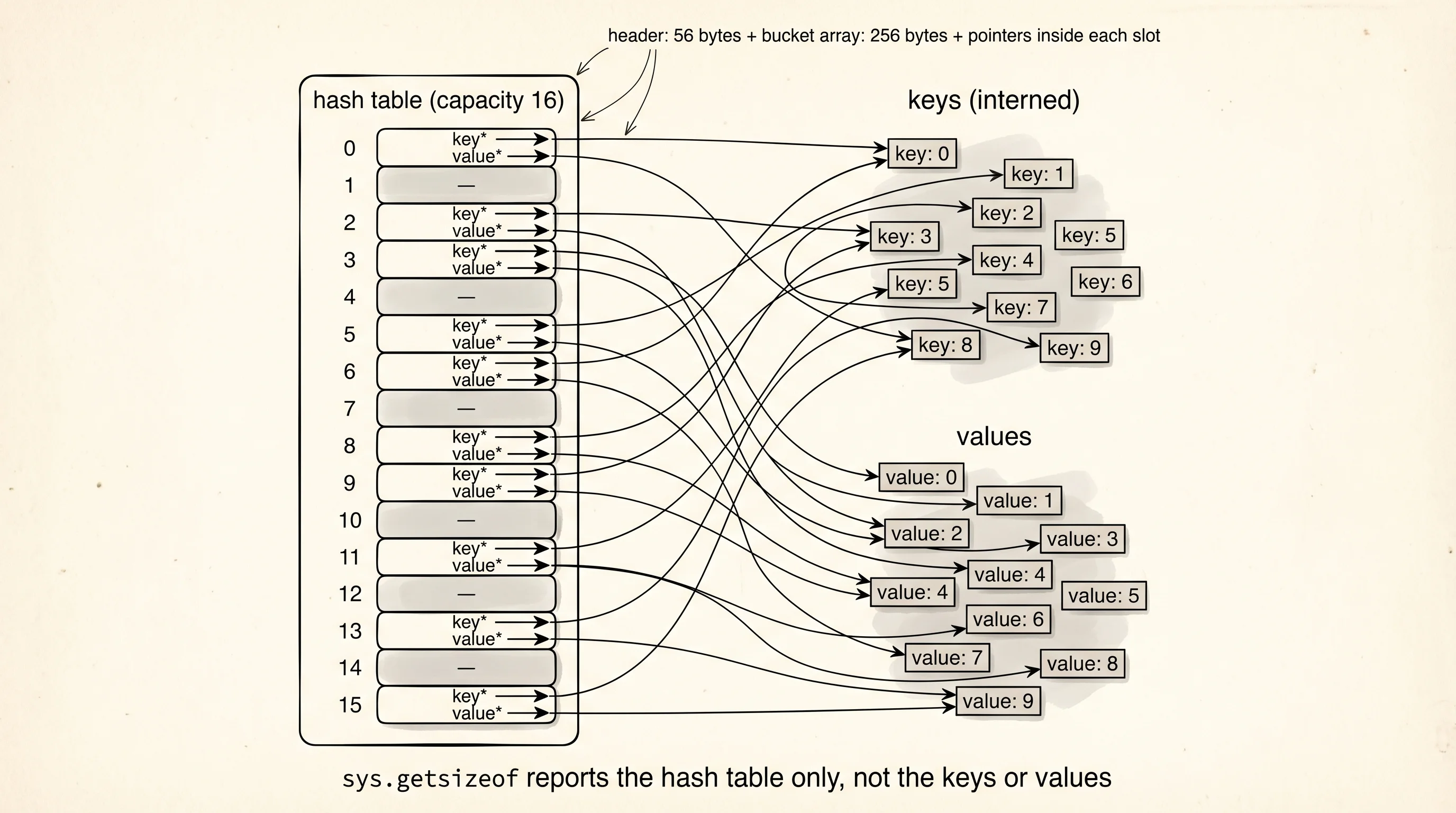
The tuple is the cheapest container because it is fixed-size and does not have to leave slack for growth. The list carries a little more overhead because the underlying array over-allocates slots to make append amortized O(1). The dict is three times the size of the tuple for the same ten values, and this is the dict-overhead tax — a hash table has to keep an array of buckets, each bucket holds a hash and a pointer to a key and a pointer to a value, and the table has to stay under 2/3 full to avoid collisions. A ten-key dict has room for 16 slots, six of them empty. The generator is the smallest surprise: 200 bytes, but it does not hold the values at all — it holds only the instructions for producing them one at a time. The values live nowhere yet.
Keep in mind what sys.getsizeof does not count. It reports the size of the container itself, not the objects inside. A list of ten strings reports the list header plus ten pointer slots, which says nothing about how big the strings are. To measure a whole tree of Python objects recursively you need a helper from pympler or a manual walk. For this lesson the single-level numbers make the point: the dict costs a lot more than it looks like it should.
Now the other tax: the walk from the desk to the drawer. Read 10 megabytes of bytes from RAM, then read the same 10 megabytes from a file on disk, and time the difference. Paste this into latency.py.
import time
from pathlib import Path

SIZE = 10 * 1024 * 1024  # 10 MB
path = Path("blob.bin")
path.write_bytes(b"x" * SIZE)

ram_copy = b"x" * SIZE

start = time.perf_counter()
for _ in range(100):
    view = ram_copy[: SIZE]
ram_elapsed = time.perf_counter() - start

start = time.perf_counter()
for _ in range(100):
    data = path.read_bytes()
disk_elapsed = time.perf_counter() - start

path.unlink()

print(f"RAM slice x100:  {ram_elapsed*1000:7.1f} ms")
print(f"Disk read x100:  {disk_elapsed*1000:7.1f} ms")
print(f"ratio (disk/RAM):  {disk_elapsed/ram_elapsed:.0f}x")
On a modern laptop with an NVMe SSD the output looks roughly like this.
RAM slice x100:      45.2 ms
Disk read x100:    1830.4 ms
ratio (disk/RAM):    40x
The second run of the disk read is faster than the first because the operating system caches the file in RAM after the first read. To see the cold-disk number you would have to clear the OS page cache between runs, which needs root. Even warm, the SSD round trip runs 40 times slower than the RAM slice on the same laptop, because the CPU has to ask the OS, the OS has to ask the SSD controller, the controller has to pull the bytes across a PCIe bus, and the bytes have to land in a kernel buffer before Python sees them. On a spinning HDD the ratio would be closer to 1000x and each read would involve the drive head physically moving across the platter.
Question to answer from that output: if the first disk read was genuinely cold, what would the ratio look like? Closer to 2000x. The warm-cache 40x is the best possible story — any real application reading a file it has not touched before pays the full bill. The takeaway from both experiments is the reason programs care about memory layout: every byte you can keep on the desk is a byte you do not have to go fetch from the drawer.
Python's memory management does a quiet job of cleaning the desk. Every object carries a reference count. When you write a = [1, 2, 3]; b = a; b = None, the list's count went up to 2 and then back down to 1. When no variable names the list anymore, the count hits zero and CPython frees the memory immediately. Reference counting breaks on cycles — if object A points at B and B points back at A, neither count reaches zero even when no outside code can reach them. A second collector called the cyclic garbage collector runs on a schedule to find unreachable cycles and break them. You rarely have to think about it. You can observe it through gc if you want.
You know what a program costs to hold on the desk and what it costs to reach into the drawer. The next thing to build is a real project — something with enough moving parts that the weights you just measured start to matter.