How Python Runs
A restaurant runs on tickets. A customer orders, the waiter scribbles on a pad and clips the slip to a rail above the pass, the expediter reads the slip and translates it into kitchen shorthand, and the line cook at the stove does the actual cooking. You never touch the pan. The waiter never touches the gas. Python runs the same way. You write source code. A program called the interpreter reads it, translates it into instructions a simpler machine can execute, and a tight loop at the bottom does the work. This lesson opens the window between the pass and the stove so you can watch a ticket travel.
Guido van Rossum wrote the first Python interpreter in C at CWI in 1989 and kept writing it for the next 30 years. The C implementation is the one almost everybody runs, and the Python community calls it CPython to distinguish it from the other interpreters that came later. CPython reads your .py file as text, splits it into tokens (words and punctuation), parses those tokens into a tree that reflects the grammar of the code, walks the tree to produce a compact list of instructions called bytecode, and hands the bytecode to a loop — the eval loop — that runs one instruction at a time. Armin Rigo started PyPy in 2003 as an attempt to skip the slow C interpreter and replace it with a just-in-time compiler written in Python itself. Google funded an effort called Unladen Swallow in 2009 that failed. Microsoft hired Guido and a team called Faster CPython in 2021 to rewrite the eval loop — Python 3.11 came out 25 percent faster as a result. In 2023 an engineer at Meta named Sam Gross published PEP 703, a proposal to remove the one rule that has kept Python's threading story weak for 30 years. We get to that rule before the lesson ends.
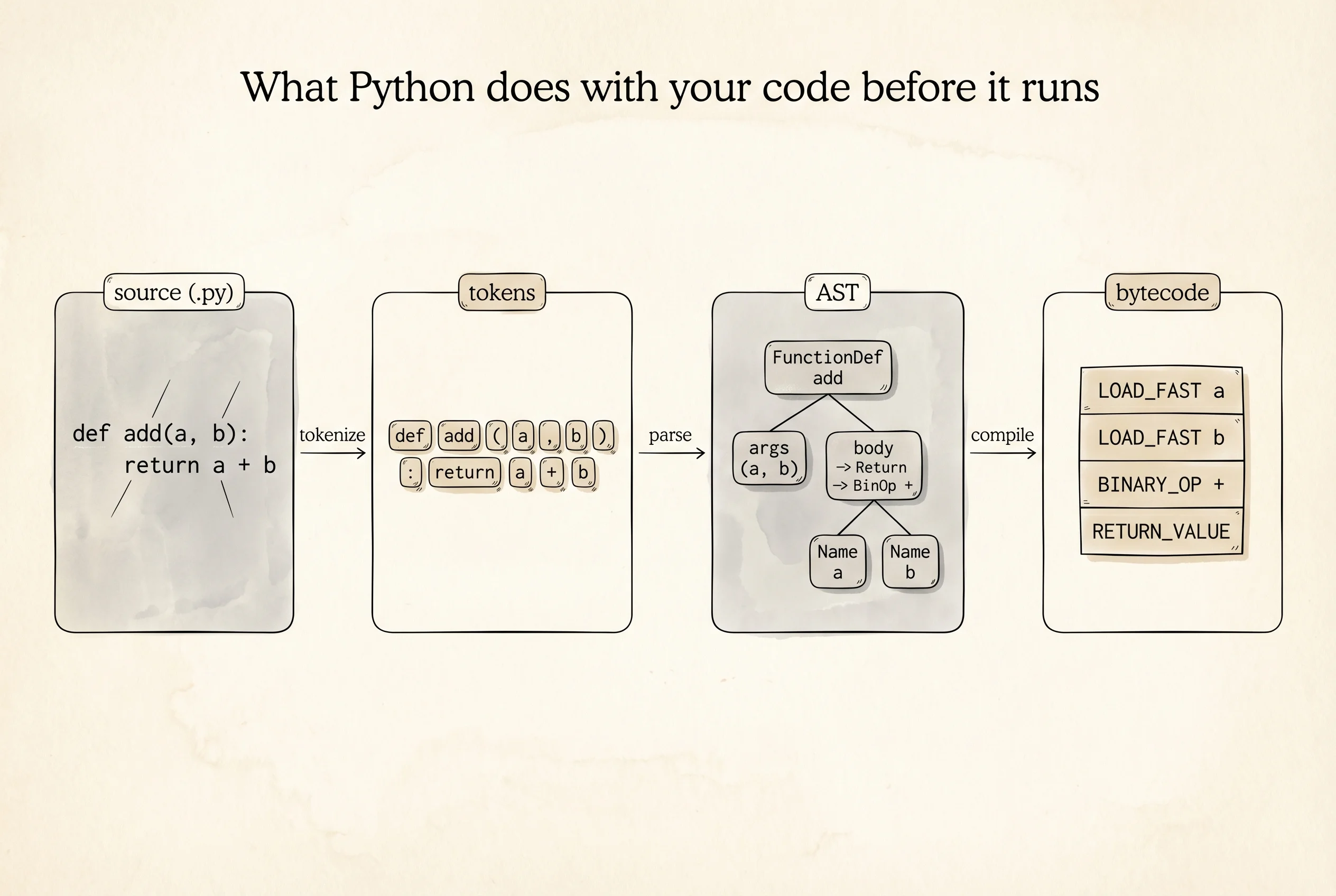
See the translation yourself. Python ships a module called dis that disassembles a function into its bytecode, the same list of instructions the eval loop actually runs. Open Python and type a tiny function, then disassemble it.
import dis

def add(a, b):
    total = a + b
    return total

dis.dis(add)
The output depends on your Python version, but on 3.12 it looks like this.
  3           0 RESUME                   0

  4           2 LOAD_FAST                0 (a)
              4 LOAD_FAST                1 (b)
              6 BINARY_OP                0 (+)
             10 STORE_FAST               2 (total)

  5          12 LOAD_FAST                2 (total)
             14 RETURN_VALUE
The left column is the line number in the source. The middle column is the byte offset inside the bytecode. The right column is the instruction. LOAD_FAST pushes a local variable onto an internal stack the eval loop maintains. BINARY_OP with argument 0 pops two values, adds them, pushes the result. STORE_FAST pops the top and stores it in a local. RETURN_VALUE pops and returns. The eval loop is a while loop that reads one instruction, does what it says, moves the instruction pointer forward, and repeats. That is the whole cook. No magic.
The instruction list is not hidden. It is a bytes object hanging off every function in a .__code__.co_code attribute. Type that into Python and print the raw bytes if you want to see the ticket before it gets translated into English.
print(add.__code__.co_code)b'\x97\x00|\x00|\x01z\x00\x00\x00_\x02|\x02S\x00'Each byte is an opcode or an argument. The interpreter walks these bytes one by one.
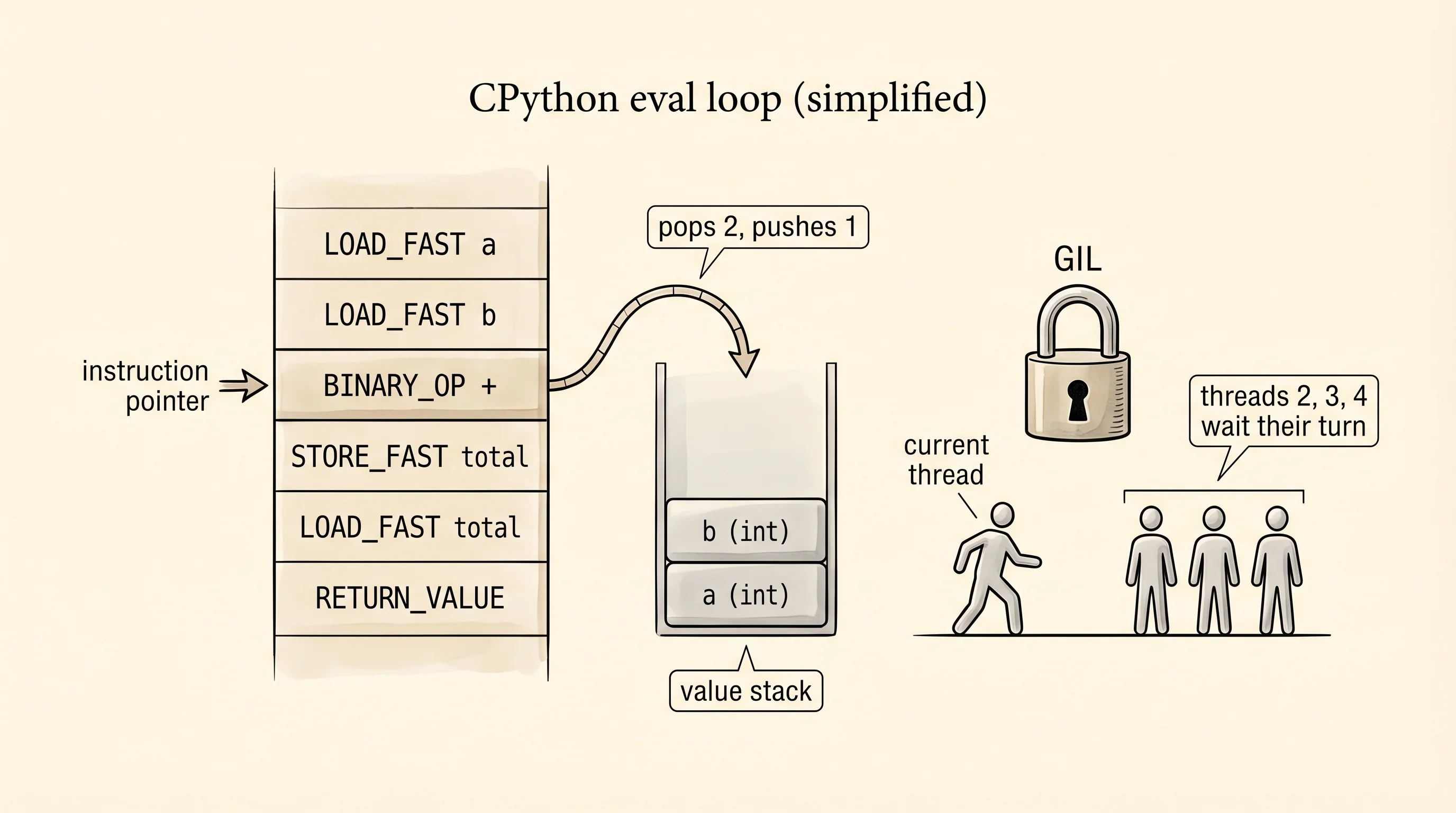
Now the rule the Faster CPython team and Sam Gross are fighting about. CPython has a global lock called the GIL — the Global Interpreter Lock. The rule is: only one thread may execute Python bytecode at a time. Multiple threads can exist in your program, they can wait on network requests in parallel, they can sleep in parallel, but the moment two threads both want to run Python code, the GIL forces them to take turns. The reason is historical — CPython's memory manager, especially the reference counter from lesson 34, is not thread-safe, and putting a fine-grained lock around every object would slow single-threaded programs to a crawl. The GIL was the cheapest fix that kept single-thread speed fast.
The consequence is visible in a two-minute experiment. Write a CPU-heavy loop that sums squares from 1 to N. Run it on one thread. Run the same work split across four threads. Then run the same work using NumPy, which releases the GIL while it does the math in C. Time all three. Paste this into gil_demo.py.
import threading
import time
import numpy as np

N = 20_000_000

def work(start, stop):
    total = 0
    for i in range(start, stop):
        total += i * i

def run_single():
    start = time.perf_counter()
    work(0, N)
    return time.perf_counter() - start

def run_threaded(thread_count):
    chunk = N // thread_count
    threads = [
        threading.Thread(target=work, args=(i * chunk, (i + 1) * chunk))
        for i in range(thread_count)
    ]
    start = time.perf_counter()
    for t in threads:
        t.start()
    print(f"  threads alive mid-run: {threading.active_count()}")
    for t in threads:
        t.join()
    return time.perf_counter() - start

def run_numpy():
    start = time.perf_counter()
    arr = np.arange(N, dtype=np.int64)
    total = np.sum(arr * arr)
    return time.perf_counter() - start

print(f"single thread:     {run_single():.2f}s")
print(f"four threads (Py): {run_threaded(4):.2f}s")
print(f"numpy (one call):  {run_numpy():.2f}s")
Install numpy first with uv add numpy if it is not already there, then run python gil_demo.py. Typical output on a recent laptop:
single thread:     1.82s
  threads alive mid-run: 5
four threads (Py): 1.91s
numpy (one call):  0.08s
Four threads did not divide the time by four. Four threads were slightly slower than one, because the GIL forced them to take turns and the thread-switching overhead added up. threading.active_count() reported five threads alive — the four workers plus the main thread — so the threads really were running in parallel at the OS level. The GIL made them line up at the CPython eval loop. NumPy finished in a twentieth of a second because its sum runs in a C function that tells the interpreter "I do not touch Python objects, go do something else," drops the GIL, and uses every core of the machine.
Question to answer from that output: if the GIL is holding back pure-Python multithreading, why does NumPy cheat the system? NumPy's arrays hold raw C integers, not Python objects. While NumPy's C code adds them up, no reference counts change, no Python dictionaries get touched, and nothing cares that the GIL is not held. Releasing the GIL is safe for the duration of the sum. The lesson is simple and important: for CPU-heavy math, put the hot loop inside a C-backed library. For CPU-heavy pure Python, reach for multiprocessing instead of threading and accept that each process gets its own interpreter and its own GIL. For I/O-bound work — waiting on network or disk — threads remain fine, because threads waiting on I/O already release the GIL.
Sam Gross's PEP 703, accepted in late 2023 and shipping experimentally in Python 3.13 in October 2024, removes the GIL by swapping in a thread-safe memory manager. A no-GIL build of 3.13 runs the four-thread version of the script above in about 0.5 seconds — close to the four-times speedup you would expect. The cost is a small hit to single-threaded speed. The feature is opt-in for now because the ecosystem needs time to test itself without the lock. By 2027 most Python 3 programs will run on a no-GIL build and the NumPy escape hatch will matter less.
You have seen the interpreter read tokens, emit bytecode, and execute it under a 30-year-old lock. The next question is what the interpreter is actually storing while it runs — and why a dictionary with ten keys weighs twenty times more than you would guess.