Python Environments
A mechanic's tool chest has one drawer per job. Sockets for brakes. Screwdrivers for trim. Torque wrenches locked away from the hammers. Pull the wrong drawer and the work still gets done, but nothing is where it should be and something breaks that did not need to. A Python environment is one drawer of that chest — one project's set of tools, kept separate from every other project's tools so they cannot collide. This lesson walks the chest drawer by drawer and ends with the apprentice who does it all in a fraction of the time.
Before 2007, every Python programmer installed packages into a single system-wide Python. Project A needed Django 1.0. Project B needed Django 1.2. Installing B broke A. Running A's tests broke B. The community called the result "dependency hell" and everybody lived in it. Ian Bicking, a Mozilla engineer, shipped a tool called virtualenv that year with a small idea: copy the Python interpreter into a folder inside your project and install this project's packages into that folder only. Each project got its own drawer. In 2012, Python 3.3 folded the idea into the standard library as venv, and from then on every Python tutorial started with a venv step. That is the drawer you built in the setup lesson.
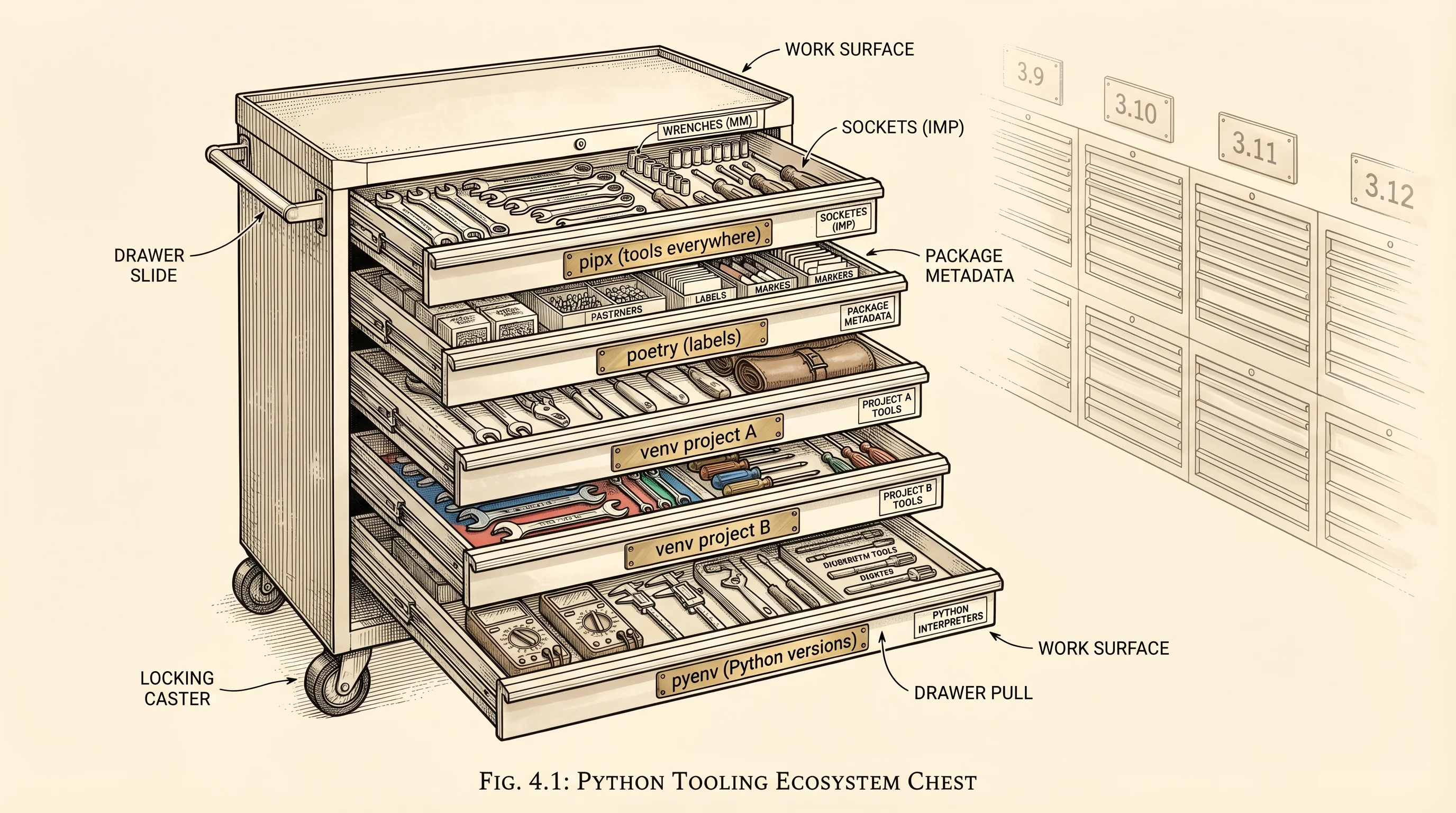
A venv handles one project. It does nothing about the Python version that project runs on. If project A runs on Python 3.9 and project B needs 3.12, the venv will not help — both drawers still live inside the same chest. Kenneth Reitz wrote pyenv in 2012 to solve that. pyenv is the whole wall of chests. Each chest is a different Python version, downloaded and compiled from source into a folder under your home directory. You pick which chest to open per project with a file called .python-version. Install pyenv and switching from 3.9 to 3.12 is one command. The system Python never changes.
Two smaller tools belong on the wall. pipx installs command-line Python tools in their own venvs so a tool like ruff or black is available everywhere without polluting any project. Think of it as the pegboard over the workbench — tools you reach for across every job, each hung on its own hook. And poetry, released in 2018 by a French engineer named Sébastien Eustace, tried to solve a different problem: a requirements.txt file lists what you installed but not why, and it does not pin the exact version of every transitive dependency. Poetry introduced a pyproject.toml that declares the project and a poetry.lock file that records the exact version of every package in the dependency tree. Rebuild on a new machine and you get bit-for-bit the same drawer.
Poetry was slow. Installing a real project could take minutes because pip resolves dependencies one at a time in Python, and compiling packages like numpy or cryptography pulls wheels across the network serially. In early 2024 a company called Astral, founded by Charlie Marsh who had shipped the Rust-based linter ruff the year before, released uv. uv is a Python package manager written in Rust. It solves the dependency graph in parallel, downloads wheels in parallel, caches everything locally by content hash, and uses hardlinks instead of copies when building a venv. Benchmarks put it at 10 to 100 times faster than pip and poetry on the same workloads. The project that took poetry 45 seconds to install takes uv under a second. uv is the apprentice who already knew the whole shop by week one.
Install uv on your machine. Pick the command for your OS.
curl -LsSf https://astral.sh/uv/install.sh | shThe installer drops uv into ~/.local/bin. Close and reopen the terminal so the PATH picks it up, then confirm.
uv --versionpowershell -ExecutionPolicy ByPass -c "irm https://astral.sh/uv/install.ps1 | iex"The installer drops uv.exe into %USERPROFILE%\.local\bin. Close and reopen PowerShell so the PATH picks it up, then confirm.
uv --versionNow the apprentice rebuilds the workbench from scratch. Step into the project folder from the setup lesson and tell uv to recreate the venv with a lock file.
cd learning-python
uv init --python 3.12
uv add rich
uv init writes a pyproject.toml that describes the project and a .python-version that pins the Python version. uv add rich installs the rich library (a pretty terminal printer you will use later) and records it in pyproject.toml along with a uv.lock file listing every transitive dependency at a specific version. The venv lives in .venv/ just like before, but now the recipe to rebuild it is the two committed files.
Delete the .venv folder and rebuild it from the lock file. The point is to time how fast the apprentice works. Paste this into a file called bench.py.
import subprocess
import time
from pathlib import Path
import shutil

venv = Path(".venv")
if venv.exists():
    shutil.rmtree(venv)

start = time.perf_counter()
subprocess.run(["uv", "sync"], check=True)
elapsed = time.perf_counter() - start

print(f"uv sync: {elapsed:.2f}s")
Run it with python bench.py. On a warm cache on a laptop built in the last five years, expect something under a second.
Resolved 8 packages in 12ms
Installed 8 packages in 9ms
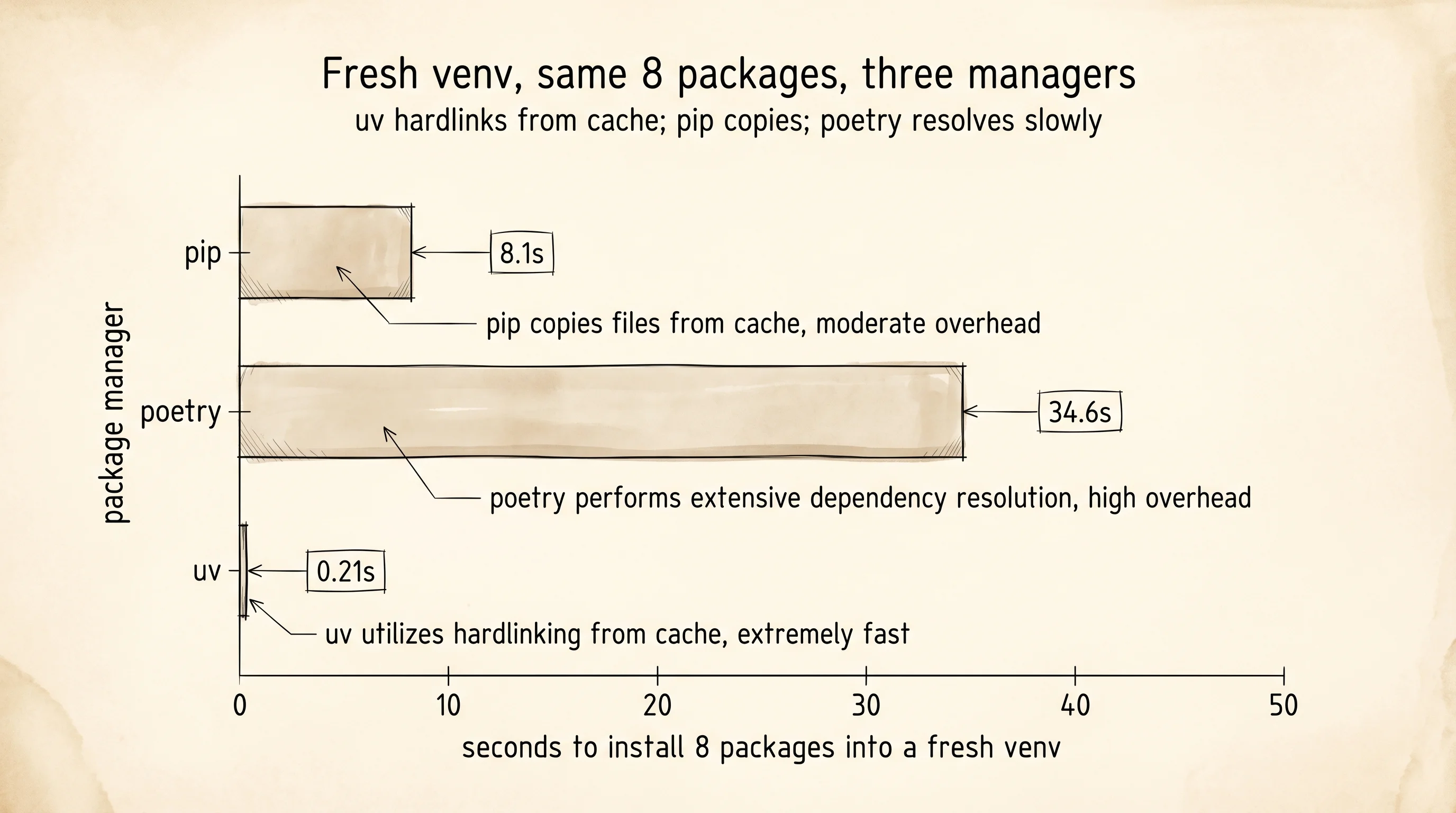
uv sync: 0.21s
Two hundred milliseconds to install eight packages into a new venv. The equivalent run with pip install -r requirements.txt takes 6 to 10 seconds on the same machine. The same run with poetry takes 20 to 40 seconds. The reason the gap is this wide is that uv reads the lock file, sees every package is already in its content-addressed cache from a previous install, and hardlinks the files into the new venv instead of copying bytes. A hardlink is an OS-level pointer to the same file on disk — creating one takes microseconds regardless of the file's size. Pip copies every file.
How many packages did the uv sync report? Eight, even though you only asked for rich. The seven extras are rich's dependencies — markdown-it-py, pygments, mdurl, and a few smaller ones — and the lock file pins every one of them. Rebuild the venv on any machine six months from now and the lock file gives you the same eight packages at the same versions. The drawer is reproducible.
The whole chain of tools from venv to uv exists to answer one question: what does this project need, and where does it live? You now know. The next lesson opens the drawer labeled python itself and looks at what happens when the interpreter reads a line of your code.