Python Gotchas
Every gym has its injury stories. The deadlift where the back rounded on rep 9. The bench where the spotter was on his phone. The bicep tear on the cheat curl that should have been 80 pounds, not 130. The lifters who have been around 20 years know every one of those stories, and they tell you about them before you load the bar. Python has the same stories. Each one is a small piece of language behavior that looks normal until it bites someone, and then everyone who has been around long enough nods and says they have seen it before. Knowing the list early is what keeps you off the bench press of bad code.
The traps live where the language made a choice for one good reason and that choice has a sharp edge somewhere else. Mutable default arguments come from Python deciding that a default value is computed once, when the function is defined, not every time the function is called — fast and predictable, but lethal when the default is a list. The integer cache from -5 to 256 comes from CPython optimizing the most common integers as singletons in memory — saves bytes, breaks identity tests for big numbers. The float precision issue comes from IEEE 754, the 1985 standard everyone uses, which cannot represent 0.1 in binary any more than you can write 1/3 cleanly in decimal. None of these are bugs. Each is a reasonable trade with a sharp edge. The fix is the same in every case: see it once with your own eyes, and the next time you write the pattern that triggers it, you stop.
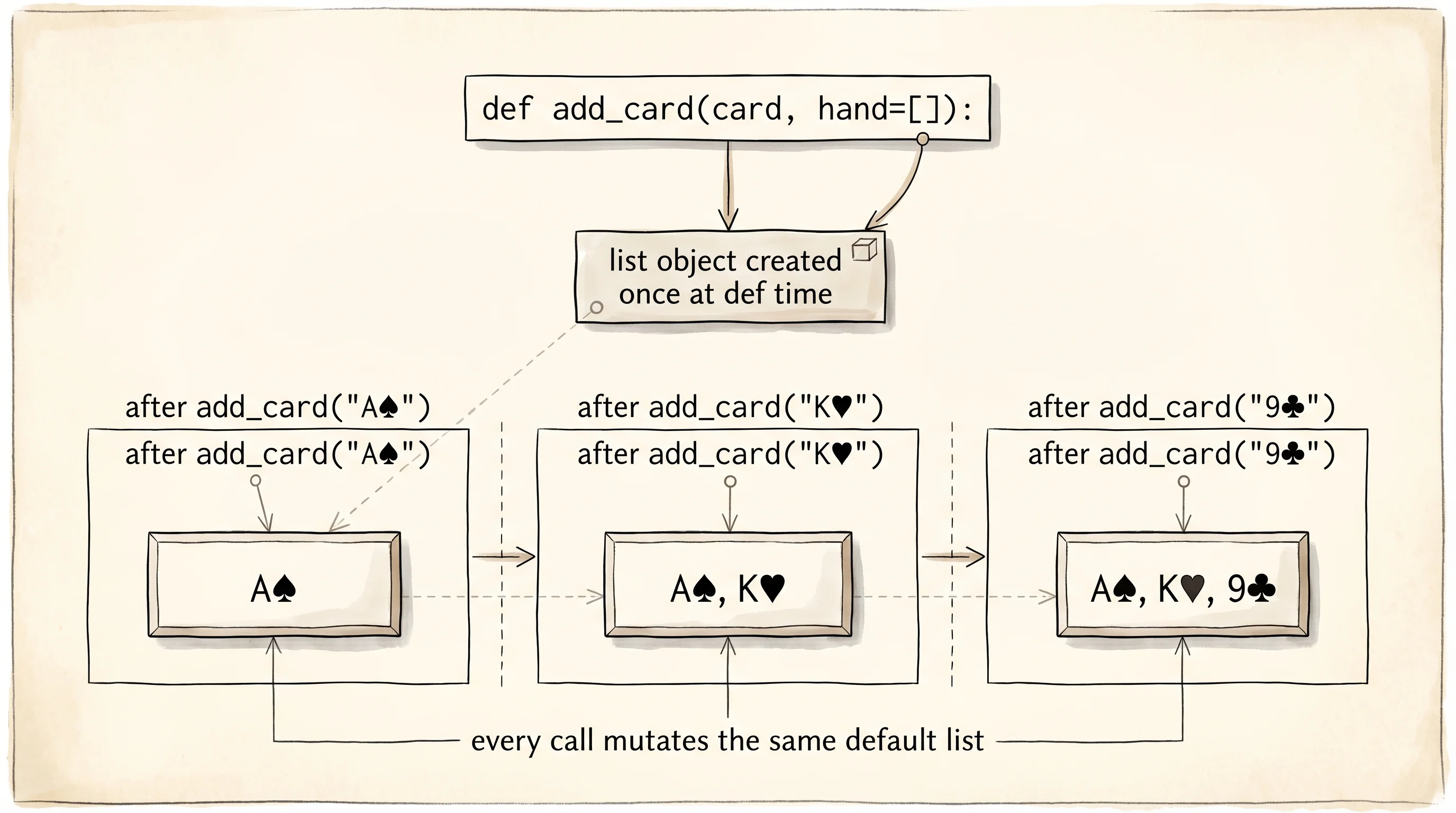
The most famous trap is the mutable default argument. Open a file called gotchas.py and type this in. Run it. Do not skip ahead.
def add_card(card, hand=[]):
    hand.append(card)
    return hand


print(add_card("As"))
print(add_card("Kh"))
print(add_card("9c"))
Output:
['As']
['As', 'Kh']
['As', 'Kh', '9c']
The default hand=[] was supposed to give every call a fresh empty list. Instead, every call shares the same list object — the one that was created once, the moment Python read the def line. Each call mutates that shared list and returns it. The same add_card("9♣") call returns three cards, not one. The fix is to use None as the default and build a new list inside the body:
def add_card(card, hand=None):
    if hand is None:
        hand = []
    hand.append(card)
    return hand


print(add_card("As"))
print(add_card("Kh"))
print(add_card("9c"))
Output:
['As']
['Kh']
['9c']
Each call now gets its own list. The is None check is the standard pattern. Mypy and pyright both flag the mutable-default form when you turn on strict mode, which is the second-best reason to use them after the first reason in the last lesson.
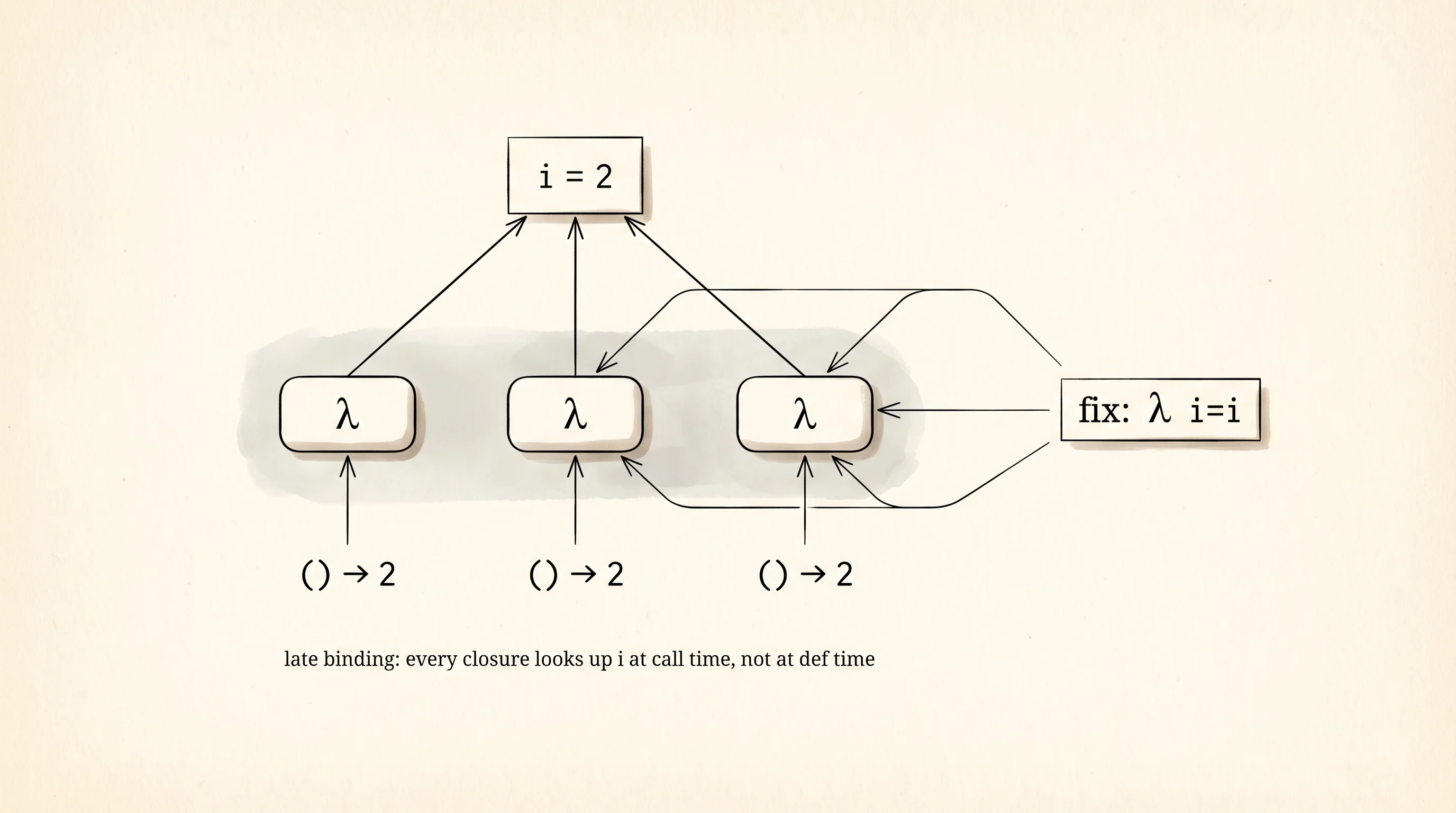
The next trap is late-binding closures. Inside a for loop, a function you define captures the variable name, not the value at the time of definition. The function looks up the name when it runs, by which point the loop has finished and the variable is sitting at the last value.
makers = [lambda: i for i in range(3)]
print([m() for m in makers])
Output:
[2, 2, 2]You wanted [0, 1, 2]. You got [2, 2, 2]. The three lambdas all point at the same i, which is 2 by the time you call them. The fix is to capture the value at definition time by passing it as a default argument:
makers = [lambda i=i: i for i in range(3)]
print([m() for m in makers])
Output:
[0, 1, 2]The i=i says: take the current value of i from the loop and bind it as a default to the lambda's own parameter i. Each lambda now has its own i baked in.
The third trap is is versus ==. The == operator asks "do these have equal values?" The is operator asks "are these literally the same object in memory?" For most things you write, you want ==. For None, True, and False, you want is, because those are singletons. Mixing them up is the pattern.
a = 256
b = 256
print(a is b)

a = 257
b = 257
print(a is b)
Output:
True
False
CPython caches every integer from -5 to 256 as a single shared object. When you write a = 256 and b = 256, both names point to the one cached 256. With 257, no cache, two separate objects with equal values. The is test passes for one and fails for the other. If your code asks if score is 100: and the score is computed, you have a bug that shows up only on certain numbers. The rule is: use == for value comparison, use is only for None, True, False.
The fourth trap is float precision. The float type is IEEE 754 binary, which means most decimal fractions are stored as the closest binary approximation. The classic demonstration:
print(0.1 + 0.2)
print(0.1 + 0.2 == 0.3)
Output:
0.30000000000000004
False
The third decimal is wrong because 0.1 and 0.2 have no exact binary representation. The fix when you need exact decimal math (money, for instance) is the decimal module:
from decimal import Decimal

print(Decimal("0.1") + Decimal("0.2"))
print(Decimal("0.1") + Decimal("0.2") == Decimal("0.3"))
Output:
0.3
True
For everything else, never compare floats with ==. Use math.isclose(a, b) to check whether they are within a tolerance.
The fifth trap is mutating a list while you are iterating over it. The iterator does not know you removed an element, and the indices shift under it. The trace is the only way to see the bug.
nums = [1, 2, 3, 4, 5, 6]
for n in nums:
    print(f"saw {n}; nums is now {nums}")
    if n % 2 == 0:
        nums.remove(n)
print(f"final: {nums}")
Output:
saw 1; nums is now [1, 2, 3, 4, 5, 6]
saw 2; nums is now [1, 2, 3, 4, 5, 6]
saw 4; nums is now [1, 3, 4, 5, 6]
saw 6; nums is now [1, 3, 5, 6]
final: [1, 3, 5]
You wanted to remove every even number. The iterator skipped 4 because removing 2 shifted 4 into the position the loop counter just left. You also missed nothing on 6 by luck of where the indices landed. The fix is to build a new list with a comprehension instead of mutating the one you are walking:
nums = [1, 2, 3, 4, 5, 6]
nums = [n for n in nums if n % 2 != 0]
print(nums)
Output:
[1, 3, 5]Same answer, no surprise. The pure-function move from two lessons ago — return a new value, do not mutate the input — is also the safest move here.
The sixth trap is shadowing builtins. Python lets you name a variable list or dict or id or type. The moment you do, you have lost access to the real one for the rest of that scope.
list = [1, 2, 3]
print(list)
print(list((4, 5, 6)))
Output:
[1, 2, 3]
Traceback (most recent call last):
  File "gotchas.py", line 47, in <module>
    print(list((4, 5, 6)))
TypeError: 'list' object is not callable
The list name now points to your list, not the builtin. The call list((4, 5, 6)) tries to call your list as a function and crashes. The fix is to name your variable cards or items or anything that is not a builtin. Mypy and ruff will both warn you when you shadow a builtin.
A small question for the reader: in the iteration trap above, the loop saw 1, 2, 4, 6 — not 1, 2, 3, 4, 5, 6. Why was 3 skipped?
It was not. Look again. The trace shows 1, 2, 4, 6 because when the loop's index moved from position 1 (the 2) to position 2, the list had already been modified to [1, 3, 4, 5, 6], and position 2 in that new list is 4. The number 3 was never at position 2 in the modified list at the moment the iterator looked. The iterator is just a counter, not a smart walker. That is the whole bug.
You now know the list of gotchas that show up in production every week of every Python career. The next stop is to look inside Python itself — the venv tools, the interpreter, the memory model — so the language stops feeling like magic and starts feeling like a machine you understand.