Primitive Types
A house in Python is never just a house. It is a 45-pound plate, or a 2.5-pound plate, or a 25-kilo plate from a European gym. Each kind has a fixed shape, a fixed weight, and rules about what you are allowed to stack on top of it. The variables from the last lesson are Post-it notes. The houses they point at are typed. A primitive type is the smallest, most basic kind of house Python knows how to build.
The story of why every machine on Earth agrees on what a 0.1 means started in a fight. Through the 1970s every computer manufacturer had its own format for floating point numbers — the same calculation gave different answers on a DEC machine, an IBM, a Cray, an HP. Programs that worked in one lab broke in the next. In 1977 a Berkeley professor named William Kahan got pulled into an industry committee tasked with picking one format. The standard he helped write, IEEE 754, shipped in 1985 and ended the chaos. Every Python float on your machine right now follows IEEE 754. The other big fix came later. Python 2 stored strings as raw bytes by default, which broke any time a name had an accent or a Chinese character or an emoji in it. In 2008 Python 3 made str Unicode by default, which killed an entire decade of encoding bugs in one release.
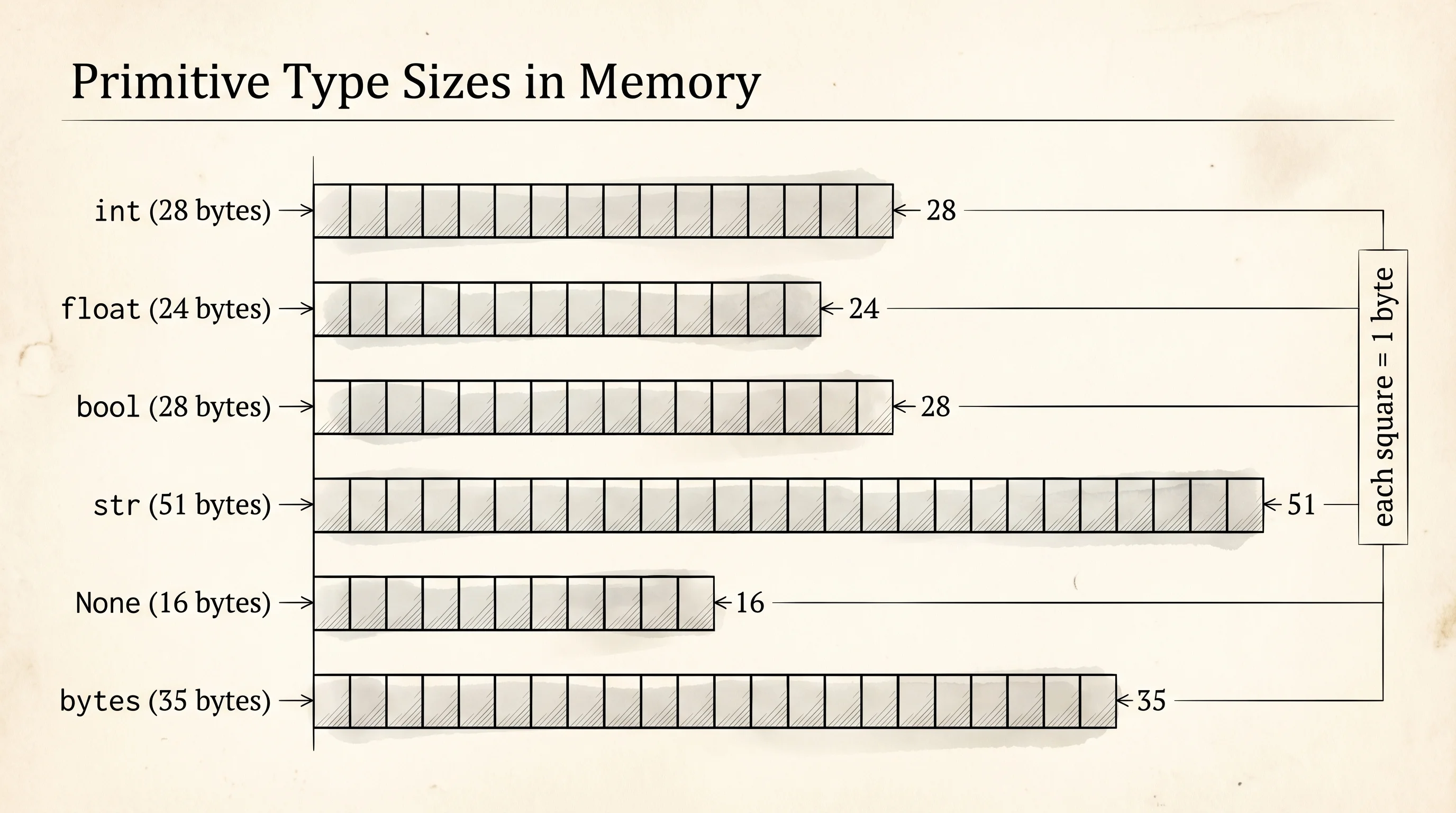
Python's primitive types are the building blocks every other value is made of. There are six you will use almost every day. int is a whole number. float is a number with a decimal point. bool is True or False. str is text. None is the absence of a value. bytes is raw binary data, the kind of thing that comes off a network socket or a disk read.
Every house takes up real space in your machine's memory. The built-in sys.getsizeof function tells you how much. Open the Python prompt with python and try this.
import sys

print("int 0:", sys.getsizeof(0), "bytes")
print("int 10:", sys.getsizeof(10), "bytes")
print("int 10**100:", sys.getsizeof(10 ** 100), "bytes")
print("float 3.14:", sys.getsizeof(3.14), "bytes")
print("bool True:", sys.getsizeof(True), "bytes")
print("str 'hi':", sys.getsizeof("hi"), "bytes")
print("str 'hello world':", sys.getsizeof("hello world"), "bytes")
print("None:", sys.getsizeof(None), "bytes")
print("bytes b'hi':", sys.getsizeof(b"hi"), "bytes")
You will see something like this. The exact numbers vary by Python version and operating system.
int 0: 24 bytes
int 10: 28 bytes
int 10**100: 72 bytes
float 3.14: 24 bytes
bool True: 28 bytes
str 'hi': 51 bytes
str 'hello world': 60 bytes
None: 16 bytes
bytes b'hi': 35 bytes
Notice that ints get bigger as the number gets bigger. That is unusual. In most languages an int is a fixed-size box — 4 bytes, no matter the value, which means there is a maximum number you can store. Python's int has no maximum. It grows the box to hold the number. The 100-digit number above takes 72 bytes; an int that needs 1000 digits would take more. The price is that int math in Python is slower than in C, because each operation has to check the size first. The benefit is that you never get the silent overflow bug that has burned every C programmer who ever lived.
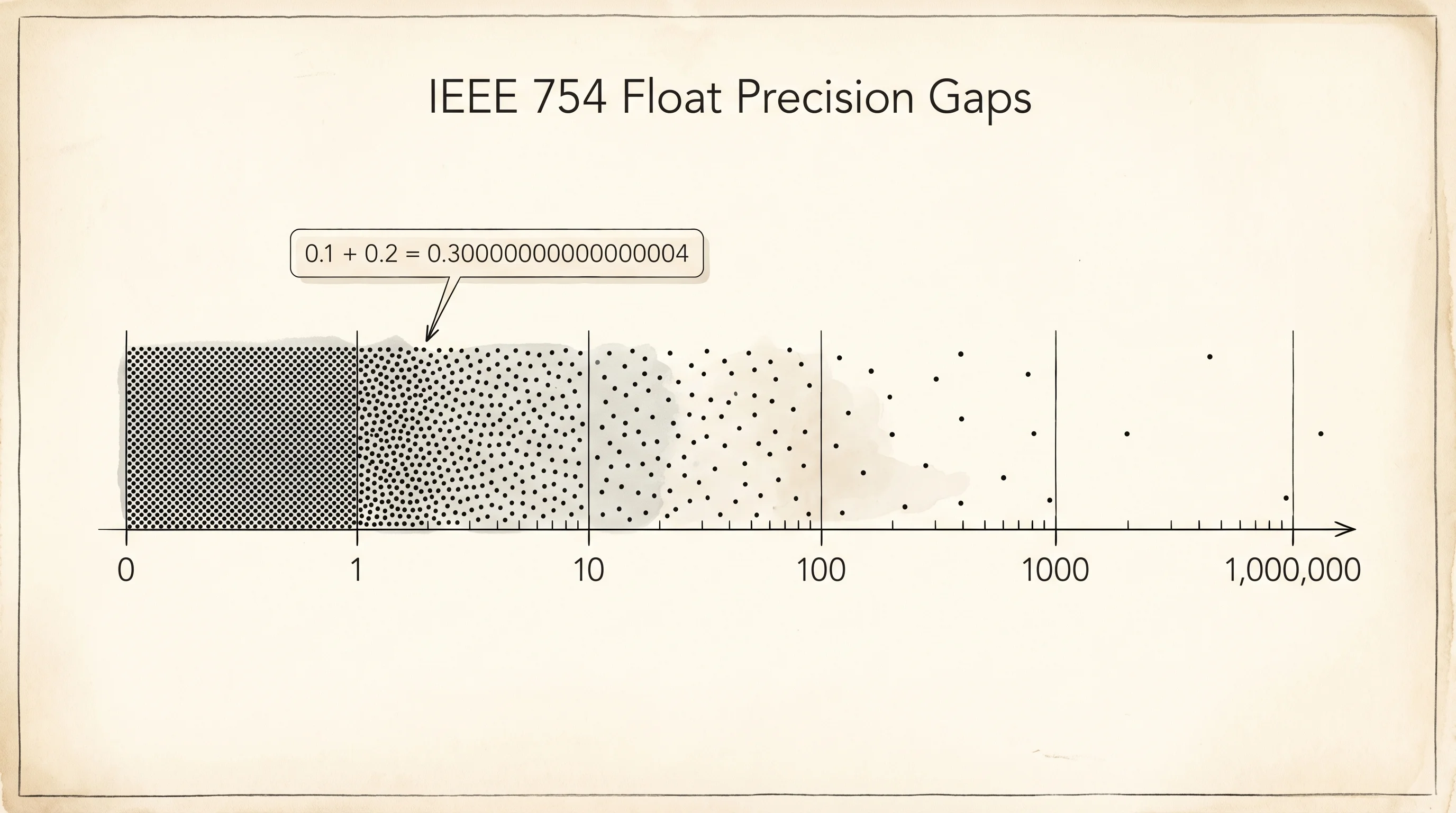
Floats do not have that escape hatch. A float is exactly 8 bytes, always. Those 8 bytes follow the IEEE 754 standard from 1985: 1 bit for the sign, 11 bits for the exponent, 52 bits for the fraction. That is enough to represent numbers from about 10 to the negative 308 up to 10 to the 308, but only with about 15 to 17 decimal digits of precision. The gaps between representable numbers get bigger as the numbers get bigger. The most famous consequence is this.
print(0.1 + 0.2)
print(0.1 + 0.2 == 0.3)
The output:
0.30000000000000004
False
That is not a Python bug. It is what IEEE 754 says the answer is. The fraction 0.1 cannot be written exactly in binary, the same way 1/3 cannot be written exactly in decimal — you would need infinite digits. Binary 0.1 is a repeating fraction that gets cut off after 52 bits. When you add the cut-off binary 0.1 to the cut-off binary 0.2, the leftover error in both adds up, and the result is a tiny bit too big. Print every step and watch the error appear.
a = 0.1
b = 0.2
c = a + b
print("a:", repr(a))
print("b:", repr(b))
print("c:", repr(c))
print("c == 0.3?", c == 0.3)
print("close enough?", abs(c - 0.3) < 1e-9)
a: 0.1
b: 0.2
c: 0.30000000000000004
c == 0.3? False
close enough? TrueThe lesson: never use == to compare floats. Use a tolerance. The pattern abs(a - b) < 1e-9 says "are these two numbers within a billionth of each other?" That is the right question to ask of a float, because exact equality is the wrong question.
The other primitives have their own quirks worth meeting once. bool is technically a subclass of int — True is 1 and False is 0, which is why True + True returns 2. str is immutable like int: you cannot change a single character of an existing string, only build a new string. None is a singleton, meaning there is exactly one None object in the entire program, and every variable that "is None" points at that same object. bytes looks like a string but is not — it is raw 0-to-255 byte values, and you have to decode it with an encoding like UTF-8 before you get readable text.
You can hold values now, with confidence about how big they are and where they will surprise you. The next problem is that your code runs every line top to bottom with no choices — you need a way to tell the machine when to skip, when to repeat, and when to branch.