Variables and Memory
A variable in Python is a Post-it note. Write a name on the Post-it, stick it to a house, and from then on you can find the house by reading the name. The house is the data. The Post-it is the variable. Two Post-its can stick to the same house. The house never knows how many notes are on it.
The idea that data and the names for it should live in the same memory is older than Python by 44 years. In 1945 a mathematician named John von Neumann wrote a draft report on a machine called EDVAC, the computer that would replace ENIAC at the University of Pennsylvania. The report proposed something radical for the time: store the program and the data together in one memory, instead of wiring the program in by hand. Every machine you have ever used follows that report. Fourteen years later in 1959, John McCarthy at MIT was building a language called LISP and ran into a new problem — once a program could create new values on the fly, who was responsible for cleaning them up when nothing pointed at them anymore? McCarthy invented garbage collection: a background process that scans memory, finds the houses with no Post-its on them, and tears them down. Python uses a descendant of that idea right now, every time you run a program.
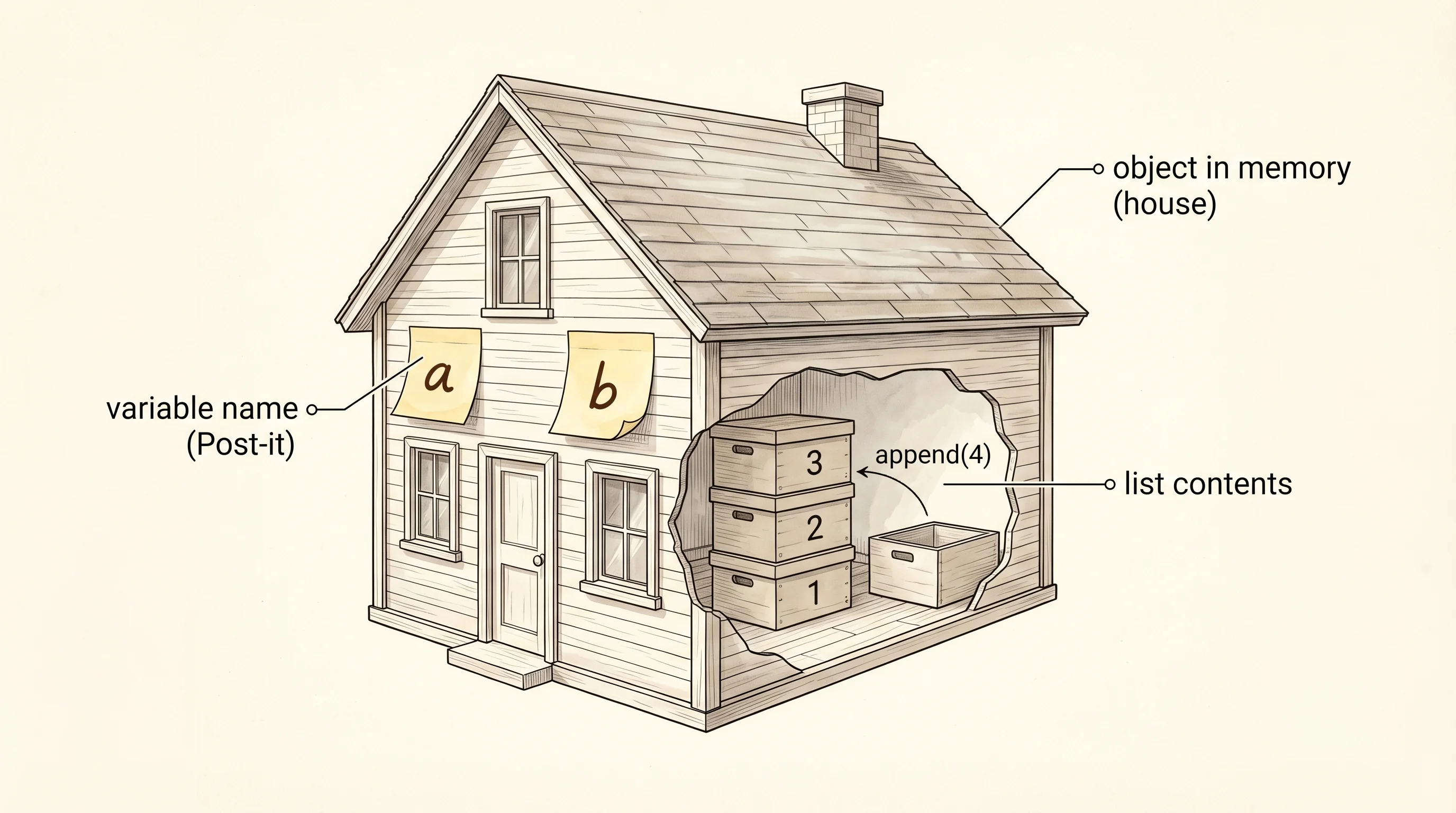
Open your terminal, activate the venv from the setup lesson, and start Python with the python command. You should see a >>> prompt. Type these three lines.
a = [1, 2, 3]
b = a
b.append(4)
print(a)
The last line prints [1, 2, 3, 4]. You only changed b, but a changed too. That is the surprise the Post-it analogy was preparing you for. The line b = a did not copy the list. It stuck a second Post-it on the same house. When you appended to b, you added a room to the house. Both notes still point at the same house, so both names see the new room.
You can prove the two names point at the same address with the built-in id function. id(x) returns the integer memory address Python is using for x right now.
a = [1, 2, 3]
b = a
print("id of a:", id(a))
print("id of b:", id(b))
print("same house?", id(a) == id(b))
The output looks something like this. The actual numbers will differ on your machine. The important part is that the two ids match.
id of a: 4376512384
id of b: 4376512384
same house? True
Now run the same trick with integers and watch the behavior change.
a = 10
b = a
b = b + 1
print("a:", a)
print("b:", b)
print("id of a:", id(a))
print("id of b:", id(b))
a is still 10. b is 11. The two ids are different. What happened is that b = b + 1 did not modify the integer 10 in place — it computed a new integer 11 and stuck the b Post-it on that new house. The a Post-it never moved. Integers in Python are immutable: there is no way to "change" the number 10 itself, only to point a name at a different number.
Lists are mutable. Integers, floats, strings, booleans, and tuples are immutable. A mutable object is a house you can renovate. An immutable object is a house carved out of a single block of stone — if you want a different one, you build a new house and move the Post-it. That distinction is the one rule that determines whether b = a followed by changing b will surprise you or not.
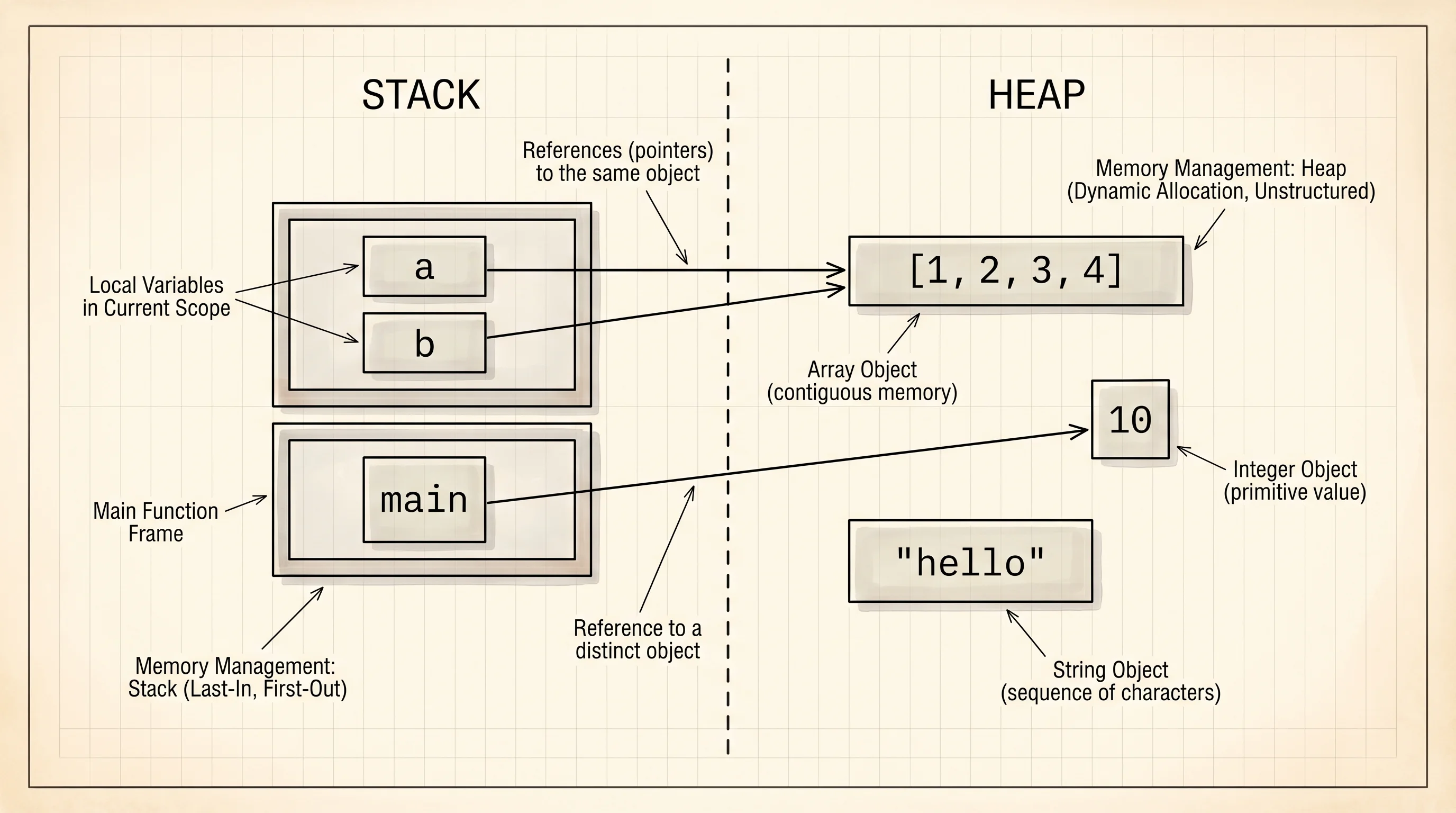
Python keeps two regions in memory while your code runs. The stack holds the names — the Post-its themselves, organized by which function is currently running. The heap holds the houses — the actual list objects, integer objects, string objects. Assignment writes to the stack. Mutation writes to the heap. When the function ends, the stack frame disappears and the Post-its go with it. The houses on the heap survive as long as at least one Post-it anywhere in the program still points at them. The garbage collector cleans up the rest on its own schedule.
A question to answer from the print output above: when you ran b = b + 1, did the integer 10 ever change? The answer is no. You created a brand new integer 11 in a different memory address and pointed b at it. The 10 sitting in memory was untouched, and a is still looking right at it.
Names and references are wired up. The next question is what kinds of things they can point at — what the basic building blocks of a Python value actually are.