What Is an SDK?
Picture the same restaurant from the chatbot page. The face behind the pass-through window speaks a single language: HTTP. You hand it a slip of paper — method, path, headers, a JSON body — and it hands back another slip with a status code and a JSON body of its own. That is the whole protocol. You already know how to talk this way from the what-is-an-api lesson. You also know that on the chatbot page you never once wrote the word "POST" or handed a header yourself. The Python SDK did it for you. An SDK — Software Development Kit — is a waiter hired by the restaurant who speaks your language, writes the slip for you, walks it to the window, and brings the answer back typed the way Python likes its answers typed. This page strips the waiter away and shows you exactly which slips get written, then puts the waiter back and shows you the same job done in one line.
The pattern is older than the web. Sun Microsystems shipped the first big commercial SDK in 1995 — the Java Development Kit — as a way to give third-party developers a canonical Python-like wrapper around their runtime. Amazon's Mark Jarrett started boto in 2006 to wrap the new AWS APIs in Python, because nobody wanted to hand-craft the XML signatures AWS required. Google shipped google-cloud-python in 2015. Stripe's SDK, written by Patrick Collison's team in 2011, became the example every startup points to when it says "we want developer experience like Stripe's." The pydantic-v2 wave in 2023 pushed every serious SDK toward fully typed request and response objects. By 2026 the norm is: every API worth using ships an SDK in Python, TypeScript, Go, and Ruby within a quarter of launch, and the SDK is auto-generated from an OpenAPI or protobuf spec so the wire format and the Python types never drift.
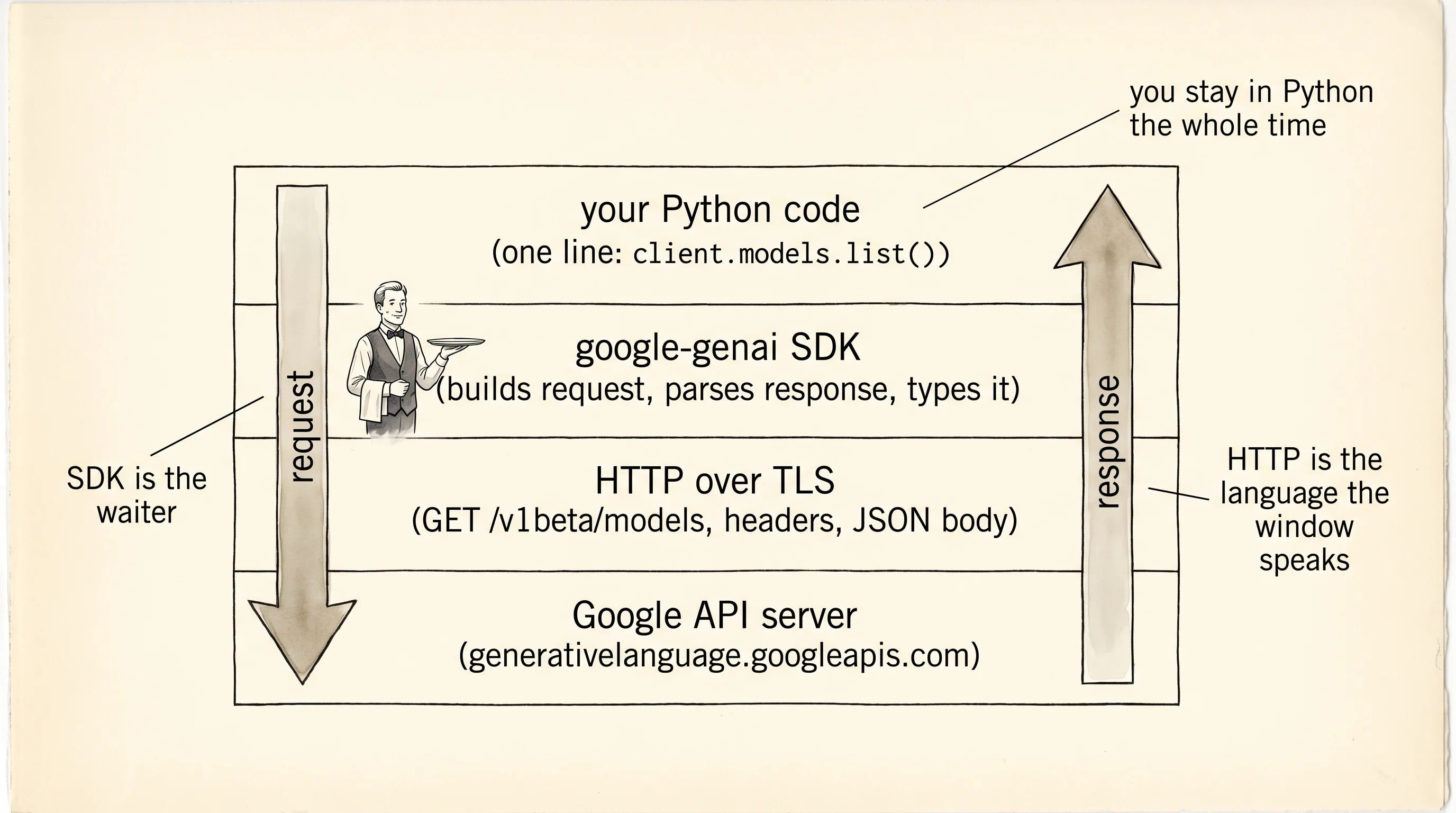
Work inside your chatbot project — same venv, same .env. You already have google-genai installed. Install httpx alongside it:
cd ~/learning-python/chatbot
source .venv/bin/activate
pip install httpx
cd $HOME\learning-python\chatbot
.venv\Scripts\Activate.ps1
pip install httpxhttpx is a modern HTTP client for Python with the same API shape as requests but with type hints and async built in. You will write the slip by hand in httpx, then write the same slip in one line with google-genai and compare.
The job is "get the list of Gemini models Google currently offers." Google's REST API for that is an HTTP GET to https://generativelanguage.googleapis.com/v1beta/models with the API key in a query string. The raw call from scratch, saved as raw_list.py:
import json
import os
import httpx
from dotenv import load_dotenv

load_dotenv()
api_key = os.environ["GEMINI_API_KEY"]

url = "https://generativelanguage.googleapis.com/v1beta/models"
params = {"key": api_key, "pageSize": 50}
headers = {"User-Agent": "aarit-sdks-lesson/0.1"}

with httpx.Client(timeout=10.0) as client:
    response = client.get(url, params=params, headers=headers)

print("status:", response.status_code)
print("content-type:", response.headers["content-type"])

if response.status_code != 200:
    print("body:", response.text)
    raise SystemExit(1)

payload = response.json()
models = payload["models"]
print(f"got {len(models)} models")
for model in models[:5]:
    print(f"- {model['name']} | input tokens: {model.get('inputTokenLimit')}")
Every piece on this page is something you typed before. url is the endpoint. params is the query string — httpx assembles it into ?key=...&pageSize=50 for you. headers adds a User-Agent identifying your script, which is polite even if not required. The with httpx.Client(timeout=10.0) as client block is the same context manager pattern from file-io: open a connection pool, guarantee it closes even on an error. client.get(...) writes a real HTTP request and waits for a real response. The status check catches 4xx and 5xx the way the apis-build-and-consume lesson taught. response.json() parses the body — and because this is a public Google endpoint, the body is a dict with a top-level models key.
Run it with python raw_list.py. A trimmed run:
status: 200
content-type: application/json; charset=UTF-8
got 47 models
- models/gemini-2.5-flash | input tokens: 1048576
- models/gemini-2.5-pro | input tokens: 2097152
- models/gemini-2.0-flash | input tokens: 1048576
- models/gemini-2.0-flash-lite | input tokens: 1048576
- models/embedding-001 | input tokens: 2048
Now the same job done through the SDK. Save as wrapped_list.py:
import os
from dotenv import load_dotenv
from google import genai

load_dotenv()
client = genai.Client(api_key=os.environ["GEMINI_API_KEY"])

models = list(client.models.list())
print(f"got {len(models)} models")
for model in models[:5]:
    print(f"- {model.name} | input tokens: {model.input_token_limit}")
Same venv, same key, same result. Run it and the output is the same handful of model names. The 20 lines of HTTP plumbing from raw_list.py collapsed to one — client.models.list() — and the rest is a print loop.
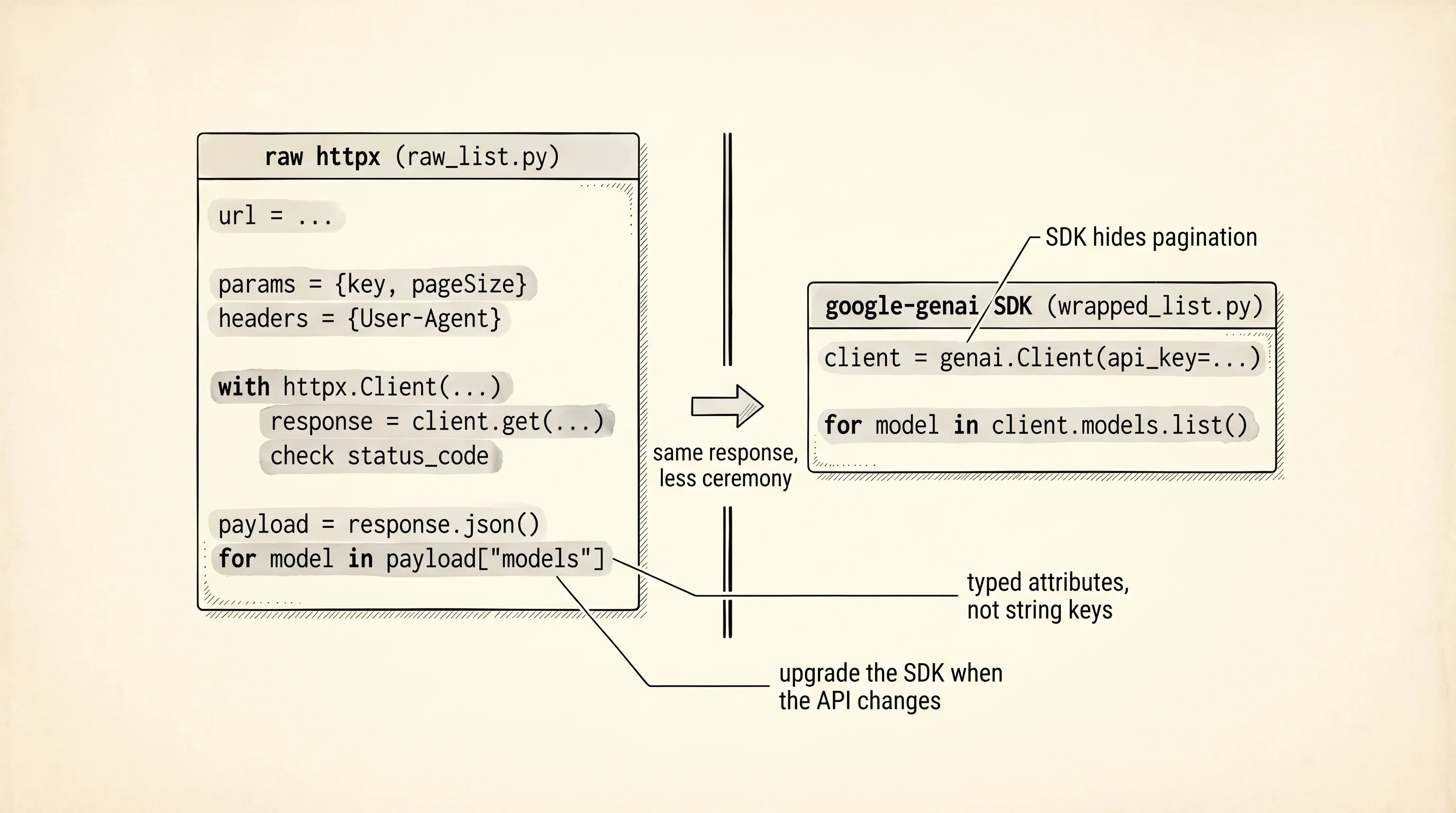
Put the two files side by side and read what disappeared. The URL string. The query params dict. The headers dict. The status-code check. The JSON parse. The key-indexed payload["models"]. The string-based model['name']. Every one of those is a piece you could get wrong and discover at runtime, and every one of those is now the SDK's problem. model.name is a typed attribute on a typed object — your editor autocompletes it, mypy catches the typo before you run. client.models.list() handles pagination under the hood: the REST endpoint returns at most 50 models per call and ships a nextPageToken if there are more, and the SDK calls it again and again on your behalf until the generator is exhausted. Look at raw_list.py — pageSize=50 is hard-coded and there is no loop for the second page. The raw version silently caps at 50 and stops. The SDK version never makes you think about it.
A question to answer from the two files: if the Google API changes its response shape next year and renames inputTokenLimit to maxInputTokens, which of the two scripts breaks first, and which one keeps working?
The raw script breaks the moment the deploy ships. model.get('inputTokenLimit') returns None because the key no longer exists, and the print line shows input tokens: None instead of crashing loudly. The SDK script keeps working because Google ships a new version of google-genai the same day the API changes, and the SDK's input_token_limit attribute is mapped from the new field name inside the library. You run pip install --upgrade google-genai and the code is still one line. This is why every serious cloud company ships an SDK — the SDK is the shock absorber between the wire format and your business logic. You pay for the SDK by tying yourself to one library. You benefit by never thinking about the wire format again.
Some developers still reach for the raw call. Three reasons show up. First, a language with no SDK — if you are writing Python but your coworker's service is written in Elixir, Elixir might not have a Gemini SDK, and that person writes raw HTTP. Second, debugging — when the SDK misbehaves and you want to see the actual wire traffic, you drop down to httpx to prove the server returned what it returned. Third, shaving dependencies — a Lambda function that only needs to make 1 specific API call does not need to ship a 30 MB SDK in its zip file. For everything else, the SDK wins.
You can talk to an LLM and you understand why the SDK is the right abstraction 99 percent of the time. The model can reply with text. It cannot reach into your filesystem, call your poker scoring module, or query your database. The next page teaches a protocol that fixes exactly that.