Terminal Chatbot with an LLM
The philosophy page asked you for a favor that cost something: no LLM writes your code until you reach this page. You kept it. Fifty-four lessons of loops, classes, graphs, scoring tuples, queues, and Lambda invocations — all typed by you. The bar got heavier. Your hippocampus got thicker. This page is the reward. The kitchen pass-through window has a new face behind it. The face has read every cookbook ever printed, every Stack Overflow answer, every book on poker strategy, every sports biography. You are about to open a conversation with it through Python.
The face is a large language model, and the story of how it got to a Python package you can pip install is 7 years old. OpenAI shipped GPT-2 in February 2019 and held back the full weights because the text it generated was too convincing. GPT-3 followed in June 2020 and lived behind an API from day one — you paid per token, they never shipped a model you could run on your own laptop. ChatGPT launched November 30, 2022 on top of GPT-3.5, and the product hit a million users in 5 days. Google responded with Bard in March 2023, then renamed the family Gemini in December 2023. Anthropic shipped Claude in March 2023. By 2025 every major company sold the same thing: a Python SDK that wraps an HTTP endpoint you can call with a string and a dollar. This lesson calls Gemini because Google's free tier is the most generous of the three in 2026.
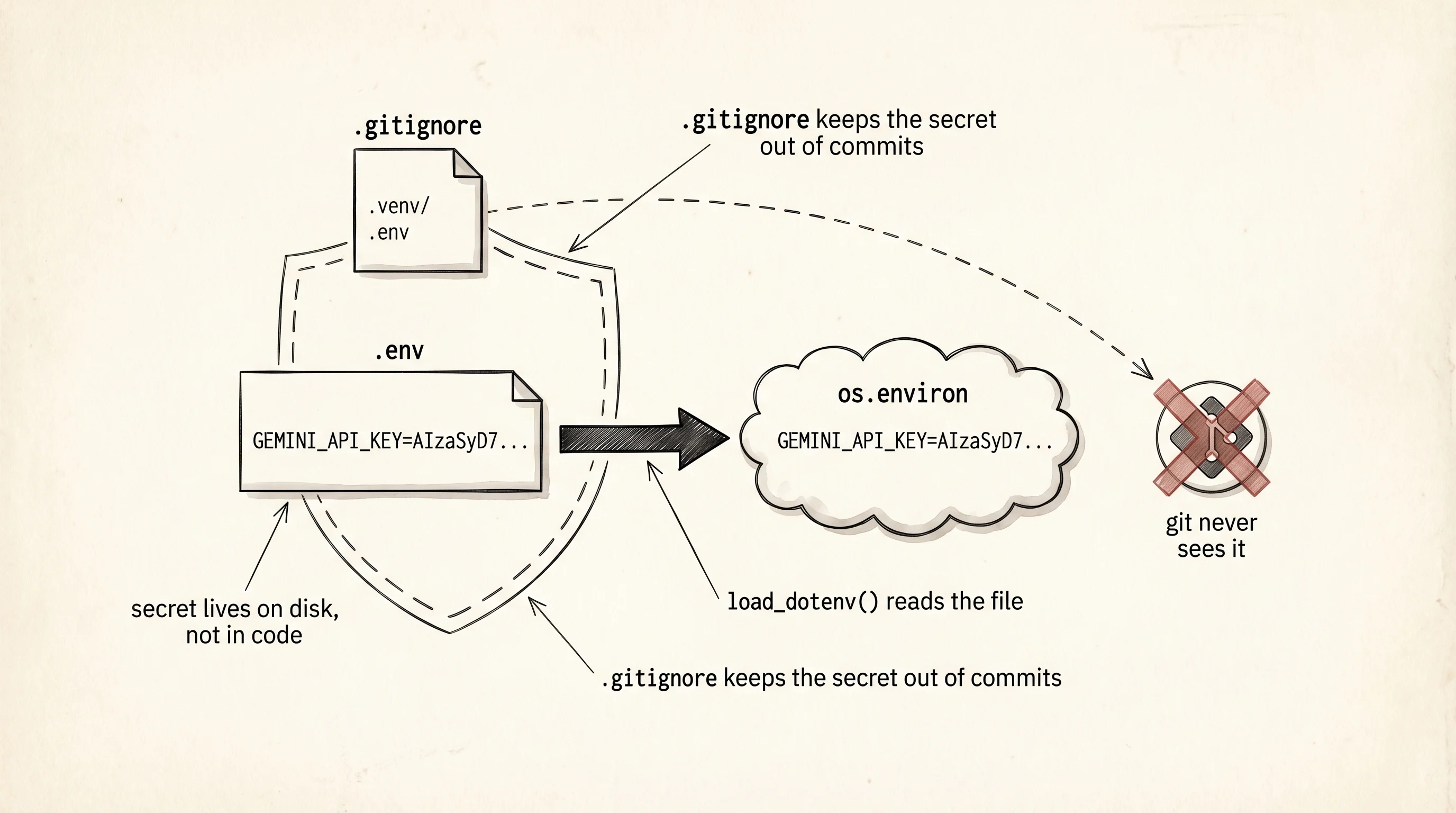
The first move is a fresh workspace. Every project you've built so far got its own folder and its own venv — the chatbot is no different. Open your learning-python folder and scaffold a new project.
cd ~/learning-python
mkdir chatbot
cd chatbot
python3 -m venv .venv
source .venv/bin/activate
pip install google-genai python-dotenv
cd $HOME\learning-python
mkdir chatbot
cd chatbot
py -m venv .venv
.venv\Scripts\Activate.ps1
pip install google-genai python-dotenvTwo packages land in the venv. The first, google-genai, is Google's official SDK for Gemini. It wraps the REST API in Python functions, holds a typed Client object, and knows how to stream tokens back one chunk at a time. The second, python-dotenv, reads a file called .env on disk and loads each line into os.environ so your code sees the key as an environment variable instead of a hard-coded string. You never paste a secret straight into a .py file — that is the rule this lesson is built around.
Get a key. Open https://aistudio.google.com/app/apikey in your browser, sign in with a Google account, and click "Create API key." Google issues a long string that starts with AIza.... This string is the same as your credit card number. Anyone with it can run requests against your Google account, and by default Gemini's free tier covers the first 1500 requests per day — past that it bills to whatever card you attach later. Do not paste the string into Slack. Do not commit it to git. Do not show it on a screen while screen-sharing.
Store the key in a file called .env at the root of the chatbot project. The file has one line:
GEMINI_API_KEY=AIzaSyYourRealKeyGoesHereNow the harder half: teaching git to never let that file escape. Create a second file called .gitignore at the same level as .env, with two lines:
.venv/
.env
The .gitignore file is git's eyes-closed list. Any path that matches a line in it is invisible to git add and git commit. You init the repo once per project, right after creating these two files, so the very first commit never sees the secret.
git init
git add .gitignore
git commit -m "ignore venv and env"
ls -la
git init
git add .gitignore
git commit -m "ignore venv and env"
Get-ChildItem -ForceThe ls -la on macOS and Get-ChildItem -Force on Windows both show hidden files — files whose names start with a dot. The .env is one of them, which is why a regular ls on macOS pretends it isn't there. Confirm both .env and .gitignore appear in the listing and that git status reports .env as untracked-and-ignored rather than untracked.
Write the first script. Save this as one_shot.py:
import json
import os
from dotenv import load_dotenv
from google import genai

load_dotenv()
api_key = os.environ["GEMINI_API_KEY"]

client = genai.Client(api_key=api_key)
response = client.models.generate_content(
    model="gemini-2.5-flash",
    contents="In one sentence, what is a redstone repeater for?",
)

print("--- raw response object ---")
print(json.dumps(response.model_dump(), indent=2, default=str))
print("\n--- just the text ---")
print(response.text)
Run it with python one_shot.py. load_dotenv reads .env from the current folder and fills in os.environ. os.environ["GEMINI_API_KEY"] will raise KeyError if the key is missing, which is the early-explicit-failure behavior you want — no quiet None leaking into the client. The Client holds the key and the HTTP session. generate_content sends one prompt and blocks until the whole reply is back. The raw response is a pydantic object, and model_dump() turns it into a plain dict so json.dumps can print it. The short .text accessor pulls out the actual reply string.
The raw dump is ugly on purpose. You want to see what the server actually returned before the SDK pretties it up:
--- raw response object ---
{
  "candidates": [
    {
      "content": {
        "parts": [
          {"text": "A redstone repeater extends a signal across longer distances and can delay it by 1 to 4 ticks."}
        ],
        "role": "model"
      },
      "finish_reason": "STOP",
      "index": 0
    }
  ],
  "usage_metadata": {
    "prompt_token_count": 11,
    "candidates_token_count": 24,
    "total_token_count": 35
  },
  "model_version": "gemini-2.5-flash"
}

--- just the text ---
A redstone repeater extends a signal across longer distances and can delay it by 1 to 4 ticks.
Three fields matter. candidates is a list because the API can return more than one reply draft — by default it returns 1. finish_reason: STOP means the model stopped on its own, not because it hit a token limit. usage_metadata is the bill: you paid for 11 tokens of prompt and 24 tokens of output. Every time you call the API, you pay for both halves. A token is roughly 4 characters of English, so "redstone repeater" is 4 or 5 tokens on its own.
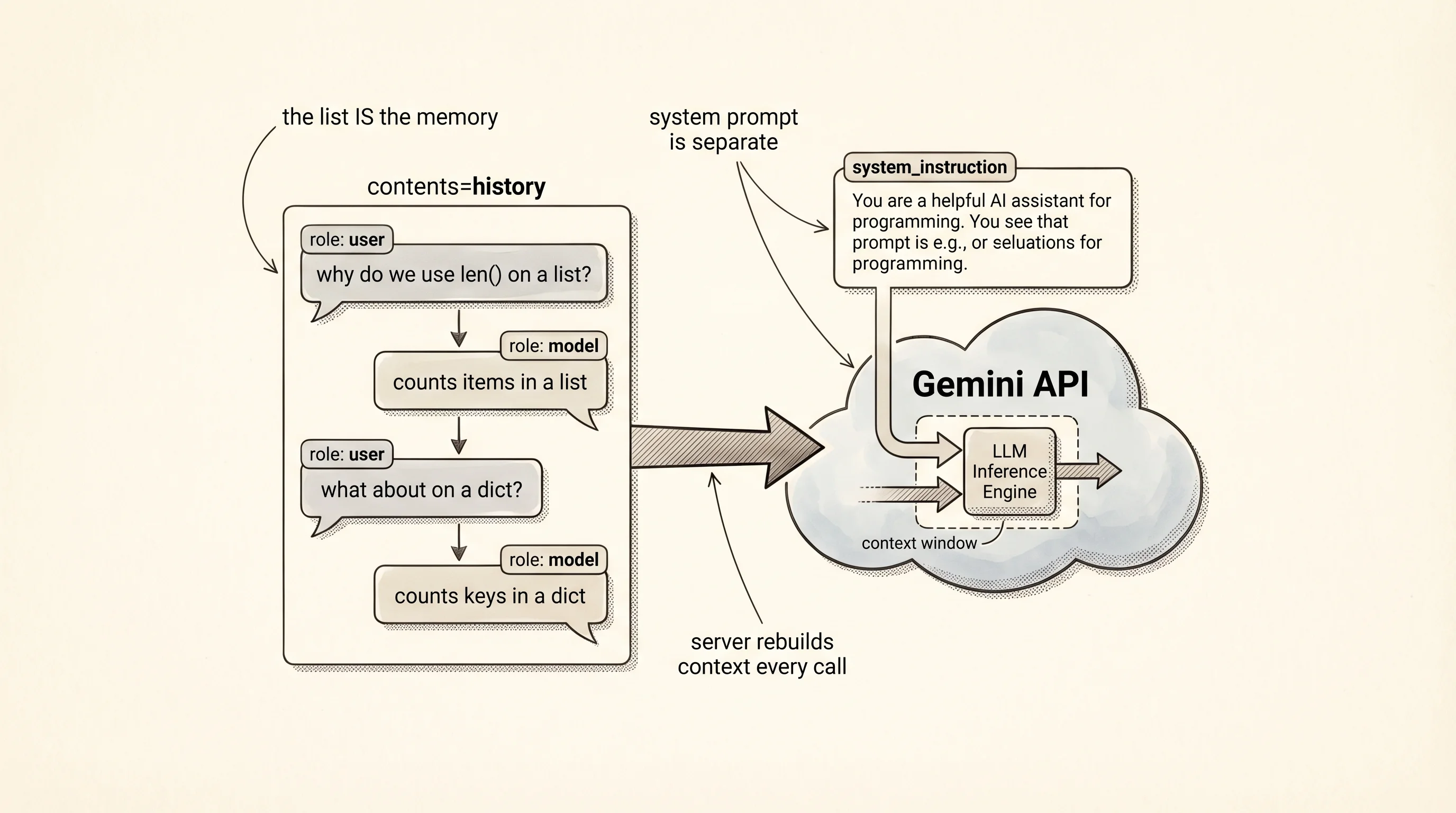
A one-shot call is fine for a search-engine replacement. It is useless for a conversation. The model has no memory between calls — every generate_content starts with a blank slate. A chatbot is a loop that keeps a running list of every turn so far, sends the whole list on every call, and appends the new reply to the list before the next prompt. The list is the memory. You own it, not the server.
Save this as chat.py:
import os
from dotenv import load_dotenv
from google import genai
from google.genai import types

load_dotenv()
client = genai.Client(api_key=os.environ["GEMINI_API_KEY"])

history: list[types.Content] = []
system_instruction = (
    "You are a patient tutor for a 10-year-old learning Python. "
    "Keep answers under 3 sentences. Use concrete examples, not jargon."
)


def ask(user_text: str) -> str:
    history.append(
        types.Content(role="user", parts=[types.Part(text=user_text)])
    )
    reply_chunks: list[str] = []
    stream = client.models.generate_content_stream(
        model="gemini-2.5-flash",
        contents=history,
        config=types.GenerateContentConfig(
            system_instruction=system_instruction,
        ),
    )
    for chunk in stream:
        if chunk.text:
            print(chunk.text, end="", flush=True)
            reply_chunks.append(chunk.text)
    print()
    full_reply = "".join(reply_chunks)
    history.append(
        types.Content(role="model", parts=[types.Part(text=full_reply)])
    )
    return full_reply


def main() -> None:
    print("chatbot ready. type 'quit' to leave.")
    while True:
        user_text = input("you: ").strip()
        if user_text.lower() in {"quit", "exit", ""}:
            break
        print("bot: ", end="", flush=True)
        ask(user_text)
        print(f"(turns so far: {len(history)})")


if __name__ == "__main__":
    main()
The history list is every turn in order. Each turn is a Content object with a role — "user" for you, "model" for Gemini — and a parts list holding the text. The system instruction is separate from history because it applies to every turn and does not count as a conversational exchange. generate_content_stream is the streaming cousin of generate_content — instead of blocking until the whole reply is ready, it yields chunks as the model produces them. Each chunk has a .text attribute holding the next few tokens. The print(chunk.text, end="", flush=True) line writes the chunk without a newline and flushes the terminal buffer so you see each token the moment it arrives, the same way ChatGPT's web UI types letter by letter. After the stream finishes, the full reply gets appended to history as a single model turn.
Run it with python chat.py. A sample session:
chatbot ready. type 'quit' to leave.
you: why do we use len() on a list?
bot: `len()` counts how many items are in a list so you can loop the right number of times or check if it's empty. For example, `len([1, 2, 3])` gives you 3.
(turns so far: 2)
you: what about on a dict?
bot: On a dict, `len()` counts the number of keys. `len({"a": 1, "b": 2})` is 2, because there are two keys.
(turns so far: 4)
you: and if i nest a list inside?
bot: `len()` still counts the top level. `len([[1, 2], [3, 4, 5]])` is 2, because the outer list has two inner lists — it doesn't look inside them.
(turns so far: 6)
you: quit
The "turns so far" counter goes up by 2 each round — one user turn, one model turn. The third question, "and if i nest a list inside?", only makes sense because Gemini sees the previous 4 turns and knows "it" points at len(). Without the history list, every message would land cold.
A question to answer from the run: on turn 3, how did Gemini know the word "it" referred to len() and not to the dict from turn 2?
The answer is the shape of contents=history. On turn 3 the SDK sent all 5 Content objects in the list: the turn-1 user question, the turn-1 model answer, the turn-2 user question, the turn-2 model answer, then the turn-3 user question. The server has no database of your chat — it rebuilds the context from scratch every call from the list you send. You pay for every token in that list on every turn, which is why long conversations with long histories get expensive even when your new message is short. A later lesson will add trimming and summarization to keep the bill down. For now the list grows unbounded and the bot remembers everything.
The chatbot runs. The testing lesson left a thread loose: unit tests checked the poker scorer in isolation, integration tests composed the scorer with the deck and the players to play a hand, and the pyramid had one tier left unbuilt. End-to-end. An E2E test is the one that drives the whole program the way a user does — the input goes in the front, the network call happens in the middle, the streamed output comes out the back, and the test reads what came out. No piece is mocked except the parts that would cost money or break the build on a flaky network.
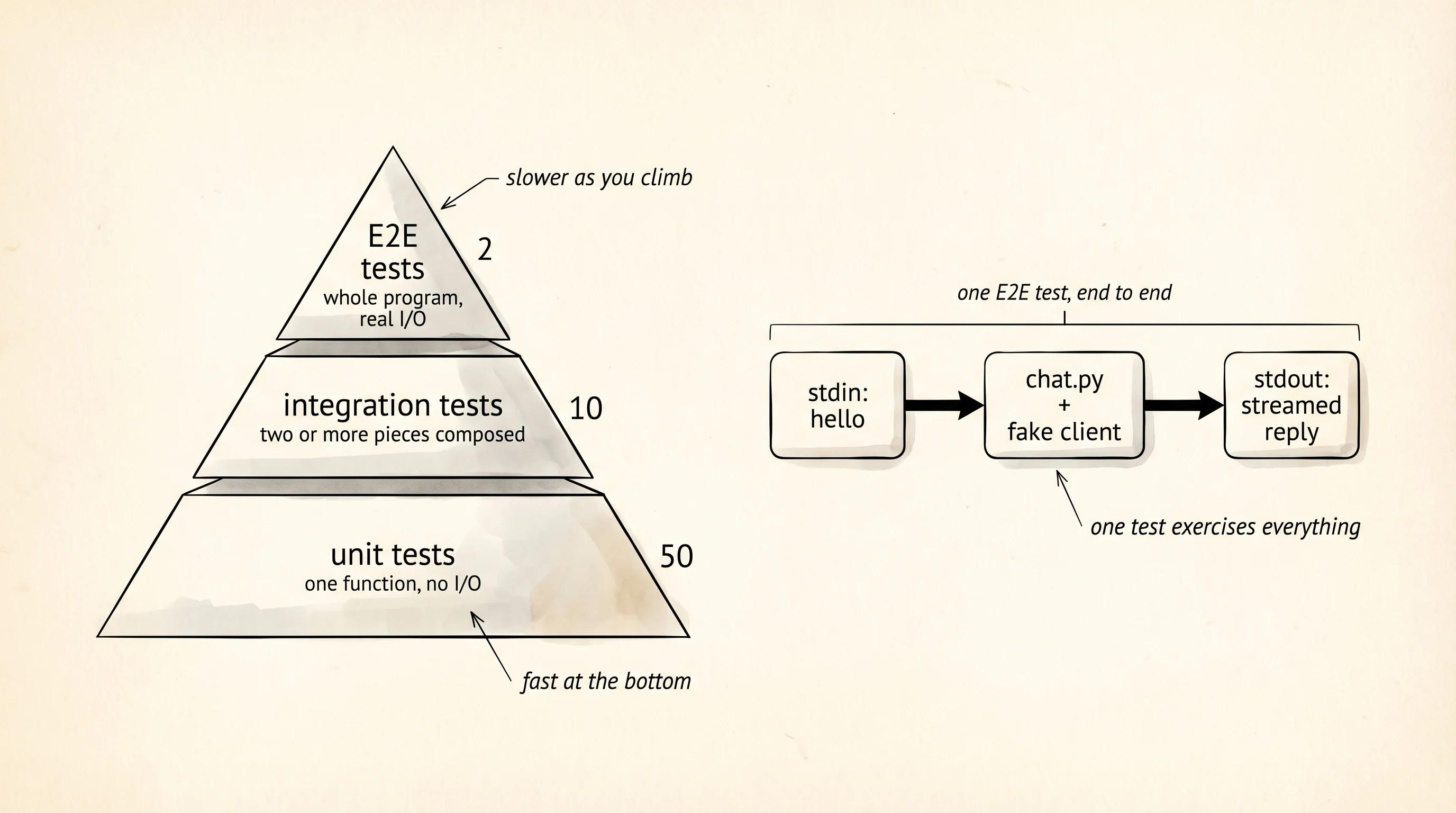
The chatbot is the right place to write one because the program has all 3 surfaces a real app has: it reads from stdin, it calls a network service, and it prints to stdout. A real Gemini call costs a fraction of a cent and needs the API key, neither of which belong in a test that runs on every commit. The fix is a fake genai.Client — an object shaped like the real one but wired to return a canned stream of chunks. Pytest ships monkeypatch for exactly this: it swaps an attribute on a module for the duration of one test and puts the original back when the test ends.
Add a tests/ folder next to chat.py and install pytest into the chatbot venv:
cd ~/learning-python/chatbot
source .venv/bin/activate
pip install pytest
mkdir tests
touch tests/__init__.py
touch tests/test_chat_e2e.py
cd $HOME\learning-python\chatbot
.venv\Scripts\Activate.ps1
pip install pytest
mkdir tests
ni tests\__init__.py
ni tests\test_chat_e2e.pyOpen tests/test_chat_e2e.py:
import os
from dataclasses import dataclass
from typing import Iterator

import pytest

os.environ.setdefault("GEMINI_API_KEY", "fake-key-for-tests")

import chat


@dataclass
class FakeChunk:
    text: str


class FakeModels:
    def __init__(self, chunks: list[str]) -> None:
        self._chunks = chunks

    def generate_content_stream(self, model, contents, config) -> Iterator[FakeChunk]:
        for piece in self._chunks:
            yield FakeChunk(text=piece)


class FakeClient:
    def __init__(self, chunks: list[str]) -> None:
        self.models = FakeModels(chunks)


def test_ask_streams_chunks_and_records_two_turns(monkeypatch, capsys) -> None:
    chat.history.clear()
    fake = FakeClient(chunks=["A list ", "stores ", "items in order."])
    monkeypatch.setattr(chat, "client", fake)

    reply = chat.ask("what is a list?")

    out = capsys.readouterr().out
    assert out == "A list stores items in order.\n"
    assert reply == "A list stores items in order."
    assert len(chat.history) == 2
    assert chat.history[0].role == "user"
    assert chat.history[0].parts[0].text == "what is a list?"
    assert chat.history[1].role == "model"
    assert chat.history[1].parts[0].text == "A list stores items in order."
The test sets a placeholder API key before importing chat so the module-level os.environ["GEMINI_API_KEY"] lookup does not raise during collection. FakeClient mimics the shape ask reaches into: a .models attribute with a .generate_content_stream method that returns an iterator of objects with a .text field. monkeypatch.setattr(chat, "client", fake) swaps the real client for the fake one only inside this test. capsys captures everything printed to stdout so the assertion can read what the streaming print calls actually wrote. Three chunks come out of the fake stream, the test reads them concatenated, and the history list has grown by exactly 2 entries — one user, one model. Run it:
pytest -vcollected 1 item
tests/test_chat_e2e.py::test_ask_streams_chunks_and_records_two_turns PASSED [100%]
============= 1 passed in 0.05s =============Green, in 50 milliseconds, with no API key spent and no network touched. The test exercises the same code path a real user does — input string in, streamed chunks out, history updated — but every external dependency has been replaced with something deterministic.
The second E2E variant goes one layer wider. Instead of importing chat and calling ask, it launches python chat.py as a subprocess, pipes a line of input to its stdin, and reads its stdout. This is the closest thing to a user typing in a terminal. It needs a small wrinkle: the subprocess does not share the parent test's monkeypatch, so the real genai.Client would try to call Google. The fix is an environment flag the script checks — when CHATBOT_FAKE=1 is set, chat.py builds a fake client instead of the real one. Add 6 lines to chat.py right where the client is created:
def _build_client() -> genai.Client:
    if os.environ.get("CHATBOT_FAKE") == "1":
        return _FakeClient()
    return genai.Client(api_key=os.environ["GEMINI_API_KEY"])


client = _build_client()
Then drop a _FakeClient class above it that yields a fixed reply, mirroring the test fake. Now write tests/test_chat_cli.py:
import subprocess
import sys


def test_cli_round_trip_prints_reply_and_quits() -> None:
    result = subprocess.run(
        [sys.executable, "chat.py"],
        input="hello\nquit\n",
        capture_output=True,
        text=True,
        timeout=10,
        env={"PATH": "", "CHATBOT_FAKE": "1"},
    )

    assert result.returncode == 0
    assert "chatbot ready" in result.stdout
    assert "bot: hi from the fake client" in result.stdout
    assert "turns so far: 2" in result.stdout
subprocess.run starts a fresh Python process, feeds it "hello\nquit\n" on stdin, and waits up to 10 seconds for it to finish. The CHATBOT_FAKE=1 env var tells chat.py to skip the real client. The test reads stdout after the process exits and asserts the banner printed, the fake reply made it through, and the turn counter reported 2. This test is slower than the in-process one — it pays the cost of spawning a Python interpreter — but it covers the part of the code the in-process test cannot: the main() loop, the input() call, and the script's exit path.
Two tests, two layers of E2E. The first calls ask directly with a swapped client and reads stdout. The second runs the script as the operating system would and reads its output through a pipe. Together they catch any change that breaks the contract the user actually sees. Unit tests are fast, integration tests compose, E2E tests ship.
You have a working chatbot. You called an API through an SDK and streamed the response. You built a conversation loop that remembers every turn. The next question is one every programmer who uses an SDK eventually asks: what is the SDK actually doing underneath? If you stripped it away and talked to the server directly, what would change?