What Is a Database?
A public library is not a pile of books. It is a pile of books plus the catalog that tells you where each book lives plus the checkout desk that remembers who borrowed what plus the rules that keep two people from walking off with the same copy of the same book at the same minute. Strip any one piece away and the whole thing breaks. A database is the same system for data. It is the shelves, the catalog, the checkout desk, and the rulebook, fused into one program that your other programs talk to over a well-defined wire.
A flat file is not enough. Your ETL pipeline already wrote rows to a CSV and your poker API returned JSON from memory. Both work until two things happen at once. Two scripts trying to append to the same CSV can tear each other's lines. A server restart wipes anything the API was holding in a Python dictionary. A third script searching for a specific row reads the whole file from top to bottom because there is no index. The first generation of computers in the 1950s ran the world like this — one team with one magnetic tape, one job at a time, finished by morning. In June 1970 an IBM researcher in San Jose named Edgar F. Codd published a paper titled "A Relational Model of Data for Large Shared Data Banks," and the world that came after it looked different.
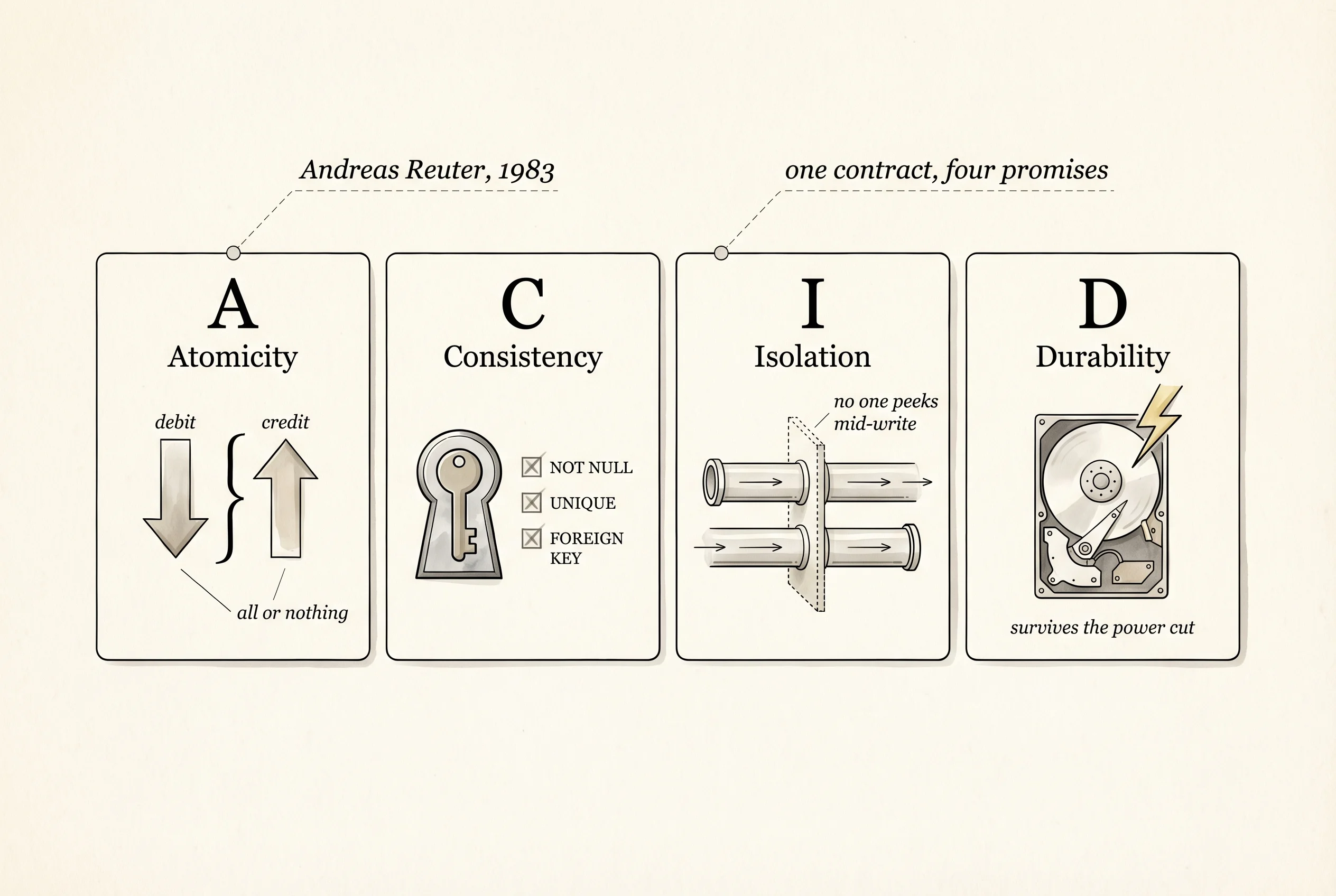
Codd's idea was to describe data as tables (he called them relations) and let anyone query the tables with a small, predictable language instead of hand-writing lookup loops. IBM built System R, the first prototype, between 1974 and 1977. Larry Ellison read Codd's paper while working at Ampex, quit, and shipped Oracle in 1979 — the first commercial relational database. Michael Stonebraker at UC Berkeley started Ingres in 1974 and Postgres in 1986. MySQL appeared in Sweden in 1995. SQLite, a single-file C library written by Richard Hipp for the US Navy in 2000, is today the most-deployed database on earth because it ships inside every iPhone, every Android, and every Chrome browser. Every one of those systems gives you the same four guarantees, captured in the acronym ACID coined by IBM's Andreas Reuter in 1983.
ACID is a contract about what happens when things go wrong mid-write. A stands for Atomicity — a transaction either fully completes or fully rolls back, never halfway. If your code tries to move 50 chips from one player to another and the database crashes between the debit and the credit, Atomicity says neither happened. C is for Consistency — every transaction moves the database from one valid state to another valid state, and any rule you declared (a foreign key, a non-null column, a uniqueness constraint) holds at the end. I is for Isolation — two transactions running at the same time cannot see each other's half-done work, so you never read a row that someone else is in the middle of changing. D is for Durability — once a transaction commits, the change is on disk and survives a power cut. Together those four words are the reason a bank can run on a database without losing your paycheck the first time a server reboots.
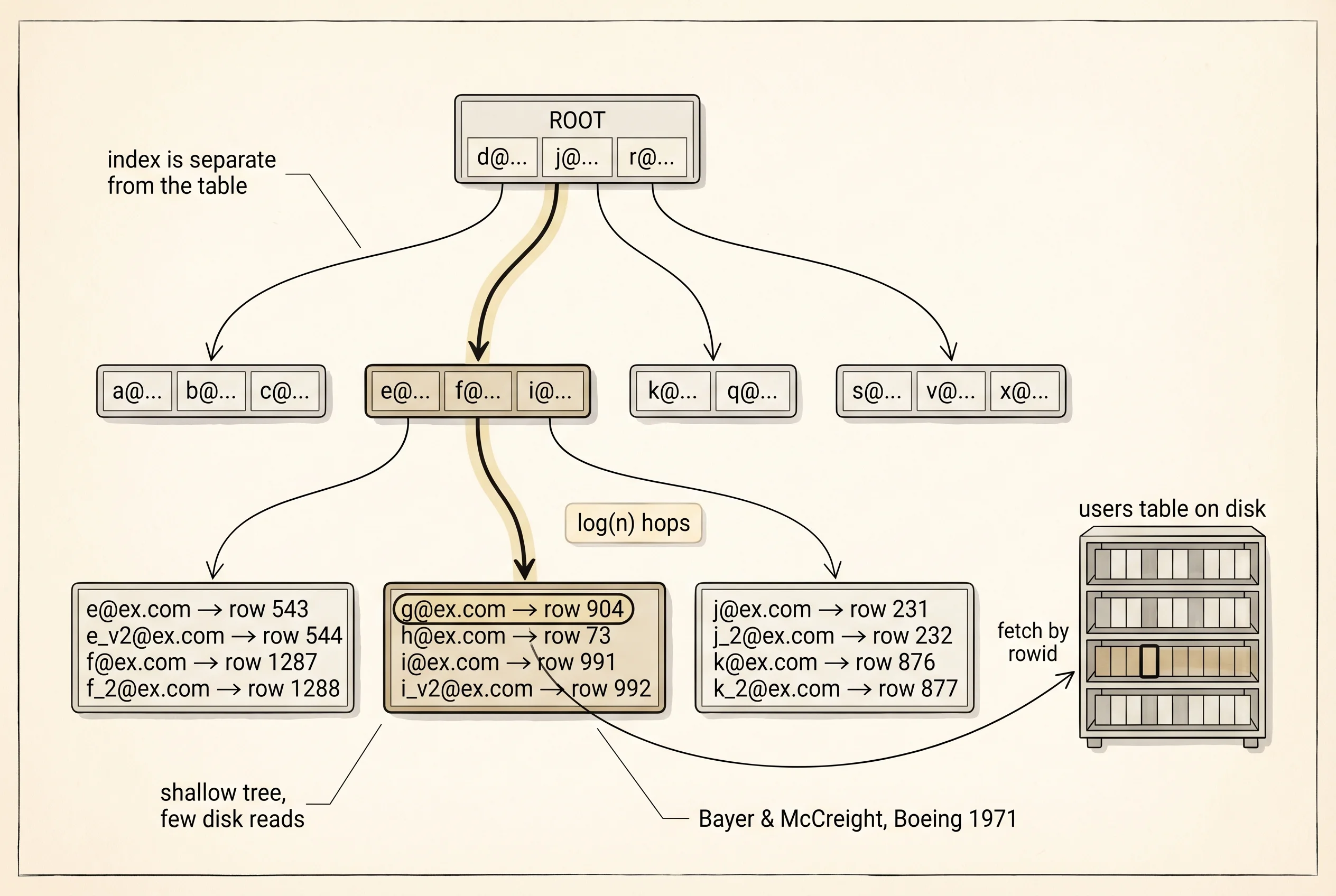
The second thing a database buys you is the index. A table is rows on shelves. An index is a separate, carefully sorted structure — usually a B-tree — that answers the question "where does this specific value live?" in a handful of disk reads instead of one read per row. Rudolf Bayer and Edward McCreight invented the B-tree at Boeing in 1971 because the disks of the 1970s were slow and the trees had to be shallow enough to reach the leaf in 3 or 4 hops. That algorithm is still the core of PostgreSQL, MySQL, SQLite, Oracle, and SQL Server in 2026. Every time you write CREATE INDEX ON users(email), the database builds one of Bayer's trees, and every lookup by email afterward costs log(n) disk reads instead of n.
The third thing a database does is enforce a schema. The tables declare their columns up front — name TEXT NOT NULL, age INTEGER, email TEXT UNIQUE — and the database refuses any row that breaks the rules. Bad data cannot get into the shelves because the checkout desk reads the rulebook on every insert. Your code no longer has to defend itself against a string where a number should be. That is the relational model: tables, rows, columns, keys, constraints, and a query language that reads the whole shape.
By the mid-2000s a second style emerged. The web had grown past what a single relational server could fit. Google published a paper on Bigtable in 2006 describing a planet-scale key-value store. Amazon published its Dynamo paper in October 2007. The New York-based company 10gen shipped MongoDB in 2009, and the "NoSQL" conference in San Francisco that summer put a name on the trend. The idea was to trade some of the relational guarantees for the ability to store flexible-shaped documents — a JSON object for each record, with no schema enforced by the database itself. You win on flexibility and horizontal scale. You lose on joins across collections and on strict consistency across replicas. A document store is the filing cabinet where every folder is its own shape; a relational store is the library wall where every book has to fit a standard shelf.
Both styles are still alive because they solve different shapes of problem. A banking ledger belongs in a relational store — the rows are all the same shape, joins across accounts are the whole point, and ACID is not optional. A social-media feed belongs in a document store — each post has a different bag of fields, the denormalized shape is the thing you read, and "eventually consistent" is fine because nobody is moving money. Your poker game sits somewhere in the middle. A history of scored hands is flat and structured, so the next lesson uses SQLite. A profile that grows new fields as the game adds new modes would fit a document store, and the lesson after builds one of those from scratch so the difference is felt in your own file on disk.
You know why a database exists, what it guarantees, and why the field split in two. You have not written a single SELECT yet. The next lesson fixes that, and it fixes it the hard way first — you build a miniature SQL engine yourself before you ever import SQLAlchemy.