SQL Databases
A library has drawers of index cards and each card has the same boxes on it: title, author, year, shelf number. The catalog only works because every card has the same shape. SQL is the clerk behind the desk. You hand her a request in a small, strict language — "find every card where the author is Knuth and the year is after 1970" — and she walks the drawers and hands back the matching cards. SQLite is the smallest copy of that library. One file on your disk holds every drawer, and the clerk lives inside a C library that ships with Python.
Don Chamberlin and Ray Boyce designed SQL at IBM in 1974 while working on System R, Codd's first relational prototype. They called it SEQUEL at first — Structured English Query Language — until a trademark conflict with a British airline forced the rename to SQL. In 2000 Richard Hipp, a contractor working on a missile-guidance system for the US Navy, wanted a database he could embed directly into a warship's software without a separate server process, so he wrote SQLite in a few thousand lines of C. He put it in the public domain, and 25 years later it sits inside every iPhone, every Android, every Chrome browser, and almost every Python project that needs a local datastore. It ships with Python's standard library as the sqlite3 module. No install needed.
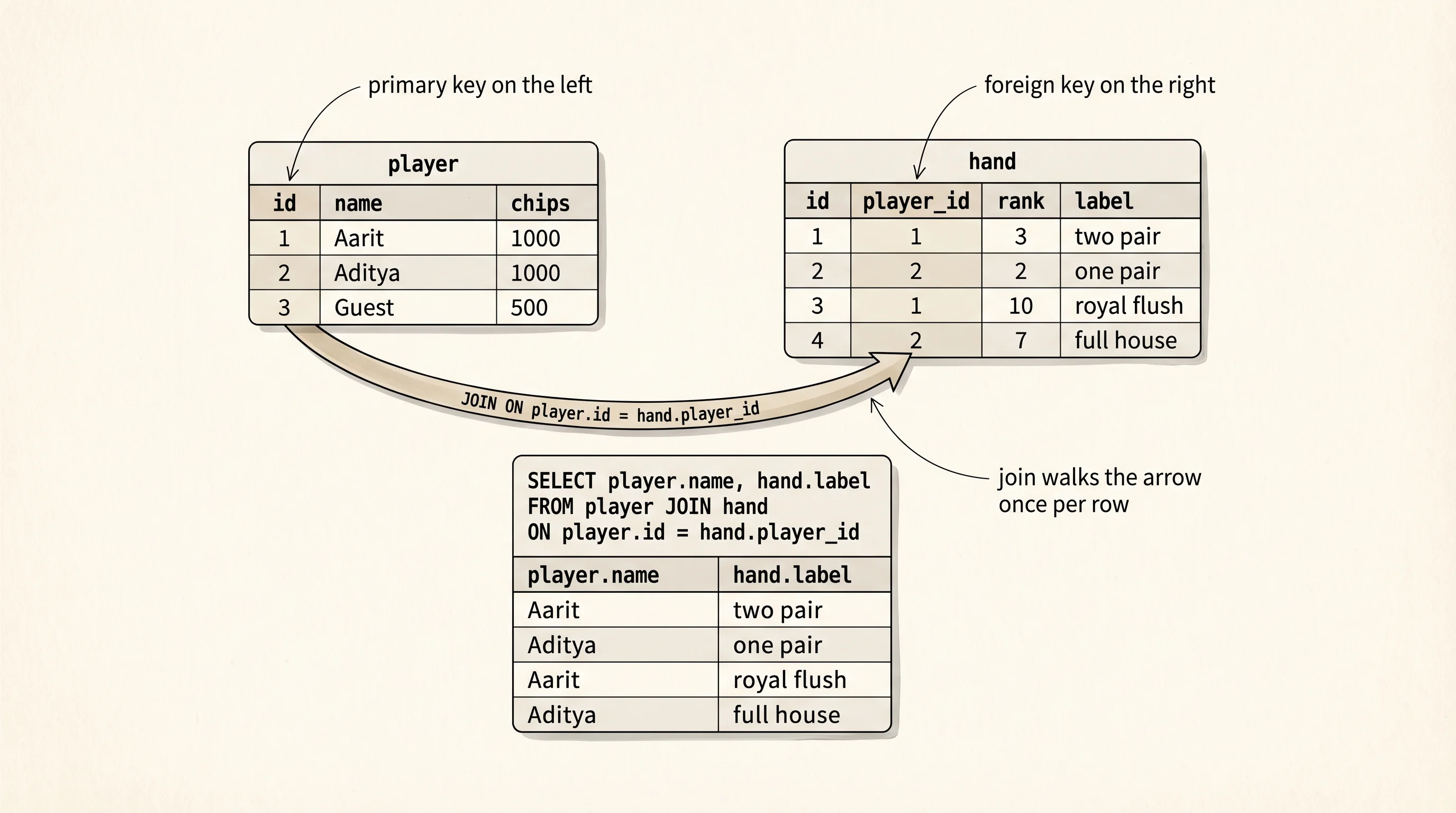
Start a project folder for the SQL work.
cd ~/learning-python
mkdir poker-sql
cd poker-sql
python3 -m venv .venv
source .venv/bin/activate
cd $HOME\learning-python
mkdir poker-sql
cd poker-sql
py -m venv .venv
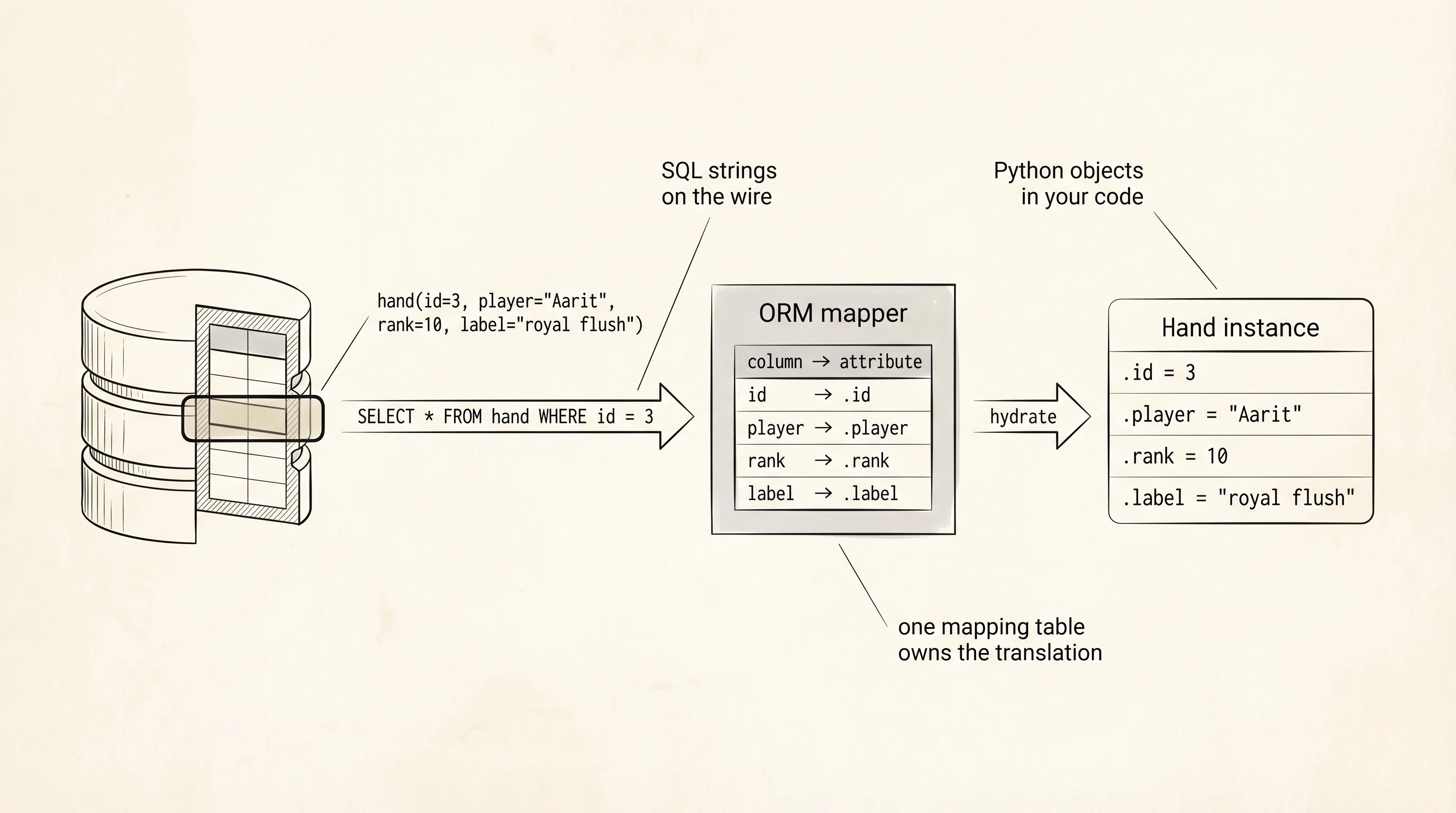
.venv\Scripts\Activate.ps1Before you meet SQLAlchemy, you build the drawers yourself. An ORM — Object-Relational Mapper — is a layer that translates between Python objects and SQL rows. You write Hand.find(id=3) and the ORM generates SELECT * FROM hand WHERE id = 3, runs it, and hands you back a Hand object with the columns filled in. Two generations of Python developers treated ORMs as magic until they wrote one. You are going to write one now, small enough to fit on one screen, and watch every SQL string it emits. This is Act 1. Act 2 throws it away and uses SQLAlchemy.
Write mini_orm.py.
from __future__ import annotations
import sqlite3
from typing import Any, ClassVar


connection = sqlite3.connect("poker.db")
connection.row_factory = sqlite3.Row


def run(sql: str, params: tuple[Any, ...] = ()) -> sqlite3.Cursor:
    print("SQL:", sql, params)
    cursor = connection.cursor()
    cursor.execute(sql, params)
    connection.commit()
    return cursor


class Query:
    def __init__(self, model: type[Model]) -> None:
        self.model = model
        self.where_clauses: list[str] = []
        self.where_params: list[Any] = []
        self.limit_value: int | None = None

    def where(self, **kwargs: Any) -> Query:
        for column, value in kwargs.items():
            self.where_clauses.append(f"{column} = ?")
            self.where_params.append(value)
        return self

    def limit(self, n: int) -> Query:
        self.limit_value = n
        return self

    def _build_select(self) -> tuple[str, tuple[Any, ...]]:
        sql = f"SELECT * FROM {self.model.table}"
        if self.where_clauses:
            sql += " WHERE " + " AND ".join(self.where_clauses)
        if self.limit_value is not None:
            sql += f" LIMIT {self.limit_value}"
        return sql, tuple(self.where_params)

    def all(self) -> list[Model]:
        sql, params = self._build_select()
        rows = run(sql, params).fetchall()
        return [self.model(**dict(row)) for row in rows]

    def first(self) -> Model | None:
        self.limit_value = 1
        rows = self.all()
        return rows[0] if rows else None

    def delete(self) -> int:
        sql = f"DELETE FROM {self.model.table}"
        if self.where_clauses:
            sql += " WHERE " + " AND ".join(self.where_clauses)
        cursor = run(sql, tuple(self.where_params))
        return cursor.rowcount


class Model:
    table: ClassVar[str] = ""
    columns: ClassVar[tuple[str, ...]] = ()

    def __init__(self, **kwargs: Any) -> None:
        for column in self.columns:
            setattr(self, column, kwargs.get(column))

    @classmethod
    def query(cls) -> Query:
        return Query(cls)

    def save(self) -> None:
        cols = [c for c in self.columns if c != "id"]
        placeholders = ", ".join("?" for _ in cols)
        values = tuple(getattr(self, c) for c in cols)
        if getattr(self, "id", None) is None:
            sql = f"INSERT INTO {self.table} ({', '.join(cols)}) VALUES ({placeholders})"
            cursor = run(sql, values)
            self.id = cursor.lastrowid
        else:
            assignments = ", ".join(f"{c} = ?" for c in cols)
            sql = f"UPDATE {self.table} SET {assignments} WHERE id = ?"
            run(sql, values + (self.id,))


class Hand(Model):
    table = "hand"
    columns = ("id", "player", "rank", "label")


def setup_schema() -> None:
    run("""
        CREATE TABLE IF NOT EXISTS hand (
            id INTEGER PRIMARY KEY AUTOINCREMENT,
            player TEXT NOT NULL,
            rank INTEGER NOT NULL,
            label TEXT NOT NULL
        )
    """)


def main() -> None:
    setup_schema()
    run("DELETE FROM hand")
    Hand(player="Aarit", rank=3, label="two pair").save()
    Hand(player="Aditya", rank=2, label="one pair").save()
    Hand(player="Aarit", rank=10, label="royal flush").save()

    print("--- all Aarit hands ---")
    for hand in Hand.query().where(player="Aarit").all():
        print(hand.id, hand.player, hand.rank, hand.label)

    print("--- first royal ---")
    royal = Hand.query().where(rank=10).first()
    if royal is not None:
        print(royal.id, royal.player, royal.label)

    print("--- delete Aditya ---")
    deleted = Hand.query().where(player="Aditya").delete()
    print("rows deleted:", deleted)


if __name__ == "__main__":
    main()
Run it with python mini_orm.py. The run helper prints every SQL string before sending it to SQLite, so the abstraction stays transparent — you see exactly what your ORM is saying to the database.
SQL: CREATE TABLE IF NOT EXISTS hand (...) ()
SQL: DELETE FROM hand ()
SQL: INSERT INTO hand (player, rank, label) VALUES (?, ?, ?) ('Aarit', 3, 'two pair')
SQL: INSERT INTO hand (player, rank, label) VALUES (?, ?, ?) ('Aditya', 2, 'one pair')
SQL: INSERT INTO hand (player, rank, label) VALUES (?, ?, ?) ('Aarit', 10, 'royal flush')
--- all Aarit hands ---
SQL: SELECT * FROM hand WHERE player = ? ('Aarit',)
1 Aarit 3 two pair
3 Aarit 10 royal flush
--- first royal ---
SQL: SELECT * FROM hand WHERE rank = ? LIMIT 1 (10,)
3 Aarit royal flush
--- delete Aditya ---
SQL: DELETE FROM hand WHERE player = ? ('Aditya',)
rows deleted: 1
Read one SQL line at a time. CREATE TABLE IF NOT EXISTS hand declares the shape: 4 columns, with id auto-incrementing and the other three NOT NULL. The INSERT lines use ? placeholders for values — sqlite3 substitutes the tuple values in after escaping them, which is the one and only defense against SQL injection attacks (a story for the security-focused chapter of a book for another day). The SELECT ... WHERE player = ? line is the catalog-clerk query: find every card where the author is "Aarit," return them all. The DELETE ... WHERE player = ? line removes 1 row and returns a count. Every operation is one string of SQL that the Python code built by hand.
A question worth answering from the output: why does the INSERT list only 3 columns when the table has 4? The code at cols = [c for c in self.columns if c != "id"] excludes id because SQLite's AUTOINCREMENT fills it in. If you had passed an explicit id, the save method would have used the UPDATE path instead. That small branching rule is what separates an insert from an update in every ORM ever written. You now understand how the magic works because you wrote it.
Act 2. Throw the mini ORM away. Install SQLAlchemy, the grown-up library that almost every serious Python backend reaches for.
pip install "sqlalchemy>=2.0"pip install "sqlalchemy>=2.0"Mike Bayer started SQLAlchemy in 2005 out of frustration with Django's ORM hiding too much SQL from him. His design goal was the opposite: let you choose how high up the abstraction ladder you want to be. You can write raw SQL strings. You can write a Pythonic Core query that builds SQL expressions without classes. You can write full ORM classes that feel like your own objects. All three styles sit in the same library, and SQLAlchemy 2.0 in 2023 rewrote the top layer to use modern Python type hints. Write with_sqlalchemy.py next to the mini ORM.
from sqlalchemy import create_engine, select, delete
from sqlalchemy.orm import DeclarativeBase, Mapped, mapped_column, Session


engine = create_engine("sqlite:///poker.db", echo=True)


class Base(DeclarativeBase):
    pass


class Hand(Base):
    __tablename__ = "hand"
    id: Mapped[int] = mapped_column(primary_key=True)
    player: Mapped[str]
    rank: Mapped[int]
    label: Mapped[str]


def main() -> None:
    Base.metadata.create_all(engine)
    with Session(engine) as session:
        session.execute(delete(Hand))
        session.add_all([
            Hand(player="Aarit", rank=3, label="two pair"),
            Hand(player="Aditya", rank=2, label="one pair"),
            Hand(player="Aarit", rank=10, label="royal flush"),
        ])
        session.commit()

        print("--- all Aarit hands ---")
        for hand in session.scalars(select(Hand).where(Hand.player == "Aarit")):
            print(hand.id, hand.player, hand.rank, hand.label)

        print("--- first royal ---")
        royal = session.scalar(select(Hand).where(Hand.rank == 10))
        if royal is not None:
            print(royal.id, royal.player, royal.label)

        print("--- delete Aditya ---")
        result = session.execute(delete(Hand).where(Hand.player == "Aditya"))
        session.commit()
        print("rows deleted:", result.rowcount)


if __name__ == "__main__":
    main()
The echo=True on create_engine is the SQLAlchemy switch that prints every generated SQL statement to the terminal, same as the print in your mini ORM. The whole point of Act 2 is comparing the output to Act 1.
CREATE TABLE hand (
    id INTEGER NOT NULL,
    player VARCHAR NOT NULL,
    rank INTEGER NOT NULL,
    label VARCHAR NOT NULL,
    PRIMARY KEY (id)
)
BEGIN (implicit)
DELETE FROM hand
INSERT INTO hand (player, rank, label) VALUES (?, ?, ?), (?, ?, ?), (?, ?, ?)
COMMIT
BEGIN (implicit)
SELECT hand.id, hand.player, hand.rank, hand.label FROM hand WHERE hand.player = ?
--- all Aarit hands ---
1 Aarit 3 two pair
3 Aarit 10 royal flush
SELECT hand.id, hand.player, hand.rank, hand.label FROM hand WHERE hand.rank = ? LIMIT ? OFFSET ?
--- first royal ---
3 Aarit royal flush
DELETE FROM hand WHERE hand.player = ?
COMMIT
--- delete Aditya ---
rows deleted: 1
Two SQLAlchemy strings are worth singling out. The INSERT ... VALUES (?, ?, ?), (?, ?, ?), (?, ?, ?) line is a multi-row insert — SQLAlchemy batched your 3 saves into one SQL statement, which is faster than the 3 separate inserts your mini ORM emitted. That is a real performance win you get for free by using the library. The other thing: the SELECT lists every column by name instead of SELECT *. Explicit column lists protect you from schema changes silently widening your result set. Good ORMs do this by default.
The shape of the two scripts is the same. Both declare a class per table, both expose save (via session.add), where, and delete. Both turn Python operations into SQL strings and send them to SQLite. SQLAlchemy wins on three fronts: it knows every SQL dialect, not just SQLite; it handles connection pools and transaction lifecycles; it gives you migration tooling called Alembic for free. You use it on every real project. You understand it because you wrote the tiny version first.
Structured rows and columns fit a lot of the world. A pile of user profiles where every user has a different set of fields — some users logged a poker statistic, some users did not, and a few have a nested settings object — fits badly. The next lesson builds a document store for exactly that shape.