NoSQL Databases
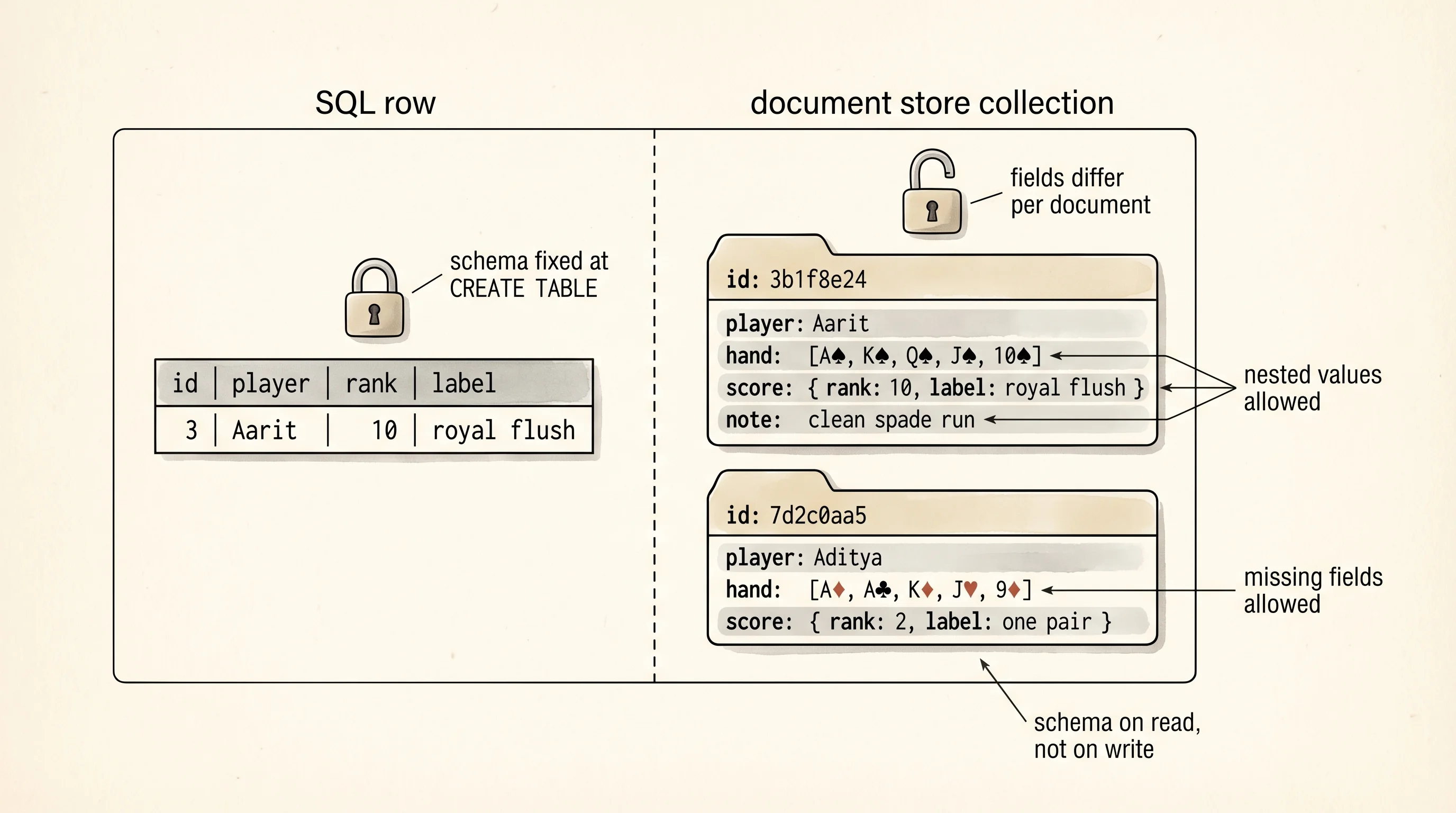
A filing cabinet has drawers. A drawer has folders. Every folder holds a stack of papers and the papers inside one folder do not have to match the papers inside the next folder — one folder holds a birth certificate, another holds a stack of receipts, a third holds a 40-page contract with a sticky note on it. The label on the front of each folder is the only rule. A document store is that filing cabinet for data. The drawers are called collections. The folders are called documents. Each document is a JSON object, and two documents in the same collection can have wildly different shapes. The store asks only that you give each folder an id on the label.
The relational library from the last two lessons handles well-shaped rows. A lot of the web is not well-shaped. Doug Cutting open-sourced Hadoop in 2006 at Yahoo to crunch search-index data across a thousand commodity disks, and teams running on Hadoop started saving each record as a fat JSON blob because schema migrations across a thousand boxes were a nightmare. Amazon published its Dynamo paper in October 2007, arguing that for a planet-scale shopping cart you trade some consistency to get more availability. Dwight Merriman and Eliot Horowitz at 10gen in New York shipped MongoDB in 2009. That summer Johan Oskarsson organized the "NoSQL Meetup" in San Francisco, and the crowd at the meetup — Cassandra from Facebook, Redis from Salvatore Sanfilippo, CouchDB from Damien Katz — took the name. NoSQL became shorthand for a family of stores that gave up SQL and schemas and joins in exchange for flexible documents, horizontal scale, or both.
Start a project folder.
cd ~/learning-python
mkdir poker-docs
cd poker-docs
python3 -m venv .venv
source .venv/bin/activate
cd $HOME\learning-python
mkdir poker-docs
cd poker-docs
py -m venv .venv
.venv\Scripts\Activate.ps1Act 1: build a document store from scratch. The store lives in a single JSON file on disk. Every write reads the file, mutates the Python list, and writes the file back. That is slow. It is also exactly how MongoDB worked on its first day, scaled up — a running process holding documents in memory and flushing them to a file. Your version loads the whole file on every call. MongoDB keeps it in a memory-mapped region and streams only the dirty pages. The shape is the same. Write doc_store.py.
from __future__ import annotations
import json
import uuid
from pathlib import Path
from typing import Any, Callable


Document = dict[str, Any]
Predicate = Callable[[Document], bool]


class DocStore:
    def __init__(self, path: str | Path) -> None:
        self.path = Path(path)
        if not self.path.exists():
            self.path.write_text("[]", encoding="utf-8")

    def _read(self) -> list[Document]:
        return json.loads(self.path.read_text(encoding="utf-8"))

    def _write(self, docs: list[Document]) -> None:
        self.path.write_text(json.dumps(docs, indent=2), encoding="utf-8")
        print("--- file now ---")
        print(self.path.read_text(encoding="utf-8"))

    def insert(self, doc: Document) -> Document:
        docs = self._read()
        stored = {"_id": str(uuid.uuid4())[:8], **doc}
        docs.append(stored)
        self._write(docs)
        return stored

    def find(self, predicate: Predicate) -> list[Document]:
        return [d for d in self._read() if predicate(d)]

    def find_one(self, predicate: Predicate) -> Document | None:
        for d in self._read():
            if predicate(d):
                return d
        return None

    def update(self, predicate: Predicate, changes: Document) -> int:
        docs = self._read()
        count = 0
        for d in docs:
            if predicate(d):
                d.update(changes)
                count += 1
        self._write(docs)
        return count

    def delete(self, predicate: Predicate) -> int:
        docs = self._read()
        kept = [d for d in docs if not predicate(d)]
        removed = len(docs) - len(kept)
        self._write(kept)
        return removed


def main() -> None:
    store = DocStore("hands.json")
    store.delete(lambda d: True)

    store.insert({"player": "Aarit", "hand": ["As", "Ks", "Qs", "Js", "10s"], "score": {"rank": 10, "label": "royal flush"}})
    store.insert({"player": "Aditya", "hand": ["Ad", "Ac", "Kd", "Jh", "9d"], "score": {"rank": 2, "label": "one pair"}, "note": "all-in on river"})
    store.insert({"player": "Aarit", "hand": ["Ks", "Kd", "7h", "7s", "Jh"], "score": {"rank": 3, "label": "two pair"}})

    print("### find Aarit's hands")
    for d in store.find(lambda d: d["player"] == "Aarit"):
        print(d["_id"], d["score"]["label"])

    print("### first royal")
    royal = store.find_one(lambda d: d["score"]["rank"] == 10)
    if royal is not None:
        print(royal["_id"], royal["player"], royal["hand"])

    print("### update note on Aarit's royal")
    updated = store.update(
        lambda d: d["player"] == "Aarit" and d["score"]["rank"] == 10,
        {"note": "clean spade run"},
    )
    print("rows updated:", updated)

    print("### delete Aditya")
    removed = store.delete(lambda d: d["player"] == "Aditya")
    print("rows removed:", removed)


if __name__ == "__main__":
    main()
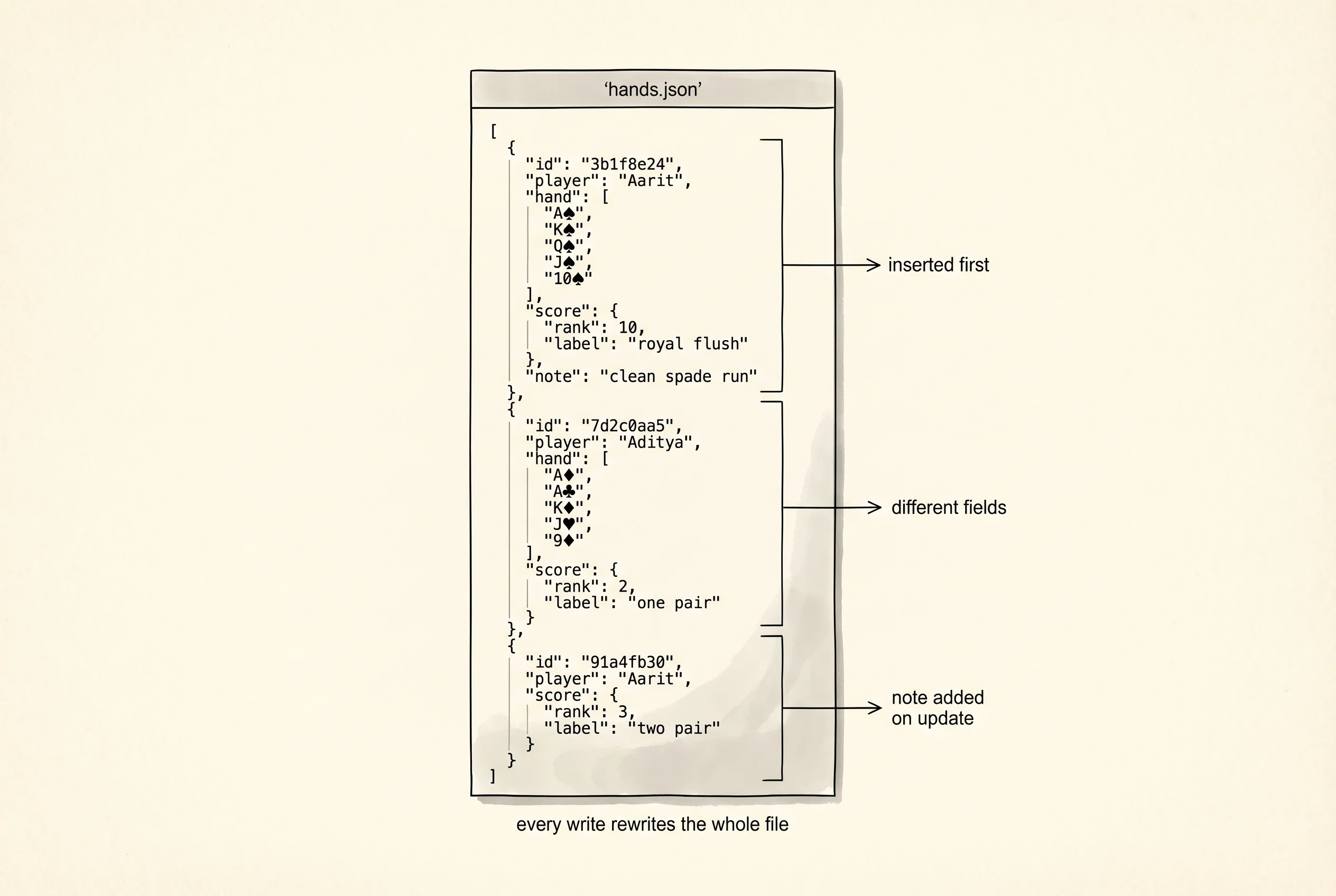
Run python doc_store.py. After each write the store prints the entire JSON file so you see the on-disk state move.
--- file now ---
[]
--- file now ---
[
  {
    "_id": "3b1f8e24",
    "player": "Aarit",
    "hand": ["As", "Ks", "Qs", "Js", "10s"],
    "score": {"rank": 10, "label": "royal flush"}
  }
]
--- file now ---
[
  { "_id": "3b1f8e24", ... },
  {
    "_id": "7d2c0aa5",
    "player": "Aditya",
    "hand": ["Ad", "Ac", "Kd", "Jh", "9d"],
    "score": {"rank": 2, "label": "one pair"},
    "note": "all-in on river"
  }
]
--- file now ---
[
  { "_id": "3b1f8e24", ... },
  { "_id": "7d2c0aa5", ..., "note": "all-in on river" },
  {
    "_id": "91a4fb30",
    "player": "Aarit",
    "hand": ["Ks", "Kd", "7h", "7s", "Jh"],
    "score": {"rank": 3, "label": "two pair"}
  }
]
### find Aarit's hands
3b1f8e24 royal flush
91a4fb30 two pair
### first royal
3b1f8e24 Aarit ['As', 'Ks', 'Qs', 'Js', '10s']
### update note on Aarit's royal
--- file now ---
[
  { "_id": "3b1f8e24", ..., "note": "clean spade run" },
  { "_id": "7d2c0aa5", ... },
  { "_id": "91a4fb30", ... }
]
rows updated: 1
### delete Aditya
--- file now ---
[
  { "_id": "3b1f8e24", ..., "note": "clean spade run" },
  { "_id": "91a4fb30", ... }
]
rows removed: 1
Three things jump out from the output. Aarit's royal flush folder picked up a note field after the update. The note field did not exist on the original document and it did not exist on Aarit's two-pair document either. No migration, no ALTER TABLE — a folder just grew a new piece of paper in it. That is the flexibility trade. Two documents in the same collection have different shapes on disk, and your code has to reach for d.get("note") instead of d["note"] when it reads, because the field may or may not exist. The predicate is a plain Python function. MongoDB replaces that with a JSON query document — {"player": "Aarit"} — but the job is identical: take a doc, return a bool. Every find, update, and delete walks the whole collection because there is no index. That is the performance trade. MongoDB builds B-tree indexes on fields you ask it to, same as the relational world; you just have to ask.
Act 2. Throw the handmade cabinet away and meet tinydb. TinyDB is the grown-up version of exactly what you just wrote — a single-file JSON document store written by Markus Siemens in 2013 for Python projects that want MongoDB's shape without a server. For the real thing with indexes and clustering you would install MongoDB Community Server and use pymongo; for local work TinyDB is faster to set up and the API is the same shape.
pip install tinydbpip install tinydbWrite with_tinydb.py.
from tinydb import TinyDB, Query


def main() -> None:
    db = TinyDB("hands_tiny.json")
    db.truncate()

    db.insert({"player": "Aarit", "hand": ["As", "Ks", "Qs", "Js", "10s"], "score": {"rank": 10, "label": "royal flush"}})
    db.insert({"player": "Aditya", "hand": ["Ad", "Ac", "Kd", "Jh", "9d"], "score": {"rank": 2, "label": "one pair"}, "note": "all-in on river"})
    db.insert({"player": "Aarit", "hand": ["Ks", "Kd", "7h", "7s", "Jh"], "score": {"rank": 3, "label": "two pair"}})

    Hand = Query()

    print("### find Aarit's hands")
    for d in db.search(Hand.player == "Aarit"):
        print(d["score"]["label"])

    print("### first royal")
    royal = db.get(Hand.score.rank == 10)
    if royal is not None:
        print(royal["player"], royal["hand"])

    print("### update note on Aarit's royal")
    updated = db.update(
        {"note": "clean spade run"},
        (Hand.player == "Aarit") & (Hand.score.rank == 10),
    )
    print("doc ids updated:", updated)

    print("### delete Aditya")
    removed = db.remove(Hand.player == "Aditya")
    print("doc ids removed:", removed)


if __name__ == "__main__":
    main()
Run it. Open hands_tiny.json and read the contents.
{
  "_default": {
    "1": {
      "player": "Aarit",
      "hand": ["As", "Ks", "Qs", "Js", "10s"],
      "score": { "rank": 10, "label": "royal flush" },
      "note": "clean spade run"
    },
    "3": {
      "player": "Aarit",
      "hand": ["Ks", "Kd", "7h", "7s", "Jh"],
      "score": { "rank": 3, "label": "two pair" }
    }
  }
}
TinyDB nests everything under a default collection name and uses auto-incrementing integer ids instead of your uuid hex string. The Query class builds predicates that look like attribute access — Hand.score.rank == 10 compiles to a function that reads the nested rank field. The & combines two predicates with AND (you would also see | for OR). The API reads Pythonic, and the file format is still JSON you can open in any editor. Underneath, the machinery matches the cabinet you wrote.
A question worth answering from the output: why did TinyDB keep the _default wrapper when your handwritten store held a plain list? TinyDB supports multiple named collections — you could db.table("users") and get a second collection inside the same file, which is how MongoDB organizes tables under one database. The wrapper reserves the space. Your cabinet only held one drawer; TinyDB is a full cabinet from day one.
You have an API that scores poker hands. You have a database that can store them. Neither knows the other exists yet. The next lesson wires them together.