What Is an API?
A busy restaurant has a little shelf between the kitchen and the dining room with a heat lamp over it. Waiters slide tickets onto a spike on the kitchen side. Cooks slide finished plates onto the shelf on the dining room side. Neither side steps into the other room. The shelf is a contract: tickets in, plates out, and both sides agree on what a ticket looks like and what a plate looks like. An API is that shelf between two programs. One program writes a request in a shape the other program promises to understand. The other program writes a response in a shape the first program promises to understand. Nobody wanders into anybody else's kitchen.
The shape was not always this clean. In 1991 a consortium called the OMG published CORBA, the Common Object Request Broker Architecture, which tried to make a function on one computer feel like a function on yours. It was a swamp. Every vendor shipped a different implementation, the wire format was binary, and wiring two CORBA systems together took weeks. In 1999 Microsoft's Don Box and others pushed SOAP, which dressed everything in XML envelopes and a separate file called WSDL that described the contract. SOAP worked, and banks still run it, but the messages were long and noisy. In 2000 a graduate student at UC Irvine named Roy Fielding wrote his PhD dissertation, "Architectural Styles and the Design of Network-based Software Architectures," and in chapter 5 he described a style he called REST — Representational State Transfer. The idea: use the verbs HTTP already has (GET, POST, PUT, DELETE), name things with URLs, send JSON or plain text as the body, and let the HTTP status code say what happened. Simple enough to type by hand. The Twitter API in 2006, Amazon S3 the same year, and Stripe in 2011 all shipped REST, and the developer world stopped arguing.
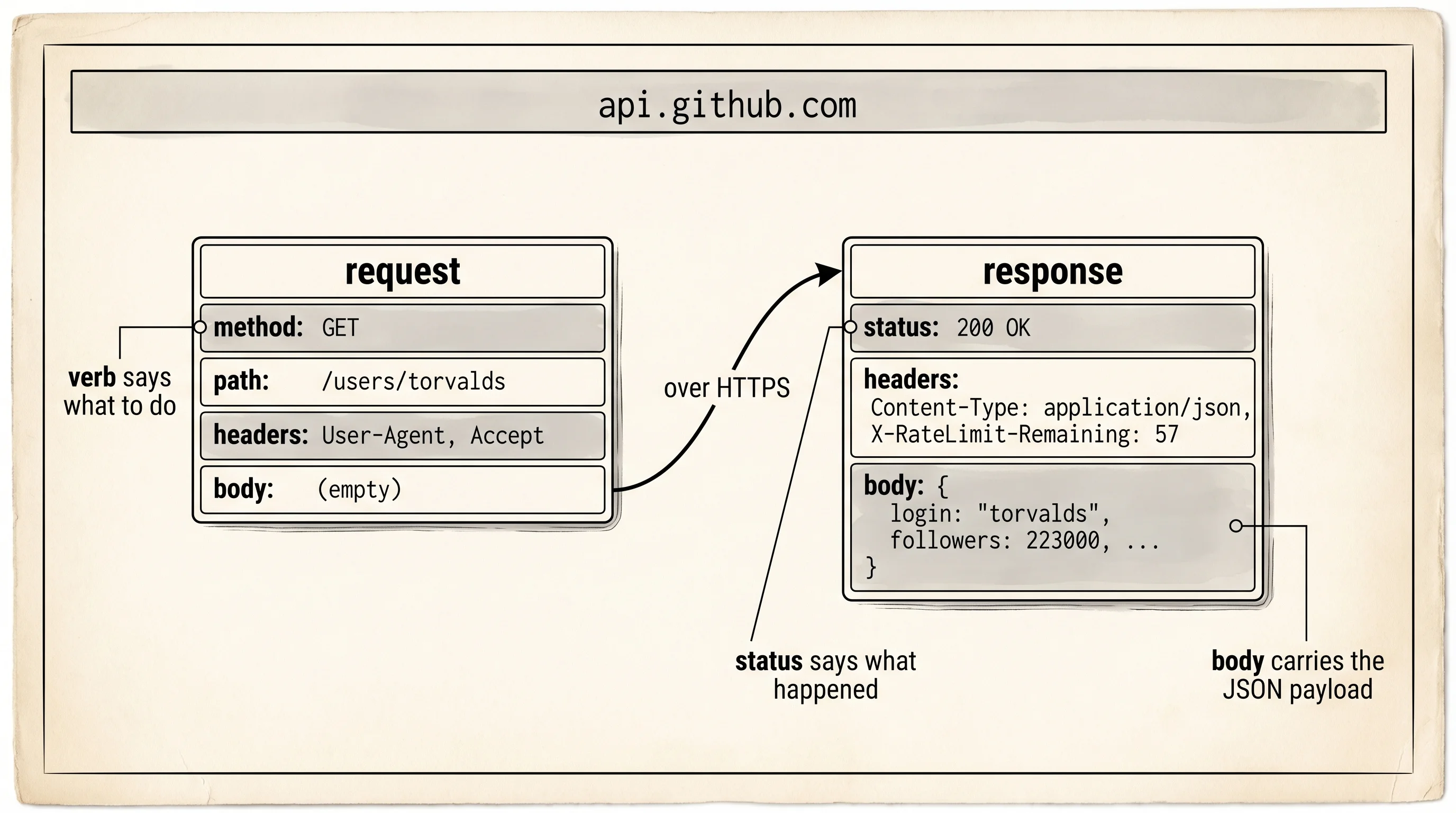
A request has four parts. A method — the verb, like GET to read or POST to write. A path — the URL, which names the thing. Headers — small key-value strings that carry metadata like what kind of content you want. A body — optional, carrying the payload when you are sending data in. A response has three parts. A status code — a 3-digit number where 2xx means it worked, 4xx means the caller messed up, 5xx means the server messed up. Headers. A body, usually JSON. That is the whole shelf.
GitHub runs a public REST API at api.github.com. Every repository, user, and commit on the site has a URL. The URL for a user's public profile is /users/<username>. Try it from the terminal before you touch Python. The tool is curl, the same curl you used in the ETL lesson — it speaks HTTP from the command line. Make sure your venv is active and run one call.
curl -i https://api.github.com/users/torvaldscurl.exe -i https://api.github.com/users/torvaldsThe -i flag tells curl to print the response headers before the body. Linus Torvalds wrote Linux in 1991 and git in 2005, so GitHub uses his profile as its demo page. The output arrives in two parts separated by a blank line.
HTTP/2 200
server: github.com
content-type: application/json; charset=utf-8
x-ratelimit-limit: 60
x-ratelimit-remaining: 57
x-ratelimit-reset: 1713193200
cache-control: public, max-age=60

{
  "login": "torvalds",
  "id": 1024025,
  "type": "User",
  "name": "Linus Torvalds",
  "company": "Linux Foundation",
  "location": "Portland, OR",
  "public_repos": 7,
  "followers": 223000,
  "created_at": "2011-09-03T15:26:22Z"
}
Read the headers. HTTP/2 200 is the status line — version 2 of the protocol, status 200 for OK. content-type tells your program the body is JSON, so you should parse it as JSON and not as plain text. x-ratelimit-remaining: 57 tells you GitHub will accept 57 more unauthenticated calls from your IP this hour before it starts rejecting you with a 403. Rate limits are how public APIs keep one caller from eating the whole kitchen.
Now the same call from Python with no third-party libraries. The standard library ships a module called urllib.request that speaks HTTP. You will replace it with a friendlier library called requests later, but the first call must be at the bare metal so you see what a friendlier library hides. Save this as github_profile.py in your learning-python folder.
import json
import urllib.request

url = "https://api.github.com/users/torvalds"
request = urllib.request.Request(url, headers={"User-Agent": "aarit-learning"})

with urllib.request.urlopen(request) as response:
    status = response.status
    headers = dict(response.headers)
    body_bytes = response.read()

print("status:", status)
print("--- headers ---")
for key, value in headers.items():
    print(f"{key}: {value}")

print("--- body ---")
payload = json.loads(body_bytes.decode("utf-8"))
print(json.dumps(payload, indent=2)[:400])
print("login:", payload["login"])
print("followers:", payload["followers"])
Run it with python github_profile.py. The two print sections keep the headers and the body on opposite sides of a divider so the two halves of the response stay visible.
status: 200
--- headers ---
Server: github.com
Content-Type: application/json; charset=utf-8
X-RateLimit-Limit: 60
X-RateLimit-Remaining: 56
X-RateLimit-Reset: 1713193200
Cache-Control: public, max-age=60
...
--- body ---
{
  "login": "torvalds",
  "id": 1024025,
  "type": "User",
  "name": "Linus Torvalds",
  "company": "Linux Foundation",
  "location": "Portland, OR",
  ...
}
login: torvalds
followers: 223000
Three lines of this script are worth slowing down on. The User-Agent header is polite — GitHub requires every caller to identify itself, and if you skip it you get a 403. The with urllib.request.urlopen(...) context manager opens a TCP connection, sends the request, reads the response, and closes the socket when the block exits. The body arrives as raw bytes because HTTP does not know or care that the bytes happen to be text. You decode them as UTF-8, then hand them to json.loads which turns the string into a Python dictionary. A requests.get(url).json() call would do all four steps in one line — that is the shortcut you earn after you understand what it hides.
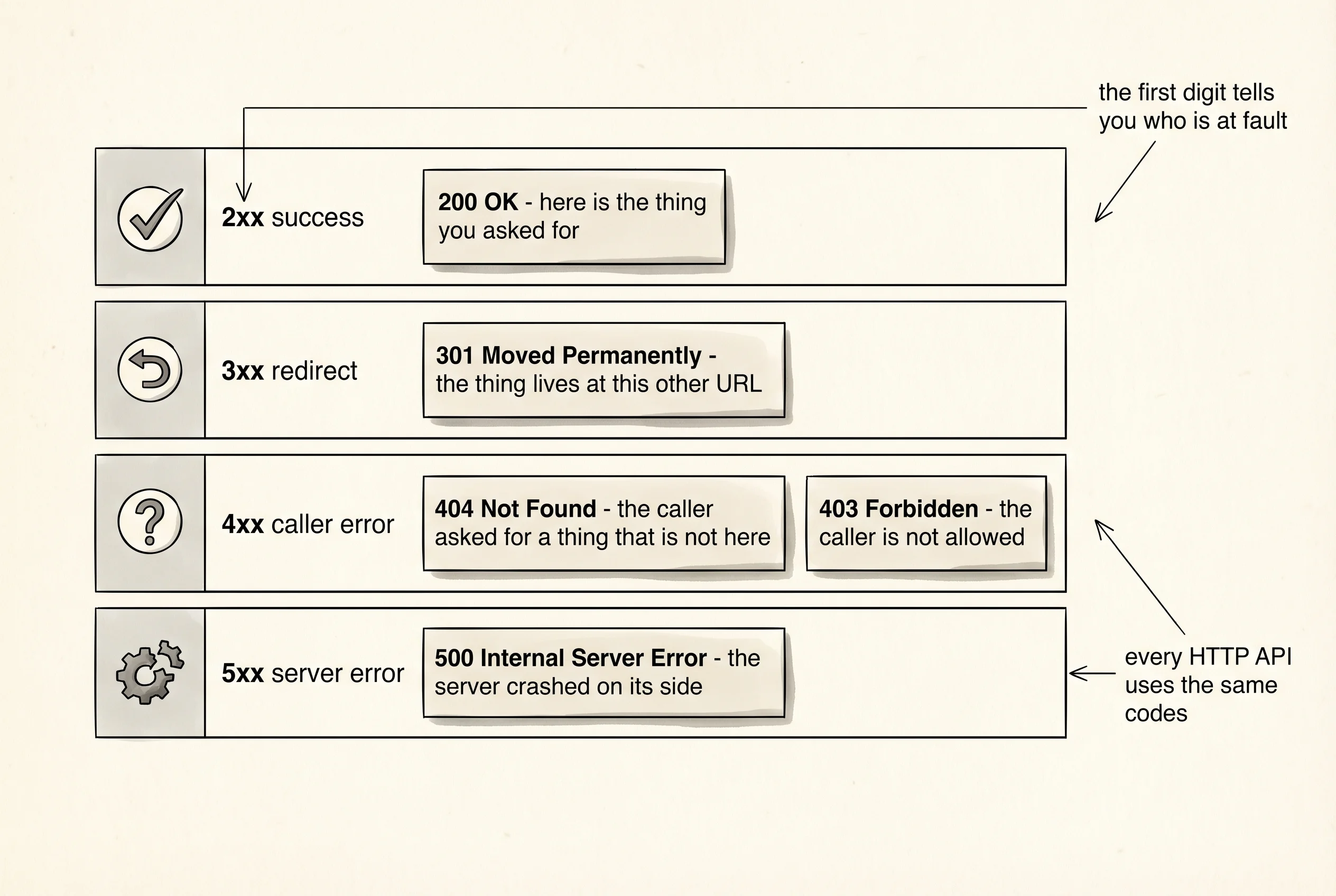
A question worth answering from the output: what happens when you call a user who does not exist? Change the URL in the script to https://api.github.com/users/this-user-absolutely-does-not-exist-42 and run it again.
urllib.error.HTTPError: HTTP Error 404: Not FoundThe server returned status 404, which means the caller asked for a thing that is not there. urllib.request.urlopen raises a urllib.error.HTTPError on any 4xx or 5xx status because by default it treats those as errors. The requests library does not — it returns the response object and leaves the check to you. Both behaviors are defensible. What matters is that the number 404 crossed the wire and told your program exactly what was wrong, in the same language any other client would have understood.
You called someone else's API and read what it sent back. You have not built one yet. The next lesson puts you behind the kitchen window — you write the handlers, you set the menu, you decide what the responses look like.