Elastic Beanstalk and LightSail
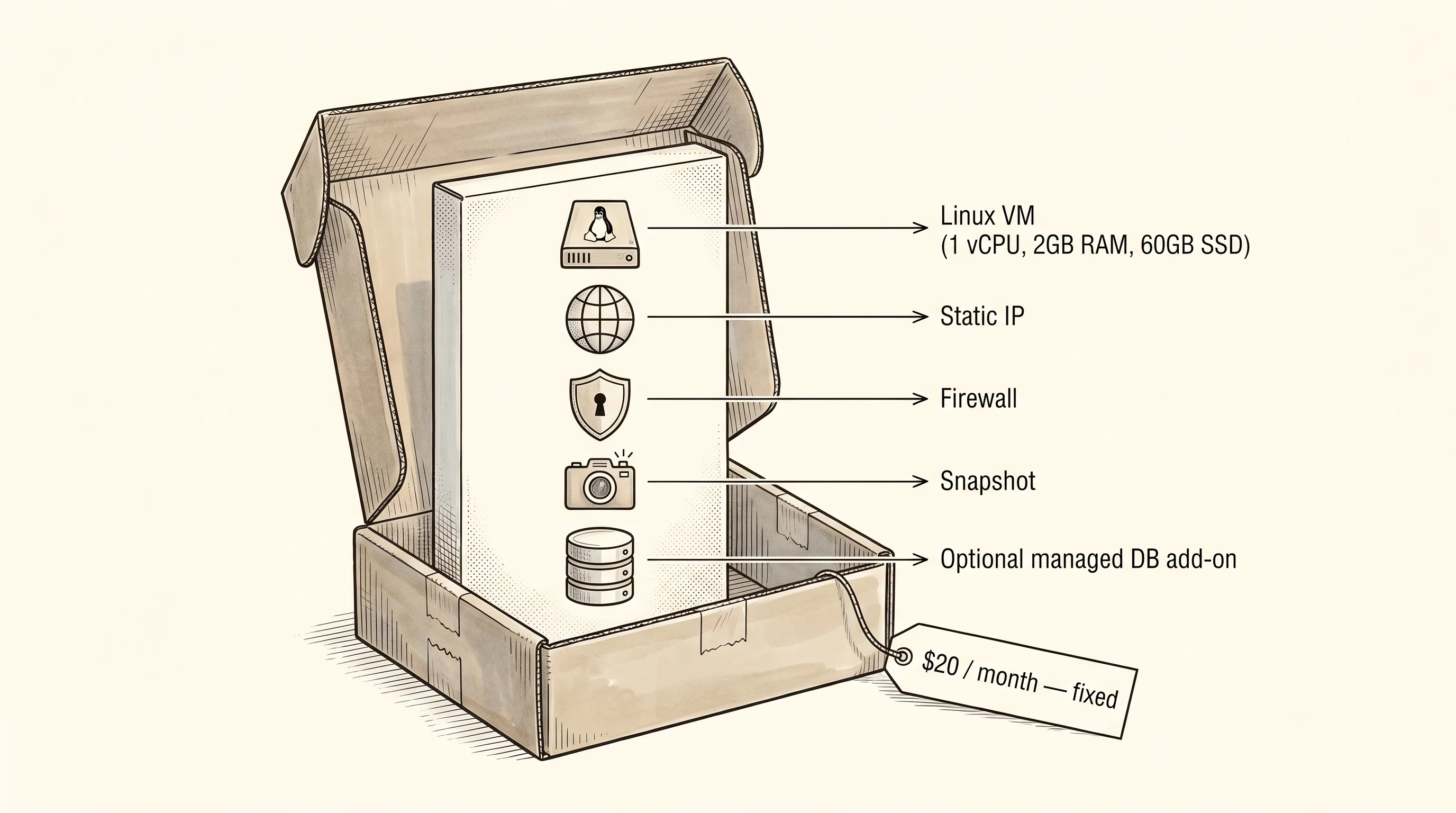
Walk into a Best Buy and you can leave with three different gaming setups. The first is a bag of parts — case, motherboard, CPU, RAM, GPU, fans, cables — and you bolt the thing together at your desk. The second is a pre-built tower from a company like Falcon Northwest where the parts are picked for you, the wiring is done, and somebody already ran the stress tests. The third is a Mac Mini sitting on a shelf in a sealed box with one price tag and one power cord. EC2 is the bag of parts. Elastic Beanstalk is the pre-built tower. Lightsail is the Mac Mini. All three end with a computer that plays the same games, but the amount of work between the credit card swipe and the first frame is wildly different.
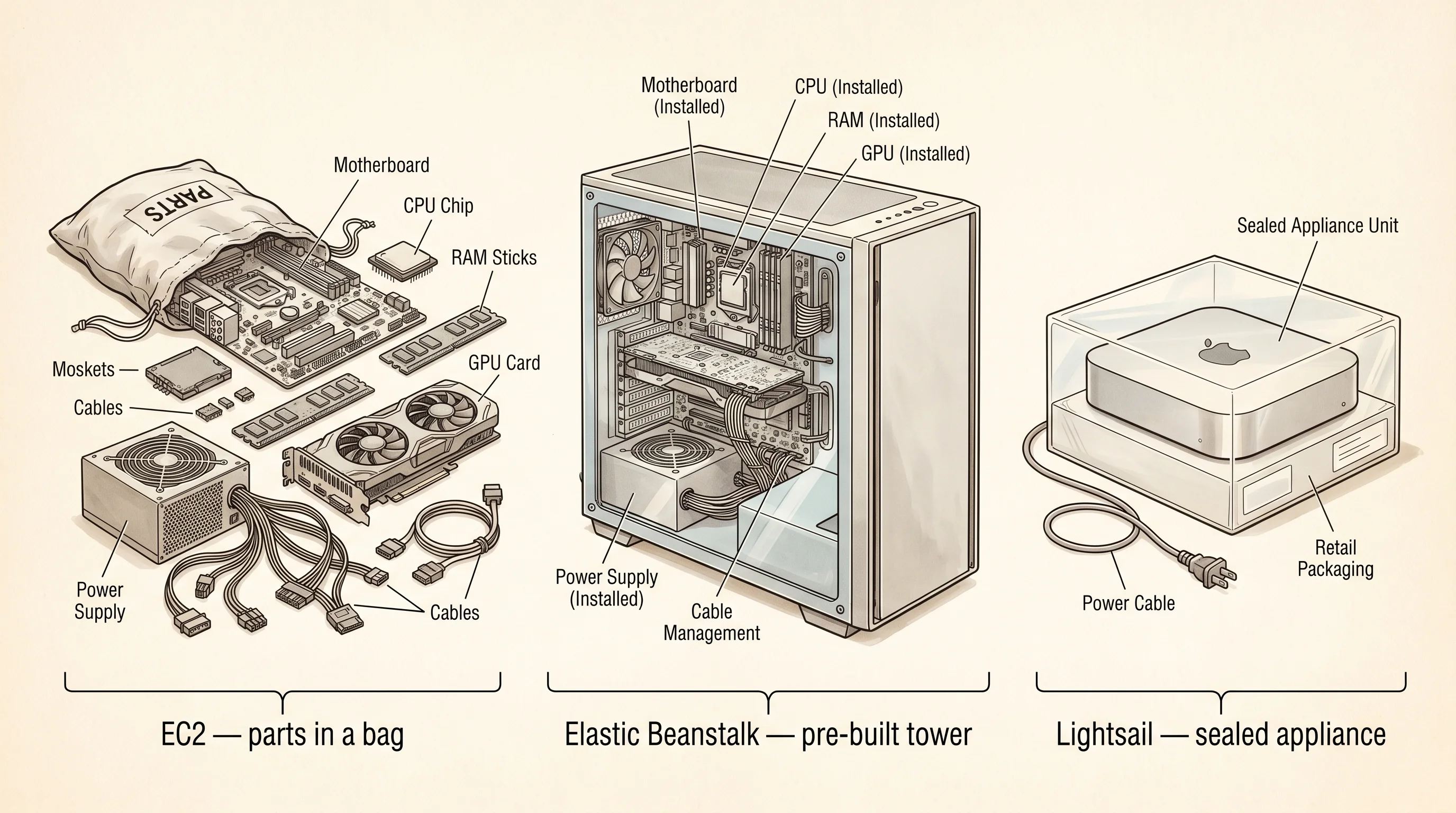
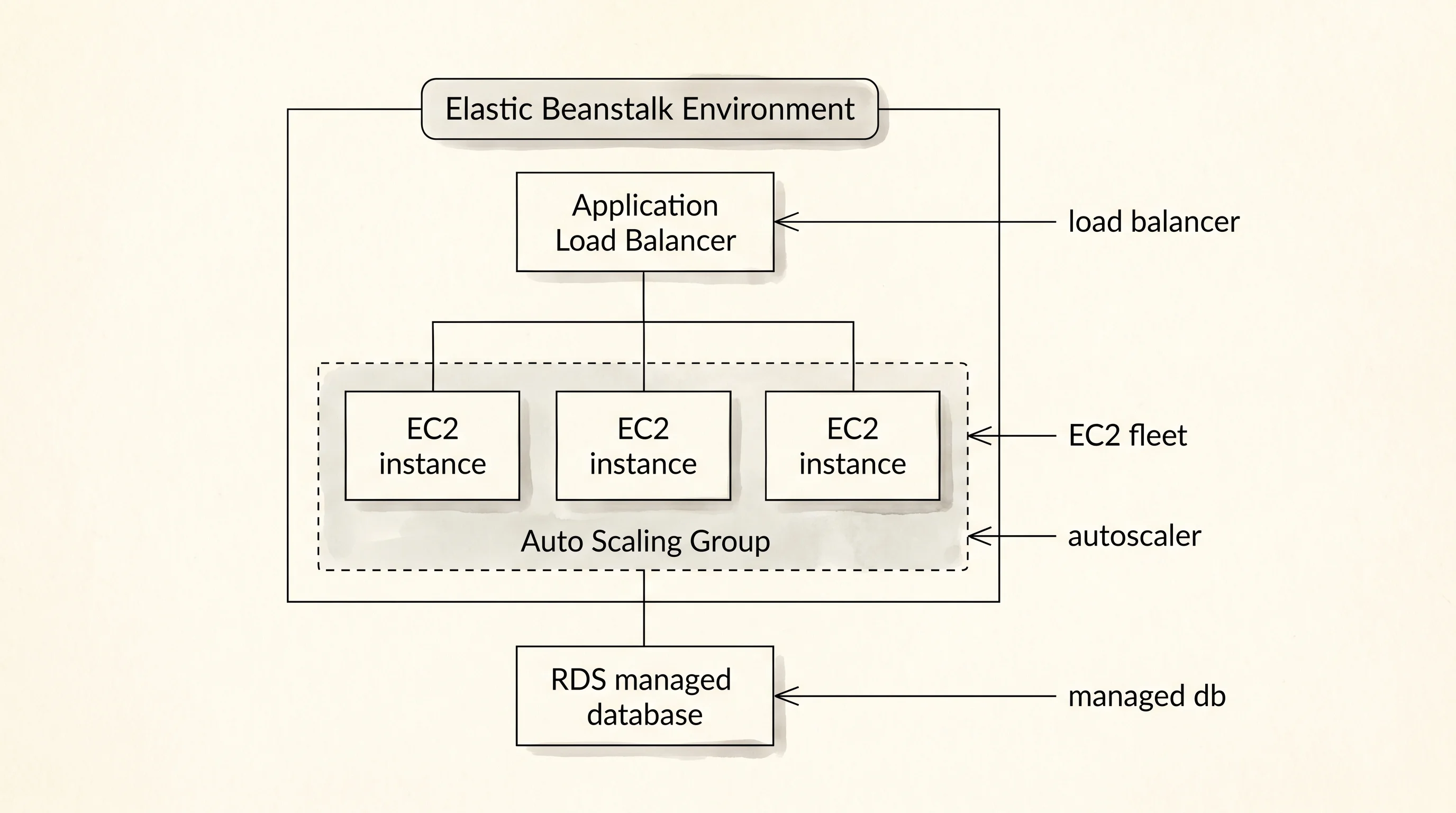
Amazon launched EC2 in 2006 and within two years they noticed the same thing happening over and over. A developer would rent an EC2 instance, then spend three days wiring a load balancer in front of it, attaching an Auto Scaling group behind it, hooking up an RDS database, configuring CloudWatch alarms, and writing the deploy script that pushes new versions without dropping traffic. Every team rebuilt the same stack from scratch. In 2011 Amazon shipped Elastic Beanstalk to package that stack into one button — pick a runtime, upload a zip, and Beanstalk creates the EC2 instances, the load balancer, the auto-scaling rules, and the deployment pipeline for you. It is the pre-built tower. The parts inside are still EC2 and ALB and RDS, but somebody else picked them and bolted them together.
Lightsail showed up in 2016 to solve the other end of the problem. A side-project developer does not want a tower at all. They want a $5-a-month Linux box that comes with a static IP, a firewall, and a snapshot button — the cloud equivalent of a Mac Mini you plug in and forget about. Beanstalk was still too much machinery for that crowd, and EC2's pricing calculator scared them off because the bill could swing from $4 to $40 depending on data transfer. Lightsail's promise is one fixed monthly price for a fixed VM bundle. No surprises, no auto-scaling, no load balancer in front, no architecture diagram. One box.
The first thing to model is what you are deploying. Three facts about the app drive every downstream decision.
#[derive(Copy, Clone, PartialEq, Eq)]
enum DeployTarget {
    Beanstalk,
    Lightsail,
}

#[derive(Copy, Clone, PartialEq, Eq)]
#[allow(dead_code)]
enum Traffic {
    Steady,
    Bursty,
}

struct App {
    name: &'static str,
    runtime: &'static str,
    needs_db: bool,
    expected_traffic: Traffic,
}

struct DeployResult {
    target: DeployTarget,
    machines: &'static str,
    load_balancer: bool,
    autoscale: bool,
    managed_db: bool,
    monthly_cost_usd: u32,
    setup_minutes: u32,
    knobs_exposed: u32,
}
DeployTarget is the picker — you are choosing Beanstalk or Lightsail and the type forces the caller to name which one. Traffic carries one piece of business knowledge the deploy plan cares about: is the load steady all day or does it spike during dinner hours? That single fact decides whether the pre-built tower needs to wake more identical towers when the room gets hot. App is the smallest description of what you are shipping — a name, a runtime, whether it touches a database, and the traffic pattern. DeployResult is what the cloud hands back: a plain bag of facts about the machines that will exist after the deploy finishes, what they cost, and how many knobs the operator now has to worry about.
A struct of eight fields is a deliberate choice here. The alternative is to return a String of human-readable text and let the caller parse it, which is how Amazon's own console pages started in 2010 and which created a cottage industry of scrapers. A typed struct lets the rest of the program ask result.autoscale and get a bool, not a regex match. Every fact a deploy produces should be a field, never a sentence.
The deploy function is one match statement. The whole point of the lesson lives inside it.
fn deploy(app: &App, target: DeployTarget) -> DeployResult {
    match target {
        DeployTarget::Beanstalk => DeployResult {
            target,
            machines: "auto-scaling group of EC2",
            load_balancer: true,
            autoscale: matches!(app.expected_traffic, Traffic::Bursty),
            managed_db: app.needs_db,
            monthly_cost_usd: 95,
            setup_minutes: 25,
            knobs_exposed: 40,
        },
        DeployTarget::Lightsail => DeployResult {
            target,
            machines: "one fixed VM bundle",
            load_balancer: false,
            autoscale: false,
            managed_db: app.needs_db,
            monthly_cost_usd: 20,
            setup_minutes: 8,
            knobs_exposed: 6,
        },
    }
}

fn name_of(t: DeployTarget) -> &'static str {
    match t {
        DeployTarget::Beanstalk => "Elastic Beanstalk",
        DeployTarget::Lightsail => "Lightsail",
    }
}

fn traffic_of(t: Traffic) -> &'static str {
    match t {
        Traffic::Steady => "steady",
        Traffic::Bursty => "bursty",
    }
}

fn yes_no(b: bool) -> &'static str {
    if b { "yes" } else { "no" }
}
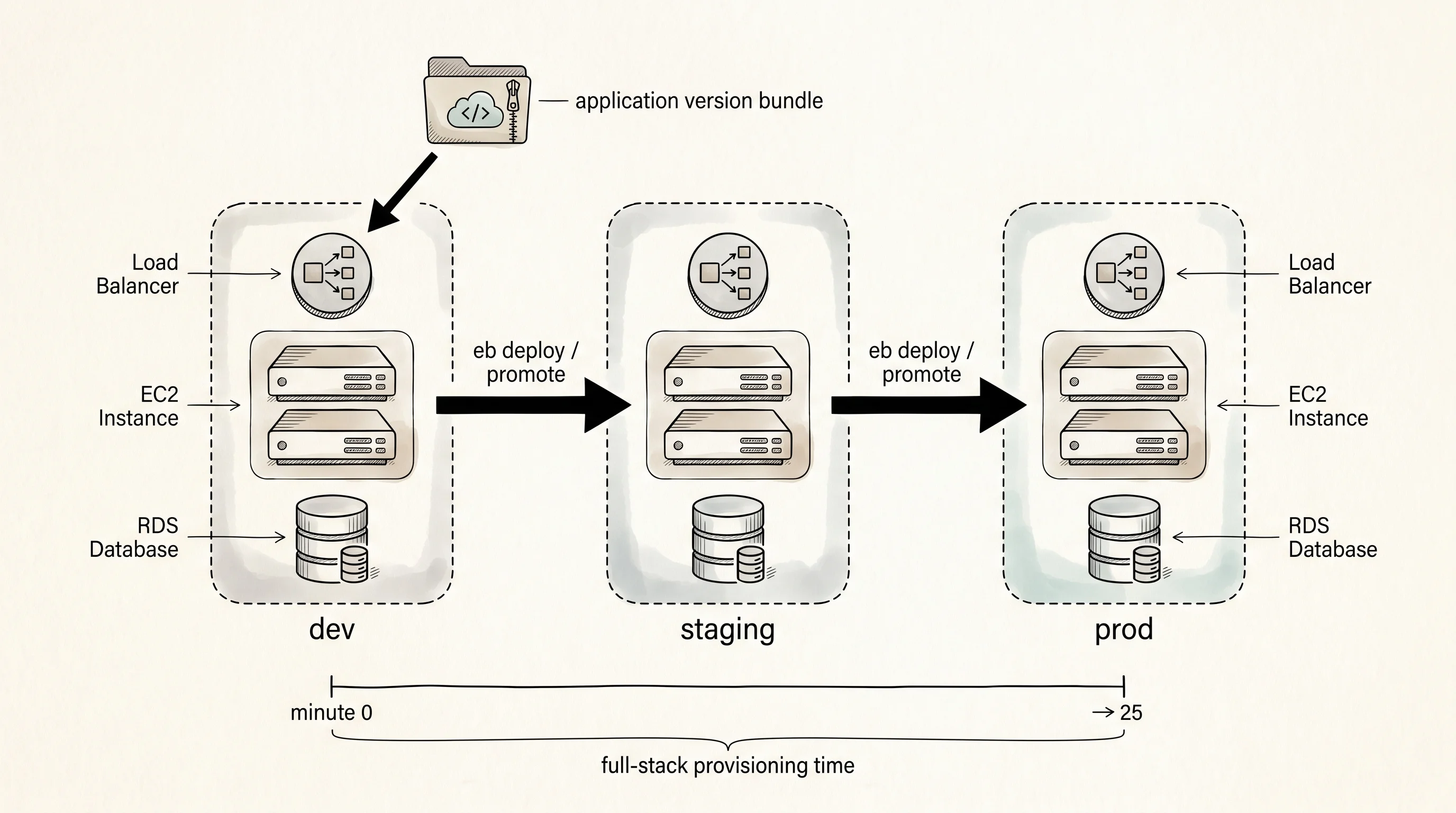
Reading the Beanstalk arm tells you what the tower actually contains. The machines are an auto-scaling group of EC2 instances, not one box. A load balancer sits in front of those instances so a browser hitting your domain never knows which instance answered. The autoscale flag flips on when the app's traffic is bursty, which is the case the analogy was built around — dinner-hour spikes mean the tower has to clone itself for an hour and then shrink back. Managed db means RDS sits next to the app and gets backups, failovers, and patches without you touching a config file. The cost is higher because you are renting a fleet, and the setup time is twenty-five minutes because Beanstalk has to spin up every piece. Forty knobs are exposed in the console — instance type, health-check path, rolling-deploy batch size, environment variables, every layer is a setting you can override if you need to.
The Lightsail arm strips almost all of that. One fixed VM bundle, no load balancer, no autoscale, twenty dollars flat. Setup is eight minutes because the only thing happening is provisioning a single box from a pre-baked image. Six knobs are exposed because Lightsail's whole pitch is that you do not want the other thirty-four. The managed db field stays on because Lightsail does offer a managed database add-on, just one tier, just one knob — instance size — instead of the dozen RDS gives you.
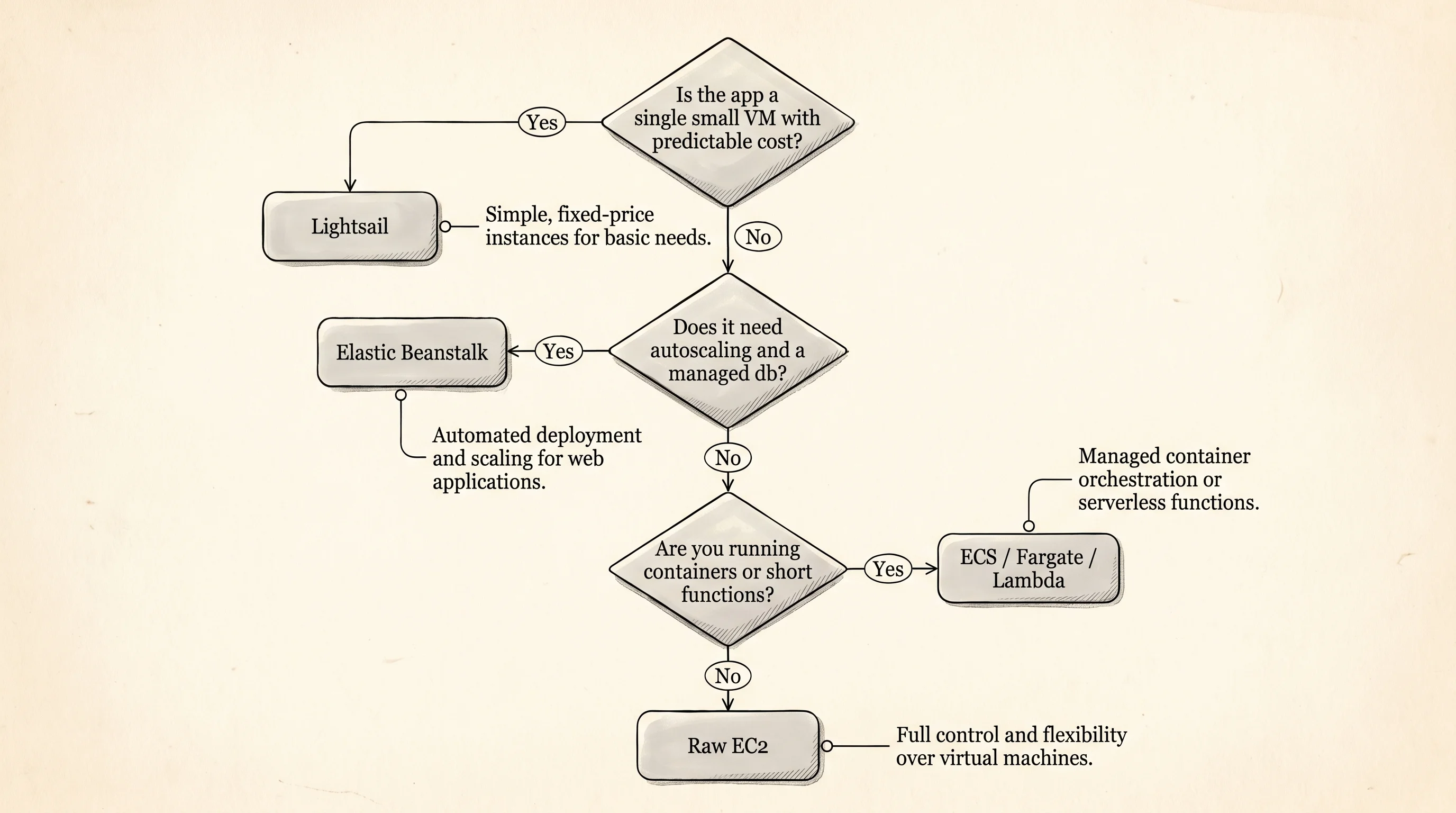
This is the trade. Beanstalk gives you elasticity and durability and pays for it with cost and knobs. Lightsail gives you predictability and simplicity and pays for it with a ceiling on what the app can handle. Neither one is the right answer for every app. A toy URL shortener with twelve users a day belongs on Lightsail and would waste money on Beanstalk. A growing SaaS that doubles every quarter belongs on Beanstalk and would suffocate on Lightsail's fixed VM. An app that already needs hundreds of containers with custom networking belongs on neither — it has outgrown both and should be on ECS or EKS or Lambda.
Drive both deploys through the same App and print the plans side by side.
fn print_app(app: &App) {
    println!("name:    {}", app.name);
    println!("runtime: {}", app.runtime);
    println!("db:      {}", yes_no(app.needs_db));
    println!("traffic: {}", traffic_of(app.expected_traffic));
}

fn print_plan(p: &DeployResult) {
    println!("target:        {}", name_of(p.target));
    println!("machines:      {}", p.machines);
    println!("load balancer: {}", yes_no(p.load_balancer));
    println!("autoscale:     {}", yes_no(p.autoscale));
    println!("managed db:    {}", yes_no(p.managed_db));
    println!("cost / month:  ${}", p.monthly_cost_usd);
    println!("setup time:    {} min", p.setup_minutes);
    println!("knobs exposed: {}", p.knobs_exposed);
}

fn print_compare(a: &DeployResult, b: &DeployResult) {
    let diff_cost = a.monthly_cost_usd as i32 - b.monthly_cost_usd as i32;
    let diff_setup = a.setup_minutes as i32 - b.setup_minutes as i32;
    println!("cost gap:  Beanstalk costs ${} more / month", diff_cost);
    println!("setup gap: Beanstalk takes {} more minutes", diff_setup);
    println!("verdict:   bursty + db -> Beanstalk; small + cheap -> Lightsail");
}
The driver is twenty lines. It builds one App, calls deploy twice with the two targets, and prints each DeployResult plus a one-line comparison at the end. The comparison math is the part the reader should actually look at — the cost gap and the setup gap are the two numbers that decide most architecture meetings.
--- app ---
name:    menu-app
runtime: rust-axum
db:      yes
traffic: bursty

--- elastic beanstalk plan ---
target:        Elastic Beanstalk
machines:      auto-scaling group of EC2
load balancer: yes
autoscale:     yes
managed db:    yes
cost / month:  $95
setup time:    25 min
knobs exposed: 40

--- lightsail plan ---
target:        Lightsail
machines:      one fixed VM bundle
load balancer: no
autoscale:     no
managed db:    yes
cost / month:  $20
setup time:    8 min
knobs exposed: 6

--- side by side ---
cost gap:  Beanstalk costs $75 more / month
setup gap: Beanstalk takes 17 more minutes
verdict:   bursty + db -> Beanstalk; small + cheap -> Lightsail
Read the output top to bottom. The app block names the thing being deployed and confirms the traffic pattern is bursty. The Beanstalk plan shows the tower — an auto-scaling group, a load balancer, autoscale on because traffic is bursty, a managed RDS, $95 a month, twenty-five minutes of setup, and forty knobs in the console. The Lightsail plan shows the Mac Mini — one fixed bundle, no balancer, no autoscale, the same managed db option, $20 a month, eight minutes of setup, and six knobs total. The side-by-side block computes the gap: Beanstalk costs $75 more every month and takes 17 more minutes to set up the first time. The verdict line is the rule of thumb — bursty traffic with a database wants Beanstalk; small predictable apps want Lightsail.
One question worth asking — if the cost gap is $75 a month, why would anybody pick Beanstalk for a side project? They would not, and that is the whole point of having two products. Amazon could have left Lightsail off the menu and shoved every customer into Beanstalk, but the people building weekend projects would have walked to DigitalOcean or Linode where $5 boxes have been the norm since 2011. Lightsail exists because Beanstalk's $95 floor scared off the bottom of the market, not because Beanstalk was missing a feature.
The thing both of these products cannot do is hold an app that has outgrown one tower or one Mac Mini — once you need bin-packed containers across dozens of hosts with their own service-discovery and rolling-update semantics, the pre-built tower runs out of room, which is what ECS, EKS, and Fargate exist to solve.