S3 with aws-sdk-rust
A self-storage facility down the freeway rents you a numbered unit, hands you a key, and asks no questions about what you put inside. The unit might hold a couch, a stack of comic books, or a single shoebox — the office does not know and does not care. You drive up, roll the door open, drop your stuff inside, roll the door shut, and drive off. Amazon S3 is the same building. The units are called buckets, the things inside are called objects, and the office is a worldwide fleet of servers that promises to keep the door closed and the contents intact for as long as you keep paying rent.
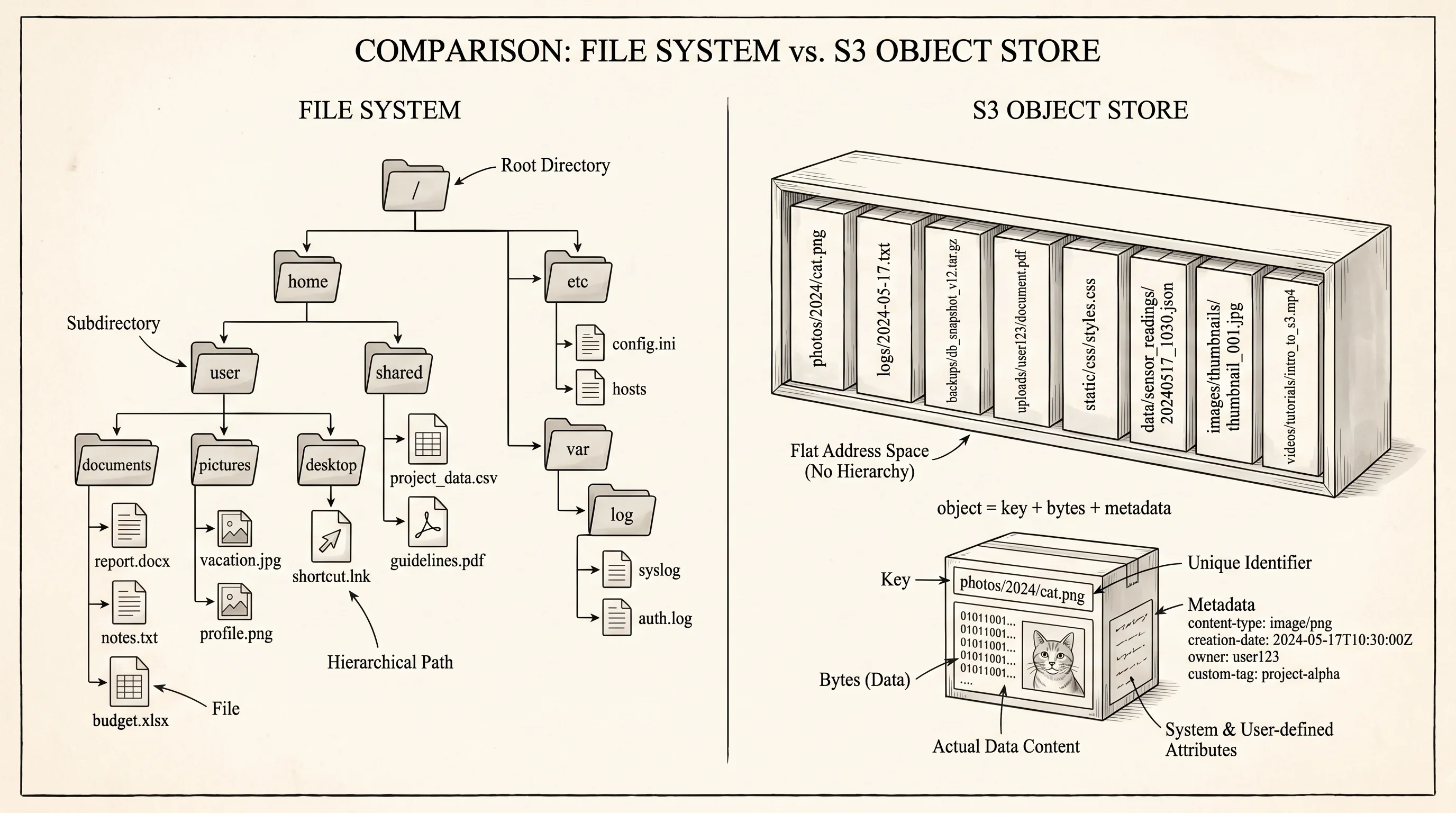
S3 launched in March 2006, the first service Amazon Web Services ever shipped. The team behind it — led by Allan Vermeulen and a small group at the Seattle office — had watched the company's own developers waste months provisioning disk arrays for every new project, then waste more months when those arrays filled up or burned out. Vermeulen's bet was that nobody actually wanted to manage disks. They wanted to call a function, hand over some bytes, and trust that the bytes would be there when they called back. The team built a system where you address each blob of bytes by a name (the key) inside a named container (the bucket), and the underlying machinery — which racks the data lived on, how many copies existed, which datacenter held them — was somebody else's problem. The first customers paid 15 cents a gigabyte a month. Within 18 months, S3 was storing more objects than every other Amazon service combined.
The first thing to internalize is that S3 is not a filesystem. A filesystem gives you folders that contain folders that contain files, and the operating system tracks every parent-child relationship in a tree. S3 has no tree. It has a flat dictionary inside each bucket — every object is identified by one string key, and the slashes inside that string are just characters. The key trips/2024/iceland.jpg is not "the file iceland.jpg inside the folder 2024 inside the folder trips." It is a single 22-character key whose lookup costs the same as any other key. The console draws a folder tree on top of those keys so the screen makes sense to a human, but the storage layer behind the curtain only knows the flat dictionary.
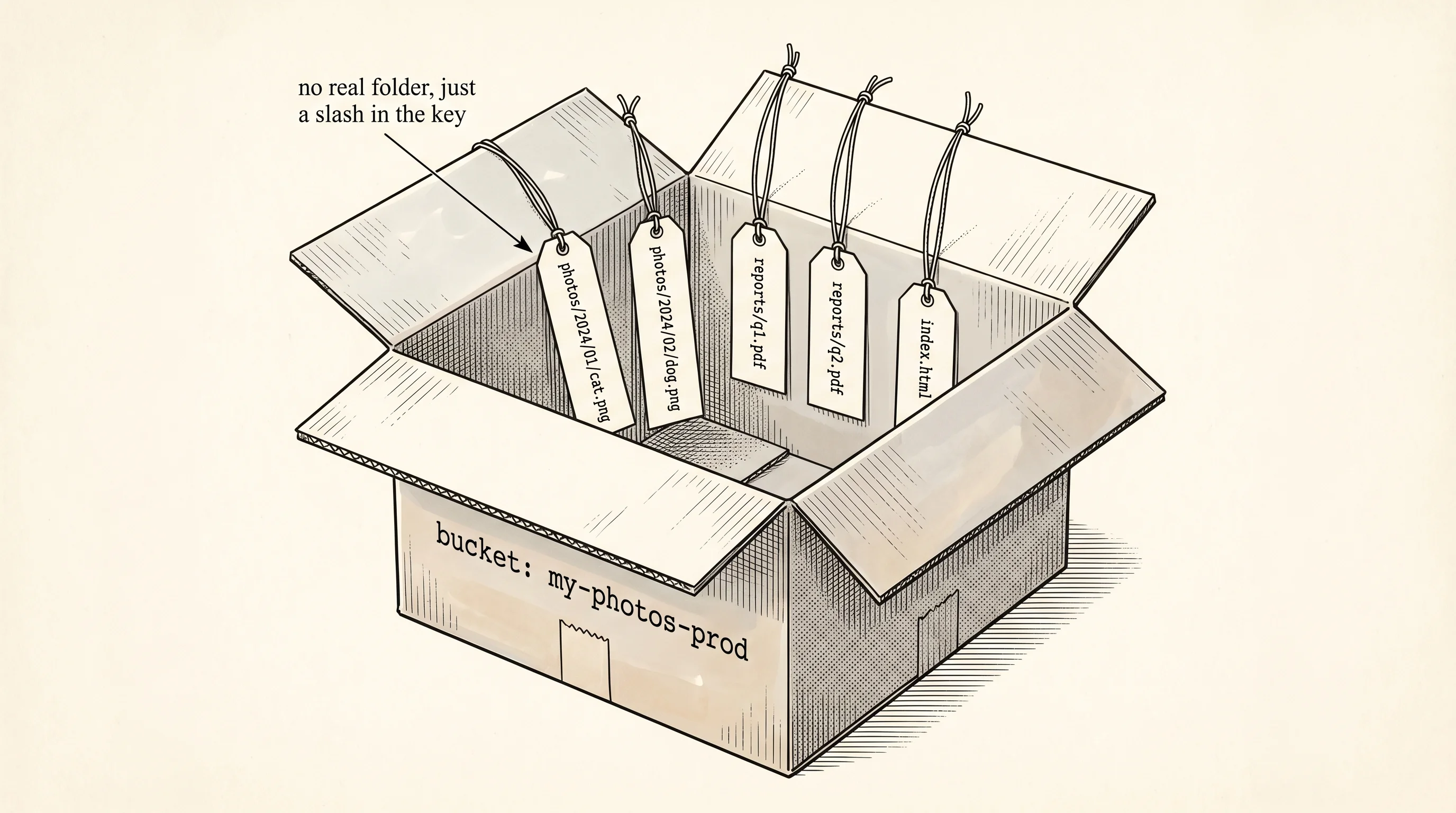
The second thing — bucket names are global. Not global within your account, not global within your region, global across every AWS customer on Earth. Once somebody else's account has a bucket named photos, no other account can ever make one. The early Amazon engineers picked this trade because it lets the URL https://photos.s3.amazonaws.com/iceland.jpg resolve without anybody specifying which account owns the bucket — the bucket name alone is enough. That choice has caused 19 years of frustration for developers trying to name their first bucket, and it is why every team in the industry now prefixes bucket names with their company name or a UUID.
The aws-sdk-rust crate is the official Rust client Amazon released in late 2022 after spending two years rewriting their SDK story across every language. The shape of the calls — client.put_object().bucket(...).key(...).body(...).send().await — is identical to the shape in the JavaScript and Python SDKs, because the team generates them all from the same internal service model. What you learn here transfers everywhere.
To see the moves without the network, here is a tiny in-memory S3 written in pure stdlib Rust. A Bucket holds a BTreeMap from key to object. An S3Client holds a BTreeMap from bucket name to bucket. Four methods cover the everyday work — put, get, list, delete.
#[derive(Clone, Copy, Debug)]
enum StorageClass {
    Standard,
    InfrequentAccess,
    Glacier,
}

struct Object {
    body: Vec<u8>,
    content_type: String,
    storage_class: StorageClass,
}

struct Bucket {
    // name and region are part of the bucket's identity in real S3 even
    // though our demo only addresses buckets through the client's map key.
    #[allow(dead_code)]
    name: String,
    #[allow(dead_code)]
    region: String,
    objects: BTreeMap<String, Object>,
}

struct S3Client {
    buckets: BTreeMap<String, Bucket>,
}
The Object struct carries the body bytes, the content type that tells browsers how to render it, and the storage class. Storage class is the part where S3 stops being a single product and starts being a price menu. The default tier, called Standard, costs about 2.3 cents per gigabyte per month and serves a request in tens of milliseconds. Standard-Infrequent Access drops the storage cost by roughly half but charges a small fee per retrieval — meant for the file you save once and read twice a year. Glacier and Glacier Deep Archive drop the storage cost by another order of magnitude but make you wait minutes or hours for the bytes to come back. The same put_object call accepts a different storage class and the underlying machinery shuttles your bytes to a different tier of hardware, transparently.
aws-s3/storage-class-tierscontent/image-manifest.json, then run pnpm generate:images.The API itself is short — create the bucket, drop objects in, ask the bucket what is inside, fetch one, delete one.
#[derive(Debug)]
enum S3Error {
    NoSuchBucket,
    NoSuchKey,
}

impl S3Client {
    fn new() -> Self {
        Self {
            buckets: BTreeMap::new(),
        }
    }

    fn create_bucket(&mut self, name: &str, region: &str) {
        self.buckets.insert(
            name.to_string(),
            Bucket {
                name: name.to_string(),
                region: region.to_string(),
                objects: BTreeMap::new(),
            },
        );
    }

    fn put_object(
        &mut self,
        bucket: &str,
        key: &str,
        body: Vec<u8>,
        content_type: &str,
        class: StorageClass,
    ) -> Result<(), S3Error> {
        let b = self.buckets.get_mut(bucket).ok_or(S3Error::NoSuchBucket)?;
        b.objects.insert(
            key.to_string(),
            Object {
                body,
                content_type: content_type.to_string(),
                storage_class: class,
            },
        );
        Ok(())
    }

    fn get_object(&self, bucket: &str, key: &str) -> Result<&Object, S3Error> {
        let b = self.buckets.get(bucket).ok_or(S3Error::NoSuchBucket)?;
        b.objects.get(key).ok_or(S3Error::NoSuchKey)
    }

    fn list_objects(&self, bucket: &str, prefix: &str) -> Result<Vec<&String>, S3Error> {
        let b = self.buckets.get(bucket).ok_or(S3Error::NoSuchBucket)?;
        Ok(b.objects.keys().filter(|k| k.starts_with(prefix)).collect())
    }

    fn delete_object(&mut self, bucket: &str, key: &str) -> Result<(), S3Error> {
        let b = self.buckets.get_mut(bucket).ok_or(S3Error::NoSuchBucket)?;
        b.objects.remove(key).ok_or(S3Error::NoSuchKey)?;
        Ok(())
    }
}
Notice that list_objects takes a prefix. S3 has no folders, but because every key is just a string, you can ask "give me every key that starts with trips/" and the server walks the sorted index returning matches. That is how the console fakes a folder tree — when you click on trips/, the UI fires a list request with that prefix and renders the results as if they were a directory. The BTreeMap in our mock keeps keys in sorted order for the same reason — when somebody asks for a prefix, we walk a contiguous range.
The driver creates a bucket, puts four objects into it (a photo, a caption, an older photo in cheaper storage, a giant video in deep archive), lists everything under trips/, gets one object, deletes one, then asks for the deleted key and a missing bucket to show how the errors come back.
fn show_class(c: StorageClass) -> &'static str {
    match c {
        StorageClass::Standard => "STANDARD",
        StorageClass::InfrequentAccess => "STANDARD_IA",
        StorageClass::Glacier => "GLACIER",
    }
}

fn main() {
    let mut s3 = S3Client::new();
    s3.create_bucket("aarit-photos", "us-east-1");
    println!("created bucket: aarit-photos (us-east-1)");
    println!();

    s3.put_object(
        "aarit-photos",
        "trips/2024/iceland.jpg",
        vec![0u8; 2_400_000],
        "image/jpeg",
        StorageClass::Standard,
    )
    .unwrap();
    s3.put_object(
        "aarit-photos",
        "trips/2024/iceland.txt",
        b"day 3, glacier hike, batteries dead".to_vec(),
        "text/plain",
        StorageClass::Standard,
    )
    .unwrap();
    s3.put_object(
        "aarit-photos",
        "trips/2019/legos.jpg",
        vec![0u8; 900_000],
        "image/jpeg",
        StorageClass::InfrequentAccess,
    )
    .unwrap();
    s3.put_object(
        "aarit-photos",
        "archive/2012/baby.mp4",
        vec![0u8; 84_000_000],
        "video/mp4",
        StorageClass::Glacier,
    )
    .unwrap();
    println!("put 4 objects.");
    println!();

    println!("list prefix 'trips/':");
    for key in s3.list_objects("aarit-photos", "trips/").unwrap() {
        let o = s3.get_object("aarit-photos", key).unwrap();
        println!(
            "  {} ({} bytes, {}, {})",
            key,
            o.body.len(),
            o.content_type,
            show_class(o.storage_class),
        );
    }
    println!();

    let got = s3.get_object("aarit-photos", "trips/2024/iceland.txt").unwrap();
    println!(
        "get trips/2024/iceland.txt -> {} bytes, type {}",
        got.body.len(),
        got.content_type,
    );
    println!();

    s3.delete_object("aarit-photos", "trips/2019/legos.jpg").unwrap();
    println!("delete trips/2019/legos.jpg");
    println!();

    let missing = s3.get_object("aarit-photos", "trips/2019/legos.jpg");
    println!("get deleted key -> {}", outcome(&missing));
    let no_bucket = s3.get_object("nope", "x");
    println!("get from missing bucket -> {}", outcome(&no_bucket));
}

fn outcome(r: &Result<&Object, S3Error>) -> String {
    match r {
        Ok(o) => format!("Ok({} bytes)", o.body.len()),
        Err(e) => format!("Err({:?})", e),
    }
}
Running the binary prints exactly what a real S3 console would show you, minus the network round trips.
created bucket: aarit-photos (us-east-1)

put 4 objects.

list prefix 'trips/':
  trips/2019/legos.jpg (900000 bytes, image/jpeg, STANDARD_IA)
  trips/2024/iceland.jpg (2400000 bytes, image/jpeg, STANDARD)
  trips/2024/iceland.txt (35 bytes, text/plain, STANDARD)

get trips/2024/iceland.txt -> 35 bytes, type text/plain

delete trips/2019/legos.jpg

get deleted key -> Err(NoSuchKey)
get from missing bucket -> Err(NoSuchBucket)
The list comes back in sorted order — 2019 before 2024, iceland.jpg before iceland.txt because dot comes before nothing in ASCII. That ordering is not an accident. The real S3 returns keys in lexicographic order too, because the underlying index is a sorted structure built for prefix scans. If you want chronological order, you bake the date into the start of the key (the way our example does) and the sort takes care of the rest.
The real aws-sdk-s3 call shape, in a Tokio program with the crate added, looks like this. The cfg gate keeps the block out of our snapshot binary so the workspace build does not pull tokio and hyper and 80 transitive dependencies just to render the code block — in your own project you would drop the gate and add the SDK to Cargo.toml.
// What the real aws-sdk-s3 calls look like in a Tokio program.
// Gated with #[cfg(any())] so this lesson's binary stays stdlib-only
// and the workspace build does not pull tokio + hyper + ~80 transitive
// deps just to render a code block. In a real project you would add
// aws-config and aws-sdk-s3 to Cargo.toml, drop the cfg, and run on a
// Tokio runtime.
#[cfg(any())]
mod real_sdk {
    use aws_config::BehaviorVersion;
    use aws_sdk_s3::primitives::ByteStream;
    use aws_sdk_s3::types::StorageClass;
    use aws_sdk_s3::Client;

    pub async fn upload(bucket: &str, key: &str, bytes: Vec<u8>) -> anyhow::Result<()> {
        let config = aws_config::load_defaults(BehaviorVersion::latest()).await;
        let client = Client::new(&config);

        client
            .put_object()
            .bucket(bucket)
            .key(key)
            .body(ByteStream::from(bytes))
            .content_type("image/jpeg")
            .storage_class(StorageClass::Standard)
            .send()
            .await?;
        Ok(())
    }

    pub async fn presign_get(bucket: &str, key: &str) -> anyhow::Result<String> {
        let config = aws_config::load_defaults(BehaviorVersion::latest()).await;
        let client = Client::new(&config);
        let presign = aws_sdk_s3::presigning::PresigningConfig::expires_in(
            std::time::Duration::from_secs(900),
        )?;
        let req = client
            .get_object()
            .bucket(bucket)
            .key(key)
            .presigned(presign)
            .await?;
        Ok(req.uri().to_string())
    }
}
The presign_get half of that snippet is worth a closer look. A presigned URL is S3's answer to a question that bedevils every file-sharing app — how do you let one specific person download one specific object without making the whole bucket public and without forcing that person to have AWS credentials? You sign a regular S3 URL with your secret key plus an expiration timestamp, and the result is a long URL anybody can paste into a browser to download exactly that one object until the timer runs out. The signature is checked by S3 on every request, so nobody can edit the URL to point at a different key. It is the equivalent of the storage facility printing you a one-time-use barcode that opens unit 47-B for the next 15 minutes and then refuses every scan after that.
The other piece of S3 that took a decade to land is the consistency guarantee. From 2006 until December 2020, S3 was eventually consistent for overwrites and deletes — you would write a new version of an object, immediately read it back, and sometimes get the old version because the read had hit a replica that had not synced yet. Developers built elaborate workarounds (writing to new keys instead of overwriting, sleeping for a second before reading). In December 2020, Amazon turned on strong read-after-write consistency for every bucket in every region overnight, at no charge. Every PUT is now visible to every subsequent GET, full stop. The team spent two years rebuilding the index layer to make that promise hold at S3's scale — over 100 trillion objects at the time of the announcement.
aws-s3/presigned-url-flowcontent/image-manifest.json, then run pnpm generate:images.Durability is the number S3 markets in their pitch deck — 11 nines, meaning if you store 10 million objects, you should statistically lose one of them every 10,000 years. They reach that number by writing every object to at least three geographically separate availability zones inside the region you picked, and constantly running a background scrubber that re-reads each replica, checks its checksum, and rebuilds any copy that does not match. You never see this happen. You handed them the bytes once, paid the 2.3 cents, and went home.
aws-s3/durability-replicationcontent/image-manifest.json, then run pnpm generate:images.One question worth asking — why did our mock implementation lose its data the moment the program exited, while real S3 keeps your data for decades after you walk away? Because our S3Client lives in RAM, and RAM is wiped the second the process ends. Real S3 writes every byte to three separate spinning-rust or flash arrays in three separate buildings before it acknowledges your put_object as successful. The acknowledgment is the contract — when the real SDK's .send().await? returns Ok, the bytes are in three datacenters, and the only way to get them out is to call delete_object (or to stop paying the bill).
S3 is excellent for objects you read once or write once. It is bad for the workload where you have one big file and 50 programs all need to edit different pieces of it at the same time, because the smallest unit you can replace is the whole object. That is the bottleneck the next lesson solves — block storage and shared filesystems that let you mount real disks onto an EC2 instance and use them the way a filesystem expects.