EBS, EFS, FSx — the Storage Trio
A restaurant has three kinds of refrigeration in the back. The line cook has a small reach-in cooler bolted to his station so the cuts he is searing tonight sit at arm's length and belong to him alone. The pastry team works out of a walk-in cooler the whole kitchen can step into, where the prep cooks, the pastry chefs, and the dishwasher all grab from the same shelves. And the catering crew rents an industrial blast chiller the size of a truck for the night of a 5000-plate wedding, because nothing else can move that much food that fast for that short a window. EC2 instances need food too. Amazon's three storage services map onto exactly those three coolers, and picking the wrong one is the same kind of mistake as asking a pastry chef to share a reach-in with the grill.
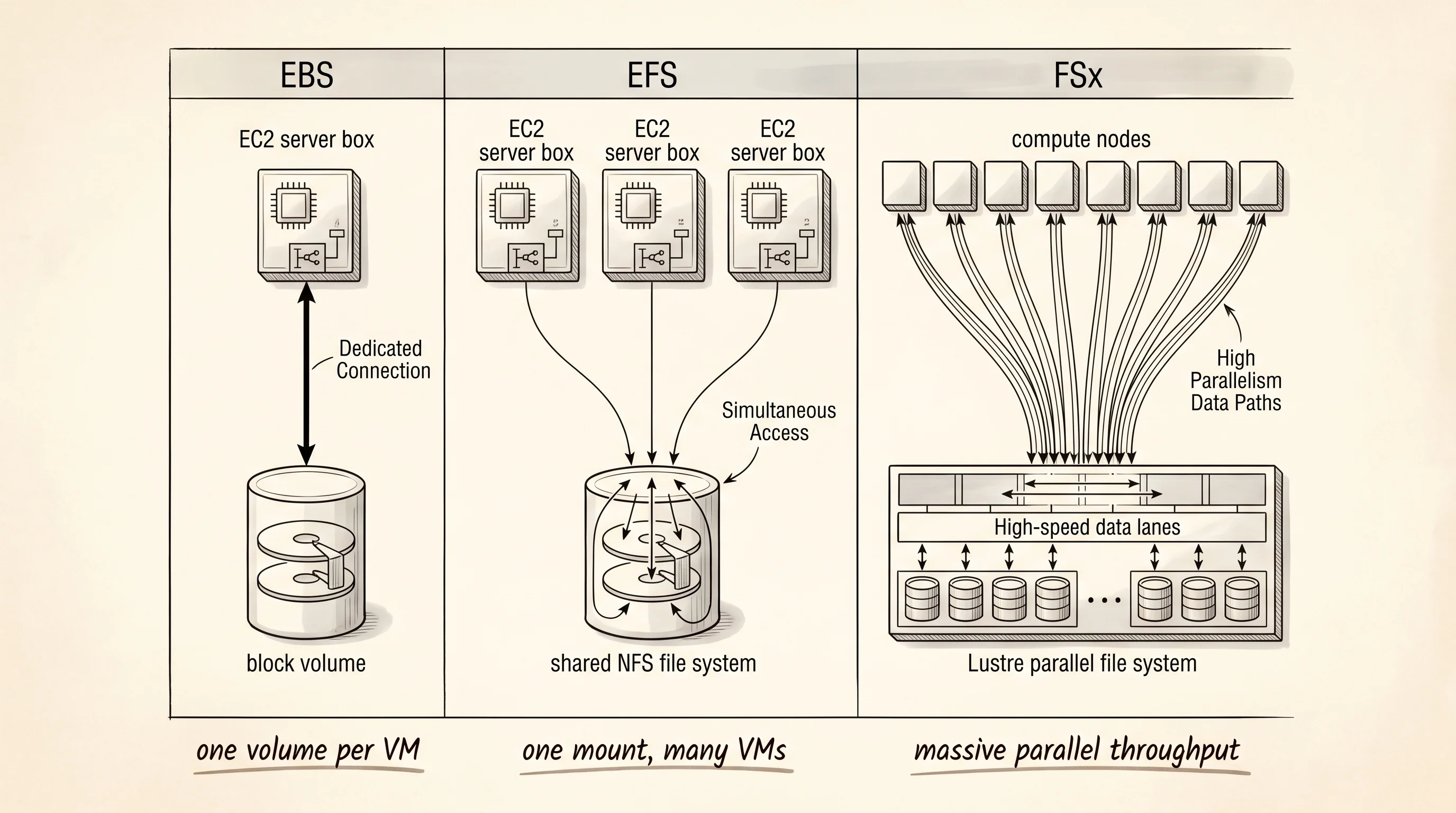
The first cooler showed up in 2008. Amazon had already launched EC2 two years earlier and discovered the obvious problem — when you stopped an instance, every byte on its local disk vanished. A web server with a database on it was a server you could not reboot. The team that solved this shipped Elastic Block Store in August 2008, and it was a block device — meaning the operating system saw it as a raw disk, the same way Linux sees a SATA drive plugged into a motherboard. You could format it with ext4, mount it at /var/lib/mysql, and the bits survived a stop and start of the instance. The catch was the rule that came with it. An EBS volume could attach to exactly one EC2 instance at a time. Block storage gives the kernel permission to cache, reorder, and assume nobody else is writing — and the moment two instances reach for the same blocks the filesystem corrupts itself in seconds. EBS is the line cook's reach-in. Fast, owned, single tenant.
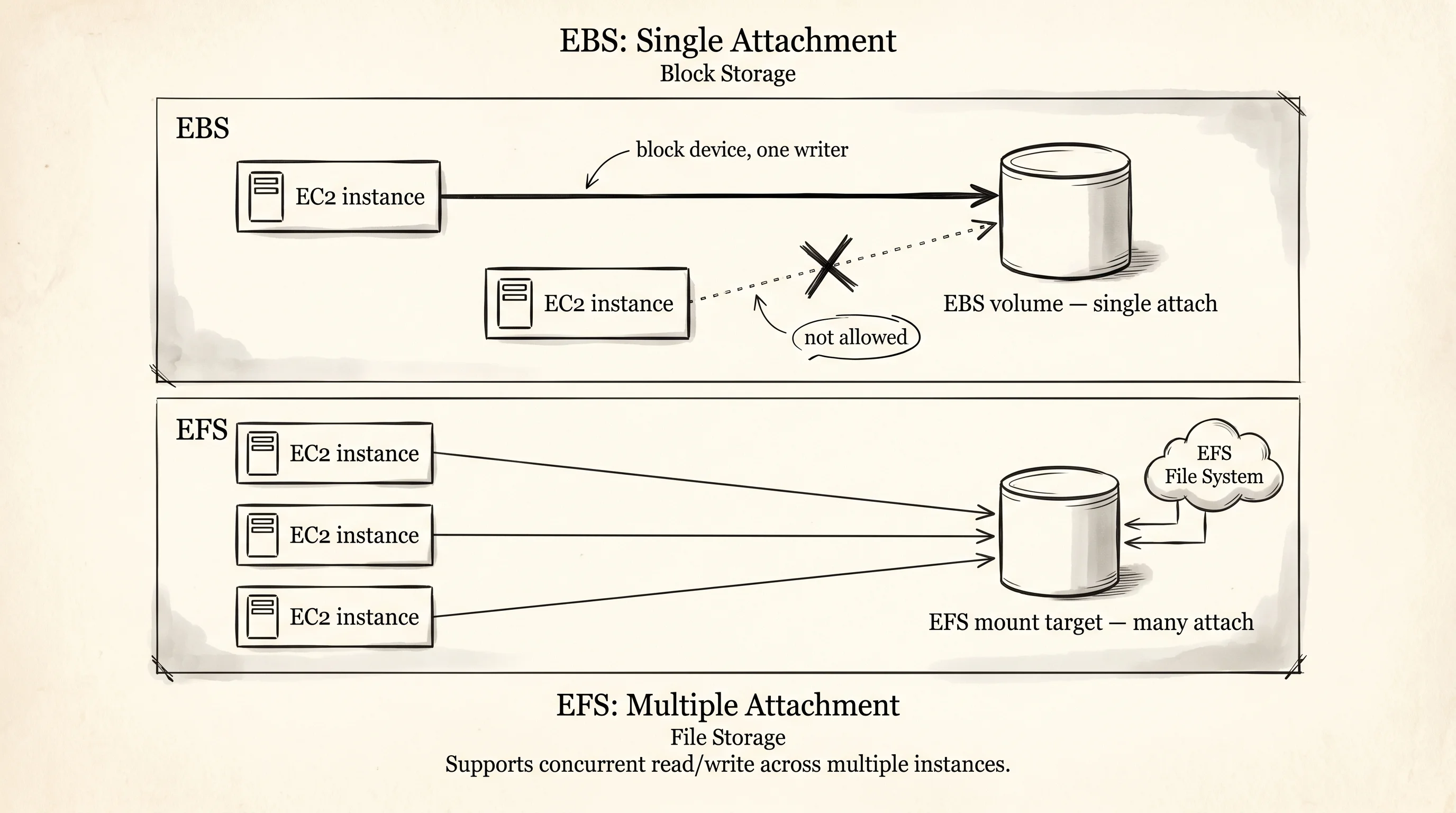
The next problem AWS heard about was content management systems. A team running WordPress on five EC2 instances behind a load balancer needed all five servers to see the same /wp-content/uploads directory, because a user who uploaded a photo to server 3 would refresh the page and hit server 1, and the photo would not be there. EBS could not solve this — the rule was one instance per volume. So in 2015 Amazon shipped Elastic File System, which spoke NFS — the same network file protocol Sun Microsystems invented in 1984 for sharing files between workstations. EFS is not a disk. It is a filesystem that lives on AWS-managed servers, and any number of EC2 instances in the same VPC can mount it at the same path and read and write to the same files. Behind the scenes it copies every write to multiple availability zones so the data survives a whole datacenter going dark. The price for sharing is latency. A read from EFS round-trips through the network and through NFS, which makes it about 3 milliseconds — three times slower than EBS, and slow enough that nobody runs a database on it.
The first knob the program needs is the kind of volume.
#[derive(Copy, Clone, PartialEq, Eq)]
enum StorageKind {
    Ebs,
    Efs,
    FsxLustre,
}

#[derive(Clone)]
struct InstanceId(&'static str);

struct Volume {
    name: &'static str,
    kind: StorageKind,
    size_gb: u32,
    attached_to: Vec<InstanceId>,
}

impl Volume {
    fn new(name: &'static str, kind: StorageKind, size_gb: u32) -> Self {
        Self {
            name,
            kind,
            size_gb,
            attached_to: Vec::new(),
        }
    }

    fn attach(&mut self, id: InstanceId) -> Result<(), &'static str> {
        if self.kind == StorageKind::Ebs && !self.attached_to.is_empty() {
            return Err("EBS allows only one attached instance at a time");
        }
        self.attached_to.push(id);
        Ok(())
    }
}
The StorageKind enum has three variants because there are three coolers — Ebs, Efs, and FsxLustre. Naming them as an enum instead of strings does the same job a Rust enum always does. The compiler refuses to compile a match arm that forgets a variant, and a function that switches on the kind will tell you the day someone adds FsxOntap to the list. The Volume struct holds the name AWS would show you in the console, the kind, the size in gigabytes, and a Vec<InstanceId> of every EC2 instance currently attached to it. The attach method is where the EBS rule lives — if the kind is Ebs and the volume is already attached to something, the call returns Err instead of pretending it worked. This is the same trick the design lessons keep returning to. Illegal states should not be reachable. A function should refuse the bad call at the door, not let the call succeed and corrupt the data downstream.
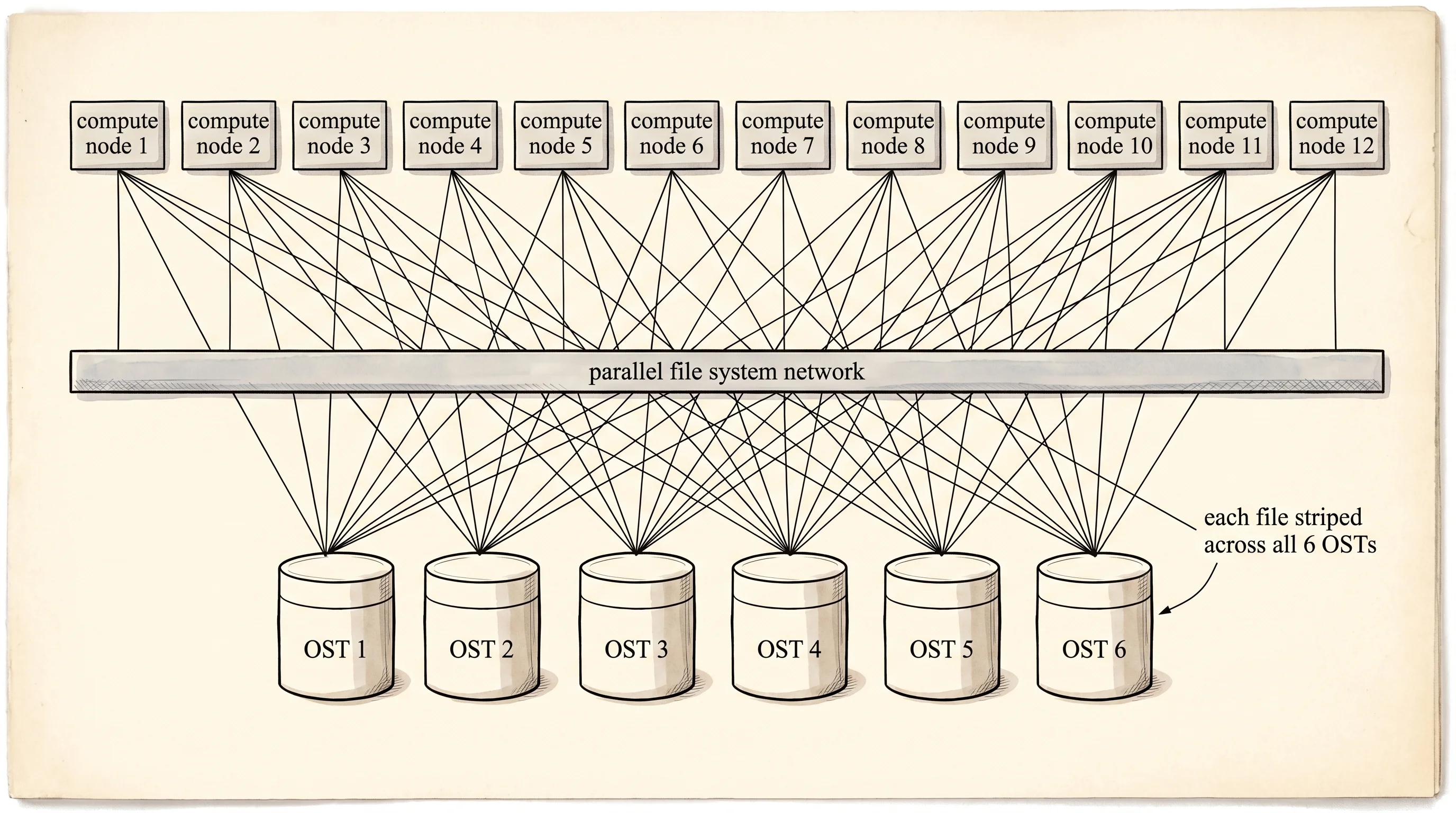
The third cooler is the one nobody talks about until they need it. In 2018 Amazon shipped FSx, which is not one service but a family of them — FSx for Lustre, FSx for Windows File Server, FSx for NetApp ONTAP, FSx for OpenZFS. Each one is a managed version of a real-world filesystem that already existed for decades, and AWS runs the cluster for you. FSx for Lustre is the strangest of the four. Lustre was built at Carnegie Mellon in the late 1990s for supercomputing labs — the kind of place running weather simulations across ten thousand CPUs that all needed to read the same input file at the same time without queueing up. A single Lustre filesystem stripes one big file across hundreds of storage servers so a thousand clients can read different pieces of it in parallel. The throughput numbers stop making sense — a real FSx Lustre deployment can sustain over 100 gigabytes per second of reads and millions of IOPS. The catch is the catch a blast chiller has. It is expensive, it is built for one specific workload, and the scratch variant does not replicate, so if you lose the cluster the data is gone. You stand it up for a training run, point your GPU fleet at it, and tear it down when the run finishes.
Each kind has a profile — the numbers the team building the kitchen needs before they pick.
struct Profile {
    label: &'static str,
    iops: u32,
    throughput_mb_s: u32,
    latency_ms: f32,
    cost_per_gb_month_cents: u32,
    durability: &'static str,
}

fn profile(kind: StorageKind) -> Profile {
    match kind {
        StorageKind::Ebs => Profile {
            label: "EBS (gp3 block)",
            iops: 16_000,
            throughput_mb_s: 1_000,
            latency_ms: 1.0,
            cost_per_gb_month_cents: 8,
            durability: "single-AZ replicated",
        },
        StorageKind::Efs => Profile {
            label: "EFS (NFS file)",
            iops: 35_000,
            throughput_mb_s: 500,
            latency_ms: 3.0,
            cost_per_gb_month_cents: 30,
            durability: "multi-AZ replicated",
        },
        StorageKind::FsxLustre => Profile {
            label: "FSx for Lustre",
            iops: 1_000_000,
            throughput_mb_s: 100_000,
            latency_ms: 0.5,
            cost_per_gb_month_cents: 14,
            durability: "scratch (no replica)",
        },
    }
}

fn kind_short(k: StorageKind) -> &'static str {
    match k {
        StorageKind::Ebs => "EBS",
        StorageKind::Efs => "EFS",
        StorageKind::FsxLustre => "FSx-Lustre",
    }
}
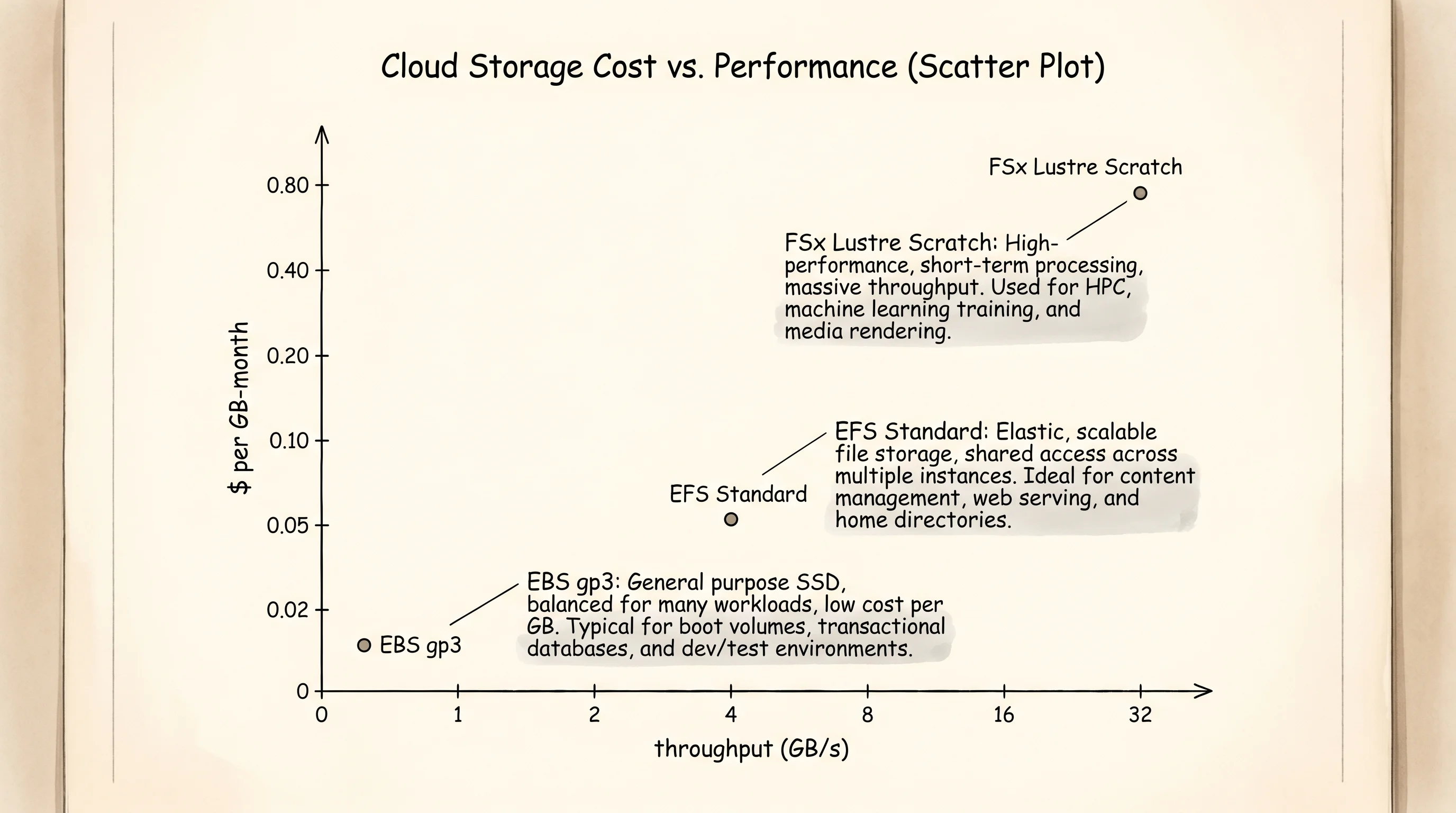
The profile function returns a Profile struct for any StorageKind. The numbers come from the AWS pricing pages and the service spec sheets — gp3 EBS gives you 16 thousand IOPS and a gigabyte per second of throughput at one millisecond of latency for 8 cents per gigabyte per month. EFS doubles the IOPS but caps the throughput around 500 megabytes per second and runs at 3 milliseconds. FSx Lustre is on a different planet — a million IOPS, 100 gigabytes per second, half a millisecond. The cost column tells the rest of the story. EBS is the cheapest at 8 cents because it is the simplest. EFS is the most expensive at 30 cents because the AWS team is running an NFS cluster across multiple availability zones on your behalf and the bill reflects that. FSx Lustre is 14 cents on the scratch tier, which sounds reasonable until you remember a single deployment is sized in terabytes and runs for the length of the job.
Now drive three real scenarios through the model and see what each one looks like.
fn build_scenarios() -> Vec<Volume> {
    let mut ebs = Volume::new("web-root", StorageKind::Ebs, 100);
    ebs.attach(InstanceId("i-web-01")).unwrap();
    let second = ebs.attach(InstanceId("i-web-02"));
    println!("second attach to EBS: {:?}", second);

    let mut efs = Volume::new("user-uploads", StorageKind::Efs, 500);
    efs.attach(InstanceId("i-api-01")).unwrap();
    efs.attach(InstanceId("i-api-02")).unwrap();
    efs.attach(InstanceId("i-api-03")).unwrap();

    let mut fsx = Volume::new("training-scratch", StorageKind::FsxLustre, 4_800);
    for host in ["i-gpu-01", "i-gpu-02", "i-gpu-03", "i-gpu-04"] {
        fsx.attach(InstanceId(host)).unwrap();
    }

    vec![ebs, efs, fsx]
}
The first scenario is the line cook. An EBS volume called web-root attaches to i-web-01 and that is the whole story. The second attach call tries to bolt the same reach-in onto a second instance and the function returns Err("EBS allows only one attached instance at a time") — which is exactly what the EC2 API does when you try the same thing in the AWS console. The second scenario is the pastry team. An EFS filesystem called user-uploads is mounted by three different API instances at the same time, and every one of them sees the same files because EFS is the walk-in cooler. The third scenario is the GPU cluster — an FSx Lustre filesystem called training-scratch, four point eight terabytes, attached to four GPU instances reading the same training data in parallel.
fn print_attach_table(volumes: &[Volume]) {
    println!();
    println!("{:<16}  {:<10}  {:>7}  {:<28}", "volume", "kind", "size GB", "attached instances");
    println!("{}", "-".repeat(72));
    for v in volumes {
        let hosts: Vec<&str> = v.attached_to.iter().map(|i| i.0).collect();
        let joined = hosts.join(", ");
        println!(
            "{:<16}  {:<10}  {:>7}  {:<28}",
            v.name,
            kind_short(v.kind),
            v.size_gb,
            joined
        );
    }
}

fn print_profile_table() {
    println!();
    println!(
        "{:<16}  {:>8}  {:>10}  {:>9}  {:>9}  {:<22}",
        "service", "IOPS", "MB/s", "latency", "cents/GB", "durability"
    );
    println!("{}", "-".repeat(86));
    for k in [StorageKind::Ebs, StorageKind::Efs, StorageKind::FsxLustre] {
        let p = profile(k);
        println!(
            "{:<16}  {:>8}  {:>10}  {:>7} ms  {:>9}  {:<22}",
            p.label,
            p.iops,
            p.throughput_mb_s,
            p.latency_ms,
            p.cost_per_gb_month_cents,
            p.durability
        );
    }
}

fn print_decision_guide() {
    println!();
    println!("pick which one:");
    println!("- one EC2 needs a boot disk or a fast database volume -> EBS");
    println!("- many EC2s need the same files (CMS, shared uploads)  -> EFS");
    println!("- HPC or ML cluster needs millions of IOPS on scratch  -> FSx for Lustre");
}
The print_attach_table function walks the volumes and prints one row per volume showing which instances each one is attached to. The print_profile_table prints the IOPS, throughput, latency, cost, and durability column for each service. The print_decision_guide is the cheat sheet the next engineer on the team needs — three sentences mapping a workload shape to the service that fits it.
fn main() {
    let volumes = build_scenarios();
    print_attach_table(&volumes);
    print_profile_table();
    print_decision_guide();
}
Build it and run it.
second attach to EBS: Err("EBS allows only one attached instance at a time")

volume            kind        size GB  attached instances
------------------------------------------------------------------------
web-root          EBS             100  i-web-01
user-uploads      EFS             500  i-api-01, i-api-02, i-api-03
training-scratch  FSx-Lustre     4800  i-gpu-01, i-gpu-02, i-gpu-03, i-gpu-04

service               IOPS        MB/s    latency   cents/GB  durability
--------------------------------------------------------------------------------------
EBS (gp3 block)      16000        1000        1 ms          8  single-AZ replicated
EFS (NFS file)       35000         500        3 ms         30  multi-AZ replicated
FSx for Lustre     1000000      100000      0.5 ms         14  scratch (no replica)

pick which one:
- one EC2 needs a boot disk or a fast database volume -> EBS
- many EC2s need the same files (CMS, shared uploads)  -> EFS
- HPC or ML cluster needs millions of IOPS on scratch  -> FSx for Lustre
Read the top of the output. The second attach to EBS line proves the rule — the function refused the second instance because the kind was Ebs. The attach table shows the topology in one glance. EBS has one host. EFS has three. FSx Lustre has four. The profile table is the buyer's guide. EBS gives the cheapest cents-per-gigabyte and the lowest latency but only one instance can use it. EFS triples the cost in exchange for letting every instance in the VPC share the same files. FSx Lustre is the only option when the IOPS number starts with a million.
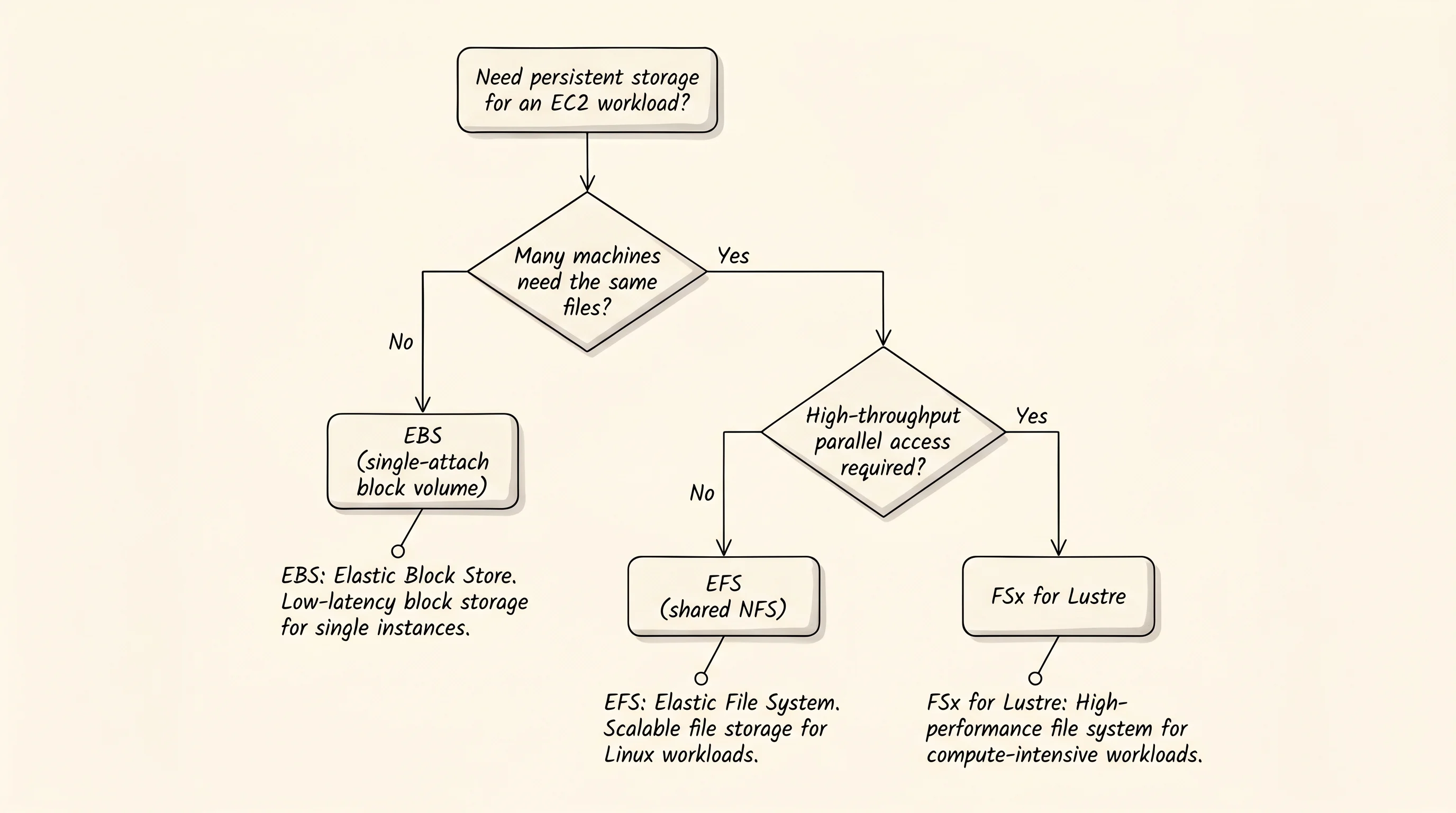
One question worth asking — why does AWS keep EBS at all when EFS can do everything EBS does and more? The answer is the same as why a restaurant keeps reach-ins around. A database does not want to share its files with anyone, and the kernel optimizations that block storage allows — write caching, page-level mapping, direct memory access — only work when one operating system owns the device. EFS gives up those optimizations in exchange for sharing. EBS keeps them in exchange for the one-host rule. Boot volumes, database storage, anything that wants the kernel to think it owns the disk — that is EBS. Shared application files, CMS uploads, the home directories of a team of developers — that is EFS. A computational workload that needs to scan a hundred-terabyte dataset across a thousand GPU cores — that is Lustre.
The thing this trio cannot do on its own is hold relational data with transactions and joins. EBS holds the bytes of a Postgres database, but Postgres itself — the query planner, the WAL, the replication — is software you have to install and manage. The next bottleneck is the managed relational database, which is what RDS and Aurora solve.