EC2 — VMs as a Service
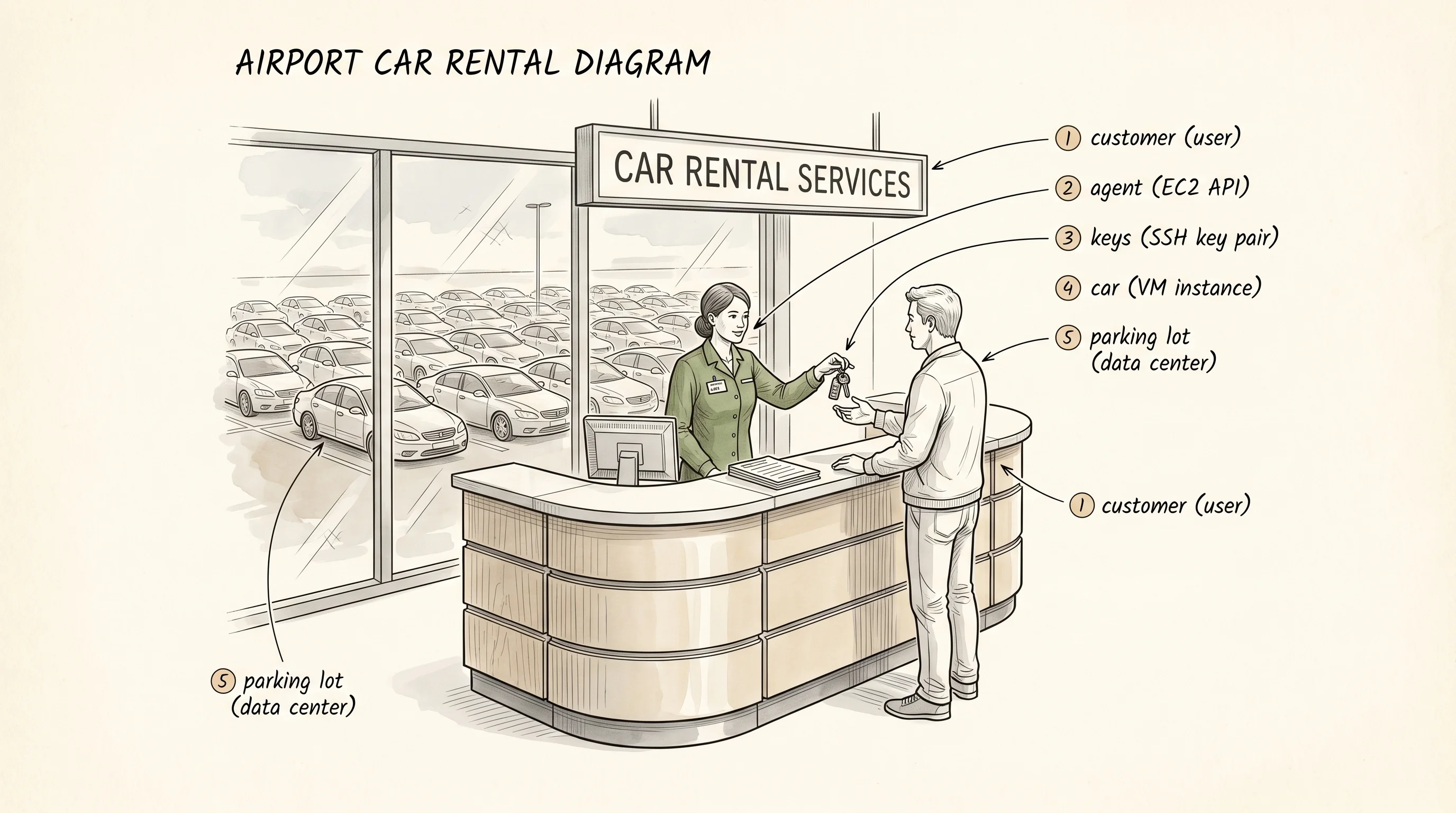
You walk up to a car rental counter, tell the agent what kind of car you want, hand over a credit card, and an hour later you drive away in a sedan that someone else owns. You hand it back when you are done. You only pay for the hours you used the keys. EC2 is the same counter, but the lot is a warehouse the size of a football field full of identical Intel and Arm servers, and the "car" is a virtual machine running inside one of them.
Before EC2 the only way to get a Linux server with a public IP was to buy the physical box. A startup in 2005 would order a 1U Dell from a colocation cage in San Jose, wait three weeks for it to ship and rack, sign a year-long contract, and pray they had not over-bought or under-bought. The bottleneck was not the server. The bottleneck was the contract, the lead time, and the capital that froze the moment the box hit the rack. In August 2006 a small team inside Amazon led by Chris Pinkham and Benjamin Black shipped a service called Elastic Compute Cloud out of a Cape Town office. You called a web API, paid 10 cents an hour, and 90 seconds later a Linux box was yours. No contract. No shipping. No rack. The "elastic" part was the part nobody had seen before — when you stopped paying, the machine vanished and someone else got the slot.
The shape of the service has not changed much since. You describe the car you want — what family, what size, what disk image to boot — and the API hands you back an identifier and an IP address. The car returns to the lot when you say so. Start with the smallest types that carry that idea.
#[derive(Debug, Clone, Copy, PartialEq, Eq)]
enum State {
    Pending,
    Running,
    Stopped,
    Terminated,
}

#[derive(Debug, Clone, Copy)]
enum Family {
    General, // t / m
    Compute, // c
    Memory,  // r
}

#[derive(Debug, Clone)]
struct Instance {
    id: String,
    family: Family,
    size: &'static str,
    ami: &'static str,
    state: State,
    ip: Option<String>,
    region: &'static str,
}

#[derive(Debug)]
enum Action {
    RunInstance {
        family: Family,
        size: &'static str,
        ami: &'static str,
        region: &'static str,
    },
    StopInstance(String),
    TerminateInstance(String),
}
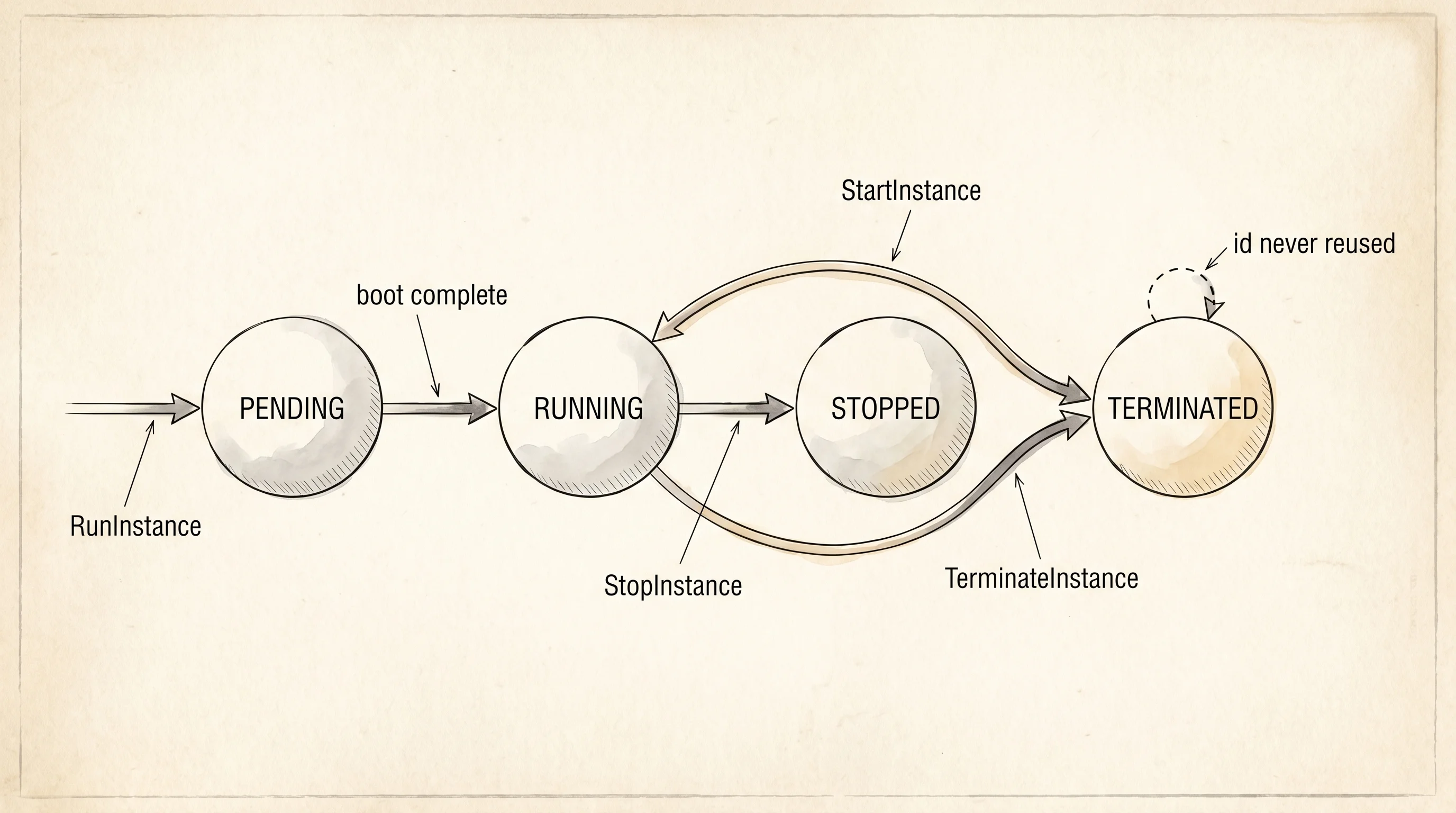
State is the lifecycle of one car. A freshly requested instance is Pending for a few seconds while the hypervisor finds a host with room. Then it boots to Running and gets an IP. Stopped is the car parked in the lot with the engine off — the disk is still there, you stop paying for the CPU, and you can start it again. Terminated is the car returned to the lot for good — the disk is wiped, the IP is freed, and the id never comes back. Encoding the four states as an enum is the same move the kitchen-table designer made with Status::InProgress — illegal combinations like "stopped but still has an IP" cannot exist because the type does not let them.
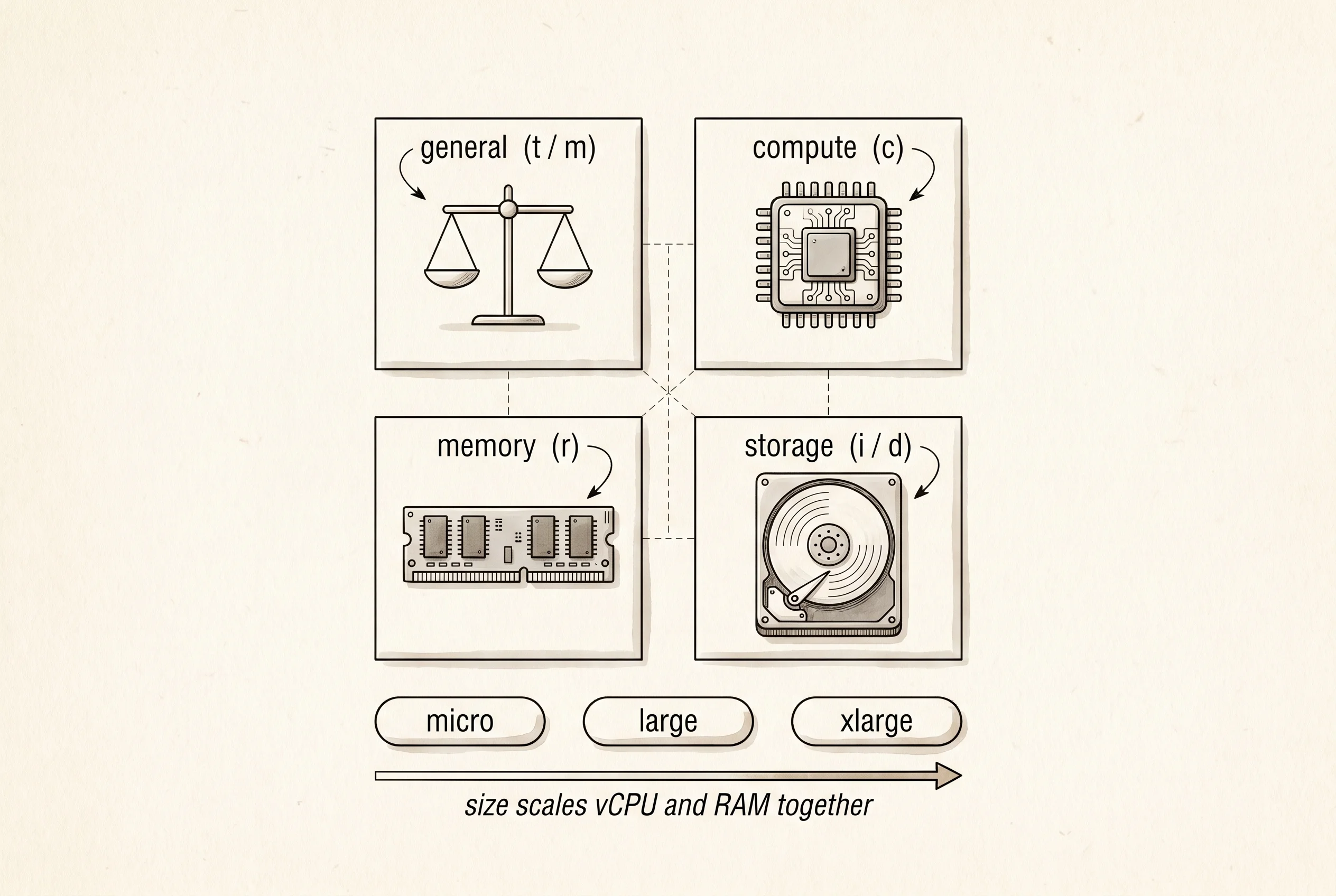
Family is the kind of car. AWS groups instances into families by what the workload needs most. t and m are general purpose — balanced CPU, memory, and network, the rental sedan. c is compute optimized with a faster CPU per dollar, the sports car for video encoding or web servers. r is memory optimized with more RAM per CPU, the cargo van for databases and in-memory caches. Inside a family the size — t3.micro, c7g.large, r6i.xlarge — picks how many of each thing you get. A t3.micro is one vCPU and one gigabyte of RAM for about a penny an hour. A r6i.xlarge is four vCPUs and 32 gigabytes for closer to a quarter an hour. The naming reads like a license plate but the pattern is fixed — letter, generation number, optional architecture hint, dot, size.
The ami field on Instance is the trickiest piece of the model. AMI stands for Amazon Machine Image and it is the disk template the car boots from. Amazon publishes one for vanilla Amazon Linux, Canonical publishes one for Ubuntu, Red Hat publishes one for RHEL, and you can build your own with a tool called Packer that bakes your application code into the image. When EC2 launches an instance it copies that disk image to a fresh volume, attaches it to the virtual machine, and powers it on. Two instances built from the same AMI start their lives byte-identical. That property is what makes auto-scaling possible — a load balancer can hand traffic to a brand new instance the moment it boots because it is the same as every other instance behind the balancer.
Action names every thing the control plane can do. Real EC2 exposes about 200 calls — describe, modify-attribute, attach-volume, associate-eip — but the three that matter for the lifecycle are RunInstance, StopInstance, and TerminateInstance. The name RunInstance is the actual AWS API name and has confused beginners for 15 years — "run" means "create and start," not "execute a script." The other two do what they say.
Now wire those types into a tiny control plane that stores a fleet and applies one action at a time.
fn apply(fleet: &mut Vec<Instance>, action: Action, next_id: &mut u32) -> String {
    match action {
        Action::RunInstance { family, size, ami, region } => {
            let id = format!("i-{:08x}", *next_id);
            *next_id += 1;
            let octet = 100 + *next_id;
            let ip = format!("10.0.1.{octet}");
            let inst = Instance {
                id: id.clone(),
                family,
                size,
                ami,
                state: State::Pending,
                ip: Some(ip),
                region,
            };
            fleet.push(inst);
            // pending boots to running once the hypervisor picks a host.
            let last = fleet.last_mut().unwrap();
            last.state = State::Running;
            format!("ran {id}")
        }
        Action::StopInstance(id) => match find(fleet, &id) {
            Some(i) if fleet[i].state == State::Running => {
                fleet[i].state = State::Stopped;
                fleet[i].ip = None;
                format!("stopped {id}")
            }
            Some(_) => format!("reject {id}: not running"),
            None => format!("reject {id}: unknown"),
        },
        Action::TerminateInstance(id) => match find(fleet, &id) {
            Some(i) => {
                fleet[i].state = State::Terminated;
                fleet[i].ip = None;
                format!("terminated {id}")
            }
            None => format!("reject {id}: unknown"),
        },
    }
}

fn find(fleet: &[Instance], id: &str) -> Option<usize> {
    fleet.iter().position(|i| i.id == id)
}
The apply function is the heart of every cloud control plane in the world. It takes the current fleet state and one action, it validates the action against the state, and it either mutates the fleet or returns a rejection string. RunInstance mints a new id like i-00000001 — real EC2 uses a 17-character hex id, the shape is the same — assigns a private IP from the VPC's CIDR block, pushes the instance onto the fleet in Pending, then flips it to Running to model the boot finishing. StopInstance only works if the instance is currently Running and frees the IP because AWS does not let you keep a private address while the machine is off. TerminateInstance works from any state because the answer is always "the instance is gone." Each rejection is a string the caller has to read, the same Result-style discipline the ATM lesson used — silent failures in a control plane are how you end up paying for a thousand machines you forgot existed.
The renderer prints the fleet as a table so the reader can watch the state change between actions. Same idea as the board renderer in tic-tac-toe — never print from inside the model, hand back data the driver can format.
fn family_tag(f: Family) -> &'static str {
    match f {
        Family::General => "general",
        Family::Compute => "compute",
        Family::Memory => "memory",
    }
}

fn print_fleet(fleet: &[Instance]) {
    println!(
        "  {:<11}  {:<18}  {:<10}  {:<11}  {:<9}  {}",
        "id", "type", "state", "ip", "region", "ami"
    );
    println!(
        "  {:<11}  {:<18}  {:<10}  {:<11}  {:<9}  {}",
        "-----------", "------------------", "----------", "-----------", "---------", "----------------------"
    );
    for i in fleet {
        let ip = i.ip.clone().unwrap_or_else(|| "-".into());
        let kind = format!("{}.{}", family_tag(i.family), i.size);
        let state = format!("{:?}", i.state).to_lowercase();
        println!(
            "  {:<11}  {:<18}  {:<10}  {:<11}  {:<9}  {}",
            i.id, kind, state, ip, i.region, i.ami
        );
    }
}
Drive the whole thing with a hardcoded list of five actions. Launch a general instance in us-east-1, then a compute instance in the same region, then a memory instance over in us-west-2, then stop the first one, then terminate the second one. Print the fleet after each step.
fn main() {
    let mut fleet: Vec<Instance> = Vec::new();
    let mut next_id: u32 = 1;

    let actions = vec![
        Action::RunInstance {
            family: Family::General,
            size: "t3.micro",
            ami: "ami-amzn-linux-2023",
            region: "us-east-1",
        },
        Action::RunInstance {
            family: Family::Compute,
            size: "c7g.large",
            ami: "ami-ubuntu-22.04",
            region: "us-east-1",
        },
        Action::RunInstance {
            family: Family::Memory,
            size: "r6i.xlarge",
            ami: "ami-amzn-linux-2023",
            region: "us-west-2",
        },
        Action::StopInstance("i-00000001".into()),
        Action::TerminateInstance("i-00000002".into()),
    ];

    for (step, action) in actions.into_iter().enumerate() {
        let outcome = apply(&mut fleet, action, &mut next_id);
        println!("step {}: {outcome}", step + 1);
        print_fleet(&fleet);
        println!();
    }
}
step 1: ran i-00000001
id type state ip region ami
----------- ------------------ ---------- ----------- --------- ----------------------
i-00000001 general.t3.micro running 10.0.1.102 us-east-1 ami-amzn-linux-2023
step 2: ran i-00000002
id type state ip region ami
----------- ------------------ ---------- ----------- --------- ----------------------
i-00000001 general.t3.micro running 10.0.1.102 us-east-1 ami-amzn-linux-2023
i-00000002 compute.c7g.large running 10.0.1.103 us-east-1 ami-ubuntu-22.04
step 3: ran i-00000003
id type state ip region ami
----------- ------------------ ---------- ----------- --------- ----------------------
i-00000001 general.t3.micro running 10.0.1.102 us-east-1 ami-amzn-linux-2023
i-00000002 compute.c7g.large running 10.0.1.103 us-east-1 ami-ubuntu-22.04
i-00000003 memory.r6i.xlarge running 10.0.1.104 us-west-2 ami-amzn-linux-2023
step 4: stopped i-00000001
id type state ip region ami
----------- ------------------ ---------- ----------- --------- ----------------------
i-00000001 general.t3.micro stopped - us-east-1 ami-amzn-linux-2023
i-00000002 compute.c7g.large running 10.0.1.103 us-east-1 ami-ubuntu-22.04
i-00000003 memory.r6i.xlarge running 10.0.1.104 us-west-2 ami-amzn-linux-2023
step 5: terminated i-00000002
id type state ip region ami
----------- ------------------ ---------- ----------- --------- ----------------------
i-00000001 general.t3.micro stopped - us-east-1 ami-amzn-linux-2023
i-00000002 compute.c7g.large terminated - us-east-1 ami-ubuntu-22.04
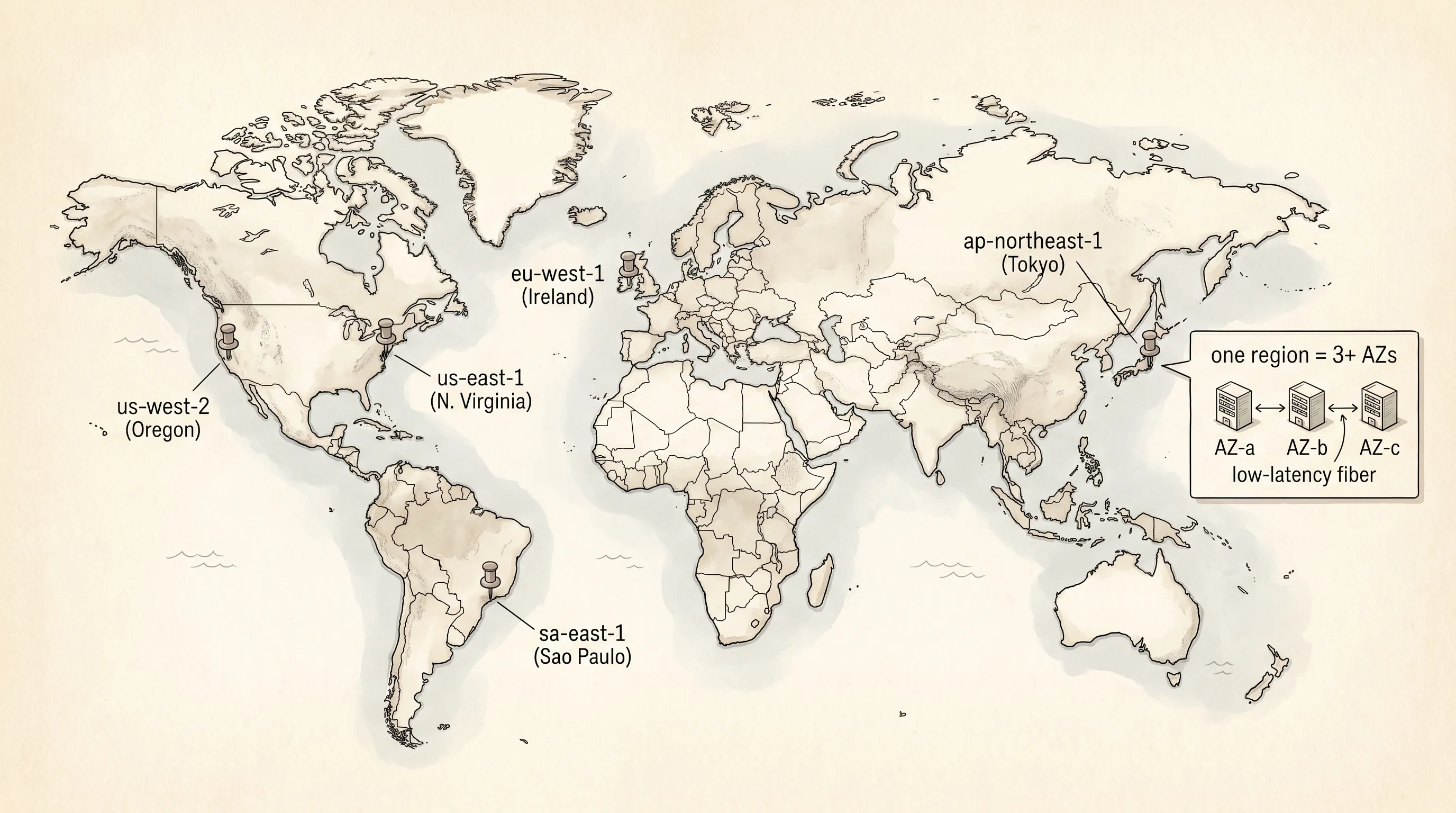
i-00000003 memory.r6i.xlarge running 10.0.1.104 us-west-2 ami-amzn-linux-2023Read the output top to bottom. Step 1 launches i-00000001, a general.t3.micro running Amazon Linux 2023 in us-east-1 with the IP 10.0.1.102. Step 2 adds a compute-optimized box on Ubuntu in the same region. Step 3 adds a memory-optimized box in us-west-2, which is the Oregon region — the same global EC2 control plane manages both with no extra setup. Step 4 stops i-00000001 and the ip column flips to a dash because AWS pulled the address back into the regional pool. The instance row is still there because the disk is still there — you keep paying a few cents a month for the storage, but nothing for the CPU. Step 5 terminates i-00000002 and the row sticks around showing terminated because real EC2 keeps the record visible in the console for about an hour before it disappears. The id i-00000002 is now poisoned — AWS will never reuse it, and any code that still holds the id will get a InvalidInstanceID.NotFound error.
One question worth asking — why does the StopInstance arm refuse the action when the instance is not running, instead of doing nothing? The reason is the same as play returning Err("game over") in tic-tac-toe. A caller that thinks it stopped a Pending instance and walks away has a bug. The explicit rejection gives the caller a chance to wait for the boot and try again, or to give up cleanly, or to log a metric. Silent no-ops in distributed systems are how outages happen at 3 in the morning.
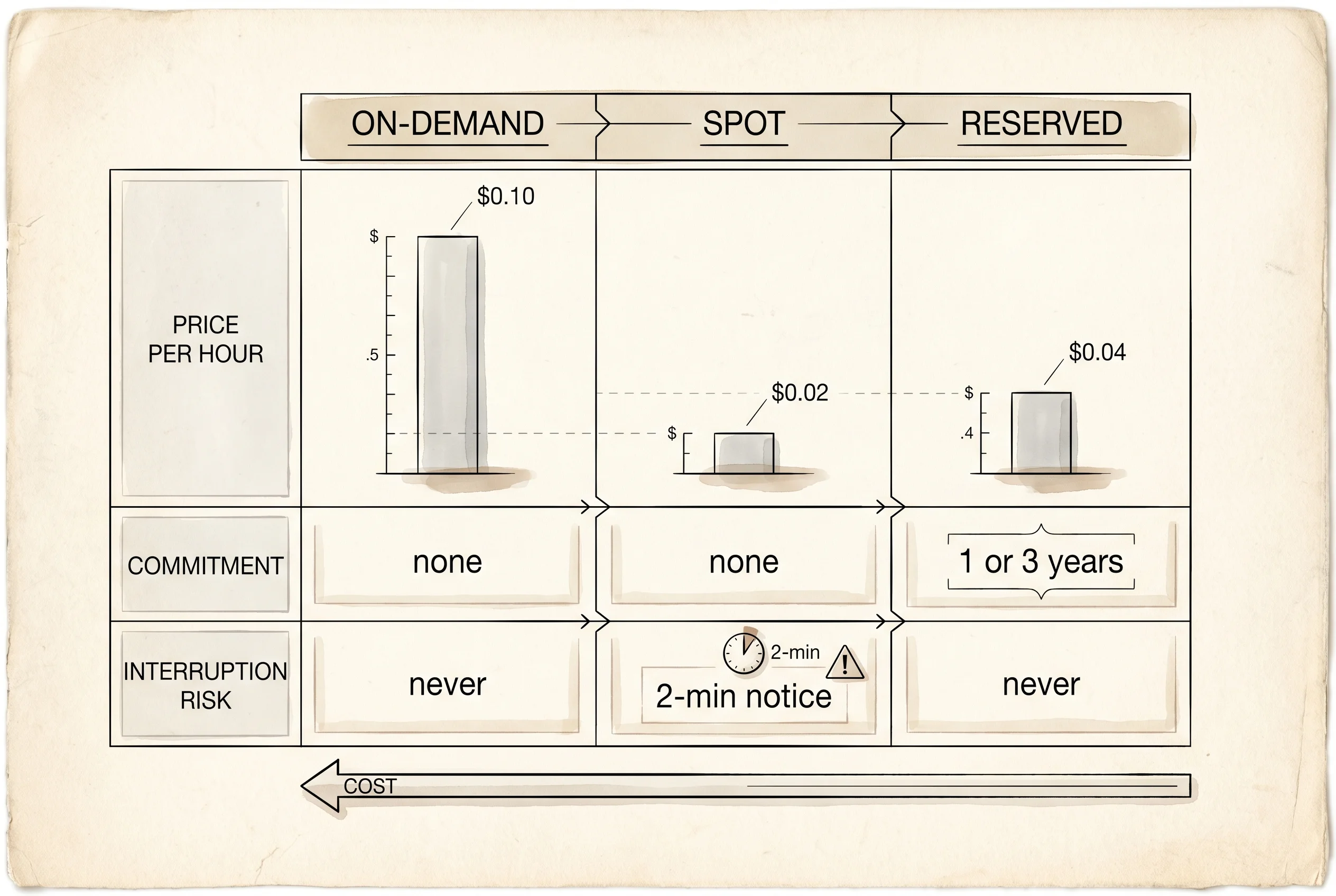
Three pricing models sit on top of this lifecycle. On-Demand is what the rental counter charges by default — a published per-hour rate, no commitment, no notice. A t3.micro on demand is about $0.01 an hour, an m7i.large is closer to $0.10. Spot Instances are the same hardware at a 70-to-90 percent discount, but Amazon can take the car back with two minutes of warning when an On-Demand customer wants the slot. Spot is how Netflix encodes movies and how genome labs run alignments — anything that can pause and resume. Reserved Instances and Savings Plans are the year-long contract — you commit to running an instance shape for one or three years and the rate drops by 30 to 70 percent. The math works the same way as a phone contract. You save real money if you actually use the line every month. You light cash on fire if you do not.
The disk under the instance is its own product called Elastic Block Store. EBS volumes are network-attached disks that survive a stop — when an instance is Stopped the EBS volume is still sitting in the same Availability Zone, waiting to reattach when the instance starts again. That is the whole reason Stopped and Terminated are different states. There is a second kind of disk called instance store, which is a physical SSD bolted to the host the instance lives on. Instance store is faster because there is no network hop, but the disk vanishes the moment the instance stops. Newer instances expose both — the EBS root volume for the OS and configuration, and a scratch instance-store volume for caches and temp files that you do not mind losing.
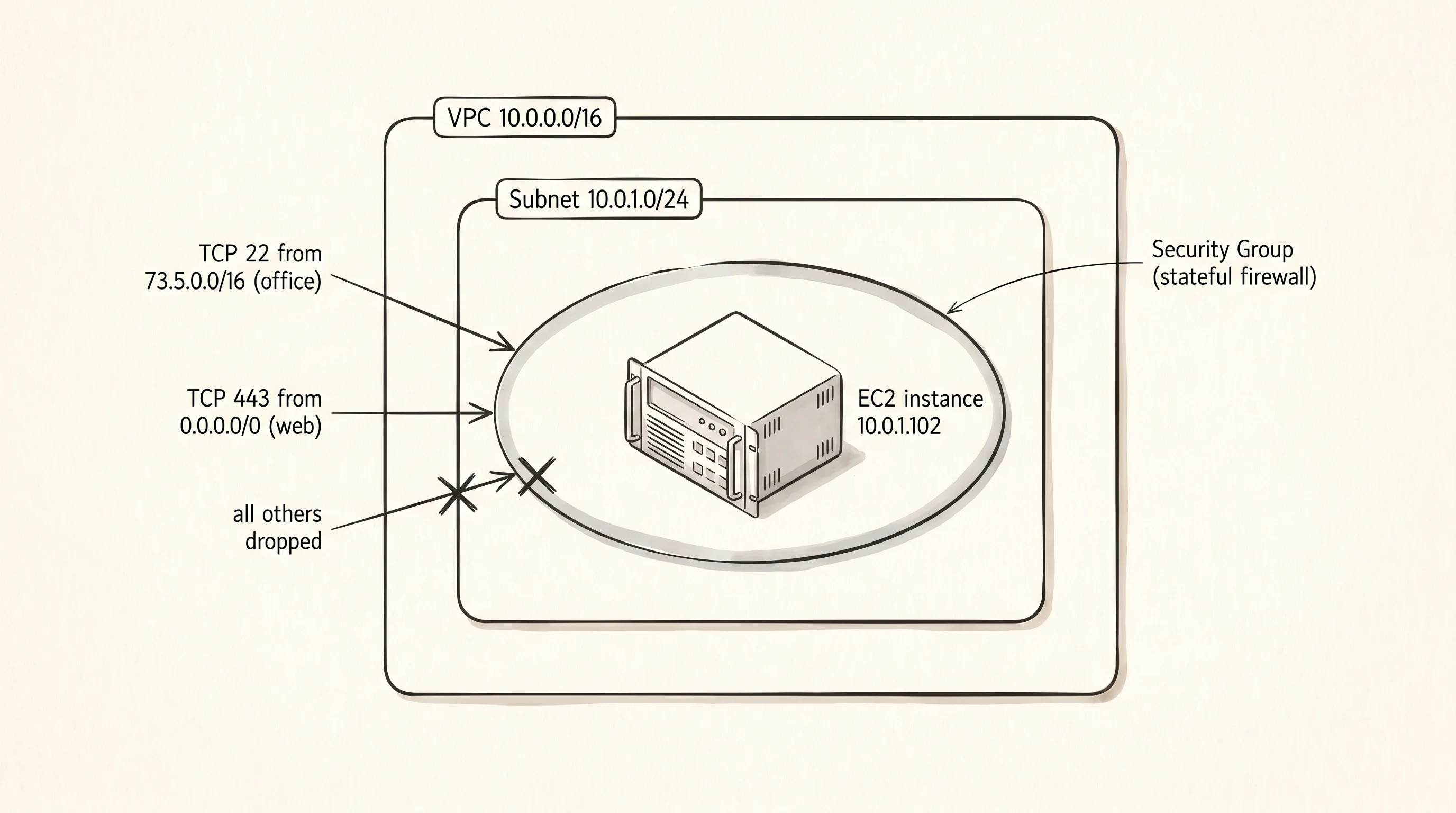
The last piece the model leaves out is the firewall. Every EC2 instance lives inside a Virtual Private Cloud, a software-defined network with its own private IP range like 10.0.0.0/16. The traffic in and out of each instance is filtered by a Security Group, which is a stateful firewall expressed as a list of allow rules — "port 22 from my office IP, port 443 from anywhere, everything else dropped." Security Groups are how a fresh EC2 instance is reachable on the public internet by SSH the moment it boots, even though the underlying box is a Linux kernel with no firewall config of its own. The networking layer in front of the instance is doing the filtering.
The thing this model cannot do is run one program faster than a single VM can hold — once the workload spans 10 or 100 boxes, you stop thinking about individual instances and start thinking about the orchestrator that schedules containers across them, which is what the next lesson on ECS, EKS, and Fargate is for.