Installing the Toolchain
A working Rust setup is a kitchen with three things in it. A knife rack on the wall that swaps the right blade onto your hand. A head chef who orders the food, lays out the prep stations, and runs the line when service starts. A sous-chef who stands at your shoulder and points at the cut you are about to make wrong. Those three are rustup, cargo, and rust-analyzer. Get them on the counter in that order and every Rust project you ever start will feel the same.
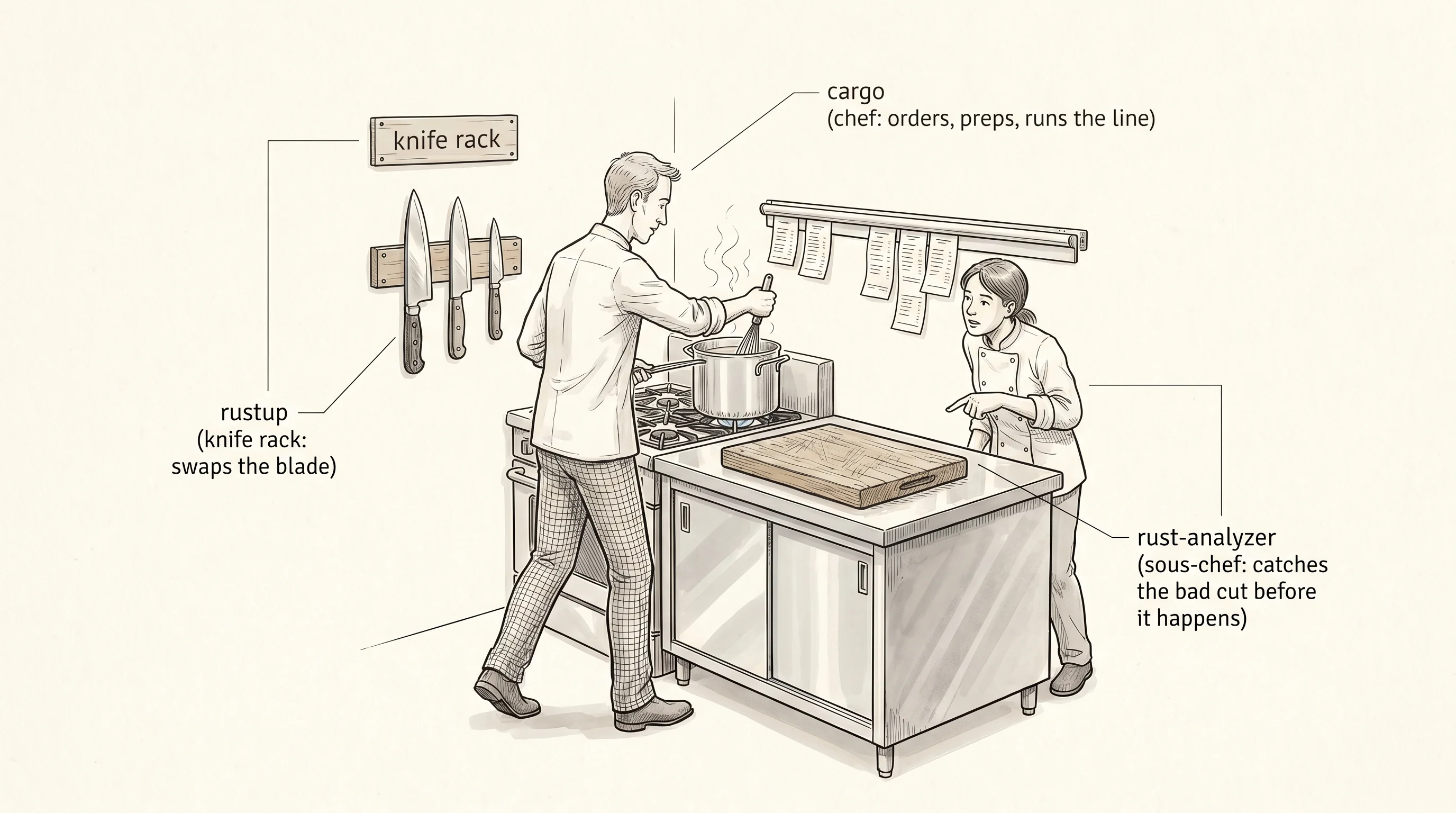
The kitchen idea is not metaphor for its own sake — it is how the people who built Rust thought about the tools. Graydon Hoare started Rust at Mozilla in 2006, and for the first six years installing it meant downloading a tarball, copying binaries by hand, and praying the version on your laptop matched the one your coworker had. Brian Anderson finally got tired of that in 2015 and shipped rustup, a single program whose only job was to keep your knife rack in order. You ask for stable, it hands you stable. You ask for nightly because some new feature you want lives there, it hangs nightly next to stable and lets you flip between them. The reason every Rust tutorial starts with rustup is that without it, nothing else in the kitchen has a blade.
Open a terminal and put the knife rack on the wall. The same one command works on Mac and Linux. On Windows you grab the installer instead.
curl --proto '=https' --tlsv1.2 -sSf https://sh.rustup.rs | sh# windows: download and double-click rustup-init.exe from https://rustup.rsPick option 1, the default install, and let it finish. Then close that terminal and open a fresh one so your shell picks up the new ~/.cargo/bin path. Run rustc --version and you should see a line like rustc 1.92.0 (...). The compiler is the blade itself — the thing that turns your .rs text into a binary your machine can run. rustup is what put it on the rack. You will almost never call rustup again after today, except once every six weeks to run rustup update and let it sharpen everything.
Cargo arrived with the same install. Yehuda Katz and Carl Lerche built it in 2014 because Rust without a build tool was unusable for any project bigger than one file. Before cargo, you compiled each file with rustc by hand, wrote a Makefile to glue them together, and tracked every dependency in a notebook. Cargo replaced all of that with one chef who knows the whole kitchen — it creates the project layout, fetches the libraries you list, runs the compiler in the right order, runs the tests, and ships the final binary. You will type cargo more than any other word in this course.
Make your first project. Move into whatever folder you keep code in and run the command every Rust programmer types on day one.
cargo new hello_world
cd hello_world
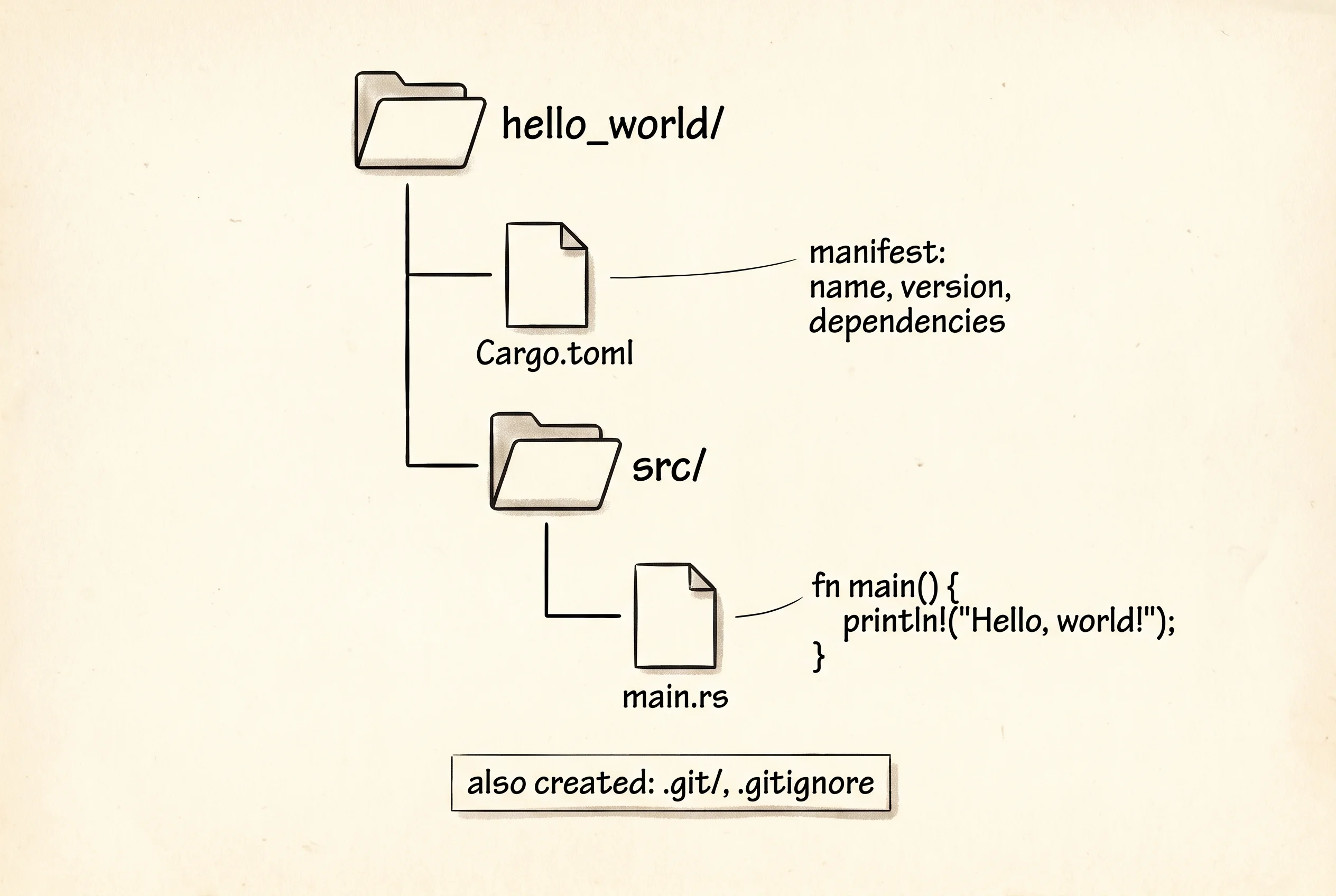
Cargo creates a folder called hello_world with two things inside. A file called Cargo.toml that lists the project's name, version, and dependencies — the chef's order ticket. A folder called src with one file in it, src/main.rs, holding a function called main that prints Hello, world!. That is the whole project. Cargo also initializes a git repo for you and writes a .gitignore so your compiled junk does not end up in version control. Open src/main.rs in your editor and read the four lines cargo wrote. You did not type them, but in a moment you will type the same thing.
Now run the project. One command does everything — compile the source, link the binary, and execute it. Cargo prints what it is doing while it works, then hands you the program's output at the bottom.
cargo runYou will see something close to this on your screen.
$ cargo new hello_world
    Creating binary (application) `hello_world` package
$ cd hello_world
$ cargo run
   Compiling hello_world v0.1.0
    Finished `dev` profile in 0.42s
     Running `target/debug/hello_world`
Hello, world!
The first three lines are cargo narrating. Compiling means the chef sent your source through rustc. Finished means the binary is built and waiting in target/debug/hello_world. Running means cargo just executed it for you. The last line, Hello, world!, is the only line your program actually printed. Everything above it is the kitchen's report. Run cargo run a second time and the Compiling line disappears — cargo noticed nothing changed and skipped straight to running the binary. That is the chef being lazy on purpose, and it is the single biggest reason Rust projects with hundreds of files stay fast to iterate on.
If you want to see the same sequence the way I am showing it to you, here is a tiny Rust program that prints the lines a real cargo new and cargo run would produce. It is not running cargo — it is just a println! for each line. Type it into a scratch file and run it the same way to get used to where the brackets and semicolons go.
fn main() {
    println!("$ cargo new hello_world");
    println!("    Creating binary (application) `hello_world` package");
    println!("$ cd hello_world");
    println!("$ cargo run");
    println!("   Compiling hello_world v0.1.0");
    println!("    Finished `dev` profile in 0.42s");
    println!("     Running `target/debug/hello_world`");
    println!("Hello, world!");
}
That leaves the third tool, the sous-chef. rust-analyzer is a separate program that runs inside your editor, watches every keystroke, and underlines mistakes the second you make them. It is the reason you do not have to wait for cargo build to find out you forgot a semicolon. Aleksey Kladov started it in 2018 because the original Rust language server was slow enough that people gave up on it. The new one parses your code in the background, holds an entire crate in memory, and answers questions like "what is the type of this variable" in a few milliseconds. The install depends on your editor.
# vs code: install the official "rust-analyzer" extension from the marketplace
# neovim: it is bundled with nvim-lspconfig, no extra step
# zed: built in, no install needed
# jetbrains rustrover: built in, no install needed
Open src/main.rs in your editor of choice and put your cursor on the word println. The sous-chef should pop a tooltip telling you println is a macro from the standard library, that it takes a format string, and that the ! is what marks it as a macro instead of a function. Delete the semicolon at the end of the line and watch the underline appear. Put it back and the underline goes away. That feedback loop — type a character, see a red line, fix it — is what makes Rust a language you can actually write. Without it you would be running cargo build every fifteen seconds.
A question. If you delete the entire src/main.rs file and run cargo run, what happens? Cargo prints an error that says it cannot find src/main.rs. The chef will not improvise a meal — the order ticket in Cargo.toml told it there is a binary called hello_world whose source lives at src/main.rs, and without that file the order is impossible to fulfill. Put the file back and the kitchen runs again. Cargo is strict the same way Rust is strict, which is the same reason Rust is the language you reach for when you cannot afford a silent failure.
The kitchen is set up and the first dish is on the counter. The next lesson reads what is actually in the dish — every word in those four lines cargo new wrote for you, and what each one means.