Layers of Abstraction
A hotel guest presses one button on the bedside phone and says "two coffees and a sandwich." A minute later the cart shows up at the door. The guest sees one request and one delivery. Behind that single sentence is a building's worth of work — the front desk took the call, the kitchen got the ticket, the prep cook chopped the bread, the runner pushed the elevator button, the elevator motor pulled cable, a power line out by the highway moved electrons. Every layer below the bedside phone is hidden on purpose. That hiding is the entire trick of modern computing, and your one-line Rust program runs through the same hotel.
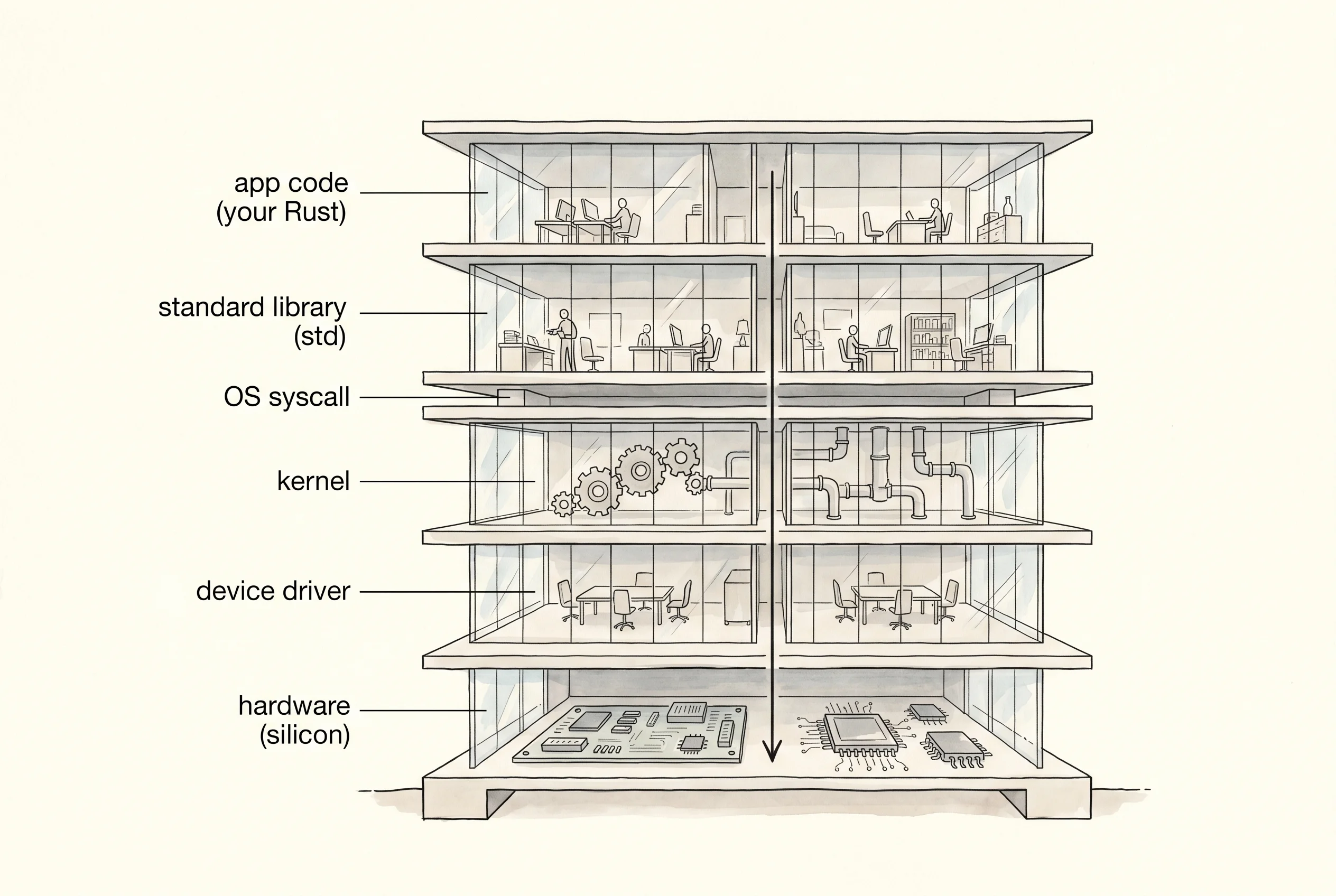
The idea that you could stack a computer's work into layers and let each one hide the one underneath was not obvious. Through the 1950s a program was a wall of punched cards and the programmer fought the machine directly — the drum, the magnetic core, the paper tape. In 1968 a Dutch professor named Edsger Dijkstra at the Eindhoven University of Technology published a paper called "The Structure of the 'THE' Multiprogramming System." He had taken his small team and built an operating system in six layers, each one allowed to call only the layer right below it. Layer zero handled the processor. Layer one handled memory. Layer two handled the operator's console. By the top, a user program saw a clean machine. Dijkstra proved his system was correct by reasoning about one layer at a time, which had never been done before. The paper landed like a hammer. Within five years every serious operating system on Earth was being built as a stack of layers.
A few years later, Ken Thompson and Dennis Ritchie at Bell Labs took the same idea further. They wrote Unix in a brand-new language called C, and they shipped a thing called the C standard library — a set of functions like printf and malloc that wrapped the raw kernel calls in something a programmer could read. The library was a layer of its own, sitting between the program and the operating system, and that pattern became the shape of every language that came after. Rust's standard library is the direct descendant of Ritchie's libc. When you write println!, you are typing into the top floor of a hotel that Dijkstra and Ritchie poured the foundation for.
Here is the smallest way to see how thin the top floor really is. The first thing your program touches is the stack — a strip of memory that holds the little handles for every variable you make. Each type has a fixed size on the stack. The compiler asks std::mem::size_of at compile time and the answer never changes.
fn print_sizes() {
    println!("type           bytes on the stack");
    println!("------------------------------------");
    println!("{:<13}  {:>4}", "bool", size_of::<bool>());
    println!("{:<13}  {:>4}", "u8", size_of::<u8>());
    println!("{:<13}  {:>4}", "i32", size_of::<i32>());
    println!("{:<13}  {:>4}", "f64", size_of::<f64>());
    println!("{:<13}  {:>4}", "&str", size_of::<&str>());
    println!("{:<13}  {:>4}", "String", size_of::<String>());
    println!("{:<13}  {:>4}", "Vec<u8>", size_of::<Vec<u8>>());
    println!("{:<13}  {:>4}", "Box<i32>", size_of::<Box<i32>>());
}
Run it the same way you ran the last lesson's program. You should see this.
type           bytes on the stack
------------------------------------
bool              1
u8                1
i32               4
f64               8
&str             16
String           24
Vec<u8>          24
Box<i32>          8

you wrote: let s = String::from("hi");
  app code  : one line, two tokens, looks free
  std       : asks the allocator for 2 bytes of heap
  syscall   : on first heap use, brk or mmap grows the data segment
  kernel    : page table gets a fresh entry pointing at RAM
  driver    : DRAM controller picks rank, bank, row, column
  hardware  : capacitors in two cells get charged to hold 'h' and 'i'

you wrote: println!("{}", s);
  app code  : one macro call, looks free
  std       : formats into a buffer, then calls write(1, buf, 2)
  syscall   : a single trap drops the cpu into ring 0
  kernel    : copies 2 bytes into the tty driver's queue
  driver    : pushes bytes over a uart or pty to the terminal
  hardware  : pixels light up on your screen spelling hi
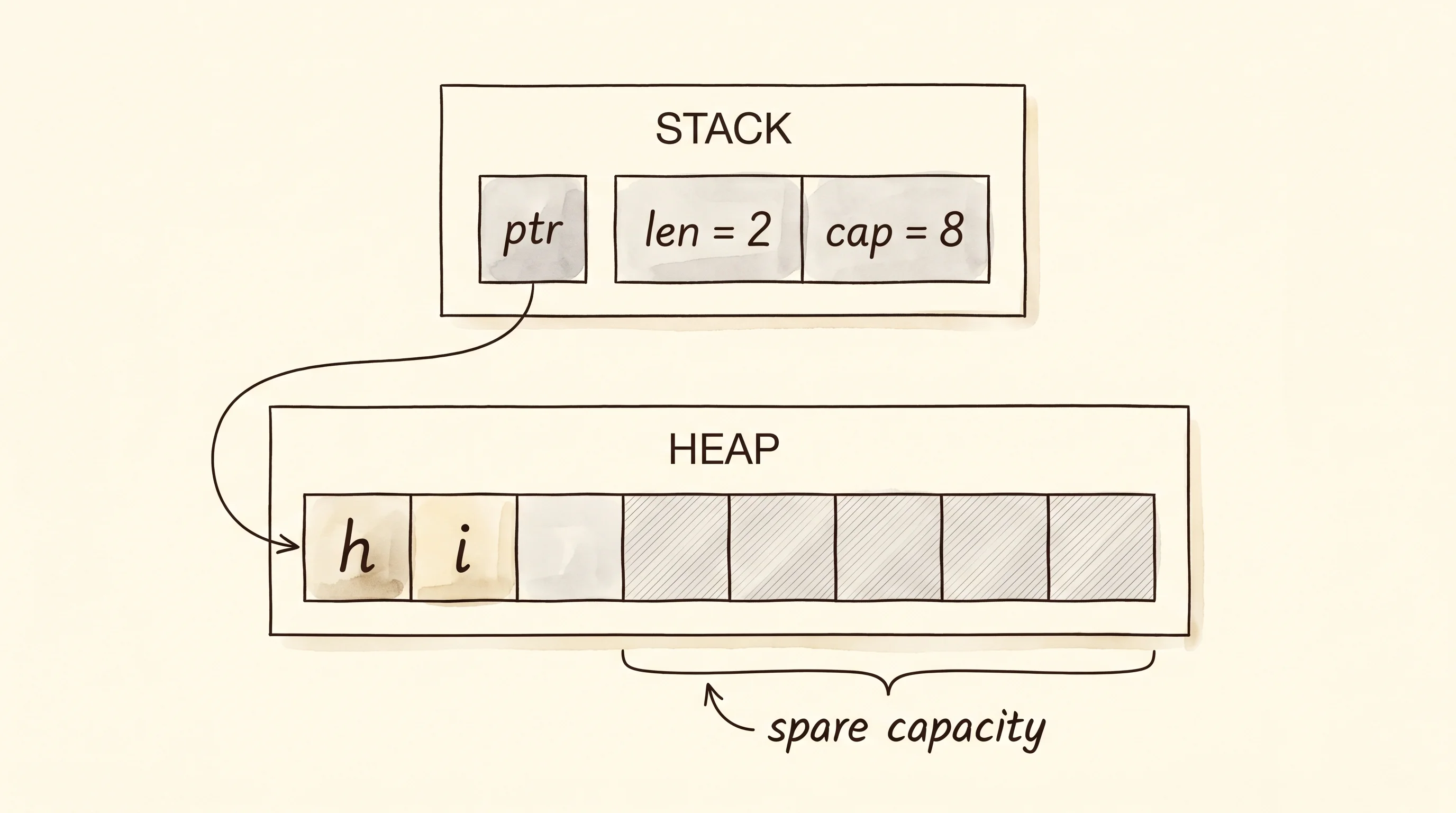
Read the top half of the output first. A bool is 1 byte. An i32 is 4. An f64 is 8. A String is 24 bytes on the stack — and that is the part that surprises every new programmer. A string can hold a paragraph, a chapter, a whole book. How is the handle for it only 24 bytes? The answer is the hotel. The 24 bytes are not the letters. They are three small pieces of paper — a pointer that says "the letters live at hotel room 4F-12", a length that says "the message is 2 characters long", and a capacity that says "the room has space for 8 characters before we need to upgrade." The letters themselves live on a different floor of the building called the heap, and the handle on the stack is just the room key.
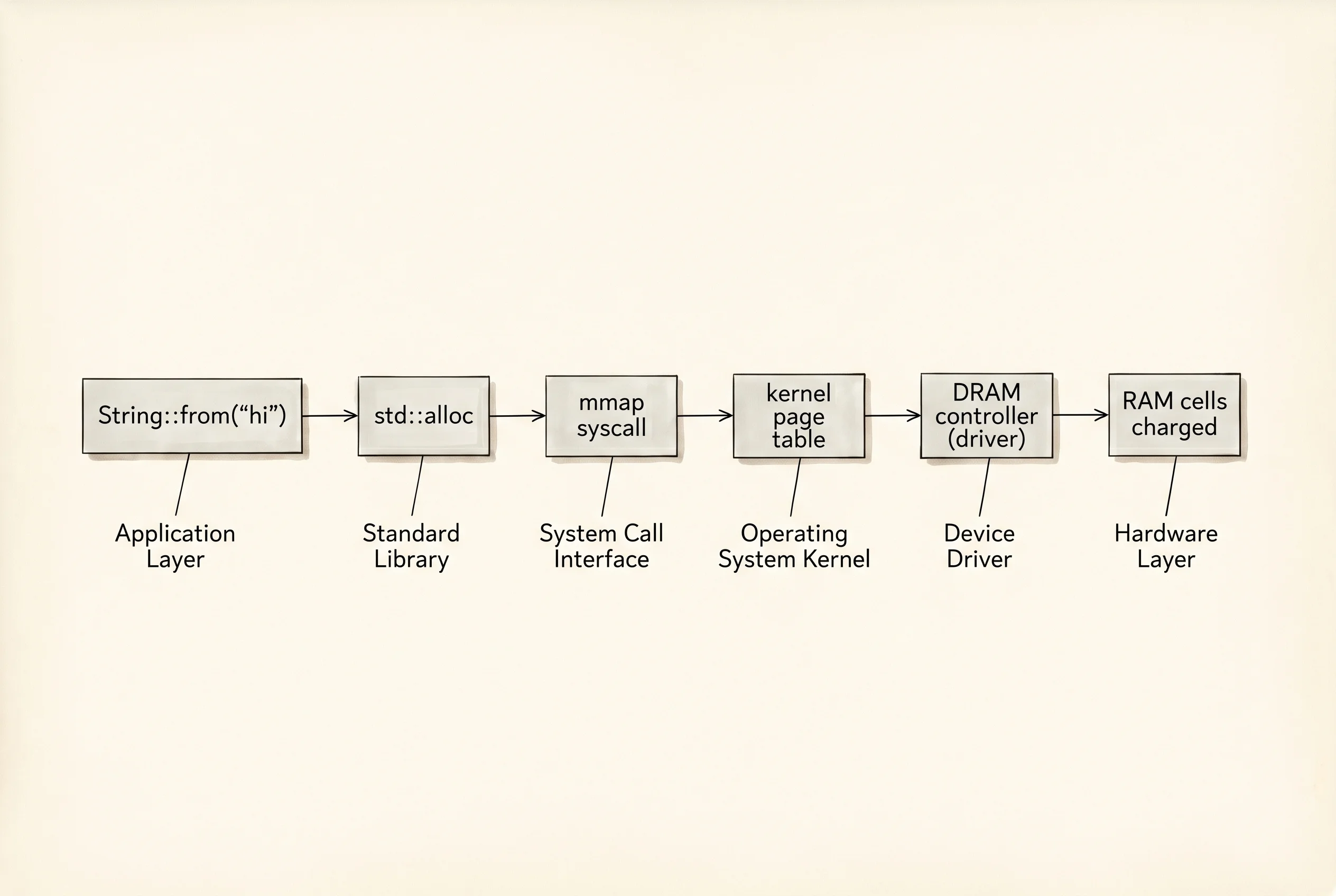
The bottom half of the output is what happens when you take that one line, let s = String::from("hi"), and ride the elevator all the way down. Here is the code that printed those trace lines — every println! is one floor of the hotel speaking up.
fn trace_one_line() {
    let s = String::from("hi");
    println!("you wrote: let s = String::from(\"hi\");");
    println!("  app code  : one line, two tokens, looks free");
    println!("  std       : asks the allocator for 2 bytes of heap");
    println!("  syscall   : on first heap use, brk or mmap grows the data segment");
    println!("  kernel    : page table gets a fresh entry pointing at RAM");
    println!("  driver    : DRAM controller picks rank, bank, row, column");
    println!("  hardware  : capacitors in two cells get charged to hold 'h' and 'i'");
    println!();
    println!("you wrote: println!(\"{{}}\", s);");
    println!("  app code  : one macro call, looks free");
    println!("  std       : formats into a buffer, then calls write(1, buf, 2)");
    println!("  syscall   : a single trap drops the cpu into ring 0");
    println!("  kernel    : copies 2 bytes into the tty driver's queue");
    println!("  driver    : pushes bytes over a uart or pty to the terminal");
    println!("  hardware  : pixels light up on your screen spelling {}", s);
}
The top floor is your code — one line, two tokens, looks free. The next floor down is the standard library, which decides the room is too small to hold "hi" on the stack and asks the allocator for 2 bytes on the heap. The allocator is a separate program inside your program that keeps track of every heap room it has handed out. If the heap has no room left, the allocator calls down through the floor to the operating system. That call is called a syscall — system call — and on Linux it is brk or mmap. It is the moment your program leaves the realm where it can do whatever it wants and politely asks the kernel for help.
The kernel is the layer that owns the whole building. It runs at a higher privilege than your code, in something the chip calls ring 0, and it is the only thing on the machine allowed to talk to the hardware. When your mmap syscall lands, the kernel finds an unused chunk of real memory, writes an entry into a table called the page table that maps your address to that real chunk, and hands control back. Below the kernel is the driver — a special program the kernel loads at boot that knows how to talk to one specific piece of hardware. For memory, the driver is the DRAM controller. The driver picks the right rank, bank, row, and column on the physical RAM stick. At the bottom of the stack is the hardware itself — a row of tiny capacitors on a silicon die, and the controller charges two of them to hold the letters h and i. Six layers, one line of code.
The second println! is the same story for a different errand. The macro builds a buffer, the standard library calls write(1, buf, 2), the syscall traps into the kernel, the kernel hands the bytes to the terminal driver, the driver pushes them over a pseudo-terminal to the program drawing your screen, and the pixels light up. The number of moving parts is staggering. The reason it feels free is that every layer above the hardware is a contract — "tell me what you want and I will do the work, and I promise the answer will look the same to you no matter what changes underneath."
A question. Look at the output line that says Box<i32> 8. A Box<i32> is a handle to a single i32 that lives on the heap. An i32 is 4 bytes. Why does the handle take 8 bytes instead of 4? Because the handle is not the integer — it is the room key, and a room key on a 64-bit machine is a memory address, and memory addresses on a 64-bit machine are always 8 bytes. The same reason a String carries a pointer that is 8 bytes. Every box of any size has a key that is always the same size, because the size of the key depends on the building, not on what is inside the room.
The whole point of layering is that you can change one floor without ripping out the rest. Apple replaced the Intel CPU under macOS with their own M1 chip in 2020. Every Rust program in the world kept compiling. The driver layer absorbed the change. The kernel above it never noticed. Your code above the kernel never knew there was anything to notice. That is the contract paying off. The next bottleneck is what happens when one of those contracts is wrong — when the layer underneath does not behave the way the layer above expected — and the next lesson is about the tool that lets you watch the layers in motion: the toolchain you install to compile, run, and debug your Rust.