Searching
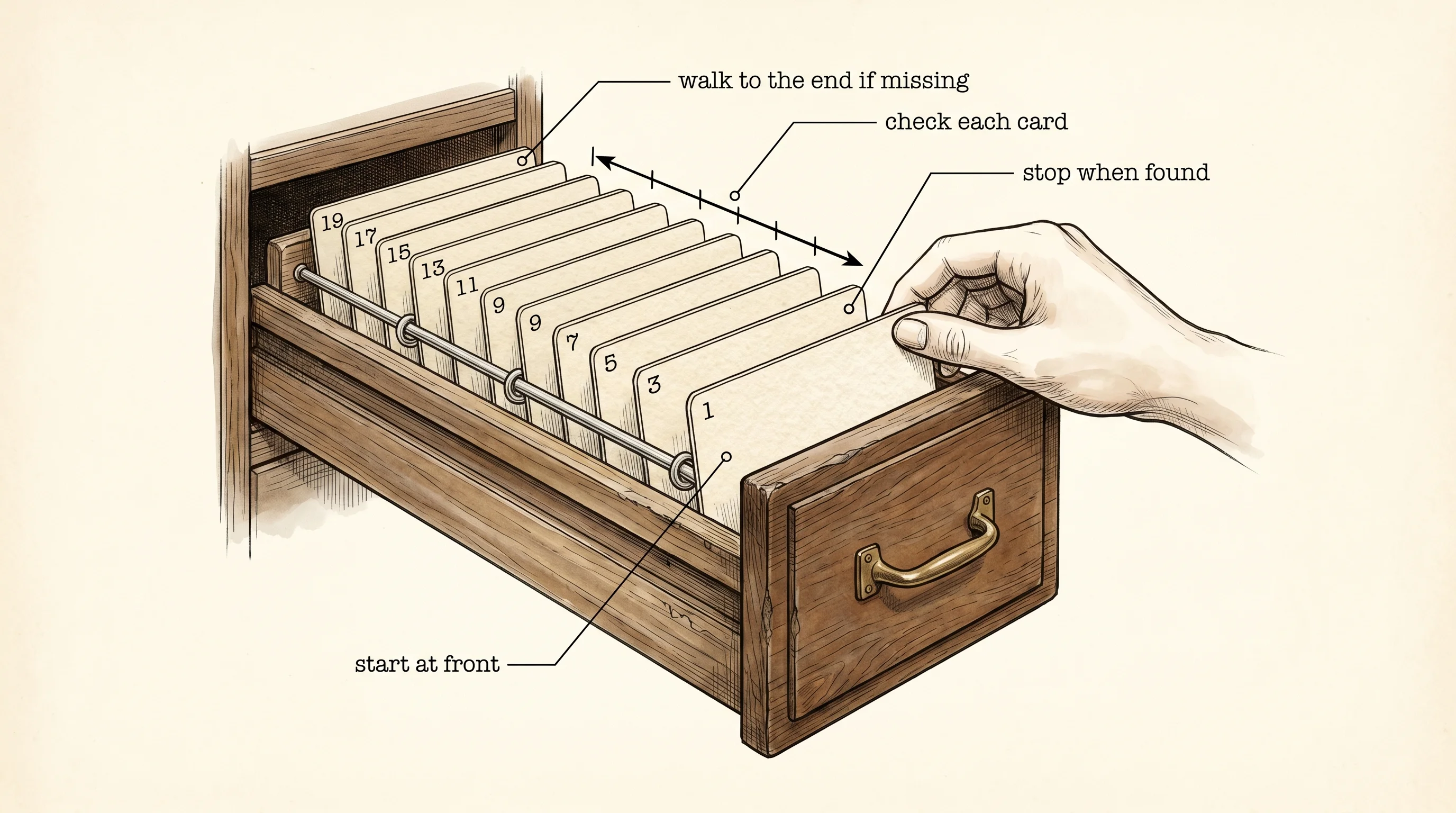
A card catalog drawer at the library has a hundred index cards lined up behind two metal rods. The cards are sorted by title — A through Z, top to bottom. You want to find Charlotte's Web. You can do this two ways. You can pull every card out of the drawer one at a time, read the title, slide it back, and walk the whole alphabet until you hit it. Or you can stick your finger in the middle of the drawer, glance at the card under it, and decide whether Charlotte's Web comes before or after that card. Then you do the same thing on the half that survives. Searching is that drawer. Every algorithm in this lesson is one of those two finger moves dressed up in code.
John Mauchly — the guy who helped build ENIAC, the first general-purpose electronic computer, in 1946 — gave a lecture that summer where he sketched out the idea of cutting the drawer in half instead of reading it card by card. He did not write the code. He just said the idea out loud. It took sixteen years before anyone published a version of the halving trick that actually worked on every input — Donald Knuth credited a paper by Derrick Lehmer from 1960 and a clean writeup by Kenneth Iverson in 1962. Then in 1986 Jon Bentley, a Bell Labs researcher who wrote a column called Programming Pearls, told a roomful of professional programmers to write binary search on a piece of paper. Ninety percent of them got it wrong. The bug was almost always the same: an off-by-one error in where the search window stopped. The trick had been sitting in textbooks for two decades and the textbook authors themselves were still getting it wrong. That is how slippery this small piece of code is.
We will write both versions by hand. The shelf is a fixed array of ten numbers, already sorted.
const SHELF: [i32; 10] = [1, 3, 5, 7, 9, 11, 13, 15, 17, 19];The first version is the walk-the-whole-drawer version. It is called linear search because you move in a straight line from one end to the other. You check card 0, then card 1, then card 2, and you stop the second you see the number you want. If you walk off the end without finding it, the answer is not on the shelf.
fn linear_search(shelf: &[i32], target: i32) -> Option<usize> {
    for (index, &card) in shelf.iter().enumerate() {
        println!("  linear: checked index {index} (value {card})");
        if card == target {
            return Some(index);
        }
    }
    None
}
Read it once. The function takes a slice of numbers and a target. It loops with enumerate so each step gives you both the index and the value. It prints what it touched, then checks. If the card matches, it returns Some(index) — the Some is Rust's way of saying here is a real answer wrapped up. If the loop walks off the end, the function returns None — I looked everywhere and the card is not here. The Option type is how Rust forces you to think about the missing case before the compiler lets you ship.
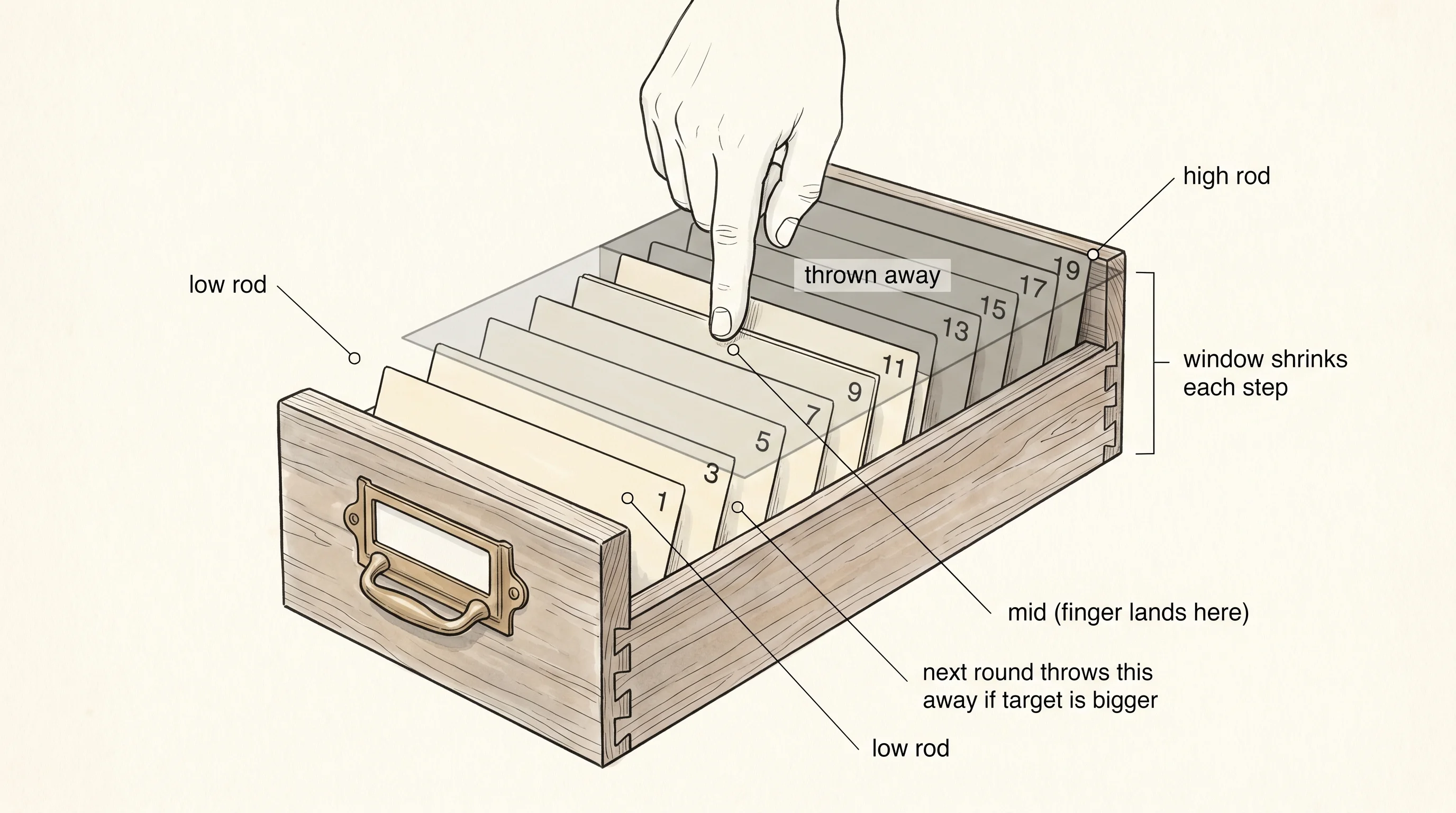
The halving version is binary search. You put your finger in the middle of the drawer. You read the card under your finger. If the card is the one you want, you are done. If your card comes before the finger card, you throw away the bottom half of the drawer and search the top half. If it comes after, you throw away the top half. Each move cuts the live search window in half. A drawer of a thousand cards is exhausted in ten steps. A drawer of a million is exhausted in twenty.
fn binary_search(shelf: &[i32], target: i32) -> Option<usize> {
    let mut low: usize = 0;
    let mut high: usize = shelf.len();
    while low < high {
        let mid = low + (high - low) / 2;
        println!(
            "  binary: low={low} mid={mid} high={high} (value {})",
            shelf[mid]
        );
        if shelf[mid] == target {
            return Some(mid);
        } else if shelf[mid] < target {
            low = mid + 1;
        } else {
            high = mid;
        }
    }
    None
}
The two variables low and high are the two metal rods at the ends of the live search window. They start at 0 and at shelf.len() — covering the whole drawer. The window shrinks every loop. mid is where your finger lands. The line low + (high - low) / 2 looks fussier than the textbook (low + high) / 2, and that fussiness is the exact bug that tripped up the programmers in Bentley's room. If low + high overflows the integer size — easy on a big array — the simpler formula wraps around and lands mid outside the drawer. Computing the gap first and adding it to low never overflows. This was a real bug in Java's standard library binary search for nine years. Joshua Bloch, who maintained that code at Sun and then Google, wrote a blog post in 2006 called Extra, Extra — Read All About It: Nearly All Binary Searches and Mergesorts are Broken. He fixed it the same way.
The body of the loop has three branches. If the middle card matches, return its index. If the middle card is smaller than the target, throw away everything from low through mid by setting low = mid + 1. The + 1 is the second place the off-by-one ghost lives — if you just write low = mid, you will check the same card forever and the loop will never end. If the middle card is bigger than the target, throw away everything from mid through high - 1 by setting high = mid. Note the asymmetry. low moves to mid + 1 because we already checked mid. high moves to mid because the window is half-open: it includes low but not high. Mixing those conventions is the third place the off-by-one ghost lives. Pick one and stick to it.
Run the program. It searches for three numbers — 7, which is on the shelf, 19, which is also on the shelf but at the very end, and 8, which is not on the shelf at all — with both algorithms.
shelf: [1, 3, 5, 7, 9, 11, 13, 15, 17, 19]

-- linear search for 7 --
  linear: checked index 0 (value 1)
  linear: checked index 1 (value 3)
  linear: checked index 2 (value 5)
  linear: checked index 3 (value 7)
linear: found at index 3

-- linear search for 19 --
  linear: checked index 0 (value 1)
  linear: checked index 1 (value 3)
  linear: checked index 2 (value 5)
  linear: checked index 3 (value 7)
  linear: checked index 4 (value 9)
  linear: checked index 5 (value 11)
  linear: checked index 6 (value 13)
  linear: checked index 7 (value 15)
  linear: checked index 8 (value 17)
  linear: checked index 9 (value 19)
linear: found at index 9

-- linear search for 8 --
  linear: checked index 0 (value 1)
  linear: checked index 1 (value 3)
  linear: checked index 2 (value 5)
  linear: checked index 3 (value 7)
  linear: checked index 4 (value 9)
  linear: checked index 5 (value 11)
  linear: checked index 6 (value 13)
  linear: checked index 7 (value 15)
  linear: checked index 8 (value 17)
  linear: checked index 9 (value 19)
linear: not on the shelf

-- binary search for 7 --
  binary: low=0 mid=5 high=10 (value 11)
  binary: low=0 mid=2 high=5 (value 5)
  binary: low=3 mid=4 high=5 (value 9)
  binary: low=3 mid=3 high=4 (value 7)
binary: found at index 3

-- binary search for 19 --
  binary: low=0 mid=5 high=10 (value 11)
  binary: low=6 mid=8 high=10 (value 17)
  binary: low=9 mid=9 high=10 (value 19)
binary: found at index 9

-- binary search for 8 --
  binary: low=0 mid=5 high=10 (value 11)
  binary: low=0 mid=2 high=5 (value 5)
  binary: low=3 mid=4 high=5 (value 9)
  binary: low=3 mid=3 high=4 (value 7)
binary: not on the shelf
Count the lines. Linear search for 7 read four cards. Binary search for 7 read four cards too — same number, by luck of where 7 sits relative to the middle. Now look at the search for 19. Linear search marched through all ten cards. Binary search found it in three. And the miss — searching for 8 — cost linear search ten reads, because it had to prove 8 was not anywhere by checking every spot, while binary search ruled 8 out in four reads. The bigger the drawer, the more lopsided this gets.
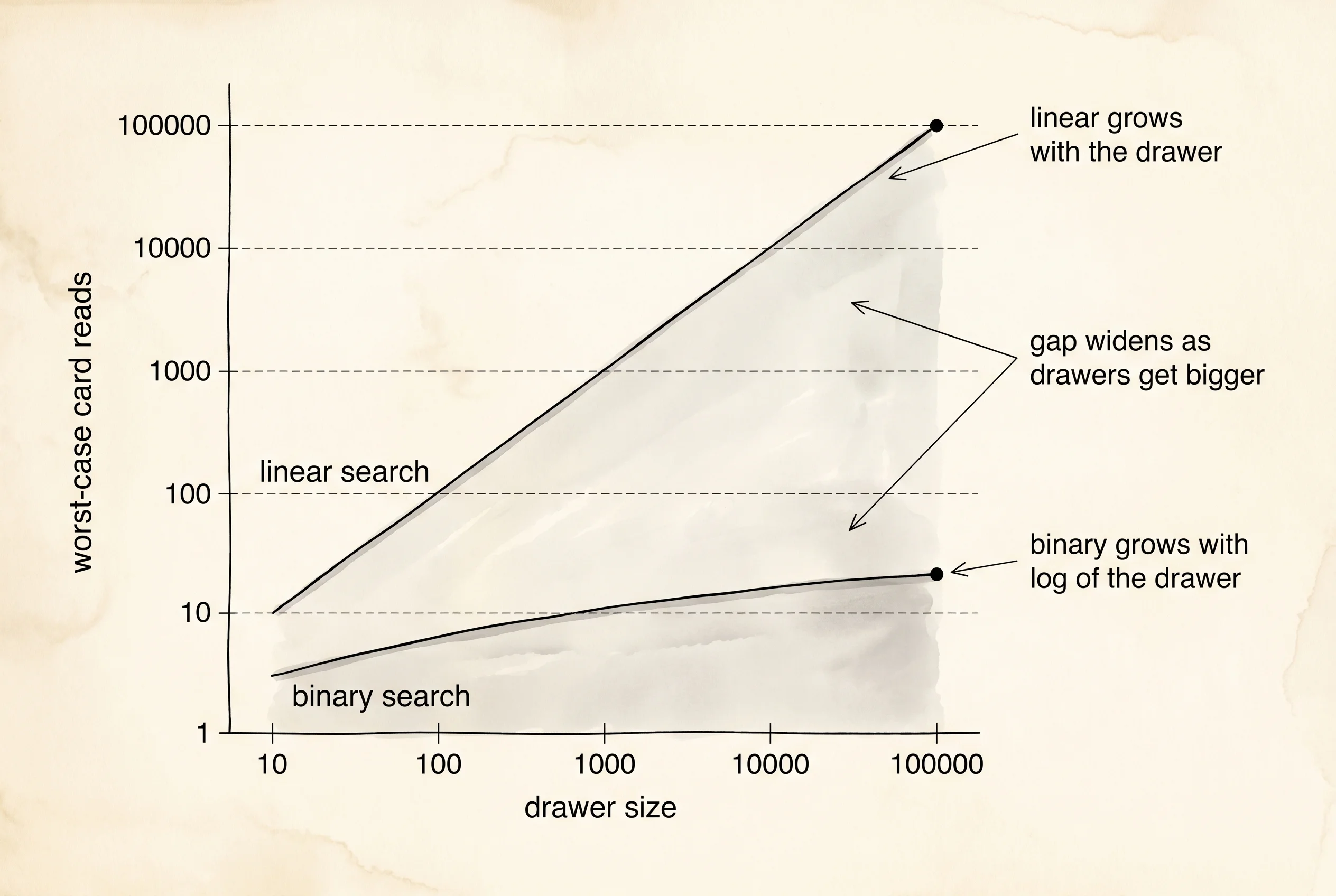
A question worth asking. Why does binary search for 7 also halve and find it on the fourth probe, when linear search found it on the fourth read? Because the middle of a ten-card drawer is index 5, and 7 sits at index 3 — below the middle. The first halving throws away the top half. The next probe lands at index 2 (value 5), still below 7. Then index 4 (value 9), now above 7. Then index 3 (value 7), the only card left in the window. The story is told by the low and high values printed at each step — watch them squeeze in from both sides. Linear search was lucky here because 7 happened to be near the front. Move 7 to the back of a thousand-card drawer and linear search reads a thousand cards while binary search reads ten.
The standard library ships its own version called slice::binary_search. It returns Result<usize, usize> instead of Option<usize> — the Ok(index) is a hit, the Err(index) is a miss that tells you where the card would have been inserted to keep the drawer sorted. That Err answer is what makes the standard library version more useful than ours for real code: insertion routines and range queries need to know where the gap is, not just that the search missed. We wrote ours by hand because the off-by-one demons only stay scared of you if you have killed them once.
The drawer trick has one limit. The cards must already be sorted. If somebody walks up to the drawer and shoves a new card into a random slot, the halving move is meaningless — the middle card is no longer a reliable signpost for which half to throw away. Re-sorting the whole drawer every time a card arrives is too slow. The next lesson is about a data structure that lets you both insert in the middle and find a card in roughly the same number of steps binary search uses — the tree.