Convolutional Padding
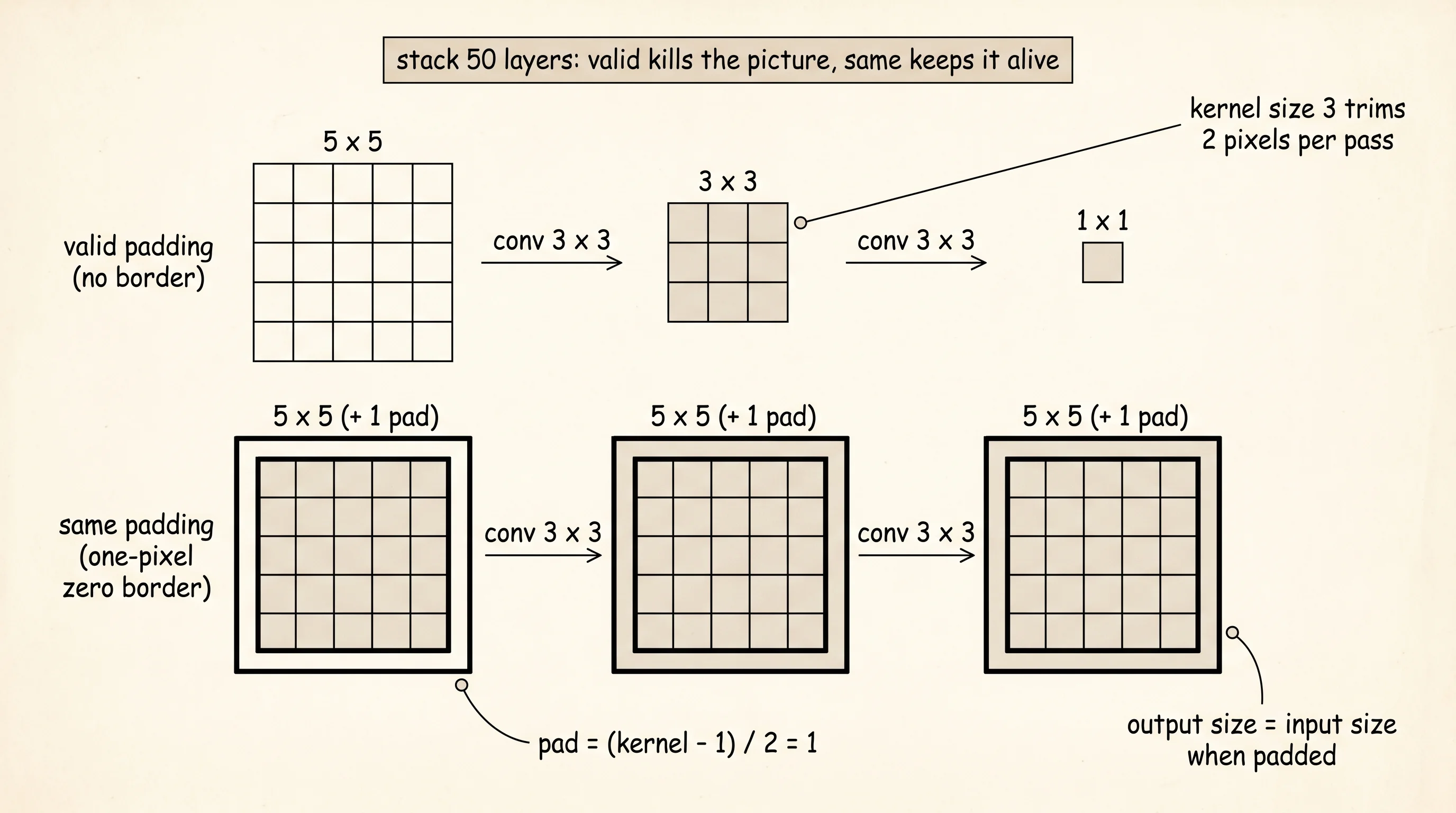
A convolution slides across an image. Every time the kernel takes a step, the picture under it loses a thin strip on every side, the way a pair of scissors trims a photo each pass. Trim a 5x5 photo with a 3x3 kernel and the photo comes out 3x3. Trim that one again with another 3x3 kernel and you have a 1x1 dot. Stack 50 trims and there is no photo left. Padding is what you tape around the photo before each cut so the original survives. Tape on a black border, slide the scissors, the border absorbs the loss, and the photo underneath comes out the same size it went in.
Yann LeCun did this first in production. His 1998 paper Gradient-Based Learning Applied to Document Recognition — the one that introduced LeNet-5, the digit network that read 10% of the checks deposited at U.S. banks for most of the 2000s — padded its convolutional layers so the spatial map kept its shape until the pooling layers cut it down on purpose. Every CNN since has done the same. The names "valid" and "same" came out of TensorFlow at Google in 2015 — "valid" because every kernel position is fully inside the original image, "same" because the output spatial size matches the input. Generative models for tiling textures use a third option, circular padding, which wraps the right edge around to feed the left edge so seams disappear when you tile the result. PyTorch added it in 2018 for the same reason a poster designer reaches for a tileable pattern.
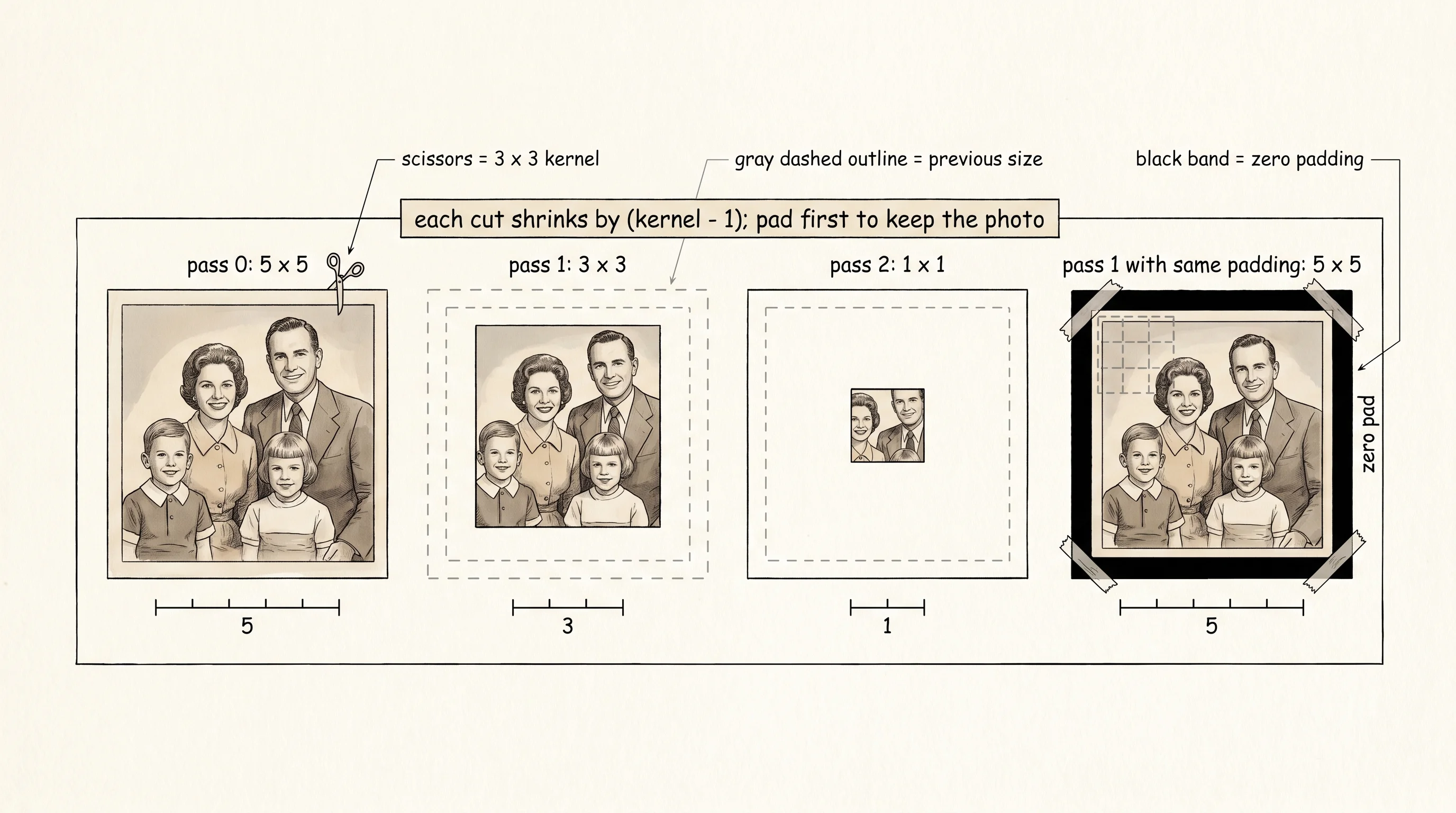
The math is one line. Take an input of size in, a kernel of size kernel, a border of pad zeros on each side, and a stride of stride pixels per slide. The output is (in + 2*pad - kernel) // stride + 1. Pick a 5x5 input, a 3x3 kernel, no padding, stride 1, and the formula gives (5 + 0 - 3) // 1 + 1 = 3. Pad with a one-pixel border and the formula gives (5 + 2 - 3) // 1 + 1 = 5 — the output matches the input, which is what "same" padding is named after. Pad with a two-pixel border and you get (5 + 4 - 3) // 1 + 1 = 7 — every kernel position that touches even one input pixel is included, which is "full" padding.
Build it. Open main.py. An image is a 2D list of floats wrapped in a small dataclass so width and height travel with the pixels.
from dataclasses import dataclass

@dataclass
class Image:
    pixels: list[list[float]]
    width: int
    height: int

    @classmethod
    def from_grid(cls, grid: list[list[float]]) -> "Image":
        height = len(grid)
        width = len(grid[0]) if height > 0 else 0
        return cls(pixels=[row[:] for row in grid], width=width, height=height)
Padding is a loop that copies the pixels into the middle of a slightly larger grid of zeros. A padding_size of 1 makes the output 2 pixels taller and 2 pixels wider; the original sits in the center.
def pad_image(image: Image, padding_size: int, mode: str = "zero") -> Image:
    if padding_size == 0:
        return Image.from_grid(image.pixels)
    new_width = image.width + 2 * padding_size
    new_height = image.height + 2 * padding_size
    padded = [[0.0 for _ in range(new_width)] for _ in range(new_height)]
    for row in range(image.height):
        for col in range(image.width):
            padded[row + padding_size][col + padding_size] = image.pixels[row][col]
    return Image(pixels=padded, width=new_width, height=new_height)
Convolution is the slide. Pick a padding mode, compute how many border pixels that mode needs, pad the image, then walk the kernel across every output position and sum the products.
def required_padding(kernel_size: int, mode: str) -> int:
    if mode == "valid":
        return 0
    if mode == "same":
        return (kernel_size - 1) // 2
    if mode == "full":
        return kernel_size - 1
    raise ValueError(f"unknown padding mode: {mode}")


def convolve_2d(image: Image, kernel: list[list[float]], padding: str = "valid") -> Image:
    kernel_size = len(kernel)
    pad = required_padding(kernel_size, padding)
    padded = pad_image(image, pad, mode="zero")
    out_height = padded.height - kernel_size + 1
    out_width = padded.width - kernel_size + 1
    output = [[0.0 for _ in range(out_width)] for _ in range(out_height)]
    for out_row in range(out_height):
        for out_col in range(out_width):
            total = 0.0
            for k_row in range(kernel_size):
                for k_col in range(kernel_size):
                    total += kernel[k_row][k_col] * padded.pixels[out_row + k_row][out_col + k_col]
            output[out_row][out_col] = total
    return Image(pixels=output, width=out_width, height=out_height)
Now the kernels. None of these were learned by a network. Every one was a research result before convolutional networks knew how to discover them. The 3x3 average is the simplest blur; Irwin Sobel published the two edge kernels at Stanford in 1968 (and made one of the first convolutions every computer-vision student copied by hand); the sharpen kernel boosts the center pixel and subtracts its four neighbors; the emboss kernel reads as a directional derivative on the diagonal and gives the picture a 3D shaded look.
BLUR_3X3 = [
    [1/9, 1/9, 1/9],
    [1/9, 1/9, 1/9],
    [1/9, 1/9, 1/9],
]
SHARPEN_3X3 = [
    [ 0, -1,  0],
    [-1,  5, -1],
    [ 0, -1,  0],
]
EDGE_HORIZONTAL = [
    [-1, -2, -1],
    [ 0,  0,  0],
    [ 1,  2,  1],
]
EDGE_VERTICAL = [
    [-1,  0,  1],
    [-2,  0,  2],
    [-1,  0,  1],
]
EMBOSS = [
    [-2, -1,  0],
    [-1,  1,  1],
    [ 0,  1,  2],
]
Render the result with five Unicode block characters — space, ░, ▒, ▓, █ — that grow from sparse to solid. The lowest pixel maps to space, the highest to a full block, and everything between picks a band by its fraction of the range. Each cell prints two characters wide so the output looks roughly square in a monospace font.
SHADES = [" ", "░", "▒", "▓", "█"]

def shade_for(value: float, low: float, high: float) -> str:
    if high <= low:
        return SHADES[0]
    fraction = (value - low) / (high - low)
    fraction = max(0.0, min(1.0, fraction))
    band = int(fraction * (len(SHADES) - 1) + 0.5)
    return SHADES[band]


def print_image(image: Image) -> None:
    flat = [v for row in image.pixels for v in row]
    low, high = min(flat), max(flat)
    for row in image.pixels:
        print("".join(shade_for(v, low, high) * 2 for v in row))
The smallest test case that shows the padding modes apart is an 8x8 picture with a bright cross on a dark background. The cross has a horizontal stroke and a vertical stroke and a center peak — every kernel finds something to react to, and the corners are dark so the border behavior of valid, same, and full is easy to see.
def build_test_image() -> Image:
    grid = [[0.0 for _ in range(8)] for _ in range(8)]
    for col in range(8):
        grid[3][col] = 1.0
        grid[4][col] = 1.0
    for row in range(8):
        grid[row][3] = 1.0
        grid[row][4] = 1.0
    return Image.from_grid(grid)
Run the blur kernel three ways and watch the output change shape. Valid trims the picture down to 6x6. Same keeps it at 8x8 by pretending there is a one-pixel border of black. Full grows it to 10x10 by including every kernel position that touches even one bright pixel.
input image (8x8 cross):
      ████
      ████
      ████
████████████████
████████████████
      ████
      ████
      ████

blur with valid padding -> 6x6:
  ░░▓▓▓▓░░
░░▒▒████▒▒░░
▓▓████████▓▓
▓▓████████▓▓
░░▒▒████▒▒░░
  ░░▓▓▓▓░░

blur with same padding -> 8x8:
    ░░▒▒▒▒░░
    ░░▓▓▓▓░░
░░░░▒▒████▒▒░░░░
▒▒▓▓████████▓▓▒▒
▒▒▓▓████████▓▓▒▒
░░░░▒▒████▒▒░░░░
    ░░▓▓▓▓░░
    ░░▒▒▒▒░░

blur with full padding -> 10x10:
        ░░░░
      ░░▒▒▒▒░░
      ░░▓▓▓▓░░
  ░░░░▒▒████▒▒░░░░
░░▒▒▓▓████████▓▓▒▒░░
░░▒▒▓▓████████▓▓▒▒░░
  ░░░░▒▒████▒▒░░░░
      ░░▓▓▓▓░░
      ░░▒▒▒▒░░
        ░░░░
The valid output is the inside of the cross. The same output is the same shape as the input with a softer fade at the rim. The full output stretches one pixel past the original on every side because the kernel was allowed to dangle off the edge.
The horizontal edge kernel, run with same padding, picks up the two horizontal strokes of the cross and ignores the vertical ones.
edge_horizontal with same padding -> 8x8:
▒▒▒▒▓▓████▓▓▒▒▒▒
▒▒▒▒▓▓████▓▓▒▒▒▒
████████▓▓████████
░░░░▒▒▒▒▒▒░░░░░░
░░░░▒▒▒▒▒▒░░░░░░
████▓▓██████████
▒▒▒▒▓▓████▓▓▒▒▒▒
▒▒▒▒▓▓████▓▓▒▒▒▒
The two dense rows are where the horizontal stroke meets the dark background. The vertical stroke in the middle column shows up only as a faint glow because the kernel is summing across rows that look the same on top and bottom — no edge, no signal.
The print moment is the dimension table. Every combination of input size, kernel size, padding mode, and stride gets one row, and the formula (input + 2*pad - kernel) // stride + 1 predicts every cell. Run it.
def dimension_report(input_size, kernel_size, padding, stride):
    return (input_size + 2 * padding - kernel_size) // stride + 1


def print_dimension_table():
    inputs = [5, 8]
    kernels = [3, 5]
    paddings = ["valid", "same", "full"]
    strides = [1, 2]
    for input_size in inputs:
        for kernel_size in kernels:
            for mode in paddings:
                pad = required_padding(kernel_size, mode)
                for stride in strides:
                    out = dimension_report(input_size, kernel_size, pad, stride)
                    print(f"{input_size:>3} {kernel_size:>3} {mode:>5} {pad:>3} {stride:>3} {out:>3}")
input kernel padding pad stride output
------------------------------------------------
5 3 valid 0 1 3
5 3 valid 0 2 2
5 3 same 1 1 5
5 3 same 1 2 3
5 3 full 2 1 7
5 3 full 2 2 4
5 5 valid 0 1 1
5 5 valid 0 2 1
5 5 same 2 1 5
5 5 same 2 2 3
5 5 full 4 1 9
5 5 full 4 2 5
8 3 valid 0 1 6
8 3 valid 0 2 3
8 3 same 1 1 8
8 3 same 1 2 4
8 3 full 2 1 10
8 3 full 2 2 5
8 5 valid 0 1 4
8 5 valid 0 2 2
8 5 same 2 1 8
8 5 same 2 2 4
8 5 full 4 1 12
8 5 full 4 2 6Read the rows. A 5x5 image with a 5x5 kernel and valid padding outputs a single pixel — the kernel has exactly one position to sit in. Same padding holds the output at 5x5 no matter which kernel you pick, because the formula was solved for pad in advance. Full padding with a 5x5 kernel adds 4 pixels of border on each side and pushes the output to 9x9. Stride 2 halves the output. None of this is intuition. The formula picks every cell.
A small question. Why does an odd kernel (3x3, 5x5) make "same" padding clean and an even kernel (4x4) make it awkward? Same padding for an odd kernel of size k needs (k-1)/2 on each side — an integer. For an even kernel that fraction is not an integer, so the output cannot be perfectly centered without adding one more pixel on one side than the other. Practitioners pick odd kernel sizes for this reason. The whole 3-5-7 ladder of kernel sizes that runs through VGG, ResNet, and every modern architecture is a downstream consequence of one floor division.
Padding lets the convolution survive the borders. Now make the kernel learn what to look for.