What Is a Library?
A laminated recipe card is a small thing a kitchen can share. The head chef writes the recipe once, tests it in her own kitchen, seals it in plastic, and hands copies to every cook in the restaurant group. The cook in the new kitchen does not rewrite the recipe. He reads the card, cooks the dish, hands the plate out the window. A Python library is that recipe card. You write the logic once, package it, and any project on any machine can import it and use it without seeing a single line of the internals.
The shared-archive idea started in 1995 with CPAN, the Comprehensive Perl Archive Network. Perl programmers were reinventing the same utilities on every machine, and a Swiss engineer named Jarkko Hietaniemi set up a central FTP site where anyone could upload a module and anyone else could download it by name. Python copied the pattern in 2003 with PyPI, which its creators nicknamed the Cheeseshop after a Monty Python sketch. The tooling stayed messy for a decade — setup.py scripts, egg files, a tangled mess of distutils and setuptools. PEP 427 in 2012 standardized the wheel format, which is the zipped file your pip install actually downloads. PEP 518 in 2016 declared pyproject.toml as the one config file every build tool should read. In 2024 Astral shipped uv publish, which pushes a wheel to PyPI in under a second. The path from "I have a useful script" to "anyone on Earth can pip install it" has never been shorter.
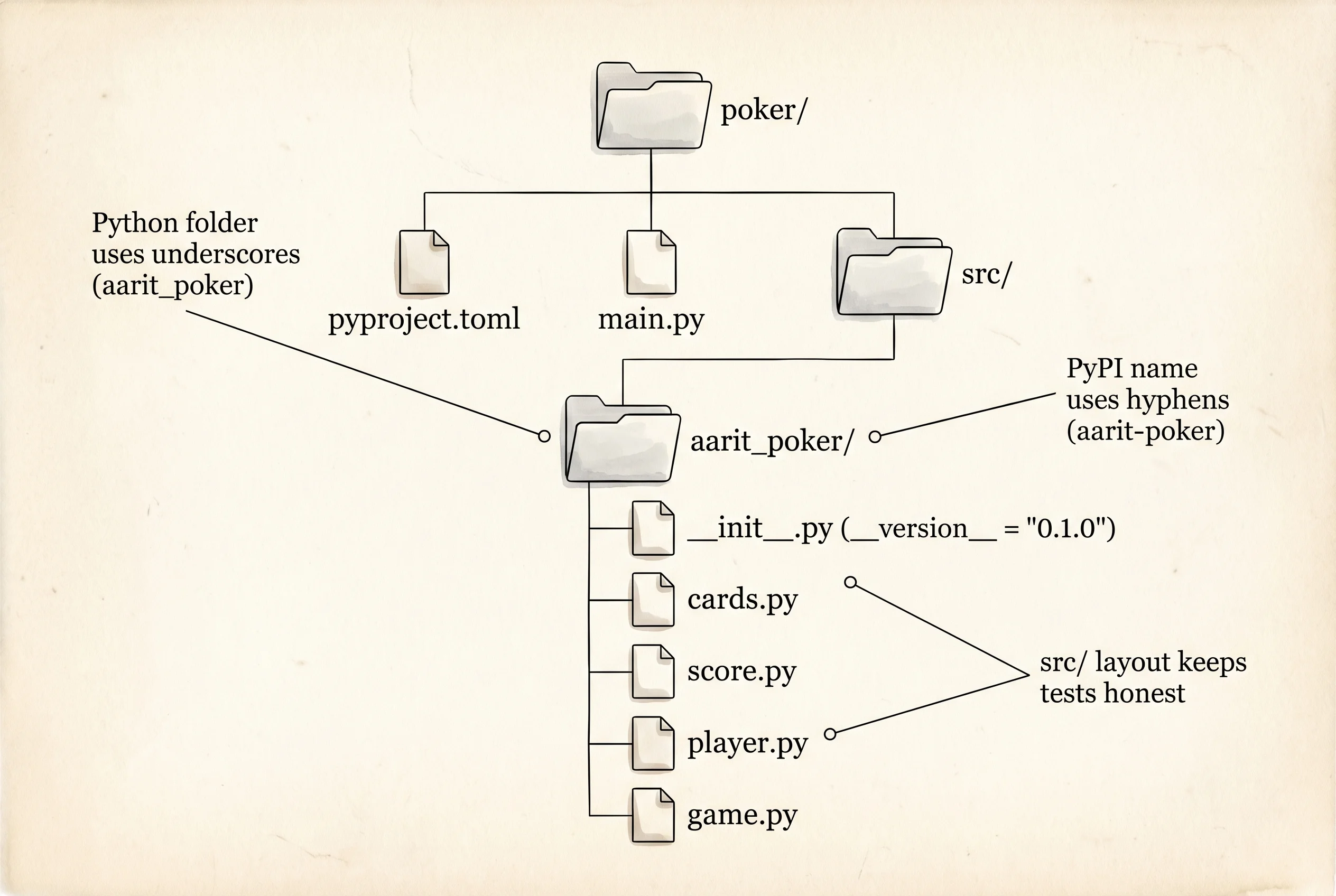
The poker project from two lessons back is the recipe card. You already built it in the right shape: a src/poker/ folder with __init__.py, cards.py, score.py, player.py, game.py, and a pyproject.toml at the top of the project. What makes it feel like "my project" instead of "a library" is one thing: the name of the folder inside src/. The folder is called poker, which is a generic word every Python user has used a thousand times. Two imports of poker from two different projects would collide. Libraries solve that with a unique name on PyPI and a matching folder name inside src/. Rename the folder to aarit_poker, update the imports, bump the package config, and the recipe card is laminated.
Open the poker project and rename the package folder. Python package names must use underscores, never hyphens. The PyPI name can have hyphens (that is why your pyproject.toml says name = "aarit-poker"). The Python folder must be aarit_poker.
cd ~/learning-python/poker
source .venv/bin/activate
mv src/poker src/aarit_poker
cd $HOME\learning-python\poker
.venv\Scripts\Activate.ps1
Rename-Item src\poker aarit_pokerEvery file inside src/aarit_poker/ still says from .cards import Card and from poker.game import PokerGame at the top of main.py. Those imports point at the old folder name. Fix them. score.py and game.py already use relative imports (.cards, .player, .score), so they keep working. The only file that names poker directly is main.py. Change it to name aarit_poker:
from aarit_poker.game import PokerGame
from aarit_poker.player import Player


def main() -> None:
    game = PokerGame(players=[Player(name="Aarit"), Player(name="Aditya")])
    winner = game.play()
    print(f"final chips: Aarit={game.players[0].chips}, Aditya={game.players[1].chips}")
    print(f"full history: {winner.name} won the hand")


if __name__ == "__main__":
    main()
A library card always carries a version number on the back. Readers need to know which printing of the recipe they are holding — a fix in version 0.2.0 is not in 0.1.0. Open src/aarit_poker/__init__.py and add a single line:
__version__ = "0.1.0"That module-level constant is the convention every Python library follows. numpy.__version__, pandas.__version__, torch.__version__ are all the same one line inside that library's __init__.py. Now update pyproject.toml to match the new folder shape. The file from the project lesson already declared name = "aarit-poker", version = "0.1.0", a setuptools build backend, and a packages.find block pointing at src/. Open the file and make sure it reads exactly this:
[project]
name = "aarit-poker"
version = "0.1.0"
description = "A tiny Texas Hold'em scoring and game engine."
requires-python = ">=3.11"
authors = [{ name = "Aarit" }]

[build-system]
requires = ["setuptools>=68"]
build-backend = "setuptools.build_meta"

[tool.setuptools.packages.find]
where = ["src"]
[project] is the metadata section every modern Python tool reads. name is how pip talks about your package (with hyphens). version is the one source of truth pip uses to decide what to upgrade. requires-python refuses the install on Python 3.10 and below. [build-system] says "when someone runs pip install ., use setuptools to bundle the wheel." [tool.setuptools.packages.find] says "the Python code lives under src/; go find the packages yourself." That last line is what turns the src/aarit_poker/ folder into the installable library.
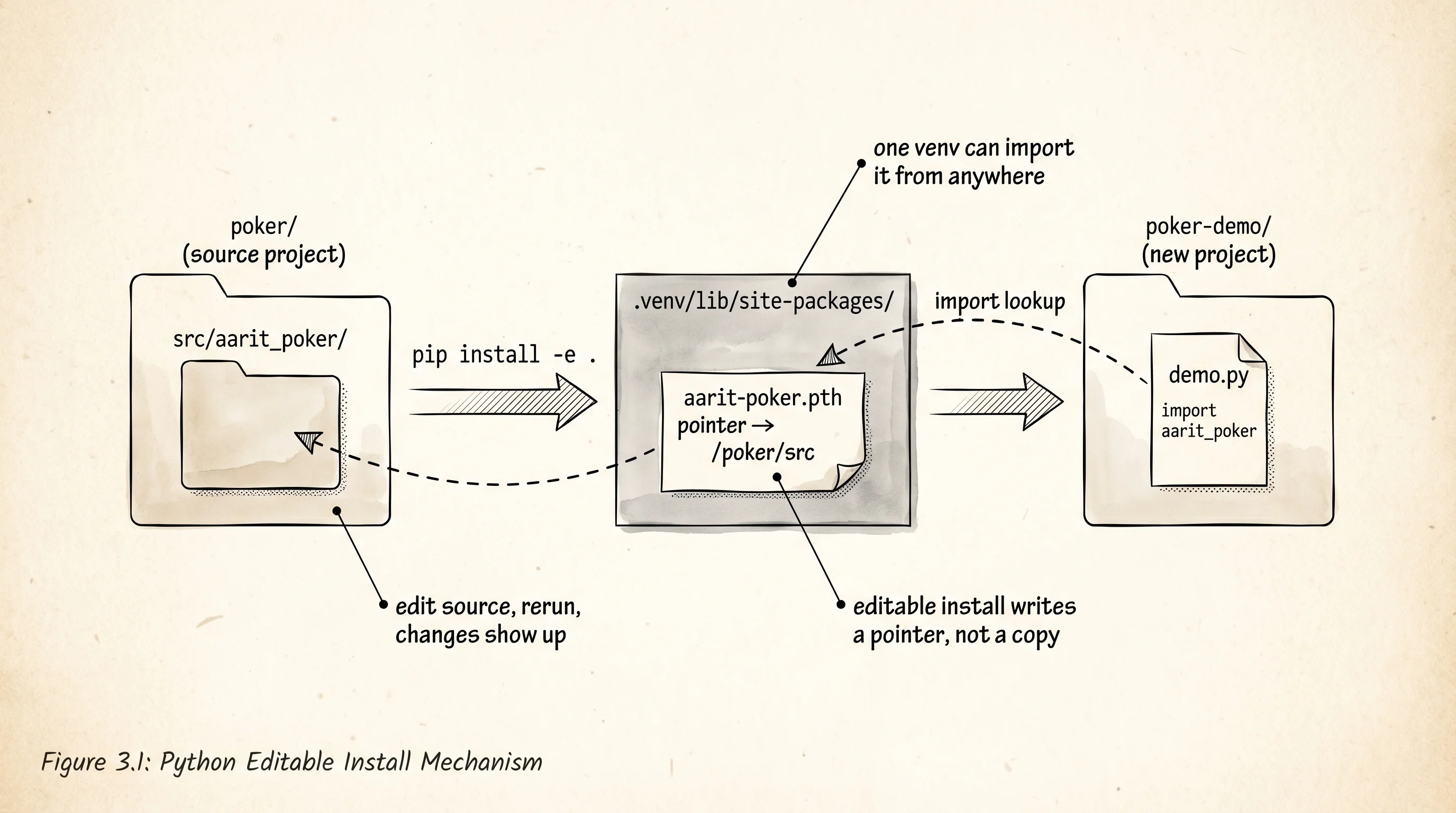
Install the package in editable mode. Editable mode writes a pointer file into your venv instead of copying the code, so every edit you make to src/aarit_poker/ shows up the next time you import it. Every library author develops this way.
pip install -e .pip install -e .The output prints a few lines ending in Successfully installed aarit-poker-0.1.0. Run the same poker game you ran before, now importing through the package name:
python main.pyThe game plays out in the terminal the same way it did in the project lesson. Nothing about the logic changed. What changed is how Python found the code. Before, python main.py worked because main.py was next to the src/ folder and setuptools had wired the import up. Now the package is installed into the venv's site-packages directory, so any Python script in any folder that uses this venv can write import aarit_poker and it works.
Prove that from a new project. Open a fresh folder, reuse the same venv, and import the package as if you downloaded it from the Internet:
cd ~/learning-python
mkdir poker-demo
cd poker-demo
touch demo.py
cd $HOME\learning-python
mkdir poker-demo
cd poker-demo
ni demo.pyWrite demo.py with no relative imports, no src/ folder, no knowledge of where the code actually lives:
import aarit_poker
from aarit_poker.cards import Card
from aarit_poker.score import score_hand, best_of_seven

print("aarit_poker version:", aarit_poker.__version__)

royal = [Card("10", "s"), Card("J", "s"), Card("Q", "s"), Card("K", "s"), Card("A", "s")]
two_pair = [Card("A", "s"), Card("A", "h"), Card("K", "d"), Card("K", "c"), Card("2", "s")]

print("royal flush score:", score_hand(royal))
print("two pair score:  ", score_hand(two_pair))

seven = [Card("A", "s"), Card("A", "h"), Card("K", "d"), Card("K", "c"),
         Card("7", "s"), Card("2", "d"), Card("9", "h")]
print("best of 7 score: ", best_of_seven(seven))
Make sure the (.venv) of the poker project is still active, then run the file:
python demo.pyOutput:
aarit_poker version: 0.1.0
royal flush score: (10,)
two pair score:   (3, 14, 13, 2)
best of 7 score:  (3, 14, 13, 7)
The demo.py file lives in a folder that has no src/, no pyproject.toml, no copy of cards.py. It does not know where the poker code is on disk. It asked Python for aarit_poker, and Python checked the venv's site-packages, found the editable pointer that setuptools wrote there, followed it back to ~/learning-python/poker/src/aarit_poker/, and loaded the modules from there. The recipe card left the original kitchen.
A question worth answering from the output: why does the royal flush print (10,) instead of something longer like (10, 14, 13, 12, 11)?
Because the scorer returns a tuple whose length varies by rank. Every non-royal hand packs kickers into the tuple so ties between hands of the same rank can be broken by comparing the later elements. A royal flush cannot tie with another royal flush in Texas Hold'em, so the tuple has one element: the rank code 10 for ROYAL_FLUSH. The tuple comparison still works because (10,) > (9, 14) is True — Python compares element by element and the first slot wins immediately.
Two commands you will run against every library you write from here on. pip list shows every package installed in the current venv. Run it now and you will see aarit-poker 0.1.0 /Users/you/learning-python/poker — the path at the end is the editable marker, telling pip that this package lives on disk instead of in a normal wheel. pip show aarit-poker prints the metadata block from your pyproject.toml alongside the version and location. Those two commands are how you inspect any third-party library on your machine.
Publishing to PyPI is one more command away. pip install build adds the official wheel builder. python -m build reads your pyproject.toml, compiles everything under src/aarit_poker/ into a .whl file and a .tar.gz file under a new dist/ folder. twine upload dist/* pushes both files to PyPI, where anyone with pip install aarit-poker can grab your code. The last step needs an account at pypi.org and an API token in your shell — we are going to skip it because a live upload fills a real namespace with a name you might want later. Build the wheel without uploading to see the factory run:
pip install build
python -m build
Output ends with:
Successfully built aarit_poker-0.1.0.tar.gz and aarit_poker-0.1.0-py3-none-any.whlOpen dist/aarit_poker-0.1.0-py3-none-any.whl with any zip tool — the file is a plain zip archive. Inside you will see the exact folder layout of src/aarit_poker/ next to a METADATA file with the contents of your [project] table. That zip is what PyPI stores. That zip is what every pip install anywhere in the world downloads and unpacks into a venv's site-packages. There is no magic here. A wheel is a zipped folder with a metadata file.
You wrote a library. Someone can use it without reading it. The next lesson reaches for one built by people whose day job is making the same kind of zip run at the speed of a C program.